
1. Introduzione
The BIGBIG WON Gale Hall Wireless Controller is a versatile gaming controller designed for use across multiple platforms including PC (Windows 10 & 11), Nintendo Switch, iOS, and Android devices. It features advanced Hall Effect joysticks and triggers, motion control capabilities, customizable buttons, and a dedicated PC application for extensive configuration. This manual provides essential information for setting up, operating, and maintaining your controller.
2. Contenuto della confezione
Prima di procedere, assicurati che tutti gli articoli elencati di seguito siano presenti nel tuo pacco:
- 1 x BIGBIG WON Gale Hall Gamepad
- 1 chiavetta USB 2.4G
- 1 cavo USB di tipo C
- 1 x Manuale utente (questo documento)
3. Controller Layout and Components
Familiarize yourself with the various buttons and features of your BIGBIG WON Gale Hall controller.
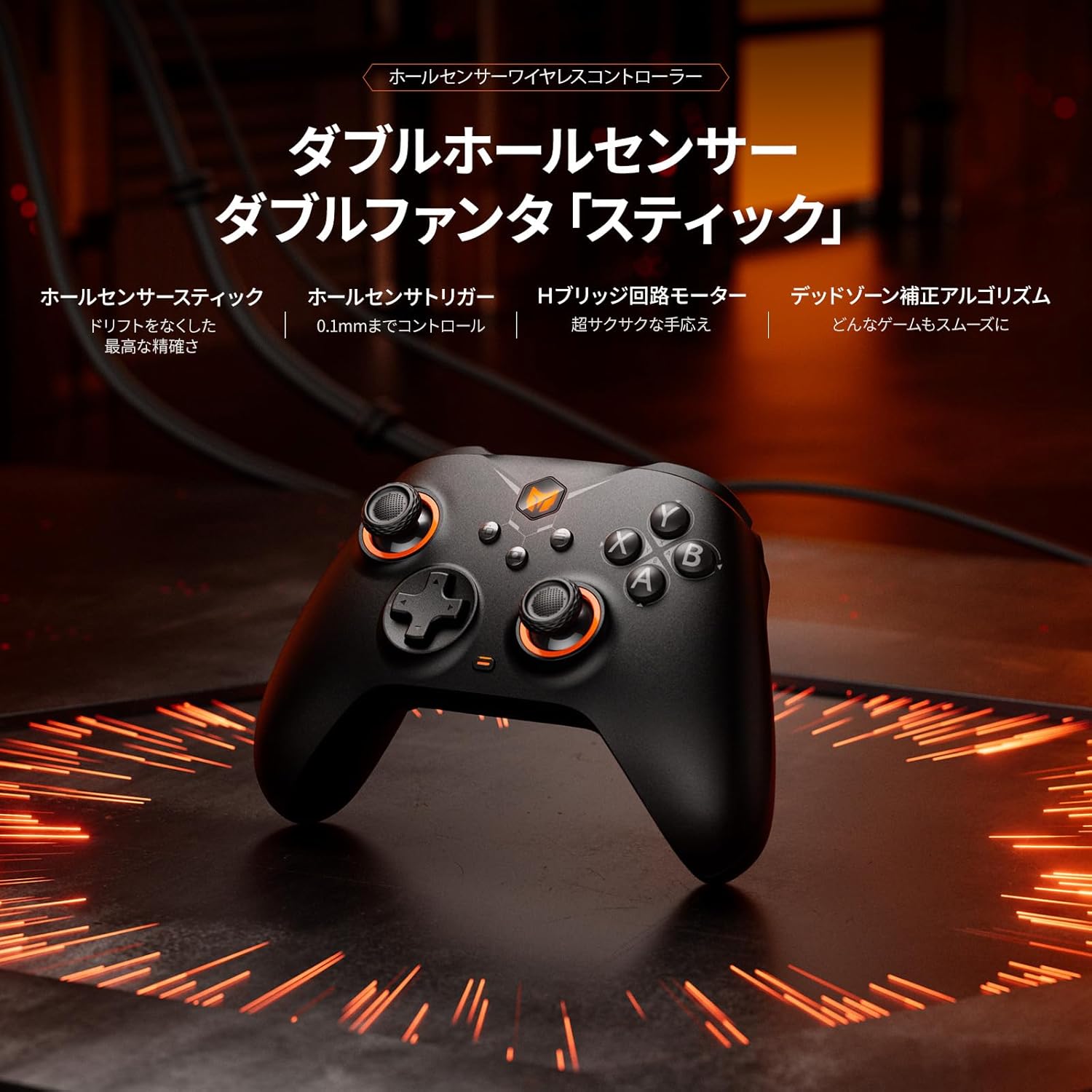
Immagine: Frontale view of the BIGBIG WON Gale Hall Wireless Controller, highlighting its ergonomic design and button placement.
- Joystick ad effetto Hall: Designed for precision and to prevent drift, offering accurate and consistent input.
- Trigger ad effetto Hall: Provide highly accurate and responsive input, suitable for both linear racing games and quick-response FPS games.
- Customizable Back Buttons (x4): Located on the rear of the controller, these buttons can be programmed for macros, remapping, or turbo functions.
- Tasto direzionale: Standard directional pad for precise movement.
- Pulsanti frontali (A, B, X, Y): Pulsanti di azione standard.
- Pulsanti dorsali (L1/LB, R1/RB) e grilletti (L2/LT, R2/RT): Per varie azioni di gioco.
- Pulsanti funzione: Including Home, Select, Start, and a dedicated Screenshot button.
- Porta USB-C: Per la connessione cablata e la ricarica.
4. Configurazione e connessione
The controller supports three connection methods: wired, Bluetooth, and 2.4G wireless adapter.

Image: The controller connected to a PC via 2.4G adapter, a tablet via Bluetooth, and a Nintendo Switch via Bluetooth, illustrating its multi-platform compatibility.
4.1. Wired Connection (USB-C Cable)
- Connect one end of the included USB Type-C cable to the controller.
- Connect the other end of the cable to a USB port on your PC, Switch dock, or compatible device.
- The controller will be automatically recognized and ready for use. This method also charges the controller.
4.2. Connessione wireless 2.4G (chiavetta USB)
- Inserisci il dongle USB 2.4G in una porta USB disponibile sul tuo PC o dispositivo compatibile.
- Power on the controller. It will automatically attempt to connect to the dongle.
- Once connected, the indicator light on the controller will stabilize, indicating a successful connection.
4.3. Connessione Bluetooth
- Assicurarsi che il controller sia spento.
- Press and hold the Bluetooth pairing button (refer to controller diagram for exact location) until the indicator light starts flashing rapidly.
- On your device (Switch, iOS, Android, or PC with Bluetooth), go to Bluetooth settings and search for new devices.
- Select "BIGBIG WON Gale Hall" from the list of available devices to pair.
- Once paired, the indicator light on the controller will stabilize.
5. Istruzioni per l'uso
5.1. Motion Control (GYROCON+)
The controller features 6-axis gyro motion control. For PC gaming, "GYROCON+" technology supports motion aiming. For Nintendo Switch, use the native motion control feature; do not enable "GYROCON+" simultaneously.

Image: The controller being used for motion aiming on a PC, demonstrating keyboard mapping, and illustrating the 50-step macro programming feature.
5.2. Customizable Back Buttons
The four back buttons can be programmed for various functions:
- Macro: Record a sequence of up to 50 steps.
- Rimappatura: Assign any other controller button function to a back button.
- Turbo: Enable rapid firing for a specific button.
Configuration is done via the BIGBIG WON PC APP.
5.3. Feedback di vibrazione
The dual motor system provides haptic feedback. You can adjust the vibration intensity through 255 levels using the BIGBIG WON PC APP to suit your preference.
5.4. Hall Joysticks and Triggers
Equipped with Hall Effect technology, the joysticks and triggers offer enhanced durability and precision, significantly reducing the risk of stick drift. The BIGBIG WON self-developed HURST Algorithm further optimizes joystick performance. Triggers can be configured for linear input (ideal for racing) or hair-trigger mode (ideal for FPS) via software.

Image: Visual representation of the Hall Effect magnetic induction triggers, showing their application in both linear racing games and quick-response FPS games.
5.5. Tasso di sondaggio
When connected via wired USB, the controller supports a 1000Hz polling rate, ensuring minimal input lag for competitive gaming.

Image: The controller displayed with a prominent "1000Hz" graphic, emphasizing its high polling rate for responsive gameplay.
5.6. Adaptive Calibration
The controller features Adaptive Calibration to minimize joystick drift without requiring manual intervention.
5.7. Keyboard-Value Mapping
Through the BIGBIG WON PC APP, you can map keyboard values to controller buttons, offering expanded control options for PC games.
5.8. BIGBIG WON PC APP
The dedicated PC application allows for extensive customization, including key mapping, macro programming, turbo settings, deadzone adjustment, motion control sensitivity, and more. This tool is essential for unlocking the full potential of your controller.

Image: Screenshots of the BIGBIG WON PC App interface, showing options for button remapping, joystick deadzone adjustment, and other customization features.
6. Specifiche
| Caratteristica | Descrizione |
|---|---|
| Dispositivi compatibili | PC (Windows 10 & 11), Nintendo Switch, iOS, Android |
| Tipo di controllore | BIGBIG WON Gale Hall Standard Gaming Controller |
| Tecnologia di connettività | Bluetooth, 2.4G Wireless Adapter, USB-C Cable |
| Caratteristiche aggiuntive | Ergonomic Design, Motion Sensing, Multi-use, Rumble Vibration, Wireless Operation |
| Quantità del pulsante | Standard layout + 4 Customizable Back Buttons |
| Fonte di alimentazione | Alimentato a batteria (1000 mAh) |
| Durata della batteria | Approximately 10+ hours of intense use |
| Peso dell'articolo | 60 grammi |
| Dimensioni dell'articolo | 5.91 x 3.94 x 1.57 pollici |
| Numero di modello | BIGBIG WON-GaleHallStandard |
7. Risoluzione Dei Problemi
If you encounter any issues with your BIGBIG WON Gale Hall controller, please refer to the following common solutions:
- Il controller non si connette: Ensure the controller is charged. Verify the correct connection method (wired, 2.4G dongle, or Bluetooth pairing) is selected and properly initiated. For Bluetooth, ensure your device's Bluetooth is enabled and the controller is in pairing mode.
- Input Lag or Disconnections (Wireless): Try moving closer to your device or 2.4G dongle to reduce interference. Ensure no other wireless devices are causing interference. For PC, consider using the wired connection for optimal performance.
- Joystick Drift: The Hall Effect joysticks are designed to prevent drift. If you experience minor drift, try using the Adaptive Calibration feature via the BIGBIG WON PC APP. Ensure the controller's firmware is up to date.
- Buttons or Triggers Not Responding: Check for any physical obstructions. Ensure the controller's firmware is updated using the BIGBIG WON PC APP. If the issue persists, a factory reset (if available through the app) might be necessary.
- PC APP Not Recognizing Controller: Ensure the controller is connected to your PC via USB-C cable. Close and reopen the PC APP. Restart your PC if necessary.
- Nessun supporto audio: Please note that this controller does NOT support audio output.
8. Manutenzione
Per garantire la longevità e le prestazioni ottimali del tuo controller:
- Mantenere pulito il controller pulendolo con un panno morbido e asciutto. Evitare l'uso di prodotti chimici aggressivi o materiali abrasivi.
- Conservare il controller in un luogo fresco e asciutto, lontano dalla luce solare diretta e da temperature estreme.
- Evitare di far cadere il controller o di sottoporlo a forti urti.
- Regularly check for and install firmware updates via the BIGBIG WON PC APP to ensure the best performance and access to new features.
9. Garanzia e supporto
BIGBIG WON provides comprehensive customer support for its products:
- Sostituzione/Rimborso: Enjoy 30 days of free replacement or a full refund from the date of purchase.
- Servizio a vita: BIGBIG WON offers lifetime before-sale and after-sale service for all your queries.
For any questions, technical assistance, or warranty claims, please contact BIGBIG WON customer support through their official channels or the retailer where you purchased the product.