
1. Introduzione
Thank you for choosing the Hama DR2002BT Digital Radio. This device offers a comprehensive audio experience with FM, DAB/DAB+ digital radio reception, and Bluetooth connectivity. Its user-friendly design, featuring large buttons and a clear 4.3-inch TFT color display, makes it suitable for all users. This manual will guide you through the setup, operation, and maintenance of your new digital radio.
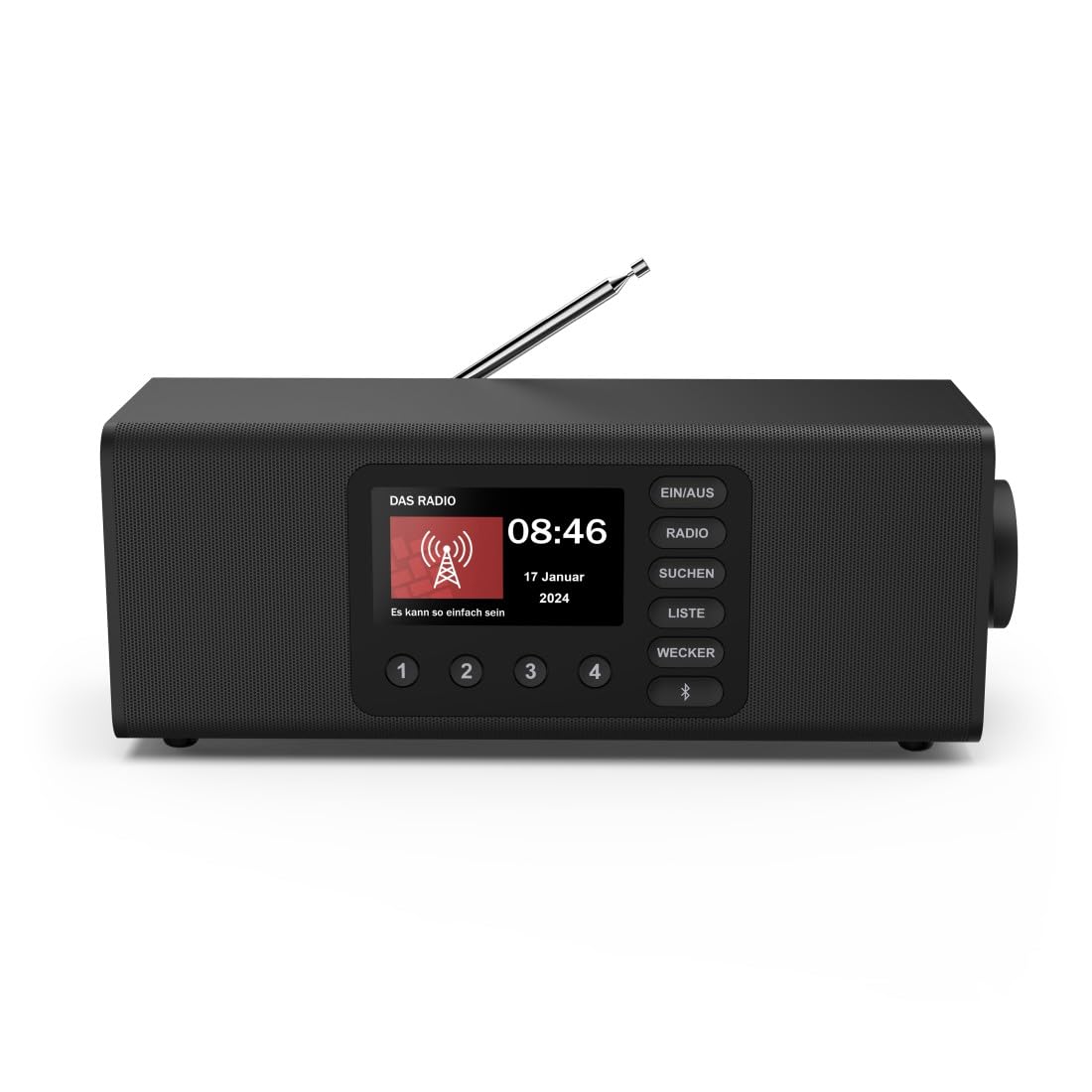
Immagine: Frontale view della radio digitale Hama DR2002BT, mostrataasing il suo display e i pulsanti di controllo.
2. Informazioni sulla sicurezza
Leggere attentamente le presenti istruzioni di sicurezza prima di utilizzare il dispositivo. Conservare il manuale per riferimento futuro.
- Non esporre il dispositivo a umidità, pioggia o temperature estreme.
- Evitare di posizionare il dispositivo vicino a fonti di calore o alla luce diretta del sole.
- Non aprire il dispositivo casing. Le riparazioni devono essere eseguite solo da personale qualificato.
- Utilizzare esclusivamente l'adattatore di alimentazione fornito.
- Garantire un'adeguata ventilazione intorno al dispositivo.
3. Contenuto della confezione
Verificare che tutti gli articoli siano presenti al momento del disimballaggio:
- Radio digitale Hama DR2002BT
- Adattatore di alimentazione
- Manuale d'uso
4. Prodotto finitoview
4.1 Comandi e display del pannello frontale

Image: Front panel of the radio highlighting the display and control buttons, with icons for Bluetooth, DAB+, and Alarm functions.
The front panel features a 4.3-inch TFT color display, large control buttons, and a rotary knob for easy navigation and selection. Key buttons include:
- EIN/AUS (ON/OFF): Accende o spegne il dispositivo.
- RADIO: Switches between FM and DAB/DAB+ modes.
- SUCHEN (SEARCH): Avvia la scansione della stazione.
- LISTE (LIST): Accede all'elenco delle stazioni disponibili.
- WECKER (ALARM): Configura le impostazioni dell'allarme.
- Pulsante Bluetooth: Attiva la modalità di associazione Bluetooth.
- Pulsanti preimpostati (1-4): Accesso rapido alle stazioni preferite memorizzate.
- Manopola (LAUTSTÄRKE/NAVIGIEREN): Controls volume and navigates menus.
4.2 Collegamenti del pannello posteriore
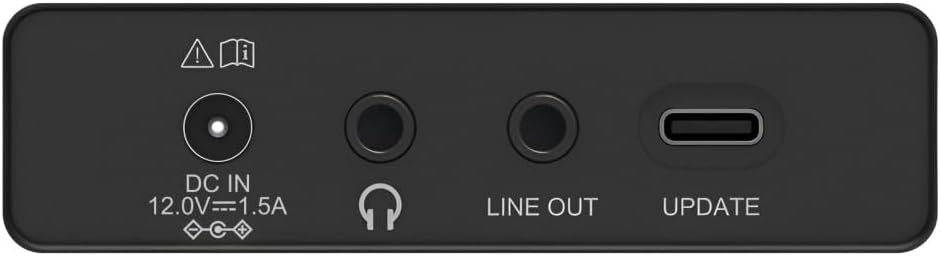
Image: Close-up of the rear panel showing the DC IN, Headphone, Line Out, and UPDATE (USB-C) ports.
Il pannello posteriore offre opzioni di connettività essenziali:
- DC IN 12.0V --- 1.5A: Power input for the external adapter.
- Jack per cuffie (3.5 mm): Per l'ascolto privato.
- LINEA IN USCITA: Uscita audio per il collegamento a dispositivi esterni amplificatori o altoparlanti.
- UPDATE (USB-C): Per gli aggiornamenti del firmware.
- Antenna telescopica: Per la ricezione FM e DAB/DAB+.

Immagine: Posteriore view of the Hama DR2002BT Digital Radio with its telescopic antenna extended for optimal signal reception.
5. Impostazione
5.1 Collegamento di alimentazione
- Collegare l'adattatore di alimentazione fornito al Ingresso CC porta sul retro della radio.
- Collegare l'adattatore di alimentazione a una presa di corrente adatta.
- La radio si accenderà automaticamente o entrerà in modalità standby.
5.2 Posizionamento dell'antenna
For optimal FM and DAB/DAB+ reception, fully extend the telescopic antenna. Position the radio near a window if reception is poor.
5.3 Configurazione iniziale (primo utilizzo)
Upon first power-on, the radio may guide you through an initial setup process, including language selection and an automatic DAB station scan. Follow the on-screen prompts.
6. Istruzioni per l'uso
6.1 Accensione/spegnimento
Premere il tasto ACCESO SPENTO pulsante per accendere o spegnere la radio.
6.2 Modalità radio DAB/DAB+
- Premere il tasto RADIO per selezionare la modalità DAB.
- If this is the first time in DAB mode or if you want to rescan, press CERCA to perform a full scan for available stations.
- Use the rotary knob to navigate through the station list. Press the knob to select a station.
- A view the station list, press the ELENCO pulsante.
6.3 Modalità radio FM
- Premere il tasto RADIO pulsante per selezionare la modalità FM.
- Premere CERCA to automatically scan for the next available FM station.
- Alternatively, use the rotary knob to manually tune to a frequency.
6.4 Memorizzazione e richiamo dei preset
The radio allows you to store up to 4 favorite stations using the dedicated preset buttons (1-4).
- Tune to the desired station (DAB or FM).
- Press and hold one of the preset buttons (1-4) until the display confirms the station has been saved.
- To recall a preset station, simply press the corresponding preset button (1-4).
6.5 Funzionamento Bluetooth

Immagine: Frontale view of the radio with Bluetooth and stereo speaker icons, indicating its wireless audio streaming capability.
The Hama DR2002BT can stream audio from your smartphone, tablet, or laptop via Bluetooth 5.0.
- Press the Bluetooth button on the front panel to enter Bluetooth pairing mode. The display will show a pairing indicator.
- On your external device (smartphone, tablet), enable Bluetooth and search for available devices.
- Select "Hama DR2002BT" from the list of devices to pair.
- Once paired, you can play audio from your device, and it will be output through the radio's speakers.
6.6 Funzione sveglia

Image: A person waking up with the Hama DR2002BT Digital Radio placed on a bedside table, illustrating its alarm clock functionality.
The radio features two independent alarm settings.
- Premere il tasto SVEGLIA pulsante per accedere alle impostazioni dell'allarme.
- Use the rotary knob to select Alarm 1 or Alarm 2.
- Configure the alarm time, source (buzzer or radio station), and repetition (once, daily, weekdays, weekends, or specific days).
- Press the rotary knob to confirm each setting.
- To quickly activate/deactivate an alarm, press the SVEGLIA button and use the rotary knob to toggle the alarm status.

Image: A person interacting with the Hama DR2002BT Digital Radio, demonstrating its ease of use for setting functions like alarms or tuning stations.
7. Manutenzione
To ensure the longevity and optimal performance of your Hama DR2002BT Digital Radio, follow these maintenance guidelines:
- Pulizia: Use a soft, dry, lint-free cloth to clean the exterior of the radio. Do not use abrasive cleaners, waxes, or solvents.
- Polvere: Regularly dust the device to prevent accumulation in vents and ports.
- Magazzinaggio: Se si conserva la radio per un periodo prolungato, scollegarla dall'alimentazione e conservarla in un luogo fresco e asciutto.
- Antenna: Maneggiare con cura l'antenna telescopica per evitare piegature o rotture.
8. Risoluzione Dei Problemi
Se riscontri problemi con la radio, fai riferimento ai seguenti problemi comuni e alle relative soluzioni:
| Problema | Possibile causa | Soluzione |
|---|---|---|
| Nessun potere | Adattatore di alimentazione non collegato; presa di corrente difettosa | Check power adapter connection; Try a different power outlet. |
| Scarsa ricezione radio (DAB/FM) | Antenna non estesa; Area con segnale debole; Interferenza | Fully extend the telescopic antenna; Reposition the radio (e.g., near a window); Perform a new station scan. |
| L'associazione Bluetooth non riesce | Bluetooth not enabled on external device; Radio not in pairing mode; Device too far | Ensure Bluetooth is on and visible on your device; Press the Bluetooth button on the radio; Move devices closer (within 10m). |
| Nessun suono | Volume troppo basso; Muto attivato; Sorgente selezionata non corretta | Increase volume using the rotary knob; Check if mute is active; Ensure the correct mode (DAB, FM, Bluetooth) is selected. |
| L'allarme non suona | Alarm not activated; Incorrect alarm time/day set | Verify alarm is enabled in settings; Check alarm time and repetition settings. |
9. Specifiche

Image: Diagram showing the dimensions of the Hama DR2002BT Digital Radio: 35 cm (width), 12.5 cm (depth), and 13 cm (height).
| Caratteristica | Dettaglio |
|---|---|
| Numero di modello | DR2002BT (00054298) |
| Reception | DAB, DAB+, FM |
| Versione Bluetooth | 5.0 |
| Potenza in uscita (RMS) | 10 W (Stereo) |
| Display | Display TFT a colori da 4.3" |
| Connessioni | 3.5mm Jack (Headphone), USB-C (Update), Line Out, DC IN |
| Alimentazione elettrica | Adattatore di alimentazione esterno |
| Dimensioni (L x P x A) | Dimensioni: 35 x 12.5 x 13 cm |
| Peso | 1788 grammi |
| Materiale | Plastica |
| Colore | Nero |
| Caratteristiche aggiuntive | Alarm Function (2 alarms), Direct Selection Keys |
10. Garanzia e supporto
Hama GmbH & Co KG provides a warranty for this product. Please refer to the warranty card included in your package or visit the official Hama websito per termini e condizioni di garanzia dettagliati.
For technical support, troubleshooting assistance, or spare parts, please contact Hama customer service or visit their websito. La disponibilità dei pezzi di ricambio nell'UE è garantita per 7 anni.
- Produttore: Azienda Hama GmbH & Co. KG
- Paese di origine: Germania
- Disponibilità di pezzi di ricambio UE: 7 anni