
1. Introduzione
Thank you for choosing the KOORUI 24E6CA 24-inch 180Hz 1ms Full HD Curved Gaming Monitor. This manual provides essential information for the safe and efficient use of your new monitor. Please read it thoroughly before installation and operation, and keep it for future reference.
2. Informazioni sulla sicurezza
- Posizionare sempre il monitor su una superficie stabile e piana per evitare che cada.
- Tenere il monitor lontano da acqua, umidità e luce solare diretta.
- Non ostruire le aperture di ventilazione. Assicurarsi che vi sia spazio sufficiente attorno al monitor per un corretto flusso d'aria.
- Utilizzare solo l'adattatore di alimentazione fornito con il monitor.
- Non tentare di riparare il monitor da soli. Per qualsiasi intervento di assistenza, rivolgersi a personale qualificato.
- Scollegare il monitor dalla presa di corrente durante i temporali o quando non viene utilizzato per lunghi periodi.
3. Contenuto della confezione
Verifica che tutti gli articoli siano presenti nel tuo pacco:
- KOORUI 24E6CA Monitor
- Base e collo del supporto
- Cavo HDMI (2.0)
- Adattatore di alimentazione
- Manuale di istruzioni

Image: KOORUI 24E6CA monitor with included accessories: HDMI cable, power adapter, stand, and manual.
4. Impostazione
4.1 Montaggio del supporto
- Rimuovere con cautela il monitor dalla confezione.
- Fissare il collo del supporto al pannello del monitor.
- Fissare la base del supporto al collo del supporto.
4.2 Installazione con montaggio VESA
The monitor supports VESA mount standard 100x100mm. To install a VESA mount, remove the stand and attach your VESA-compatible bracket.

Immagine: Posteriore view of KOORUI 24E6CA monitor showing VESA 100x100mm mounting points and port locations.
4.3 Connessione ai dispositivi
Collegare il computer o altri dispositivi al monitor utilizzando i cavi appropriati.
- DisplayPort (DP 1.2): Connects to a computer's DisplayPort output.
- hdmi (2.0): Two HDMI ports are available for connecting to computers, game consoles, or other HDMI-enabled devices.
- Uscita audio: Connect headphones or external speakers. Note: This monitor does not have built-in speakers.
- Ingresso CC: Connect the provided power adapter.

Image: Close-up of KOORUI 24E6CA monitor ports including two HDMI 2.0, one DisplayPort 1.2, Audio Out, and DC In.
4.4 Physical Adjustment
Il monitor consente la regolazione dell'inclinazione per ottimizzare la tua viewangolo di ing.
- Inclinare: Adjust the screen tilt from -5° to 15° for comfortable viewing.

Immagine: Lato view of KOORUI 24E6CA monitor demonstrating the tilt adjustment range from -5 to 15 degrees.
5. Istruzioni per l'uso
5.1 OSD Joystick Navigation
The On-Screen Display (OSD) menu is controlled by a joystick located on the back of the monitor. Use the joystick to navigate through menu options and adjust settings.
- Press the joystick to enter the OSD menu.
- Move the joystick up/down/left/right to navigate and select options.
- Press the joystick again to confirm a selection or exit a sub-menu.

Image: Diagram showing the OSD joystick on the back of the monitor and its functions for menu navigation.
5.2 modalità di gioco
The monitor offers various game modes to optimize visual settings for different game genres. These modes can be accessed via the OSD menu.
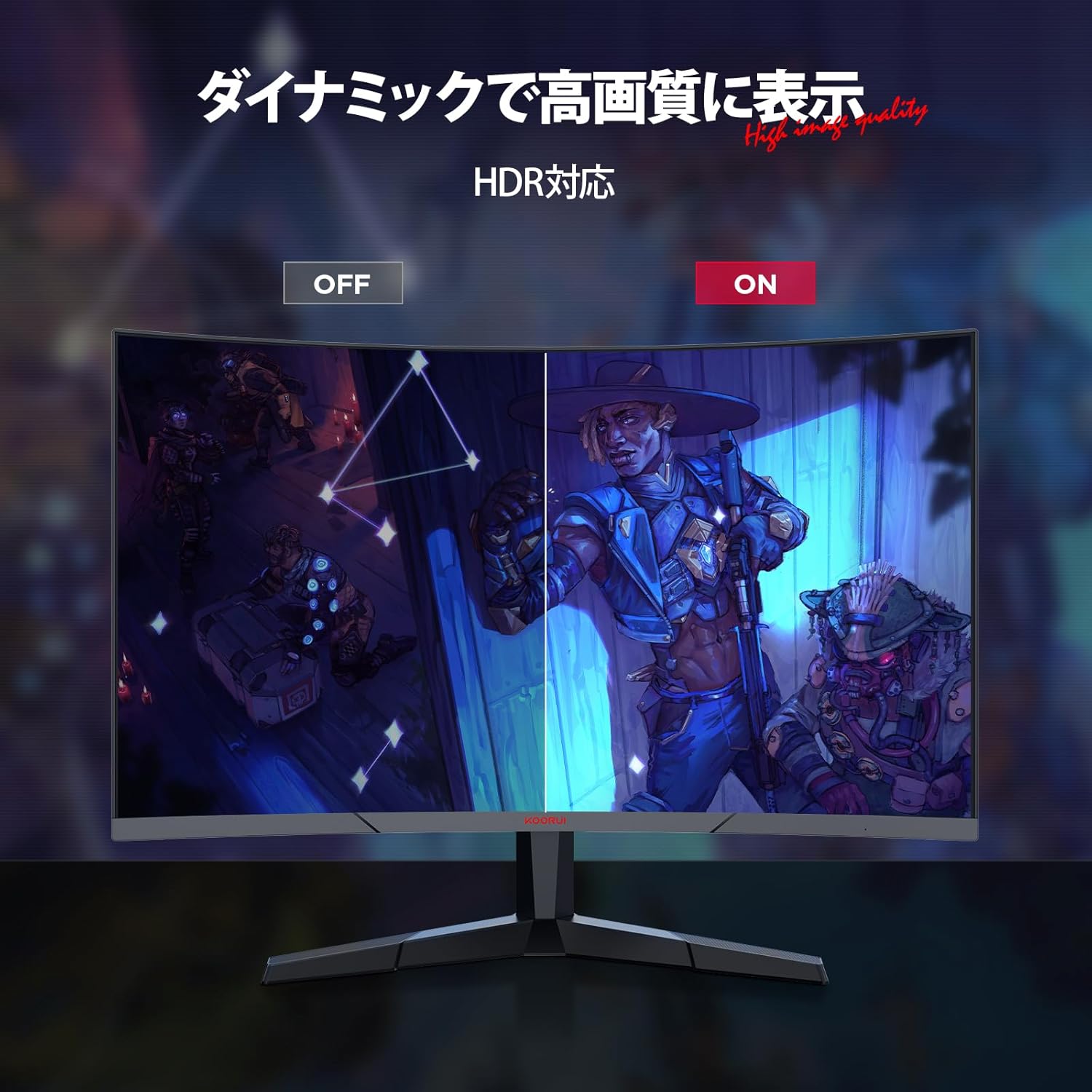
Image: KOORUI 24E6CA monitor displaying a game scene with a console controller, indicating support for Full HD at up to 180fps.
5.3 Adaptive Sync (G-Sync Compatible)
Adaptive Sync technology synchronizes the monitor's refresh rate with your GPU's frame rate, eliminating screen tearing and stuttering for a smoother gaming experience. This monitor is G-Sync compatible.

Image: Comparison showing Adaptive-Sync ON with smooth gameplay versus Adaptive-Sync OFF with screen tearing and stuttering.
5.4 HDR (alta gamma dinamica)
HDR enhances the contrast and color range of images, providing more vibrant and realistic visuals. Enable HDR through your device settings and the monitor's OSD menu for compatible content.

Image: Comparison showing HDR OFF with muted colors and contrast versus HDR ON with enhanced, vibrant colors and deeper contrast.
6 Caratteristiche
6.1 High Refresh Rate and Rapid Response Time
Experience incredibly smooth visuals with a 180Hz refresh rate and a rapid 1ms (MPRT) response time. This combination minimizes motion blur and ghosting, providing a competitive edge in fast-paced games.

Image: Comparison of 75Hz refresh rate versus 180Hz refresh rate, showing significantly smoother motion at 180Hz.

Image: Comparison of 75Hz display with tearing and stuttering versus 180Hz 1ms display with smooth, clear motion.
6.2 1500R Curved Display
La curvatura 1500R offre un'esperienza immersiva viewing experience, wrapping the image around your field of vision. This design is particularly beneficial for gaming and multimedia content, enhancing depth perception and reducing eye strain.

Image: Illustration of the 1500R curved display providing a wide field of view for immersive viewing.
6.3 Excellent Color Reproduction and Contrast
The VA panel delivers deep blacks and a high 3000:1 contrast ratio. With 99% sRGB color gamut and 72% NTSC wide color gamut, the monitor produces vivid and accurate colors. A 178° viewing angle ensures consistent color and contrast from various perspectives.

Image: Monitor's color capabilities with 72% NTSC and 99% sRGB color gamut for vibrant and clear images.
6.4 Caratteristiche della cura degli occhi
The monitor includes anti-flicker technology and blue light reduction to minimize eye strain during extended use, promoting a more comfortable viewesperienza di acquisizione.

Image: Comparison showing a display with blue light ON versus blue light OFF, indicating the monitor's eye care features.
6.5 Design senza cornice
The 3-sided frameless design maximizes screen space and enhances immersion, making it ideal for multi-monitor setups.

Image: Two KOORUI monitors in a multi-monitor setup, highlighting the 3-sided frameless design for increased immersion.
7. Manutenzione
Per garantire la longevità e le prestazioni ottimali del monitor, seguire queste linee guida per la manutenzione:
- Pulizia dello schermo: Pulire delicatamente lo schermo con un panno morbido e privo di lanugine. Per macchie ostinate, dampInumidire leggermente il panno con acqua o con un detergente specifico per schermi. Non spruzzare mai il liquido direttamente sullo schermo.
- Pulizia del Casing: Use a soft, dry cloth to wipe the monitor casing. Evitare detergenti abrasivi o solventi.
- Ventilazione: Assicurarsi che le aperture di ventilazione siano libere da polvere e detriti per evitare il surriscaldamento.
- Spegnimento: Turn off the monitor and unplug it from the power outlet when not in use for extended periods.
8. Risoluzione Dei Problemi
Se riscontri problemi con il monitor, fai riferimento ai seguenti passaggi comuni per la risoluzione dei problemi:
| Problema | Possibile soluzione |
|---|---|
| Nessuna immagine sullo schermo | Check if the power cable is securely connected. Ensure the video cable (HDMI/DP) is properly connected to both the monitor and the source device. Select the correct input source via the OSD menu. |
| L'immagine è sfocata o distorta | Check the display resolution settings on your computer. Ensure it matches the monitor's native resolution (1920x1080). Adjust the monitor's sharpness settings in the OSD menu. |
| Screen tearing o stuttering nei giochi | Ensure Adaptive Sync is enabled in both the monitor's OSD menu and your graphics card settings. Update your graphics card drivers. |
| Nessun suono dalle cuffie/altoparlanti esterni | Verify that headphones or speakers are correctly plugged into the Audio Out port. Check audio output settings on your computer. Adjust volume levels on both the monitor (if available in OSD) and the source device. |
| Il monitor non si accende | Confirm the power adapter is connected to a working power outlet and the monitor. Try a different power outlet. |
Se il problema persiste dopo aver provato questi passaggi, contattare l'assistenza clienti.
9. Specifiche
| Caratteristica | Descrizione |
|---|---|
| Marca | KOORUI |
| Numero di modello | 24E6CA (HKCJD-24E6CA) |
| Dimensioni dello schermo | 24 pollici |
| Tipo di pannello | VA |
| Curvatura | 1500R |
| Risoluzione | Risoluzione Full HD (1920 x 1080 pixel) |
| Proporzioni | 16:9 |
| Frequenza di aggiornamento | 180 Hz |
| Tempo di risposta | 1 ms (MPRT) |
| Rapporto di contrasto | 3000:1 |
| Luminosità | 250 nidi |
| Gamma di colori | 99% sRGB, 72% NTSC |
| Viewangolo di ing | 178° |
| Ingressi video | 1x DisplayPort (1.2), 2x HDMI (2.0) |
| Uscita audio | 1x Jack audio |
| Compatibilità VESA | 100x100mm |
| Dimensioni del prodotto (L x A x P) | Dimensioni: 59.8 x 39.2 x 13.4 cm |
| Peso del prodotto | 4.27 kg |
| Superficie dello schermo | Antiriflesso |
10. Garanzia e supporto
KOORUI is dedicated to providing high-quality and high-performance monitors. Your KOORUI 24E6CA monitor comes with a manufacturer warranty:
- Monitor Screen Warranty: 1 anno
- Other Accessories Warranty: 3 anni
For warranty claims or technical support, please contact KOORUI customer service. KOORUI monitors are also eligible for free collection and recycling.