
MageGee MK-Storm
Manuale utente della tastiera da gioco meccanica MageGee MK-Storm
Brand: MageGee | Model: MK-Storm
1. Introduzione
Thank you for choosing the MageGee MK-Storm Mechanical Gaming Keyboard. This 104-key wired keyboard is designed for an enhanced typing and gaming experience, featuring durable brown switches, blue backlighting, and anti-ghosting technology. This manual provides essential information for setup, operation, and maintenance to ensure optimal performance.
2. Caratteristiche principali
- Blue Backlit Gaming Keyboard: Features 20 different backlit modes, 5 brightness levels, and 5 speed adjustments. The backlight can be easily turned off.
- Mechanical Brown Switches: Offers moderate trigger key travel and force, suitable for both typing and gaming. Provides tactile feedback with a slight sound.
- Anti-Ghosting Keyboard: All 104 keys have individual switches with full N-key rollover, ensuring faster response and simultaneous key presses without conflict.
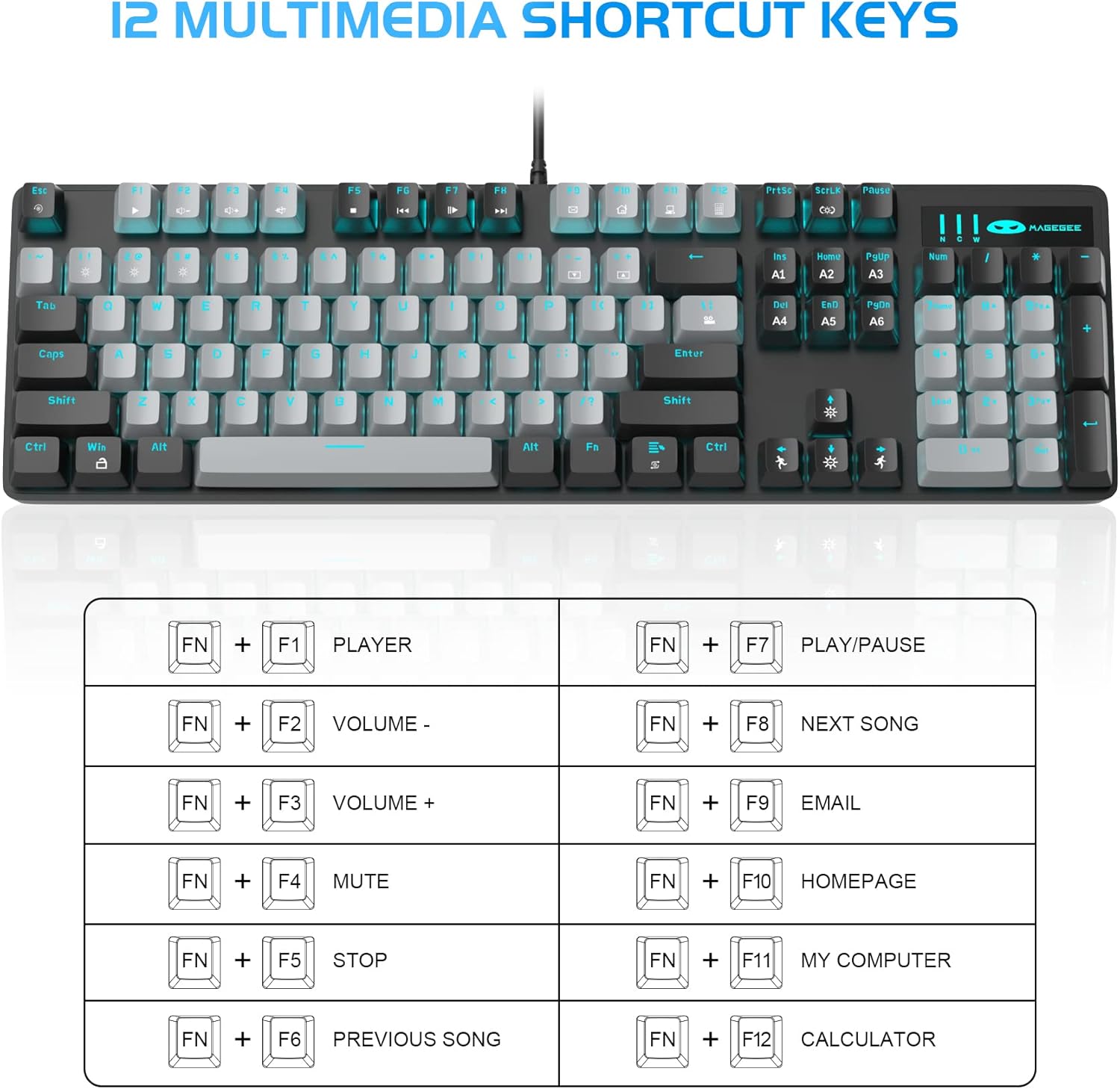
- 12 tasti di combinazione multimediali: Quick operations via FN+ F1~F12 for media control and office functions.
- Design ergonomico: Premium metal panel construction for stability. Ergonomic key layout and two-step adjustable feet for comfortable typing angles.
- Ampia compatibilità: USB wired connection compatible with Windows 2000/Vista/Win7/Win8/Win10/MAC/Linux.

3. Contenuto della confezione
The MageGee MK-Storm Mechanical Gaming Keyboard package includes the following items:
- MageGee Mechanical Gaming Keyboard (MK-Storm)
- USB Wired Cable (attached to keyboard)
- Strumento per estrarre i copritasti
- 16 Extra Keycaps (color scheme varies by keyboard variant)
- Manuale d'uso
4. Impostazione
- Collegare la tastiera: Plug the USB connector of the keyboard cable into an available USB port on your computer (PC, laptop, or desktop).
- Installazione del driver: La tastiera è plug-and-play. Il sistema operativo dovrebbe rilevare e installare automaticamente i driver necessari. In genere, non è richiesta l'installazione di software aggiuntivo per le funzionalità di base.
- Regola l'angolazione della tastiera: Flip out the two-step feet on the underside of the keyboard to adjust the typing angle to your preference.

5. Istruzioni per l'uso
5.1 Controllo della retroilluminazione
The MK-Storm keyboard features a single blue backlight with multiple modes and adjustable settings.
- Cambia modalità di retroilluminazione: Premere FN+INS per scorrere 20 diverse modalità di retroilluminazione.
- Regola luminosità: Premere FN + (Up Arrow) to increase brightness (5 levels). Press FN + (Freccia giù) per diminuire la luminosità.
- Regola la velocità: Premere FN + (Left Arrow) to decrease animation speed (5 levels). Press FN+→ (Right Arrow) to increase animation speed.
- Disattiva retroilluminazione: The backlight can be turned off by cycling through the brightness levels until it is off, or by selecting a mode that has no illumination.

5.2 tasti multimediali
Access multimedia and system functions quickly using the FN key in combination with the F1-F12 keys.
| Combinazione di tasti | Funzione |
|---|---|
| Tasto F1 | Giocatore |
| Tasto F2 | Volume - |
| Tasto F3 | Volume + |
| Tasto F4 | Muto |
| Tasto F5 | Fermare |
| Tasto F6 | Canzone precedente |
| Tasto F7 | Riproduci/Pausa |
| Tasto F8 | Prossima canzone |
| Tasto F9 | |
| Tasto F10 | Pagina iniziale |
| Tasto F11 | Il mio computer |
| Tasto F12 | Calcolatrice |
5.3 Personalizzato Profiles (If applicable)
The keyboard supports custom lighting profiles. Fare riferimento al produttore website or included software (if any) for detailed instructions on programming and saving custom lighting zones or key assignments. Once programmed, these profiles can often be accessed directly from the keyboard using FN key combinations (e.g., FN+1, FN+2, FN+3 for different profileS).
6 Personalizzazione
The MageGee MK-Storm keyboard allows for customization of keycaps and switches.
- Sostituzione dei tasti: Use the included keycap puller tool to carefully remove existing keycaps. Align the new keycap with the switch stem and press down gently until it clicks into place.
- Sostituzione dell'interruttore: The keyboard comes with extra brown switches. To replace a switch, first remove the keycap. Then, use a switch puller (not included, but often similar to a keycap puller) to gently extract the switch from the PCB. Insert the new switch, ensuring the pins align correctly, and press firmly until it seats properly.


7. Manutenzione
- Pulizia: The floating keys design makes cleaning easier. Use a soft brush or compressed air to remove dust and debris from between the keycaps. For stubborn dirt, remove keycaps using the provided tool and wipe the keyboard surface with a slightly damp panno. Assicurarsi che la tastiera sia scollegata prima di pulirla.
- Magazzinaggio: Conservare la tastiera in un luogo asciutto e fresco, lontano dalla luce solare diretta e da temperature estreme.
- Cura del cavo: Evitare di piegare o torcere eccessivamente il cavo USB per evitare danni.
8. Risoluzione Dei Problemi
- La tastiera non risponde:
- Assicurarsi che il cavo USB sia collegato saldamente sia alla tastiera che al computer.
- Prova a collegare la tastiera a una porta USB diversa del computer.
- Riavvia il computer.
- Prova la tastiera su un altro computer per escludere un problema specifico del sistema.
- Retroilluminazione non funzionante/errata:
- Ensure the backlight is not turned off (FN + ↓ to increase brightness).
- Scorrere le modalità di retroilluminazione utilizzando FN + INS.
- Check if any specific software is interfering with the lighting settings.
- Chiavi non registrate:
- Pulire la zona circostante il tasto interessato per assicurarsi che non vi siano detriti che ostruiscano l'interruttore.
- If a specific switch is faulty, consider replacing it with one of the spare switches provided, following the customization instructions.
9. Specifiche
| Caratteristica | Dettaglio |
|---|---|
| Marca | MageGee |
| Numero di modello | MK-Storm |
| Layout dei tasti | 104 tasti (dimensioni standard) |
| Tipo di interruttore | Interruttori meccanici marroni |
| Retroilluminazione | Blue Backlit (20 modes, 5 brightness, 5 speed) |
| Connettività | USB cablato |
| Anti-ghosting | Rollover completo di tasti N |
| Tasti multimediali | 12 (FN + F1-F12) |
| Materiale | Metal Panel Construction |
| Dispositivi compatibili | Computer portatile, PC |
| Sistemi operativi | Windows 2000/Vista/Win7/Win8/Win10/MAC/Linux |
| Peso dell'articolo | 2.77 libbre |
| Dimensioni del pacco | 17.63 x 12.36 x 1.89 pollici |

10. Garanzia e supporto
For warranty information, technical support, or any product-related inquiries, please contact MageGee customer service through the retailer where the product was purchased or visit the official MageGee webluogo. Conserva la ricevuta di acquisto per eventuali richieste di garanzia.
Ask a question about this manual
Ask about setup, troubleshooting, compatibility, parts, safety, or missing instructions. Manuals+ will review the question and use this page’s manual context to help answer it.