
Jowua 130W LED Hub
JOWUA 130W LED Hub User Manual
Model: 130W LED Hub
1. Introduzione
This manual provides detailed instructions for the installation, operation, and maintenance of your JOWUA 130W LED Hub. Designed specifically for Tesla Model Y and Reengineered Model 3 Highland (2024+), this hub expands your vehicle's charging capabilities with multiple ports and intelligent power management.

Image 1.1: The JOWUA 130W LED Hub, showcasing its sleek design and integrated cigarette lighter plug.
2. Informazioni sulla sicurezza
- Non esporre il dispositivo all'acqua o a umidità eccessiva.
- Evitare temperature estreme.
- Non tentare di smontare o modificare il dispositivo. Ciò invaliderà la garanzia.
- Assicurare una ventilazione adeguata attorno al mozzo durante il funzionamento.
- Use only with compatible vehicles as specified.
3. Contenuto della confezione
Verifica che tutti gli articoli siano presenti nel tuo pacco:
- JOWUA 130W LED Hub
- Integrated Type-C Cable
4. Configurazione e installazione
The JOWUA 130W LED Hub is designed for a precise fit within the Tesla Model Y and Reengineered Model 3 Highland (2024+) center console.
- Locate the Power Outlet: Identify the 15V cigarette lighter power outlet inside your Tesla's center console.
- Insert the Hub: Carefully align the JOWUA 130W LED Hub with the center console's internal structure. The hub's matte grey texture is designed to blend seamlessly with the original interior.
- Connetti alimentazione: Plug the integrated cigarette lighter connector from the hub firmly into the vehicle's 15V power outlet.
- Verifica adattamento: Ensure the hub is seated securely and does not obstruct the console lid operation.

Image 4.1: The JOWUA 130W LED Hub seamlessly integrated into the Tesla center console, showing its flush fit and accessible ports.
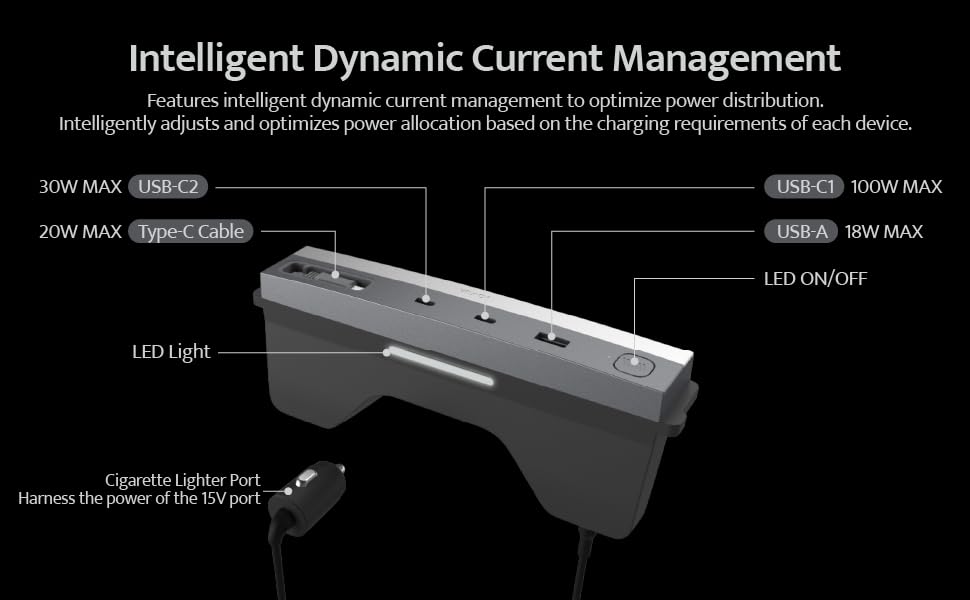
Immagine 4.2: Un primo piano view highlighting the hub's precision matching with the vehicle's original interior decor.
5. Istruzioni per l'uso
5.1 Porta Oltreview
The JOWUA 130W LED Hub features multiple charging ports and an integrated LED light for convenience.
- Porta USB-C1: Fino a 100 W di potenza massima.
- Porta USB-C2: Fino a 30 W di potenza massima.
- Porta USB-A: Fino a 18 W di potenza massima.
- Integrated Type-C Cable: Up to 20W MAX output, retractable for convenience.
- Luce LED: Provides illumination within the center console.
- Pulsante LED ON/OFF: Controlla la luce LED integrata.
Note: All ports provide power only; data transmission is not supported.

Image 5.1: Detailed diagram showing the various ports, their maximum power outputs, and the LED light controls.
5.2 Dynamic Power Management
The hub utilizes dynamic control chips to intelligently distribute power from the Tesla cigarette lighter to all connected devices. It automatically adjusts and optimizes power allocation based on the charging requirements of each device, ensuring efficient and safe charging.
5.3 Ricarica di più dispositivi
The hub supports simultaneous charging of up to four electronic devices. Refer to the power output table below for detailed power distribution scenarios.
| Tabella di potenza in uscita | Tipo di connettore USB-C1 | Tipo di connettore USB-C2 | Cavo di tipo C | USB-A |
|---|---|---|---|---|
| Utilizzo di una porta singola | 100W | |||
| 30W | ||||
| 20W | ||||
| 18W | ||||
| Dual Ports Use | 65W | 30W | ||
| 65W | 20W | |||
| 65W | 18W | |||
| 30W | 20W | |||
| 30W | 18W | |||
| 20W | 18W | |||
| Three Ports Use | 65W | 30W | 20W | |
| 65W | 30W | 18W | ||
| 65W | 20W | 18W | ||
| 30W | 20W | 18W | ||
| Four Ports Use | 65W | 30W | 20W | 18W |
Image 5.2: Table illustrating the power distribution when using single, dual, three, or all four ports simultaneously.

Immagine 5.3: Es.ample of high-speed charging for a laptop and other devices using the hub's various ports.

Image 5.4: Demonstration of the retractable Type-C charging cable, showing its ease of use and neat storage.
6. Manutenzione
- Pulizia: Use a soft, dry cloth to wipe the surface of the hub. Do not use liquid cleaners or abrasive materials.
- Ispezione del porto: Periodically check the charging ports for any dust or debris and clean gently with a dry, non-conductive tool if necessary.
- Cura del cavo: Ensure the retractable Type-C cable retracts smoothly. Avoid forcing it or pulling it at extreme angles.
7. Risoluzione Dei Problemi
- Issue: Devices are not charging.
- Soluzione:
- Ensure the hub's cigarette lighter plug is fully inserted into the vehicle's 15V power outlet.
- Check if the vehicle's power outlet is active. Some vehicles require the ignition to be on.
- Verify that the charging cables are securely connected to both the hub and your devices.
- Test with a different device or cable to rule out device/cable issues.
- Ensure the total power draw does not exceed the hub's maximum capacity (130W).
- Issue: The integrated LED light does not turn on/off.
- Soluzione:
- Press the LED ON/OFF button firmly.
- Ensure the hub is receiving power from the vehicle.
- Issue: The center console light stays on after installing the hub.
- Soluzione: The JOWUA hub is designed to maintain original car lighting. If the console light remains on, ensure the hub is correctly seated and not interfering with the console's light sensor or switch. If the issue persists, contact JOWUA support.
8. Specifiche
- Marca: GIOVANNI
- Modello: 130W LED Hub
- Dispositivi compatibili: Tesla Model Y, Reengineered Model 3 Highland (2024+)
- Porte USB totali: 4 (2x Type-C, 1x USB-A, 1x Integrated Type-C Cable)
- Potenza massima in uscita: 130 W (totale)
- Uscita USB-C1: Fino a 100W
- Uscita USB-C2: Fino a 30W
- Uscita USB-A: Fino a 18W
- Integrated Type-C Cable Output: Fino a 20W
- Interfaccia hardware: USB
- Materiale: Plastica
- Peso dell'articolo: 12.3 once
- Dimensioni della confezione: 8.46 x 4.33 x 1.57 pollici
- ASIN: B0D9JWDLKC
- Data prima disponibilità: 16 luglio 2024
9. Informazioni sulla garanzia
The JOWUA 130W LED Hub comes with a Garanzia di 1 anno dalla data di acquisto. La presente garanzia copre difetti di fabbricazione e malfunzionamenti in condizioni di normale utilizzo. Non copre danni causati da uso improprio, incidenti, modifiche non autorizzate o installazione impropria.
For warranty claims or service, please retain your proof of purchase and contact JOWUA customer support.
10. Assistenza clienti
If you have any questions, concerns, or require technical assistance, please visit the official JOWUA website or contact their customer support team. Contact information can typically be found on the product packaging or the JOWUA brand store on Amazon.
JOWUA Brand Store: Visit JOWUA Store on Amazon
Documenti correlati130W LED Hub

Ask a question about this manual
Ask about setup, troubleshooting, compatibility, parts, safety, or missing instructions. Manuals+ will review the question and use this page’s manual context to help answer it.