
Introduzione
This manual provides essential information for the safe and efficient operation of your Altera Maresca Foldable Electric Treadmill. Please read it thoroughly before assembly and first use, and keep it for future reference. Proper use and maintenance will ensure the longevity and optimal performance of your equipment.
Informazioni importanti sulla sicurezza
To reduce the risk of serious injury, always follow basic precautions when using this treadmill. Read all instructions before use.
- Consultare un medico prima di iniziare qualsiasi programma di esercizi, soprattutto se si hanno problemi di salute preesistenti.
- Tenere i bambini e gli animali domestici lontani dal tapis roulant durante il funzionamento.
- Posizionare il tapis roulant su una superficie solida e piana, con almeno 2 metri (6.5 piedi) di spazio libero dietro e 0.6 metri (2 piedi) su ciascun lato.
- Ensure the safety key is properly attached to both the console and your clothing before starting. The treadmill will stop if the safety key is disengaged.
- Non superare la capacità massima di peso dell'utente di 150 kg (330 libbre).
- Indossare calzature e abbigliamento sportivo adeguati. Evitare indumenti larghi che potrebbero impigliarsi nelle parti in movimento.
- Non utilizzare il tapis roulant se il cavo o la spina sono danneggiati o se non funziona correttamente.
- Unplug the treadmill from the power outlet when not in use, before cleaning, and before performing any maintenance.
- This treadmill is designed for indoor use only. Do not expose it to water or excessive humidity.
Contenuto della confezione
Before beginning assembly, carefully unpack all components and verify that all parts are present and undamaged. Refer to the assembly diagrams in the separate assembly guide (if provided) or the included components list. If any parts are missing or damaged, please contact customer service immediately.
Installazione e assemblaggio
The Altera Maresca Treadmill requires assembly. Follow these general steps. For detailed instructions, please refer to the dedicated assembly manual.
- Disimballare i componenti: Estrarre con cautela tutti i componenti dall'imballaggio e disporli su una superficie pulita e piana.
- Fissare i montanti: Secure the upright support frames to the base of the treadmill using the provided hardware.
- Installa Console: Mount the control console onto the top of the uprights, ensuring all electrical cables are properly connected and secured.
- Fissare tutti i dispositivi di fissaggio: Double-check that all bolts, screws, and nuts are tightened securely.
- Position Treadmill: Move the assembled treadmill to its intended location, ensuring adequate clearance around the unit.


Istruzioni per l'uso
Pannello di controllo Fineview

The control panel features an LCD display and various buttons for controlling your workout:
- Schermo LCD: Shows time, distance, calories burned, heart rate, speed, and incline level.
- Tasto AVVIO/PAUSA: Initiates or temporarily pauses the workout.
- Pulsante STOP: Ends the workout and brings the belt to a complete stop.
- Pulsanti SPEED +/-: Adjusts the running belt speed (1-20 km/h).
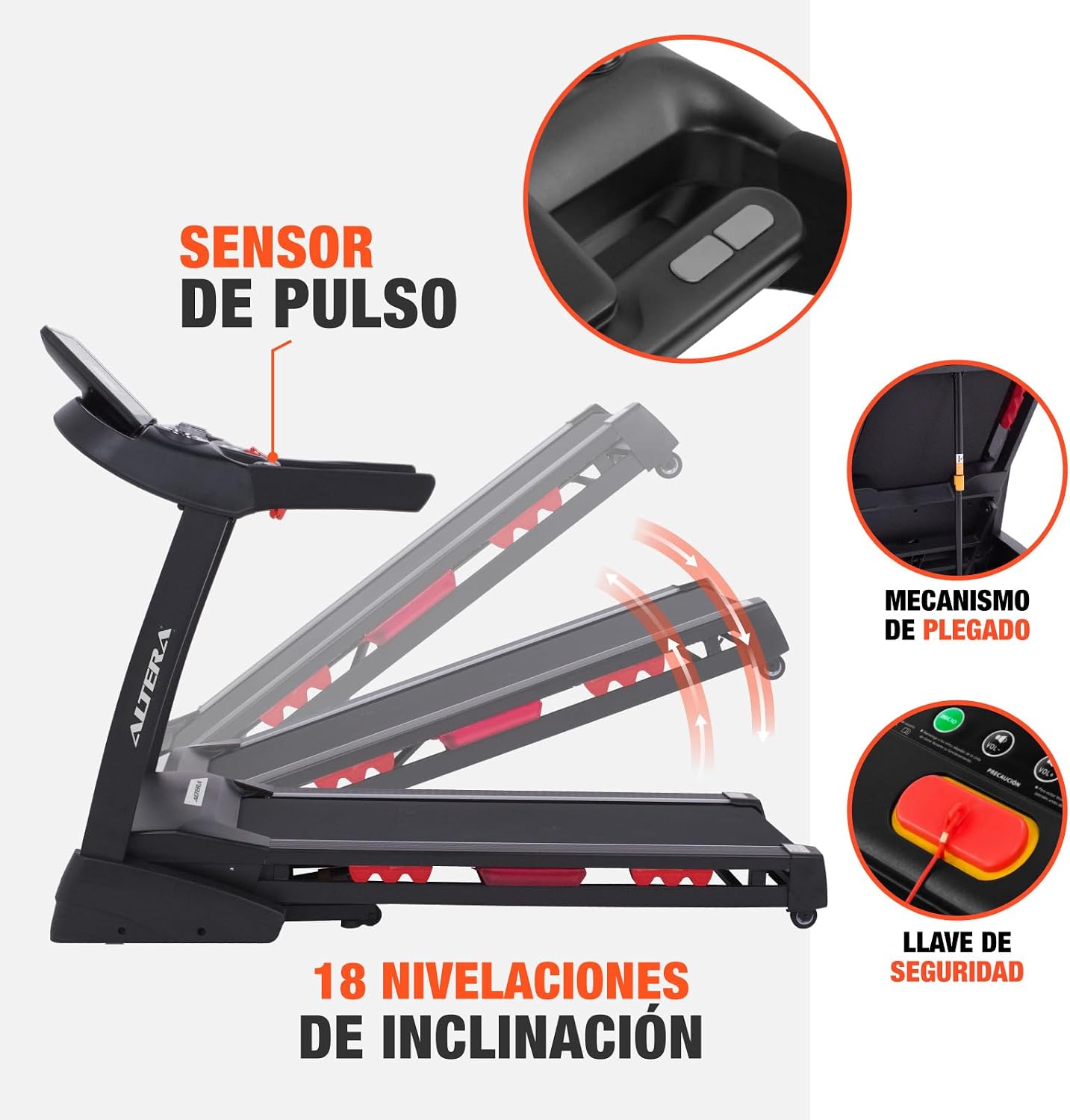
- INCLINE +/- Buttons: Adjusts the incline level (18 levels, 2°-4°).
- Pulsante PROGRAMMA: Selects from 12 pre-set workout programs.
- Pulsante MODE: Cycles through display modes or settings.
- AUX/USB Ports: For connecting external audio devices or charging.
- Bluetooth: For connecting to compatible mobile devices and apps.
Iniziare un allenamento
- Ensure the treadmill is plugged into a grounded 110V outlet.
- Attach the safety key clip to your clothing and insert the safety key into its designated slot on the console. The treadmill will not operate without the safety key.
- Step onto the side rails of the treadmill. Do not stand on the running belt when starting.
- Premere il tasto INIZIO pulsante. Dopo un breve conto alla rovescia, il nastro inizierà a muoversi a bassa velocità.
- Carefully step onto the moving belt and begin walking or running.
Regolazione della velocità e dell'inclinazione
- Utilizzare il VELOCITÀ +/- buttons to increase or decrease the belt speed.
- Utilizzare il INCLINAZIONE +/- buttons to adjust the incline level. The treadmill offers 18 levels of incline, ranging from 2° to 4°.
Utilizzo di programmi preimpostati
Premere il tasto PROGRAMMA button to cycle through the 12 pre-set workout programs. Each program has varying speed and incline profiles designed for different fitness goals. Follow the on-screen prompts to select and start a program.
Monitoraggio della frequenza cardiaca
Grasp the pulse sensors on the handlebars with both hands to monitor your heart rate. Your heart rate will be displayed on the LCD screen.
Connettività Bluetooth
The treadmill supports Bluetooth connectivity. Pair your mobile device to stream music or connect to compatible fitness applications for enhanced workout tracking and control. Use the AUX or USB ports for direct audio connection or charging.
Interrompere un allenamento
Per fermare il tapis roulant, premere il tasto FERMARE button. The belt will gradually slow down and come to a complete stop. Alternatively, pulling the safety key will immediately stop the treadmill for emergency situations.


Manutenzione
Regular maintenance is crucial for the performance and lifespan of your treadmill. Always unplug the treadmill before cleaning or performing any maintenance.
- Pulizia: Pulisci la console e le altre superfici con un pannoamp Dopo ogni utilizzo, rimuovere il sudore e la polvere con un panno. Non utilizzare detergenti abrasivi.
- Lubrificazione della cinghia di corsa: Periodically check the running belt for proper lubrication. Refer to the separate maintenance guide for instructions on how to lubricate the belt, typically every few months depending on usage.
- Tensione e allineamento della cinghia: Inspect the running belt regularly for proper tension and alignment. Adjust if necessary according to the instructions in the maintenance guide.
- Ispezione generale: Routinely check all bolts and fasteners to ensure they are tight.
Risoluzione dei problemi
If you encounter any issues with your Altera Maresca Treadmill, refer to the following common problems and solutions:
- Il tapis roulant non si avvia:
- Assicurarsi che il cavo di alimentazione sia collegato saldamente a una presa da 110 V funzionante.
- Verificare che la chiave di sicurezza sia inserita correttamente nell'apposito slot sulla console.
- Controlla l'interruttore automatico della tua casa.
- Running Belt Slips or Stops:
- The running belt may require lubrication. Refer to the maintenance section.
- The running belt may be too loose. Adjust the belt tension according to the maintenance guide.
- Rumori insoliti:
- Check for loose parts and tighten any fasteners.
- Assicurarsi che il tapis roulant sia posizionato su una superficie piana.
- Display non funzionante:
- Controllare tutti i collegamenti dei cavi alla console.
- Assicurarsi che il tapis roulant sia acceso.
Se i problemi persistono dopo aver provato queste soluzioni, contattare l'assistenza clienti.
Specifiche
| Marca | Altera |
| Modello | MARESCA |
| Potenza del motore | 3.5 CV |
| Gamma di velocità | 1 - 20 km/h (0.6 - 12.4 mph) |
| Peso massimo dell'utente | 150 kg (330 libbre) |
| Livelli di inclinazione | 18 levels (2° - 4° adjustable) |
| Programmi di allenamento | 12 programmi preimpostati |
| Tipo di visualizzazione | LCD |
| Visualizza metriche | Calories burned, Distance, Heart Rate, Incline, Time |
| Connettività | Bluetooth, Ausiliario (AUX), USB |
| Dimensioni del prodotto (L x P x A) | 182 cm x 88 cm x 140 cm (71.7 pollici x 34.6 pollici x 55.1 pollici) |
| Peso del prodotto | 88 kg (194 libbre) |
| Alimentazione elettrica | 110V (Electric Cable) |
| Materiale | Plastica |
| Assemblaggio richiesto | SÌ |

Garanzia e supporto
Garanzia: This product comes with a 3-month warranty, applicable only for manufacturing defects.
For technical support, troubleshooting assistance, or warranty claims, please refer to your purchase documentation for seller contact information. Ensure you have your product model (MARESCA) and proof of purchase available when contacting support.