
KRPTQJoo Joo4550
KRPTQJoo Voice Remote Control Instruction Manual
Model: Joo4550
1. Introduzione
This manual provides instructions for the KRPTQJoo Voice Remote Control, designed as a replacement or spare for various Haier Smart 4K LED HDTV models. This remote offers standard control functions and voice command capabilities. Please ensure your television model is listed as compatible before use.
2. Impostazione
2.1. Installazione della batteria
Il telecomando richiede due (2) batterie alcaline AAA (non incluse). Per installarle, seguire questi passaggi:
- Individuare il coperchio del vano batterie sul retro del telecomando.
- Slide the cover downwards or press the latch (if present) and lift to remove it.
- Inserire due batterie AAA, assicurandosi che i terminali positivo (+) e negativo (-) siano allineati correttamente con le marcature all'interno del vano.
- Richiudere il coperchio del vano batteria, facendolo scorrere in posizione finché non scatta in posizione.
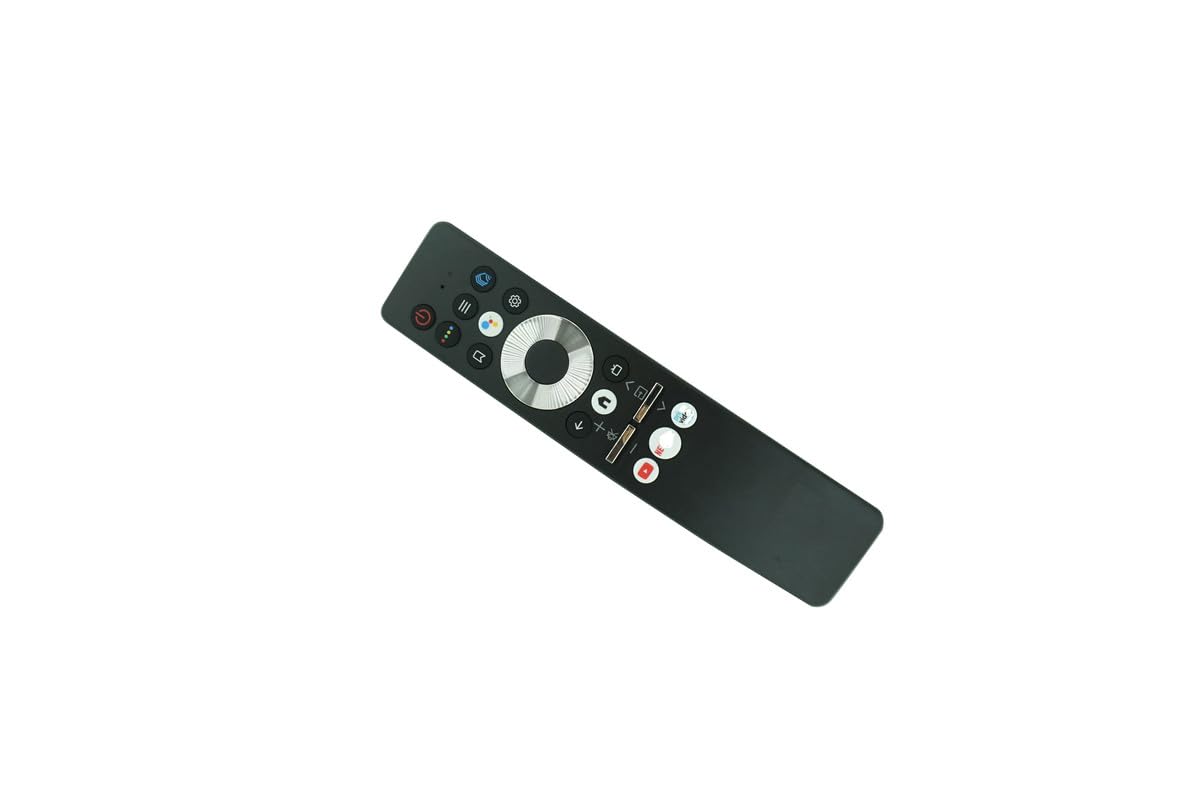
Image: Back of the remote control with the battery compartment open, ready for battery insertion.
2.2. Associazione iniziale (per funzionalità vocale)
For voice control and full functionality, this remote may require pairing with your Haier Smart 4K LED HDTV. Refer to your television's user manual for specific pairing instructions. General steps often include:
- Assicurarsi che la TV sia accesa.
- Navigate to the TV's settings menu (often labeled 'Settings', 'System', or 'Remotes & Accessories').
- Select an option to 'Add Remote' or 'Pair New Device'.
- Follow the on-screen prompts, which may involve pressing specific buttons on the new remote (e.g., 'OK' and 'Volume Down' simultaneously) or holding the remote close to the TV.
- A confirmation message should appear on the TV screen once pairing is successful.
Note: If your original remote was not a voice remote, or if your TV model does not support voice control, this feature may not be available.
3. Utilizzo del telecomando
The KRPTQJoo Voice Remote Control provides intuitive access to your television's functions. Familiarize yourself with the button layout:

Immagine: Frontale view of the remote control, displaying its buttons.
3.1. Funzioni di base
- Pulsante di accensione: Accende o spegne la TV.
- Volume su/giù: Regola il volume dell'audio.
- Canale su/giù: Cambia canale TV.
- Tastierino di navigazione (Su/Giù/Sinistra/Destra/OK): Utilizzato per navigare nei menu e selezionare le opzioni.
- Indietro/Esci: Ritorna alla schermata precedente o esce da un menu.
- Casa/Centro intelligente: Accesses the TV's main smart interface or app launcher.
3.2. Controllo vocale
If successfully paired and supported by your TV, press the dedicated Pulsante Voce (often indicated by a microphone icon) and speak clearly into the remote. You can use voice commands to:
- Cercare contenuto (ad esempio, "Trova film d'azione").
- Cambia canale (ad esempio, "Vai al Canale 5").
- Regola le impostazioni (ad esempio, "Alza il volume").
- Avviare le applicazioni (ad esempio, "Apri Netflix").
Consult your TV's manual for a complete list of supported voice commands.
4. Manutenzione
4.1. Pulizia
Per pulire il telecomando, utilizzare un panno morbido e asciutto. Per lo sporco ostinato, utilizzare un panno leggermente dampPulisci il panno con acqua o un detergente delicato e non abrasivo. Evita di usare prodotti chimici aggressivi o umidità eccessiva, poiché potrebbero danneggiare i componenti elettronici del telecomando.
4.2. Sostituzione della batteria
Sostituisci le batterie quando la risposta del telecomando diventa lenta o smette di funzionare. Sostituisci sempre entrambe le batterie contemporaneamente con batterie alcaline AAA nuove. Non mischiare batterie vecchie e nuove o tipi diversi di batterie.
4.3. Conservazione
Quando non si utilizza il telecomando per lunghi periodi, rimuovere le batterie per evitare perdite e potenziali danni al telecomando. Conservare il telecomando in un luogo fresco e asciutto, lontano dalla luce solare diretta e da temperature estreme.
5. Risoluzione Dei Problemi
- Il telecomando non risponde:
- Controllare che le batterie siano installate correttamente e abbiano una carica sufficiente. Sostituirle se necessario.
- Assicurarsi che non vi siano ostacoli tra il telecomando e il ricevitore a infrarossi del televisore.
- Verificare che il telecomando sia puntato direttamente verso la TV.
- If it's a voice remote, ensure it is properly paired with the TV.
- I comandi vocali non funzionano:
- Verify the remote is paired for voice functionality (refer to Section 2.2).
- Parlare chiaramente e tenere il telecomando vicino alla bocca quando si utilizzano i comandi vocali.
- Controlla le impostazioni del tuo televisore per assicurarti che il controllo vocale sia abilitato.
- Gamma limitata:
- Sostituire le batterie con batterie nuove.
- Assicurarsi che nessuna fonte di luce intensa (come la luce solare diretta) interferisca con il segnale IR.
6. Specifiche
| Marca | KRPTQJoo |
| Nome del modello | TV remote (Joo4550) |
| Tecnologia di connettività | Infrarossi |
| Tipo di controllore | Controllo tramite pulsanti, controllo vocale |
| Dispositivi compatibili | Television (Specific Haier Smart 4K LED HDTV models) |
| Portata massima | 8 metri |
| Numero di batterie richieste | 2 |
| Tipo di batteria | AAA alcalino |
7. Garanzia e supporto
7.1. Informazioni sulla garanzia
This KRPTQJoo remote control comes with a Garanzia di 90 giorni from the date of purchase. This warranty covers manufacturing defects under normal use. It does not cover damage caused by misuse, accidents, unauthorized modifications, or battery leakage.
7.2. Assistenza clienti
For further assistance or troubleshooting beyond the scope of this manual, please refer to the support information provided by your retailer or the manufacturer of your television. For specific TV functions or advanced settings, always consult your television's original user manual.