
VETEK HDV01-8K
Manuale utente videocamera VETEK 8K
Model: HDV01-8K
Introduzione
This user manual provides comprehensive instructions for the VETEK 8K Video Camera Camcorder (Model: HDV01-8K). Please read this manual thoroughly before operating the device to ensure proper usage and to maximize its features. Keep this manual for future reference.
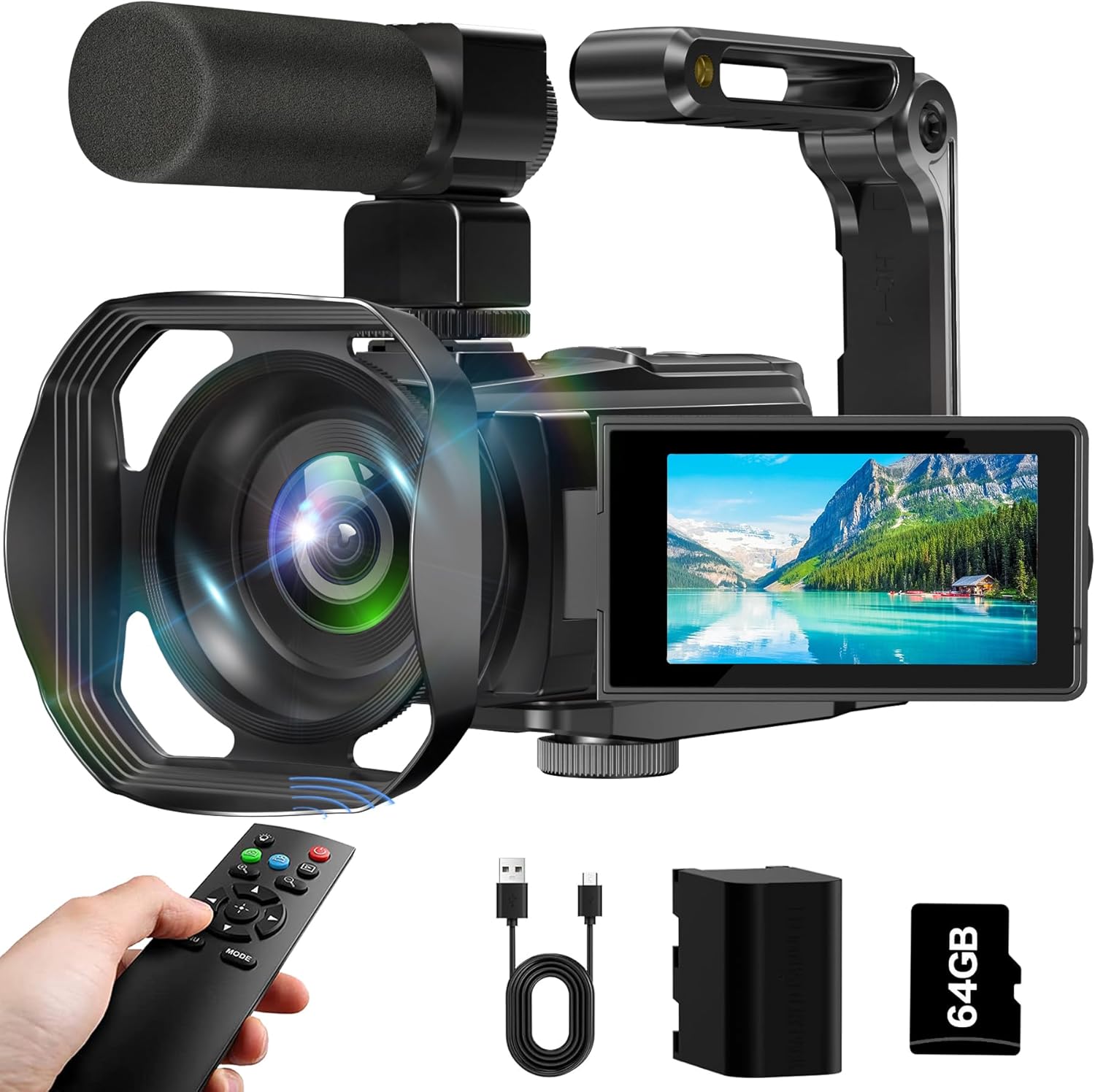
Figure 1: VETEK 8K Video Camera Camcorder with included accessories.
Contenuto della confezione
Verifica che tutti gli articoli elencati di seguito siano inclusi nel tuo pacchetto:
- VETEK 8K Video Camera Camcorder
- Microfono
- Paraluce
- Stabilizer (Hand Bracket)
- Batteria da 4500 mAh
- Scheda SD da 64 GB
- Telecomando
- Cavo di ricarica USB-C
- Sacchetto per la polvere
- Panno per la pulizia
- Manuale dell'utente (questo documento)
- Scheda post-vendita

Figura 2: Rappresentazione visiva di tutti gli accessori inclusi.
Prodotto finitoview
The VETEK 8K Camcorder is designed for ease of use while delivering high-quality video and photo capture. It features a 3-inch 270° rotating touch screen for flexible viewing and control, and supports various recording modes.

Figura 3: Oltreview of 8K 64MP CMOS sensor and 18X digital zoom capability.
Guida all'installazione
1. Installazione della batteria e della scheda SD
- Inserire la batteria: Open the battery compartment cover. Insert the 4500mAh battery, ensuring correct polarity. Close the cover securely.
- Inserisci la scheda SD: Locate the SD card slot. Insert the provided 64GB SD card (or a compatible card up to 256GB) until it clicks into place. Ensure the card is inserted correctly to avoid damage.

Figure 4: Proper battery installation.
2. Fissaggio degli accessori
- Paraluce: Screw the lens hood onto the front of the camera lens. This helps reduce glare and improve image contrast.
- Microfono: Attach the external microphone to the hot shoe mount on top of the camera. Connect the microphone cable to the designated audio input port.
- Stabilizer (Hand Bracket): Attach the hand bracket to the bottom tripod mount of the camera for improved stability during handheld recording.
Figure 5: Camcorder with all primary accessories attached for enhanced usability.
3. Accensione/Spegnimento
Open the LCD screen to power on the camcorder. Close the LCD screen to power off the camcorder.
Modalità operative e caratteristiche
1. Registrazione video e acquisizione foto
The camcorder supports 8K, 6K, 5K, 4K, and 2.7K video resolutions, and 64MP photo resolution. Use the touch screen to navigate between video and photo modes. The 18X digital zoom allows for closer shots.

Figure 6: Visual comparison of 8K vs 4K resolution capabilities.
2. IR Night Vision and Fill Light
Activate IR Night Vision for clear black and white recording in low-light conditions. The built-in LED fill light provides additional illumination for brighter photos and videos in dim environments.

Figure 7: Demonstration of IR Night Vision capability.
3. WiFi Connectivity and WebFunzione camma
Download the "Hello Cam" app from your smartphone's app store. Connect your device to the camcorder's Wi-Fi network for real-time viewing, remote control, and file transfer. The camcorder can also function as a webcam when connected to a PC via USB, suitable for live streaming or video calls.

Figure 8: Using the camcorder's WiFi function with a smartphone.

Figure 9: Camcorder connected to a laptop for webcam use or recording while charging.
4. Funzionamento del telecomando
The included remote control allows for convenient operation from a distance, including starting/stopping recording and taking photos. It has a range of up to 32 feet.

Figure 10: Remote control for the camcorder.
5. Advanced Recording Functions
Explore various recording options via the touch screen menu:
- Registrazione in loop: Continuously records, overwriting older footage quando la memoria è piena.
- Registrazione di rilevamento del movimento: Avvia automaticamente la registrazione quando viene rilevato un movimento.
- Registrazione a intervalli: Captures frames at set intervals for time-lapse videos.
- Funzione Pausa: Metti in pausa e riprendi la registrazione nello stesso file.
- Scatto continuo: Scatta più foto in rapida successione.
- Timed Selfies: Set a timer for self-portraits.

Figura 11: Esamples of Continuous Shooting and Time-Lapse Photography.
Ricarica e trasferimento dati
1. Carica della batteria
The 4500mAh battery provides up to 4.5 hours of continuous 8K recording. Connect the camcorder to a power source using the provided USB-C cable. You can record while charging.
Figure 12: Battery charging indicator on the screen.
2. Trasferimento Files
- Connessione USB: Connect the camcorder to your computer using the USB-C cable. The camera will appear as a removable drive, allowing you to drag and drop files.
- WiFi Transfer: Use the "Hello Cam" app to wirelessly transfer photos and videos to your smartphone or tablet.
- Lettore di schede SD: Remove the SD card and insert it into a compatible card reader connected to your computer for direct file accesso.
- Uscita HDMI: Connect the camcorder to an HDTV via an HDMI cable (not included) to playback photos and videos on a larger screen.

Figure 13: Various methods for transferring media from the camcorder.
Manutenzione
- Pulizia: Use the provided cleaning cloth to gently wipe the camera body and lens. Do not use liquid cleaners or abrasive materials.
- Magazzinaggio: Store the camcorder in the dust bag in a cool, dry place away from direct sunlight and extreme temperatures.
- Cura della batteria: For long-term storage, remove the battery from the camcorder. Recharge the battery periodically to maintain its lifespan.
Risoluzione dei problemi
| Problema | Possibile causa | Soluzione |
|---|---|---|
| La fotocamera non si accende. | Battery is not inserted correctly or is depleted. | Ensure battery is correctly installed. Charge the battery fully. |
| Scarsa qualità delle immagini/video. | Insufficient lighting, dirty lens, or shooting distance is too close. | Ensure adequate lighting. Clean the lens. Note that the camera has fixed focus and a shooting distance of more than 4 meters is recommended. |
| HDMI output not working. | Cavo o collegamento errato. | Ensure you are using a compatible mini HDMI cable (not included) and it is securely connected to both the camera and the display. |
| Impossibile trasferire files via WiFi. | Incorrect app or connection issue. | Ensure "Hello Cam" app is installed. Reconnect to the camera's WiFi network. |
For further assistance, please refer to the contact information provided in the After Sales Card included in your package.
Specifiche
| Caratteristica | Dettaglio |
|---|---|
| Marca | VETEK |
| Numero di modello | HDV01-8K |
| Risoluzione video | 8K (15FPS), 6K, 5K, 4K, 2.7K |
| Risoluzione della foto | 64 Megapixel |
| Ingrandire | Zoom digitale 18X |
| Schermo | 3-inch 270° Rotating Touch Screen |
| Visione notturna | Visione notturna a infrarossi (IR) |
| Connettività | WiFi, USB, HDMI (cable not included) |
| Capacità della batteria | 4500mAh |
| Magazzinaggio | Supports SD Card up to 256GB (64GB included) |
| Tipo di messa a fuoco | Fixed Focus (shooting distance > 4 meters) |
| Dimensioni | 6.11 x 2.64 x 2.64 pollici |
| Peso | 2.09 libbre |
Video ufficiali dei prodotti
8K Video Camera Camcorder, IR Night Vision Vlogging Camera
Questo video fornisce un overview of the VETEK 8K Video Camera Camcorder, highlighting its key features including 8K resolution, IR night vision, and vlogging capabilities. It demonstrates the camera's design and some of its functions.
Garanzia e supporto
VETEK offers quality after-sales service. All products are eligible for a free return within 30 days of purchase. For any questions, concerns, or technical support, please refer to the contact information provided on the After Sales Card included in your product package. We are committed to providing cost-effective entry cameras and continuously improving our products based on customer feedback.
Ask a question about this manual
Ask about setup, troubleshooting, compatibility, parts, safety, or missing instructions. Manuals+ will review the question and use this page’s manual context to help answer it.