
Talkpod SLT1
Manuale utente del ricetrasmettitore a bassa potenza Talkpod SLT1
Model: SLT1 | Brand: Talkpod
1. Introduzione
Thank you for choosing the Talkpod SLT1 Low Power Transceiver. This compact and lightweight two-way radio set is designed for reliable and easy communication in various environments, from outdoor adventures to indoor professional use. It operates without requiring a license or special qualifications, making it accessible for everyone.

Figure 1: The Talkpod SLT1 Transceiver set, featuring one red and one blue unit, along with the included USB charging cables.
2. Contenuto della confezione
Si prega di controllare il pacco per assicurarsi che siano presenti tutti gli articoli:
- Talkpod SLT1 Transceiver Unit (x2)
- Cavo di ricarica USB-C (x1)
- Clip da cintura (x2)
- Cinturino da polso (x2)
- Manuale utente (x1)
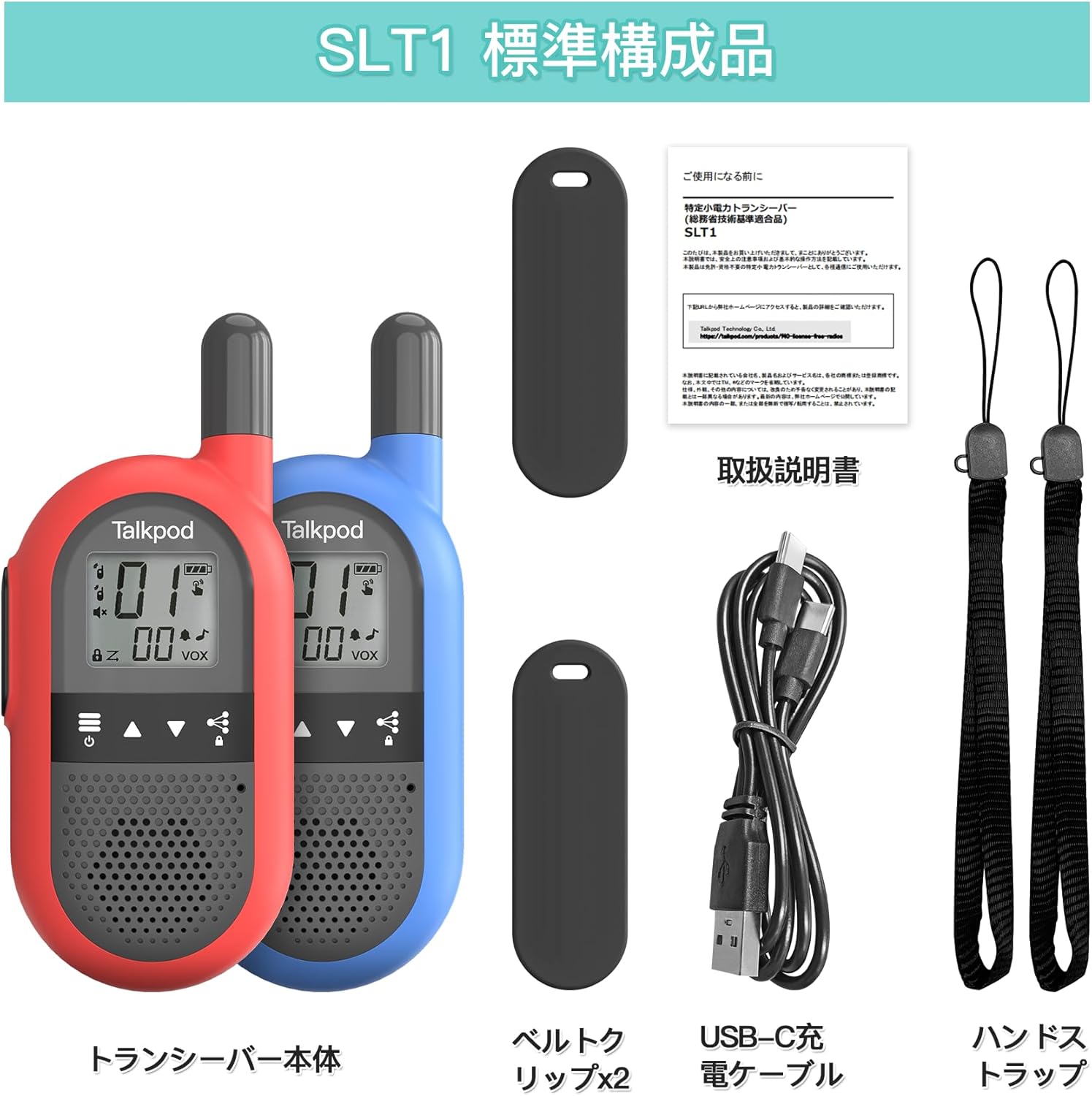
Figura 2: Oltreview of all items included in the Talkpod SLT1 package.
3. Configurazione e ricarica
3.1. Charging the Transceiver
The Talkpod SLT1 has a built-in lithium-ion battery. Before first use, fully charge the device. Use the provided USB-C charging cable to connect the transceiver to a USB power source (e.g., wall adapter, computer USB port, power bank).

Figure 3: Connect the USB-C cable to the transceiver and a USB power source for charging. A full charge provides approximately 48 hours of use.
3.2. Fissaggio della clip da cintura
To attach the belt clip, slide it onto the designated slot on the back of the transceiver until it clicks into place. To remove, gently push up and then push in the clip to release it from the slot.

Figure 4: Steps for attaching the belt clip to the transceiver.
4. Funzionamento
4.1. Layout e controlli del dispositivo
Familiarize yourself with the buttons and display of your Talkpod SLT1 transceiver:
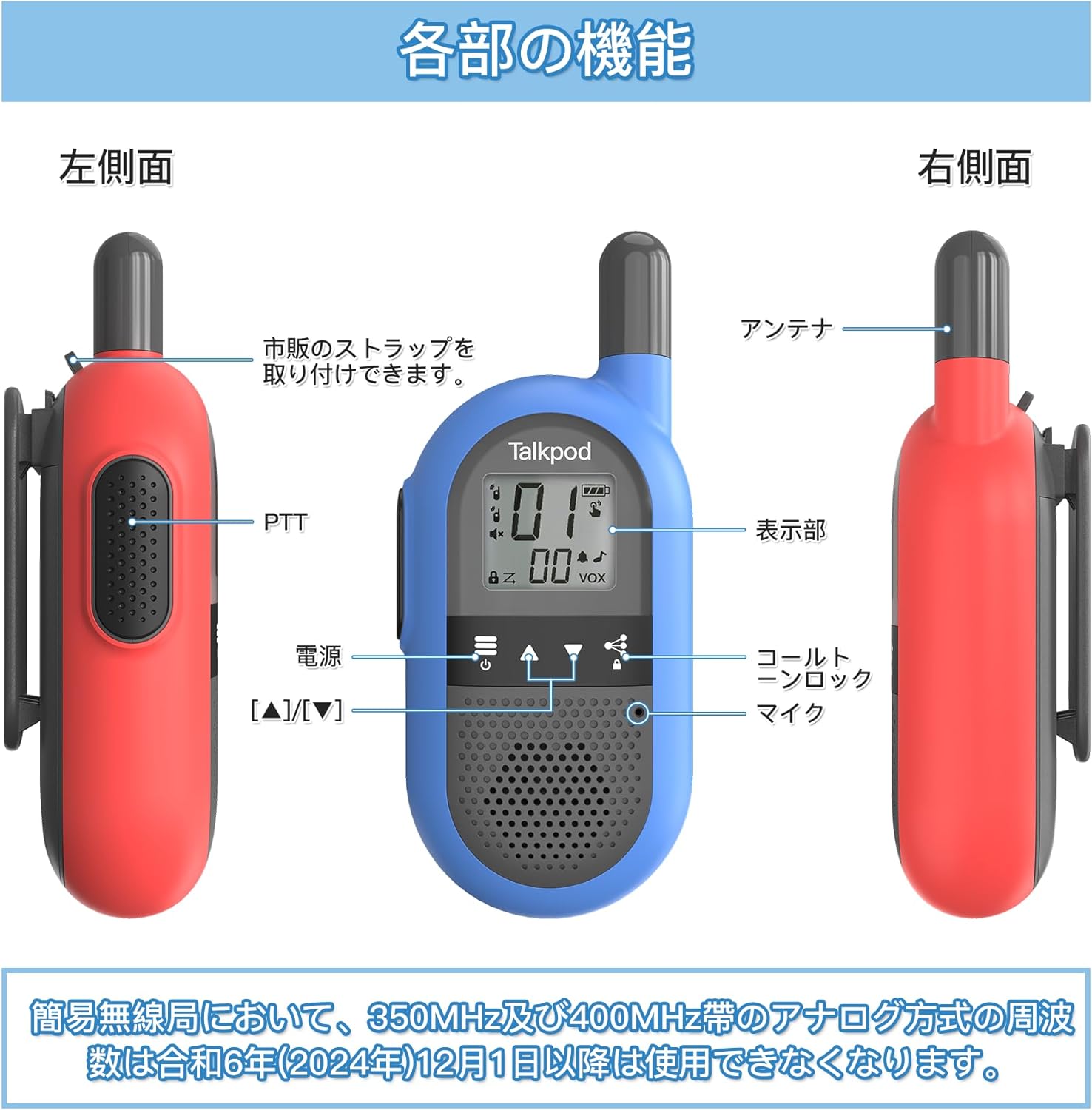
Figure 5: Detailed diagram of the transceiver's components and controls.
- Pulsante PTT (premi per parlare): Located on the left side. Press and hold to transmit, release to listen.
- Pulsante di accensione: Tenere premuto per accendere o spegnere il dispositivo.
- Display: Shows channel number, battery status, VOX indicator, and other settings.
- Microfono: Located at the bottom front.
- Antenna: Situato in cima.
- Channel Up/Down Buttons (▲/▼): Used to change channels.
- Call Tone/Lock Button: Press to send a call tone or to lock/unlock the keypad.
4.2. Comunicazione di base
- Accensione: Tenere premuto il pulsante di accensione finché il display non si illumina.
- Seleziona canale: Use the ▲ and ▼ buttons to select a channel. Ensure all transceivers you wish to communicate with are on the same channel. The Talkpod SLT1 supports 27 channels.
- Trasmettere: Press and hold the PTT button. Speak clearly into the microphone. Release the PTT button to finish transmitting.
- Ricevere: When not transmitting, the transceiver is in receive mode. You will hear incoming transmissions.
4.3. Funzione VOX (Voice Operated Exchange)
The VOX function allows for hands-free operation. When activated, the transceiver will automatically transmit when it detects your voice, without needing to press the PTT button. Refer to the full user manual for instructions on how to activate and adjust VOX sensitivity.
4.4. Raggio di comunicazione
The effective communication range of the Talkpod SLT1 varies significantly based on the environment. Obstacles such as buildings, hills, and dense foliage can reduce the range. Below are general guidelines:
- Open Line of Sight: Circa 2 km
- Suburban/Rural Areas: Approximately 1-2 km
- Expressways: Circa 500 m
- Urban Areas (with buildings): Approximately 100-200 m

Figure 6: Communication range varies by environment.
5. Manutenzione
To ensure the longevity and optimal performance of your Talkpod SLT1 transceivers, follow these maintenance guidelines:
- Pulizia: Pulire il dispositivo con un panno morbido, damp stoffa. Non utilizzare prodotti chimici aggressivi o detergenti abrasivi.
- Magazzinaggio: Store the transceivers in a cool, dry place away from direct sunlight and extreme temperatures.
- Cura della batteria: Avoid fully discharging the battery frequently. If storing for a long period, charge the battery to about 50% capacity.
- Esposizione all'acqua: The device is not waterproof. Avoid exposing it to rain or submerging it in water.
6. Risoluzione Dei Problemi
If you encounter issues with your Talkpod SLT1, try the following solutions:
| Problema | Possibile causa | Soluzione |
|---|---|---|
| Nessun potere | La batteria è scarica | Charge the transceiver fully. |
| Non riesco a comunicare | Diversi canali selezionati | Ensure both transceivers are on the same channel. |
| Scarsa qualità del suono | Fuori portata o interferenza | Move closer to the other transceiver or to an area with fewer obstacles. |
| I pulsanti non rispondono | La tastiera è bloccata | Press the Call Tone/Lock button to unlock the keypad. |
Se il problema persiste, contattare l'assistenza clienti.
7. Specifiche
| Caratteristica | Dettaglio |
|---|---|
| Numero di modello | SLT1 |
| Marca | TalkPod |
| Colore | Rosso + Blu |
| Dimensioni (L x P x A) | 3.8 x 5.6 x 12.5 cm (1.5 x 2.2 x 4.9 pollici) |
| Peso | 96 g (0.21 libbre) |
| Tipo di batteria | Ioni di litio (integrati) |
| Canali | 27 |
| Gamma di frequenza | Da 422.050 a 422.300 MHz |
| Max Communication Distance | 2 km (spazio aperto) |
| Tecnologia sintonizzatore | Frequenza ultra-alta |
| Caratteristiche speciali | Rechargeable, VOX Hands-Free, Auto Power Saving, Auto Scan |
8. Garanzia e supporto
Talkpod offers the following support for your product:
- Politica di reso/cambio: 30-day return or exchange period from the date of purchase.
- Garanzia del produttore: Garanzia del produttore di 1 anni dalla data di acquisto.
For any questions, concerns, or support inquiries regarding your Talkpod SLT1 transceiver, please contact our customer service. We aim to provide a satisfactory response within 24 hours.
Contact information for support is typically found on the product packaging or the official brand websito.
Ask a question about this manual
Ask about setup, troubleshooting, compatibility, parts, safety, or missing instructions. Manuals+ will review the question and use this page’s manual context to help answer it.