
ALLIMITY RC45162
ALLIMITY RC45162 Voice Remote Control User Manual
Model: MME-RC45162-NP
Compatible with Panasonic TV models: TX-65MX700E, TX-65MX710E, TX-43MX700E, TX-55MX710E, TX-50MX710E, TX-55MX700E
1. Introduzione
This manual provides instructions for the ALLIMITY RC45162 Voice Remote Control. This remote is designed to be fully compatible with various Panasonic TV models, offering a direct replacement experience without complex setup procedures. Its ergonomic design ensures comfortable handling and reliable performance for controlling your television.
2. Impostazione
2.1 Installazione della batteria
The ALLIMITY RC45162 remote control requires batteries for operation. Please follow these steps to install them:
- Individuare il coperchio del vano batterie sul retro del telecomando.
- Far scorrere o premere il fermo per aprire il vano batteria.
- Insert the required Lithium batteries, ensuring the positive (+) and negative (-) terminals align correctly with the markings inside the compartment.
- Chiudere saldamente il coperchio del vano batterie.
Note: This remote control requires no programming or complex installation. Once batteries are correctly inserted, it is ready for use with compatible Panasonic TV models.

Immagine: Indietro view of the remote control, highlighting the battery compartment for easy access and installation.
3. Istruzioni per l'uso
The ALLIMITY RC45162 remote control is designed for intuitive use. Below are the primary functions:
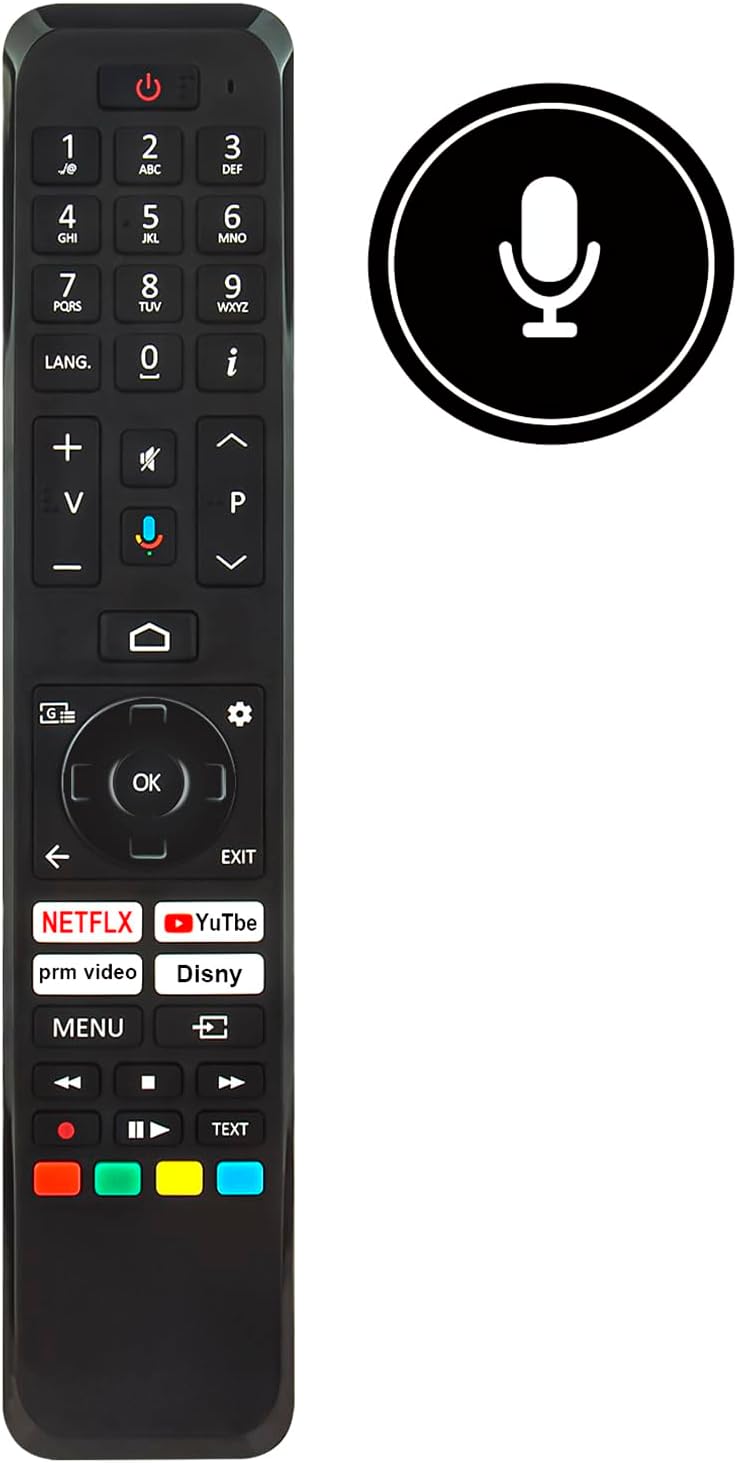
Immagine: Frontale view of the ALLIMITY RC45162 remote control, displaying the full button layout.
3.1 Funzioni di base
- Pulsante di accensione (U): Accende o spegne la TV.
- Tasti numerici (0-9): Seleziona direttamente i canali.
- Volume su/giù (+/-): Regola il volume del televisore.
- Canale Su/Giù (P^/P<): Cambia canale TV.
- Tasto muto: Disattiva o riattiva l'audio della TV.
- Tastierino di navigazione (su, giù, sinistra, destra, OK): Utilizzato per navigare nei menu e confermare le selezioni.
- Back Button (<): Ritorna al menu o alla schermata precedente.
- Pulsante di uscita: Esce dal menu o dall'applicazione corrente.
- Pulsante Home: Accede alla schermata principale della TV o all'interfaccia della smart TV.
3.2 Funzioni speciali
- Pulsante di controllo vocale (icona del microfono): Activates the voice control feature. Press and hold this button, then speak your command clearly into the remote. Release the button when finished.
- Pulsanti di accesso rapido: Dedicated buttons for popular streaming services such as Netflix, YouTube, Prime Video, and Disney+ for direct access.
- Pulsante LANG.: For language selection or audio track changes.
- Info Button (i): Visualizza informazioni sul programma o sull'input corrente.
- Pulsante Menu: Accede al menu delle impostazioni principali del televisore.
- Pulsanti colorati (rosso, verde, giallo, blu): These buttons often correspond to specific functions within TV menus or applications, as indicated on the screen.
4. Manutenzione
4.1 Pulizia
Per mantenere l'aspetto e la funzionalità del telecomando:
- Pulisci il telecomando con un panno morbido e asciutto.
- Per sporco ostinato, leggermente dampBagnare il panno con acqua o un detergente delicato e non abrasivo.
- Evitare l'uso di prodotti chimici aggressivi, solventi o materiali abrasivi, poiché potrebbero danneggiare la superficie del telecomando o i componenti interni.
4.2 Sostituzione della batteria
Replace batteries when the remote control's response becomes sluggish or stops working. Always replace all batteries at the same time with new ones of the same type. Do not mix old and new batteries or different types of batteries.
4.3 Conservazione
Se il telecomando non verrà utilizzato per un periodo prolungato, rimuovere le batterie per evitare perdite e potenziali danni al dispositivo.
5. Risoluzione Dei Problemi
If you encounter issues with your ALLIMITY RC45162 remote control, please refer to the following common solutions:
- Il telecomando non risponde:
- Controllare che le batterie siano inserite correttamente e siano sufficientemente cariche. Sostituirle se necessario.
- Assicurarsi che non vi siano ostacoli tra il telecomando e il sensore a infrarossi del televisore.
- Puntare il telecomando direttamente verso la TV.
- Il controllo vocale non funziona:
- Ensure you are pressing and holding the voice control button while speaking.
- Parlare in modo chiaro e a volume normale.
- Controlla le impostazioni del tuo televisore per assicurarti che il controllo vocale sia abilitato e configurato correttamente.
- Portata limitata o risposta intermittente:
- Replace the batteries. Low battery power can affect signal strength.
- Assicurarsi che il telecomando si trovi entro il raggio d'azione massimo (fino a 10 metri).
- Minimize sources of infrared interference, such as direct sunlight or strong artificial light.
6. Specifiche

Immagine: frontale e laterale view of the remote control, illustrating its dimensions for reference.
| Marca | ALLIMITÀ |
| Nome / numero modello | MME-RC45162-NP |
| Caratteristiche speciali | Ergonomic |
| Colore | Nero/Bianco |
| Numero massimo di dispositivi supportati | 10 |
| Dispositivi compatibili | TX-65MX700E, TX-65MX710E, TX-43MX700E, TX-55MX710E, TX-50MX710E, TX-55MX700E |
| Tecnologia di connettività | Infrarossi |
| Tipo di controllore | Controllo a infrarossi |
| Portata massima | 10 metri |
| Tipo di batteria | Litio |
| Peso dell'articolo | 59 grammi |
7. Informazioni sulla garanzia
This product is typically covered by a standard manufacturer's warranty. For specific details regarding warranty duration, coverage, and claims, please refer to the documentation provided at the time of purchase or contact your retailer. Extended warranty options may be available from third-party providers.
8. Supporto
For further assistance or if you have questions not covered in this manual, please contact the seller or the manufacturer directly. You may find contact information on the product packaging or the retailer's websito.
Ask a question about this manual
Ask about setup, troubleshooting, compatibility, parts, safety, or missing instructions. Manuals+ will review the question and use this page’s manual context to help answer it.