
1. Introduzione
This manual provides essential instructions for the safe and efficient use of your Meizu Note 21 Pro smartphone. Please read this manual thoroughly before operating the device and retain it for future reference.
2. Cosa c'è nella scatola
- Meizu Note 21 Pro Smartphone
- Adattatore di alimentazione
- (Other accessories such as USB cable, SIM ejector tool, and documentation may vary by region.)
3. Disposizione del dispositivo
Familiarize yourself with the physical components of your Meizu Note 21 Pro.
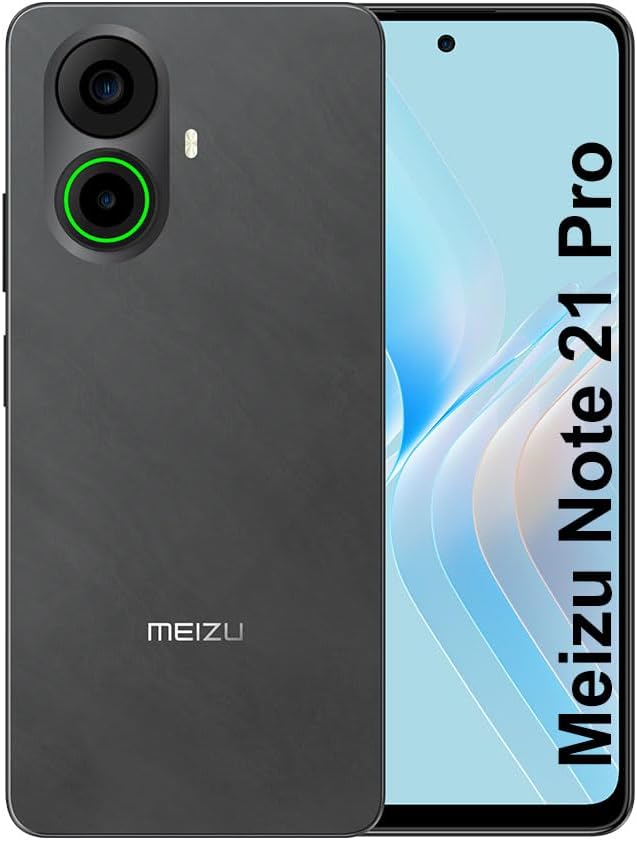
Immagine 3.1: Anteriore e posteriore view of the Meizu Note 21 Pro. The front displays the screen with a punch-hole camera. The rear shows the dual camera module with a green accent ring on one lens, a flash, and the "MEIZU" logo at the bottom.
- Display frontale: 6.78-inch FHD+ screen with a 120Hz refresh rate.
- Fotocamera frontale: Situato al centro, in alto, del display.
- Telecamere posteriori: Dual camera system, including a 64MP main camera.
- Sensore di impronte digitali laterale: Integrated for secure access.
- Porta USB: Per la ricarica e il trasferimento dei dati.
- Jack audio da 3.5 mm: Per le cuffie.
- Vassoio per scheda SIM/MicroSD: Supports Dual Nano SIM and MicroSD cards.
4. Impostazione
4.1. Inserimento delle schede SIM e MicroSD
- Individua il vassoio della scheda SIM sul lato del dispositivo.
- Inserire lo strumento di espulsione della SIM nel piccolo foro accanto al vassoio e spingere delicatamente finché il vassoio non fuoriesce.
- Inserisci la/le scheda/e Nano SIM e/o la scheda MicroSD negli appositi slot sul vassoio. Assicurati che i contatti dorati siano rivolti verso il basso.
- Reinserire con cautela il vassoio nel dispositivo finché non scatta in posizione.
4.2. Accensione iniziale e configurazione
- Press and hold the Power button until the Meizu logo appears.
- Segui le istruzioni sullo schermo per selezionare la lingua, connetterti a una rete Wi-Fi e configurare il tuo account Google.
- During setup, you will be guided to configure security features such as a PIN, pattern, or password.
4.3. Configurazione del riconoscimento delle impronte digitali
- Vai a Impostazioni > Sicurezza e privacy > Sblocco tramite impronta digitale.
- Follow the on-screen instructions to register your fingerprint by repeatedly touching the side-mounted sensor.
- Per prestazioni ottimali, assicurarsi che il dito copra l'intera area del sensore durante la registrazione.
5. Utilizzo del dispositivo
5.1. Display e navigazione
- The 6.78-inch FHD+ display operates at a 120Hz refresh rate for smooth visuals.
- Navigate the Android 14 operating system using touch gestures: tap, swipe, pinch-to-zoom.
- Per accedere alle impostazioni rapide, scorri verso il basso dalla parte superiore dello schermo.
5.2. Funzioni della fotocamera
- Apri l'applicazione Fotocamera dalla schermata iniziale o dal cassetto delle applicazioni.
- The rear camera system features a 64MP main sensor for high-resolution photos and a 2MP depth-of-field camera for portrait effects.
- The 13MP front-facing camera is suitable for selfies and video calls.
- Tap on the screen to focus, and use the on-screen shutter button to capture images. Explore various modes like Portrait, Night, and Pro within the camera app.
5.3. Prestazioni e archiviazione
- The MediaTek G99 Octa Core processor ensures efficient performance for applications and multitasking.
- The device comes with 256GB of internal storage and 8GB of RAM.
- Storage can be expanded using a MicroSD card (sold separately).
5.4. Batteria e ricarica
- The Meizu Note 21 Pro is equipped with a 5000mAh battery.
- Use the provided Power Adapter for 30W fast charging.
- To charge, connect the USB cable to the phone's USB port and the power adapter, then plug the adapter into a wall outlet.
5.5. Connettività
- 4G LTE: Supports various LTE FDD and TDD bands for cellular data. Note: This international version works on T-Mobile in the USA and globally with other carriers.
- Wi-Fi 5: Connettersi alle reti wireless per accedere a Internet.
- Bluetooth: Abbinalo ad accessori wireless come cuffie e altoparlanti.
- NFC: Per pagamenti contactless e associazione rapida con dispositivi compatibili.
- Posizione GPS: Per servizi di localizzazione e navigazione.
6. Manutenzione
- Pulizia: Utilizzare un panno morbido e privo di lanugine per pulire lo schermo e il corpo del dispositivo. Evitare prodotti chimici aggressivi o materiali abrasivi.
- Cura della batteria: Avoid extreme temperatures. Do not fully discharge the battery frequently. For optimal battery longevity, keep the charge between 20% and 80%.
- Aggiornamenti software: Controlla regolarmente e installa gli aggiornamenti di sistema per garantire prestazioni e sicurezza ottimali. Vai a Impostazioni > Sistema > Aggiornamento del sistema.
7. Risoluzione Dei Problemi
| Problema | Possibile soluzione |
|---|---|
| Il dispositivo non si accende | Ensure the battery is charged. Connect the device to the power adapter and try again. If unresponsive, press and hold the Power button for 10-15 seconds to force a restart. |
| Segnale di rete scarso | Check if the SIM card is correctly inserted. Move to an area with better network coverage. Restart the device. Verify with your carrier that your plan is active. |
| Le app sono lente o si bloccano | Chiudere le applicazioni in background. Cancellare la cache dell'app (Impostazioni > Applicazioni > seleziona app > Archiviazione e cache > Cancella cache). Restart the device. Ensure sufficient storage space. |
| Il sensore di impronte digitali non funziona | Ensure your finger and the sensor are clean and dry. Re-register your fingerprint in settings. |
8. Specifiche
- Modello: Meizu Note 21 Pro
- Sistema operativo: Androide 14
- Processore: MediaTek G99 Octa Core (2.2GHz)
- Display: 6.78 inches FHD+ (1080 x 2160 resolution), 120Hz Refresh Rate
- Memoria RAM: 8 GB
- Memoria interna: 256 GB
- Telecamera posteriore: 64MP principale + 2MP di profondità
- Fotocamera frontale: 13MP
- Batteria: 5000 mAh, ricarica rapida da 30 W
- Connettività: 4G LTE (FDD:1,2,3,4,5,7,8,12,17,18,19,20,26,28,66; TDD:38,40,41), 3G WCDMA, 2G Quad Band, Wi-Fi 5, Bluetooth, NFC, GPS
- Jack audio: 3.5 millimetri
- Dimensioni: 6.64 x 2.96 x 0.33 pollici
- Peso: 1.1 libbre
9. Garanzia e supporto
For warranty information and technical support, please refer to the warranty card included with your product or visit the official Meizu websito. Conservare la prova d'acquisto per eventuali reclami in garanzia.
For further assistance, you may contact Meizu customer service through their official channels.