
1. Introduzione
Thank you for choosing the VIFLYKOO EM3390TF Wireless Weather Station. This device provides comprehensive weather information, including indoor and outdoor temperature and humidity, a 5-day weather forecast, moon phases, and atmospheric pressure. With Wi-Fi connectivity and a dedicated app, you can monitor conditions remotely and access additional features. Please read this manual carefully to ensure proper setup and operation.
2. Prodotto finitoview
The VIFLYKOO EM3390TF Weather Station consists of a main display unit and a wireless outdoor sensor. The main unit features a color display and various control buttons, while the outdoor sensor transmits environmental data wirelessly.
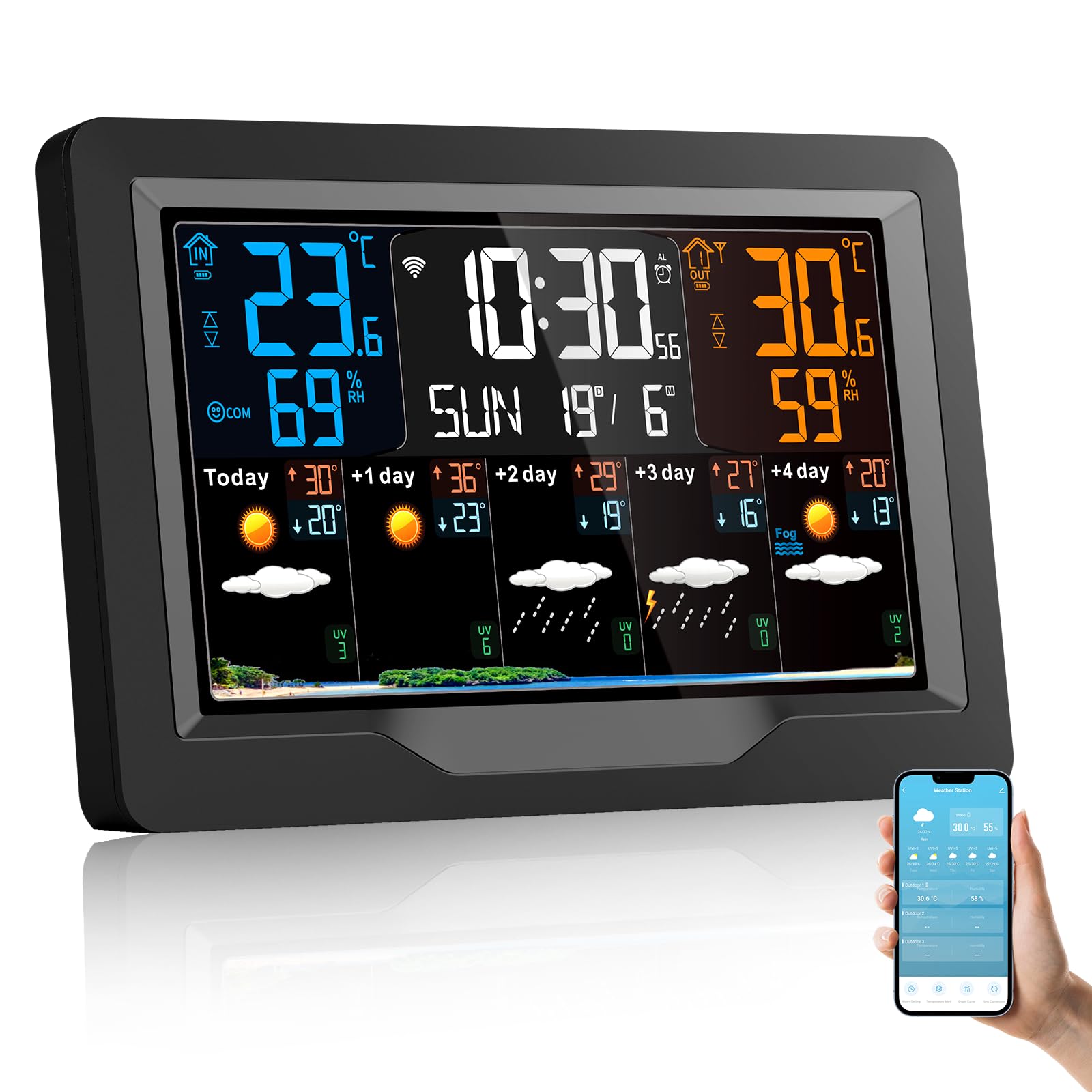
Image: VIFLYKOO EM3390TF Wireless Weather Station main unit and outdoor sensor.

Image: Detailed diagram of the VIFLYKOO EM3390TF Weather Station display and physical components. Labels include: A1: Time, A2: Indoor temperature, A3: Week for today, A4: Indoor humidity, A5: Remote wireless channel, A6: Outdoor temperature, A7: Calendar, A8: Outdoor humidity, A9: Predicted maximum temperature today and in the next 1-4 days, A10: Predicted minimum temperature today and in the next 1-4 days, A11: Weather forecast for today and the next 1-4 days, A12: UV index. B7: Hanging hole, B8: Support frame, B9: Battery compartment, B10: USB charging socket, B11: DC-POWER input jack.
3 Caratteristiche
- Multiple Data Displays: Shows indoor/outdoor temperature and humidity, time, date, sunrise/sunset times, moon phase, atmospheric pressure, comfort level, and mold risk.
- Previsioni meteo a 5 giorni: Provides a predictive weather forecast for the upcoming days.
- Connettività Wi-Fi e controllo app: Connects to your 2.4 GHz Wi-Fi network for app control and automatic time synchronization.
- Supporto multicanale: Capable of receiving data from up to three outdoor sensors (one sensor included).
- Luminosità dello schermo regolabile: Four levels of screen brightness for optimal viewin varie condizioni di illuminazione.
- Sveglia con funzione snooze: Features three sets of alarms with a five-minute snooze function.
- Avvisi di temperatura: Customizable alerts for temperature changes.
- Porta di ricarica USB: The main unit includes a USB socket for charging external devices.
- Opzioni di alimentazione: Can be powered by DC adapter or 2 AA batteries (for backup).
4. Impostazione
4.1 Disimballaggio
Carefully remove all components from the packaging. Ensure you have the main weather station unit, one wireless outdoor sensor, a power adapter, and this instruction manual.
4.2 Alimentazione dell'unità principale
- Connect the provided power adapter to the DC-POWER input jack (B11) on the back of the main unit.
- Plug the adapter into a standard electrical outlet. The display will light up.
- For backup power, open the battery compartment (B9) and insert 2 AA batteries (not included), observing polarity.
4.3 Installazione delle batterie del sensore esterno
- Aprire il vano batterie sul retro del sensore esterno.
- Inserire 2 batterie AA (non incluse), assicurandosi della corretta polarità.
- Chiudere bene il vano batterie.
4.4 Accoppiamento dei sensori
The outdoor sensor should automatically pair with the main unit upon powering both devices. If the outdoor temperature/humidity is not displayed, press the 'CH' button on the main unit to cycle through channels or the 'RESET' button on the outdoor sensor to re-initiate pairing.
4.5 Connessione Wi-Fi e configurazione dell'app

Image: Weather station display and smartphone app interface.
- Download the companion app (e.g., Smart Life or Tuya Smart) from your smartphone's app store.
- Registrati o accedi al tuo account.
- Follow the in-app instructions to add a new device. This typically involves putting the weather station into pairing mode (refer to the device's specific button combination, often holding a Wi-Fi button for several seconds).
- Durante il processo di associazione, assicurati che lo smartphone sia connesso a una rete Wi-Fi a 2.4 GHz.
- Once connected, the weather station will synchronize time and date automatically, and you can view data and control settings via the app.
5. Istruzioni per l'uso
5.1 Fine displayview
Refer to the detailed diagram in Section 2 for a complete breakdown of the display elements (A1-A12).
5.2 Regolazione della luminosità dello schermo

Image: Weather station display showing different brightness levels.
Press the light/snooze button on the top of the unit to cycle through the four brightness levels: High, Medium, Low, and Off.
5.3 Impostazione di data e ora
If connected to Wi-Fi, the time and date will synchronize automatically. If manual adjustment is needed, refer to the specific buttons on your device (usually 'MODE' or 'SET' buttons) and follow the on-screen prompts.
5.4 Funzione sveglia e snooze

Image: Weather station with alarm and snooze function.
To set an alarm, press the 'ALARM' button and use the adjustment buttons to set the desired time. To activate the snooze function when an alarm sounds, touch the top of the weather station. The snooze time is five minutes. Press any other button to turn off the alarm.
5.5 Conversione delle unità (°C/°F)
Press the '°C/°F' button (if available) or a designated button as per your device's specific controls to switch between Celsius and Fahrenheit temperature units.
5.6 Viewing Multiple Channels

Image: Weather station supporting up to 3 channels for outdoor sensors.
If you have multiple outdoor sensors, press the 'CH' button on the main unit to cycle through the data from each connected sensor (CH1, CH2, CH3).
6. Manutenzione
6.1 Pulizia
Pulire l'unità principale e il sensore esterno con un panno morbido e asciutto.amp cloth. Do not use abrasive cleaners or solvents. Ensure no moisture enters the device openings.
6.2 Sostituzione della batteria
Replace batteries in the outdoor sensor when the low battery indicator appears on the main unit's display. For the main unit, replace backup batteries periodically or if the unit loses settings during a power outage.
6.3 Posizionamento del sensore
Place the outdoor sensor in a shaded, dry location, protected from direct sunlight and rain, to ensure accurate readings. Avoid placing it near heat sources or reflective surfaces. The maximum transmission distance is approximately 60m/196ft in open air.
7. Risoluzione Dei Problemi
- Nessuna lettura della temperatura/umidità esterna:
Ensure batteries are correctly installed in the outdoor sensor. Press the 'RESET' button on the outdoor sensor. Press the 'CH' button on the main unit to re-scan for sensors. Ensure the sensor is within range (max 60m/196ft) and not obstructed by thick walls or metal objects. - Problemi di connessione Wi-Fi:
Verify your Wi-Fi network is 2.4 GHz. Ensure the weather station is in pairing mode. Restart your router and the weather station. Check app instructions for specific troubleshooting steps. - Letture imprecise:
Ensure the outdoor sensor is placed in a suitable location, away from direct sunlight, rain, and heat sources. Compare readings with other reliable thermometers if possible. - Il display è scuro o spento:
Check power adapter connection. Adjust screen brightness using the light/snooze button. Replace backup batteries if using them.
8. Specifiche
| Marca | VIFLYKOO |
| Numero di modello | EM3390TF |
| Dimensioni del prodotto | 3 x 20.5 x 13 cm; 540 g |
| Tecnologia di connettività | Wi-Fi (2.4 GHz) |
| Fonte di alimentazione | Corded Electric, Battery Powered (2 AA for main unit backup, 2 AA for sensor) |
| Precisione della temperatura | 1 °C |
| Caratteristiche speciali | Alarm, Wireless, Large Display, Adjustable Brightness, Pre-calibrated |
| Componenti inclusi | Instruction manual, Transmitter (outdoor sensor), Power cord |
| Usi consigliati | Library, Office, Home, Laboratory, Garden, Restaurant |
9. Garanzia e supporto
For warranty information or technical support, please refer to the contact details provided with your purchase or visit the official VIFLYKOO websito. Conserva la ricevuta d'acquisto come prova d'acquisto.