
1. Introduzione
Thank you for choosing the BOSGAME P2 Mini PC. This compact and powerful computer is designed to meet a wide range of computing needs, from everyday tasks to demanding applications. Equipped with an Intel Alder Lake Core i7-12700H processor, 32GB DDR4 RAM, and a 512GB NVMe SSD, it offers robust performance in a small form factor. This manual provides essential information for setting up, operating, and maintaining your Mini PC.

Image 1.1: The BOSGAME P2 Mini PC, a compact and powerful computing solution.
2. Cosa c'è nella scatola
Si prega di verificare che tutti gli articoli siano presenti nel pacco:
- Mini PC P2 12700H x1
- Manuale utente x1
- Cavo HDMI 2.0 x1
- 19V 6.32A, 120W Power Adapter x1
- VESA Mount & Screws x1
3. Prodotto finitoview
The BOSGAME P2 Mini PC is engineered for efficiency and versatility. Its compact design allows it to fit into various environments, from office desks to home entertainment setups, without occupying significant space.
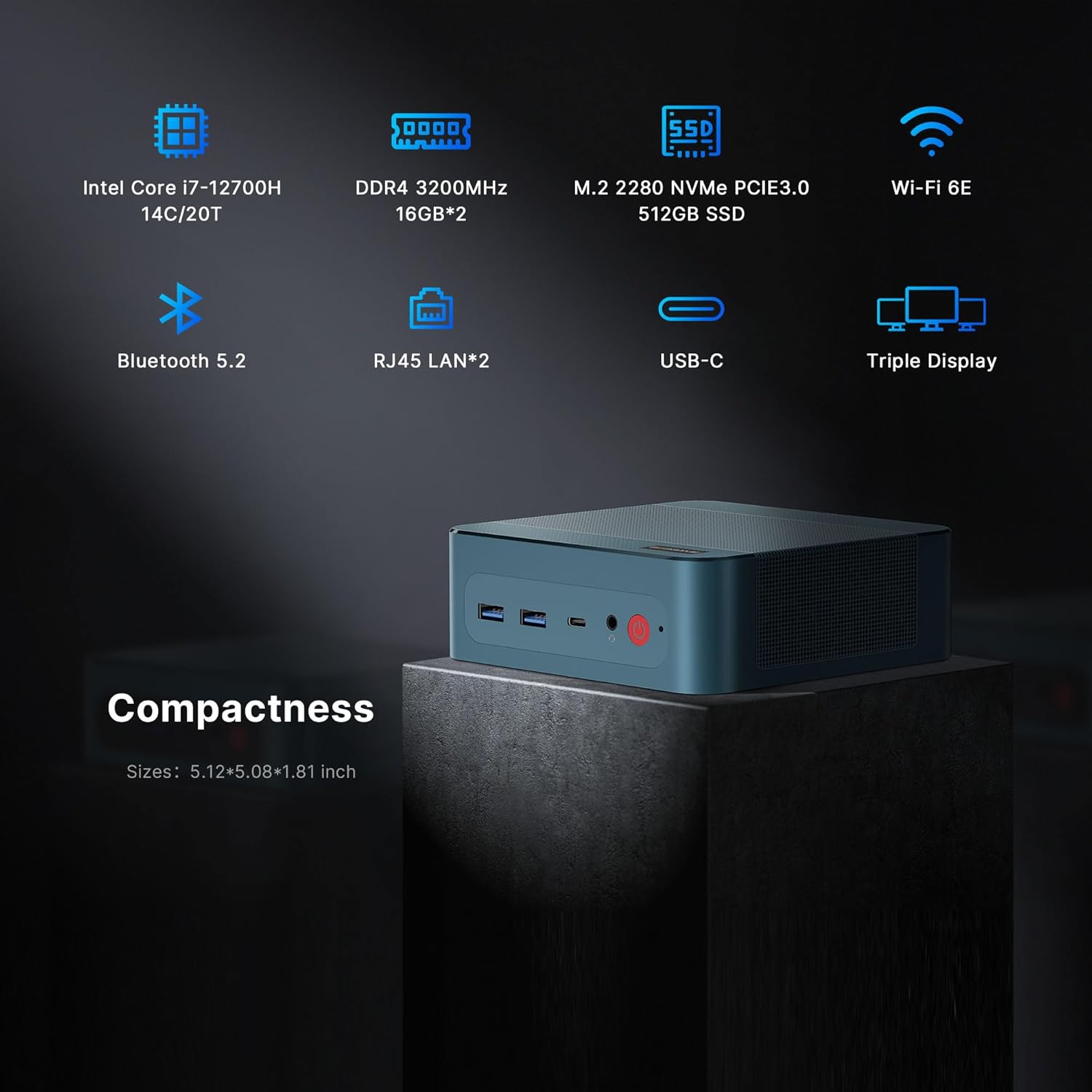
Immagine 3.1: Passoview of the BOSGAME P2 Mini PC highlighting its compact size and key specifications like Intel Core i7-12700H, DDR4 3200MHz, M.2 2280 NVMe SSD, Wi-Fi 6E, Bluetooth 5.2, Dual RJ45 LAN, USB-C, and Triple Display support.

Image 3.2: The BOSGAME P2 Mini PC integrated into a modern workspace, showcasing its small footprint next to a monitor.
4. Caratteristiche principali
4.1. Processore
The BOSGAME P2 is powered by the Intel Alder Lake Core i7-12700H processor, featuring 14 cores and 20 threads with a maximum boost clock of 4.70 GHz. This processor is designed for efficient multitasking and handling demanding applications.
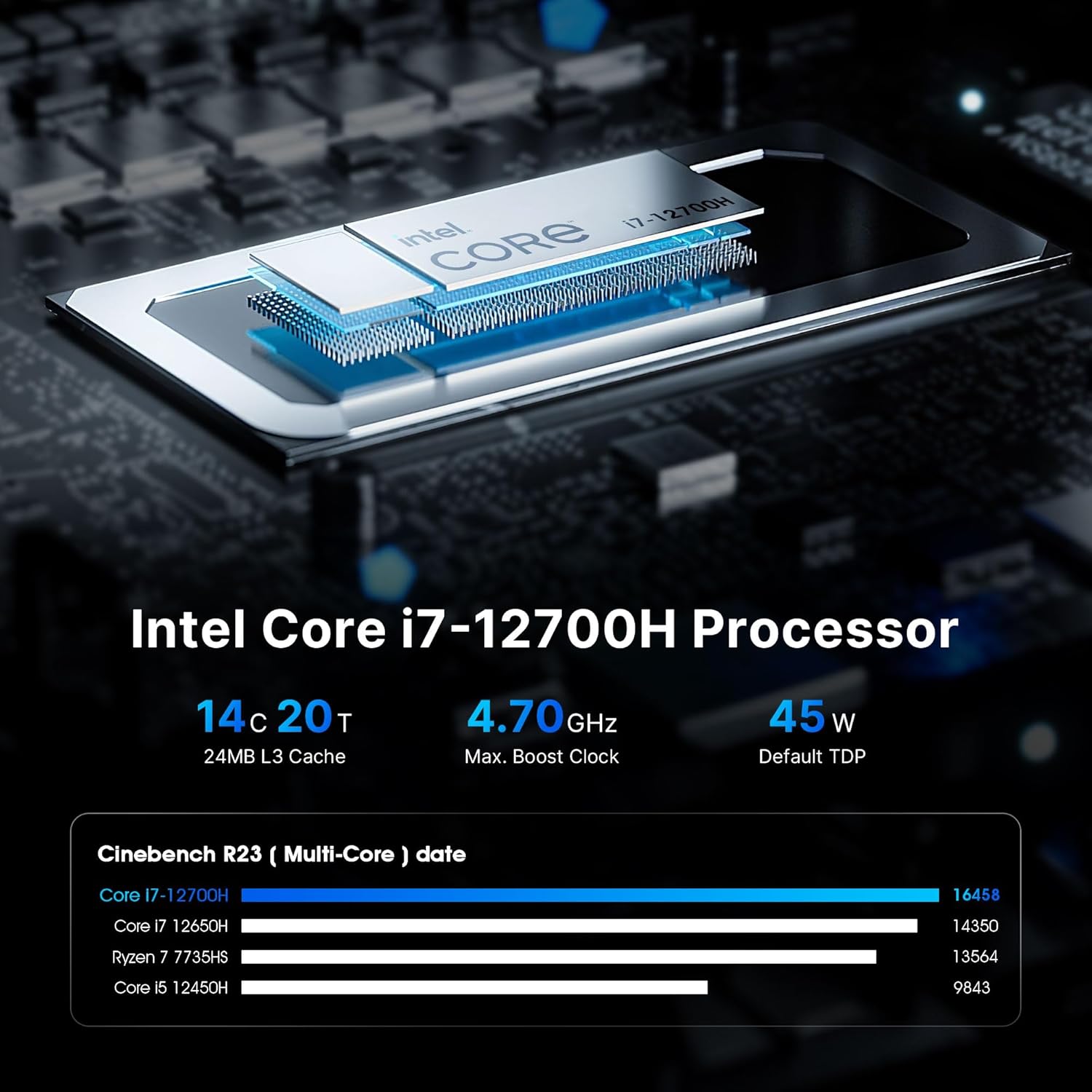
Immagine 4.1: Dettagliata view of the Intel Core i7-12700H processor, highlighting its 14 cores, 20 threads, 4.70 GHz max boost clock, and 45W TDP. A benchmark comparison chart is also shown.

Image 4.2: Performance comparison chart for the 12th Gen Intel Core i7-12700H processor against other CPUs, showing its single-core and multi-core scores.

Image 4.3: A visual comparison of performance improvements between the Intel Core i7-12700H and Intel Core i7-1165G7 in various tasks like C4D render, V-Ray render, Keyshot rendering, and X264 benchmark encoding time.
4.2. Memoria e archiviazione
The Mini PC comes with 32GB (16GBx2) of dual-channel DDR4 3200MHz SODIMM RAM, ensuring smooth multitasking. For storage, it includes a 512GB NVMe M.2 2280 SSD. The system supports up to 8TB of storage with two NVMe M.2 2280 SSD slots (2x4TB).

Image 4.4: Illustration of the DDR4 3200MHz SODIMM memory modules and the M.2 2280 NVMe 512GB SSD, emphasizing speed and capacity.

Image 4.5: Visual representation of the expandable memory (32GB DDR5 SODIMM x2, up to 64GB) and storage (512GB PCIe 4.0x4, Max 2TB) capabilities, suitable for work and entertainment.
4.3. Connettività
The BOSGAME P2 offers comprehensive connectivity options:
- Porte USB: 2x USB 3.2, 2x USB 2.0, 1x USB4 (supports Thunderbolt 4)
- Uscite video: 1x HDMI 2.0, 1x DisplayPort, 1x USB4 (supports 8K 60Hz display)
- Rete: Dual 2.5GbE LAN ports, WiFi 6E (2.4GHz, 5GHz)
- Senza fili: Bluetooth 5.2
- Audio: Interfaccia audio da 3.5 mm

Image 4.6: Diagram illustrating the various ports on the BOSGAME P2 Mini PC, including USB 3.2, Thunderbolt 4, Audio Jack, Power, DP, HDMI, RJ45, and DC, along with examples of compatible office, home, and entertainment equipment.

Image 4.7: Highlights the faster wireless network (WiFi 6E 2x2) and strong LAN capabilities (2.5x faster than WiFi 5), along with Bluetooth 5.2 for seamless connectivity.

Image 4.8: A diagram illustrating the powerful wireless connectivity of the BOSGAME P2, showing connections to various devices like monitors, speakers, mobile phones, and network components via Wi-Fi 6 and Bluetooth 5.2.

Image 4.9: Close-up of the dual 2.5G RJ45 LAN ports, emphasizing their speed advantage over traditional Gigabit ports for improved network performance.
4.4. Supporto triplo display
The Mini PC supports triple 4K 60Hz displays via 1x HDMI 2.0, 1x DisplayPort, and 1x USB4 (which supports 8K 60Hz). This capability enhances productivity and provides an immersive viewesperienza per varie applicazioni.

Image 4.10: The BOSGAME P2 Mini PC connected to three monitors, demonstrating its triple screen display support for enhanced productivity and entertainment.

Image 4.11: Illustrates the capability to support three screen displays, with HDMI (4K@60Hz), Thunderbolt 4 (8K@60Hz), and DP (4K@60Hz) outputs.

Image 4.12: Highlights the 8K Ultra HD Resolution (7630x4320px) support, providing ultra-clear picture quality for streaming services and other content.
4.5. Efficient Cooling
The BOSGAME P2 features an efficient and stable heat dissipation system, including a silent system fan and heat pipes, to ensure quiet operation and optimal performance even under load.

Immagine 4.13: Un interno view of the BOSGAME P2 Mini PC, showing the highly efficient heat dissipation system with air flowing through the chassis.

Image 4.14: Illustrates the cooling features of the BOSGAME P2, including 45W TDP, silent system fan (19% improved cooling), and heat pipe for efficient heat transfer, ensuring quiet operation.
5. Istruzioni per l'installazione
5.1. Collegamento di periferiche
- Connect your monitor(s) to the HDMI, DisplayPort, or USB4 ports using the appropriate cables.
- Collega la tastiera e il mouse alle porte USB disponibili.
- For wired network access, connect an Ethernet cable to one of the 2.5GbE LAN ports.
- Se si utilizzano altoparlanti esterni o cuffie, collegarli al jack audio da 3.5 mm.
5.2. Accensione
- Connect the provided 19V 6.32A power adapter to the DC jack on the Mini PC and then to a power outlet.
- Premere il pulsante di accensione situato sulla parte anteriore del Mini PC. La spia di alimentazione si illuminerà.
5.3. Installazione iniziale di Windows
Upon first boot, the system will guide you through the Windows 11 Pro setup process. Follow the on-screen instructions to configure your language, region, network, and user account settings.
6. Istruzioni per l'uso
6.1. Utilizzo di base
Once Windows is set up, you can use your Mini PC like any standard desktop computer. Access applications, browse the internet, and manage files. The powerful hardware ensures a responsive user experience.
6.2. Connecting to Displays
Utilize the HDMI, DisplayPort, and USB4 ports to connect up to three displays simultaneously. This is ideal for multitasking, graphic design, or immersive entertainment.
6.3. Connettività di rete
For internet access, connect to a wireless network using the integrated WiFi 6E, or use an Ethernet cable for a stable wired connection via the dual 2.5GbE LAN ports. The dual LAN ports are suitable for advanced network configurations such as software routers or firewalls.
6.4. USB4 / Thunderbolt 4 Usage
The USB4 port supports Thunderbolt 4 functionality, allowing for high-speed data transfer, external GPU connections, and 8K 60Hz display output with compatible devices.
6.5. Video del prodotto finitoview
Guarda questo video per una panoramica visivaview of a BOSGAME Mini PC. Please note that while this video showcases a BOSGAME Mini PC, the specific model featured may be the Ryzen 7 5800U variant, not the Intel Core i7-12700H P2 model. However, many general features and connectivity options are similar.
Video 6.1: An official BOSGAME video providing an overview of a BOSGAME Mini PC.
7. Manutenzione
7.1. Pulizia
To ensure optimal performance and longevity, regularly clean the exterior of your Mini PC with a soft, dry cloth. Avoid using liquid cleaners directly on the device. Periodically check the ventilation grilles for dust accumulation and gently clean them with compressed air if necessary to maintain efficient cooling.
7.2. Espansione della memoria
The BOSGAME P2 Mini PC supports storage expansion. You can add a second NVMe M.2 2280 SSD to increase your storage capacity up to 8TB (2x4TB). Refer to the detailed instructions in the full product manual or consult professional assistance for internal component upgrades.
8. Risoluzione Dei Problemi
If you encounter issues with your BOSGAME P2 Mini PC, refer to the following common solutions:
- Nessun potere: Assicurarsi che l'adattatore di alimentazione sia collegato saldamente sia al Mini PC sia a una presa di corrente funzionante. Provare una presa diversa, se disponibile.
- Nessuna visualizzazione: Verify that your monitor is correctly connected and powered on. Check the display input source on your monitor. Try connecting to a different display port or using a different cable.
- Nessuna connessione Internet (cablata): Confirm the Ethernet cable is properly connected to both the Mini PC and your router/modem. Check your router's status.
- Nessuna connessione Internet (wireless): Ensure Wi-Fi is enabled in Windows settings. Check if your Wi-Fi network is visible and enter the correct password.
- Periferica non rilevata: Try connecting the peripheral to a different USB port. Ensure drivers are up to date if required for the specific peripheral.
- Rallentamento del sistema: Chiudere le applicazioni non necessarie. Verificare la presenza di processi in background che consumano elevate risorse. Assicurarsi di avere sufficiente spazio di archiviazione libero.
For more complex issues, please contact BOSGAME customer support.
9. Specifiche
| Caratteristica | Dettaglio |
|---|---|
| Marca | BOSGIOCO |
| Nome del modello | P2 |
| Modello CPU | Intel Core I7 12700H |
| Velocità della CPU | 2.7 GHz (up to 4.7 GHz Max Boost) |
| Sistema operativo | Support Windows and Linux (Windows 11 Pro pre-installed) |
| Memoria RAM installata | 32 GB DDR4 (16 GB x 2) |
| Tecnologia della memoria RAM | DDR4 |
| Ram Memory Maximum Size | 32 GB (espandibile) |
| Descrizione del disco rigido | SSD (512GB NVMe M.2 2280) |
| Interfaccia del disco rigido | PCIE x 4 (2x M.2 2280 slots, up to 8TB total) |
| Coprocessore grafico | Grafica Intel Iris Xe |
| Uscita video | HDMI, DisplayPort, USB Type-C (USB4) |
| Risoluzione massima dello schermo | 5120 x 2880 Pixels (USB4 supports 8K 60Hz) |
| Tecnologia di connettività | Bluetooth, Ethernet, HDMI, Thunderbolt 4 (via USB4), USB |
| Tecnologia di rete wireless | Wi-Fi 6E (802.11ax) |
| Bluetooth | Bluetooth 5.2 |
| Etereo | Doppia LAN 2.5GbE |
| Porte USB totali | 7 (2x USB 3.2, 2x USB 2.0, 1x USB4) |
| Total Thunderbolt Ports | 1 (via USB4) |
| Peso dell'articolo | 1.21 chilogrammi |
| Colore | Nero |
| Potenza Tipo spina | Tipo A - 2 pin (Nord America) |
10. Garanzia e supporto
BOSGAME provides reliable after-sales service. All products have FCC, ROHS, and CE certifications. Additionally, we offer 3 years of professional factory support and 24/7 online customer service.
For further assistance or to explore other BOSGAME products, please visit the BOSGAME Store.