
1. Introduzione
The FLIPSKY MINI FSESC6.8 60V 100A is a compact and powerful Electronic Speed Controller (ESC) designed for various DIY electric vehicle applications, including e-boards, scooters, e-bikes, go-karts, and robotics. Based on VESC6 architecture, it offers advanced programmability via VESC_TOOL, supporting real-time data monitoring and multiple control modes. Its integrated aluminum heatsink ensures efficient cooling and extended lifespan.
Caratteristiche principali:
- Firmware: VESC_TOOL 5.2 (supports firmware upgrade).
- Voltage Gamma: 14V-60V (4-13S, safe for 4S to 12S; voltage spikes must not exceed 60V).
- Corrente continua: 100A (dependent on mounting and ambient temperature).
- Corrente istantanea: 150A.
- BEC: 5 V@1.5 A.
- ERPM: 150000.
- Sensori supportati: Sensorless control only (no Hall serial port).
- Modalità supportate: BLDC, FOC (sinusoidal).
- Control Interface Ports: USB, CAN, UART, IIC.
- Input Set Support: PPM, ADC, NRF, UART.
- Funzioni di protezione: Basso volumetage, alto volumetage, over-current, temperature abnormality, MOSFET over-temperature.
- Supporto modulo IMU: Compatible with MPU9250, MPU9150, MPU6050, LSM6DS3, BMI160 via IIC interface for balancing car functionality.
- Dissipazione del calore: Integrated aluminum heatsink.
2. Linee guida di sicurezza
Always prioritize safety when working with electronic components and high-power systems. Failure to follow these guidelines may result in injury, damage to equipment, or fire.
- Voltage Limiti: Non superare il volume massimotage of 60V. Ensure your battery configuration (4S-12S) is within the safe operating range.
- Limiti attuali: While the continuous current is 100A, sustained operation at high currents depends on adequate cooling. Monitor temperatures to prevent overheating.
- Cablaggio corretto: Ensure all connections are secure and correctly polarized. Incorrect wiring can cause severe damage to the ESC and other components.
- Isolamento: Insulate all exposed wires and connections to prevent short circuits.
- Firmware: It is recommended to use the default firmware to avoid potential damage. Exercise caution when upgrading firmware.
- Ambiente: Operate the ESC in a clean, dry environment. Avoid exposure to water, dust, and extreme temperatures.
- Dispositivi di protezione individuale: When testing or operating electric vehicles, always wear appropriate safety gear, including helmets, knee pads, and elbow pads.
3. Prodotto finitoview E specifiche
The FLIPSKY MINI FSESC6.8 is designed for high-performance applications, featuring a robust build with an aluminum heatsink for optimal thermal management.
Dimensioni:
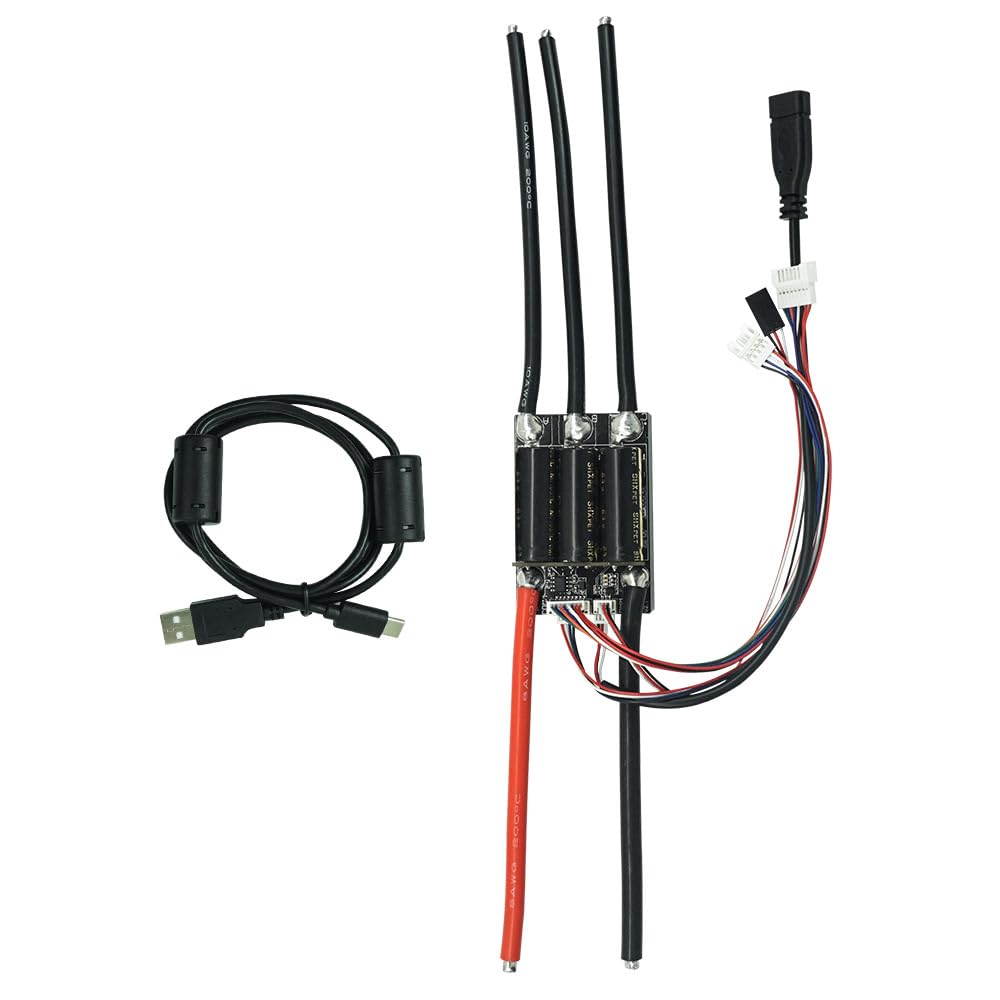
Image: FLIPSKY MINI FSESC6.8 with key dimensions highlighted. The unit measures 64mm in length, 43.5mm in width, and 34.7mm in height (including the heatsink).
Specifiche dettagliate:
| Specificazione | Valore |
|---|---|
| Firmware | 5.2 (supporta l'aggiornamento) |
| Corrente continua | 100A |
| Corrente istantanea | 150A |
| Voltage Gamma | 14V-60V (4-13S, safe for 4S-12S) |
| Uscita BEC | 5V @ 1.5A |
| ERPM | 150000 |
| Supported Hall Sensors | No (sensorless control only) |
| Modalità supportate | BLDC, FOC (sinusoidale) |
| Porte di interfaccia di controllo | USB, CAN, UART, IIC |
| Supporto del set di input | PPM, ADC, NRF, UART |
| Calibro del filo del motore | Cavo AWG 10 |
| Calibro del cavo di alimentazione | Cavo AWG 8 |
| Dimensioni (LxWxH) | 64 x 43.5 x 34.7mm (including heatsink) |
| Materiale | Aluminum (heatsink) |
Product Demonstration and Loading Test:
Video: Questo video fornisce una panoramicaview of the FLIPSKY MINI FSESC6.8 60V 100A ESC, highlighting its compact design, key specifications, and a 50V/100A loading test demonstrating its performance and real-time data monitoring via VESC Tool.
4. Cosa c'è nella scatola
- FLIPSKY MINI FSESC6.8 60V 100A Electronic Speed Controller with heatsink
5. Configurazione e installazione
This section guides you through the physical wiring and initial software configuration of your FLIPSKY MINI FSESC6.8. For a visual guide, please refer to the embedded video.
Collegamenti elettrici:

Image: Detailed diagram of the FLIPSKY MINI FSESC6.8 showing all communication and power ports, including COMM, PPM, USB, CAN, and Battery connections.
- Collegare i fili di fase del motore: Connect the three motor phase wires (A, B, C) from your brushless motor to the corresponding terminals on the ESC.
- Collegare la batteria: Connect the positive (B+) and negative (B-) terminals of your battery to the respective power inputs on the ESC. Ensure correct polarity.
- Connect Communication Ports:
- CAN-BUS (for multiple ESCs): If using two ESCs for a 2WD setup, connect their CAN serial ports via a CAN-BUS wire.
- PPM/UART/ADC/NRF: Connect your receiver or control input device (e.g., remote, throttle) to the appropriate port (PPM, UART, ADC, or NRF) on the ESC.
- USB: For initial configuration and real-time data monitoring, connect the ESC to a computer via a USB cable.
- Fili del sensore Hall: Note that this ESC model supports sensorless control only, so there is no Hall serial port for external Hall sensors.
VESC Tool Configuration:
The VESC Tool software is essential for configuring the ESC parameters to match your motor and battery setup. Ensure you have the latest VESC Tool installed.
- Connect to VESC Tool: Connect the ESC to your computer via USB. Open VESC Tool and click 'AutoConnect'.
- Motor Setup Wizard: Navigate to 'Setup Motors FOC' wizard. Follow the prompts to:
- Select the correct motor type (e.g., Medium Outrunner).
- Input your battery cell series (e.g., 12S) and capacity.
- Perform 'Run Detection' to automatically detect motor parameters.
- Check and adjust motor direction (Forward/Reverse) if needed.
- Input Setup Wizard: Navigate to 'Setup Input' wizard. Follow the prompts to:
- Select your input type (e.g., 'ADC input, such as conventional ebike throttles' for throttle control).
- Perform throttle mapping by twisting the throttle to full and pressing the brake to max. Click 'Apply' and then 'Next'.
- Select the control type, for example, 'Current Reverse ADC2 Brake Button' for combined throttle and brake control.
- Click 'Write Configuration To Vesc' and then 'Finish'.
- Verifica operazione: After configuration, carefully check the motor running status by gently applying throttle.
E-Skateboard Assembly and VESC Tool Setup:
Video: This video demonstrates the complete process of building a 2WD electric skateboard using two FLIPSKY MINI FSESC6.8 controllers, including detailed wiring and VESC Tool parameter setup for both ESCs.
6. Modalità operative
The FLIPSKY MINI FSESC6.8 supports various control modes to suit different application requirements:
- Controllo attuale: Direct control over the motor current.
- Controllo del ciclo di lavoro: Direct control over the motor's duty cycle.
- Controllo della velocità: Regulates motor speed (RPM).
- Controllo della posizione: For precise positioning applications (requires external IMU module for balancing car functionality).
These modes can be configured and fine-tuned using the VESC Tool software.
7. Manutenzione
To ensure optimal performance and longevity of your FLIPSKY MINI FSESC6.8, regular maintenance is recommended:
- Mantenere pulito: Regularly inspect and clean the ESC to remove any dust, dirt, or debris that could impede cooling or cause short circuits.
- Controllare le connessioni: Periodically verify that all wire connections are secure and free from corrosion or damage.
- Monitorare la temperatura: During operation, especially under heavy loads, monitor the ESC temperature. Excessive heat can reduce performance and lifespan. Ensure adequate airflow around the heatsink.
- Aggiornamenti del firmware: Controlla il FLIPSKY ufficiale website or VESC Project for the latest firmware updates. While updates can offer improvements, always follow official instructions carefully and back up your settings before updating.
- Magazzinaggio: When not in use for extended periods, store the ESC in a dry, cool place, disconnected from the battery.
8. Risoluzione Dei Problemi
If you encounter issues with your FLIPSKY MINI FSESC6.8, consider the following troubleshooting steps:
- Nessun potere: Controllare i collegamenti della batteria, il volume della batteriatage, and ensure the ESC is receiving power.
- Il motore non gira: Verify motor phase wire connections. Re-run the motor detection wizard in VESC Tool. Check for any error codes in VESC Tool's real-time data or terminal.
- Funzionamento intermittente: Inspect all wiring for loose connections or damage. Check for interference if using wireless control.
- Surriscaldamento: Ensure the ESC has sufficient airflow. Reduce load or adjust motor/battery settings if consistently overheating. Check for short circuits in motor windings.
- Direzione del motore errata: Use the VESC Tool's motor setup wizard to invert the motor direction if necessary.
- Problemi di comunicazione: Ensure USB cable is properly connected. Check UART/CAN connections for multiple ESCs. Verify correct baud rates in VESC Tool.
- Problemi relativi al firmware: If issues arise after a firmware update, try reverting to a previous stable version or re-flashing the current firmware.
For persistent issues, consult the FLIPSKY support resources or community forums.
9. Garanzia e supporto
The FLIPSKY MINI FSESC6.8 comes with a 2-month warranty from the manufacturer, Flipsky. This warranty covers manufacturing defects under normal use conditions.
For technical support, warranty claims, or further inquiries, please contact Shenzhen Flipsky Technology Company Limited directly or visit their official website. Ensure you have your purchase details and product model number available when seeking support.
Manufacturer: Flipsky