
Informazioni importanti sulla sicurezza
- Assicurarsi che il mixer sia collegato a una fonte di alimentazione con il volume correttotage come specificato.
- Non esporre l'unità alla pioggia o all'umidità per evitare incendi o scosse elettriche.
- Non aprire il casing. Affidare tutti gli interventi di manutenzione a personale qualificato.
- Tenere l'unità lontano da fonti di calore e dalla luce solare diretta.
- Always use the provided power adapter. If a replacement is needed, ensure it matches the original specifications.
Prodotto finitoview
The Kmise 16 Channel Digital Audio Mixer (Model J121) is designed for professional audio mixing, offering a comprehensive set of features for various applications. It includes multiple input/output options, advanced sound processing capabilities, and versatile connectivity.
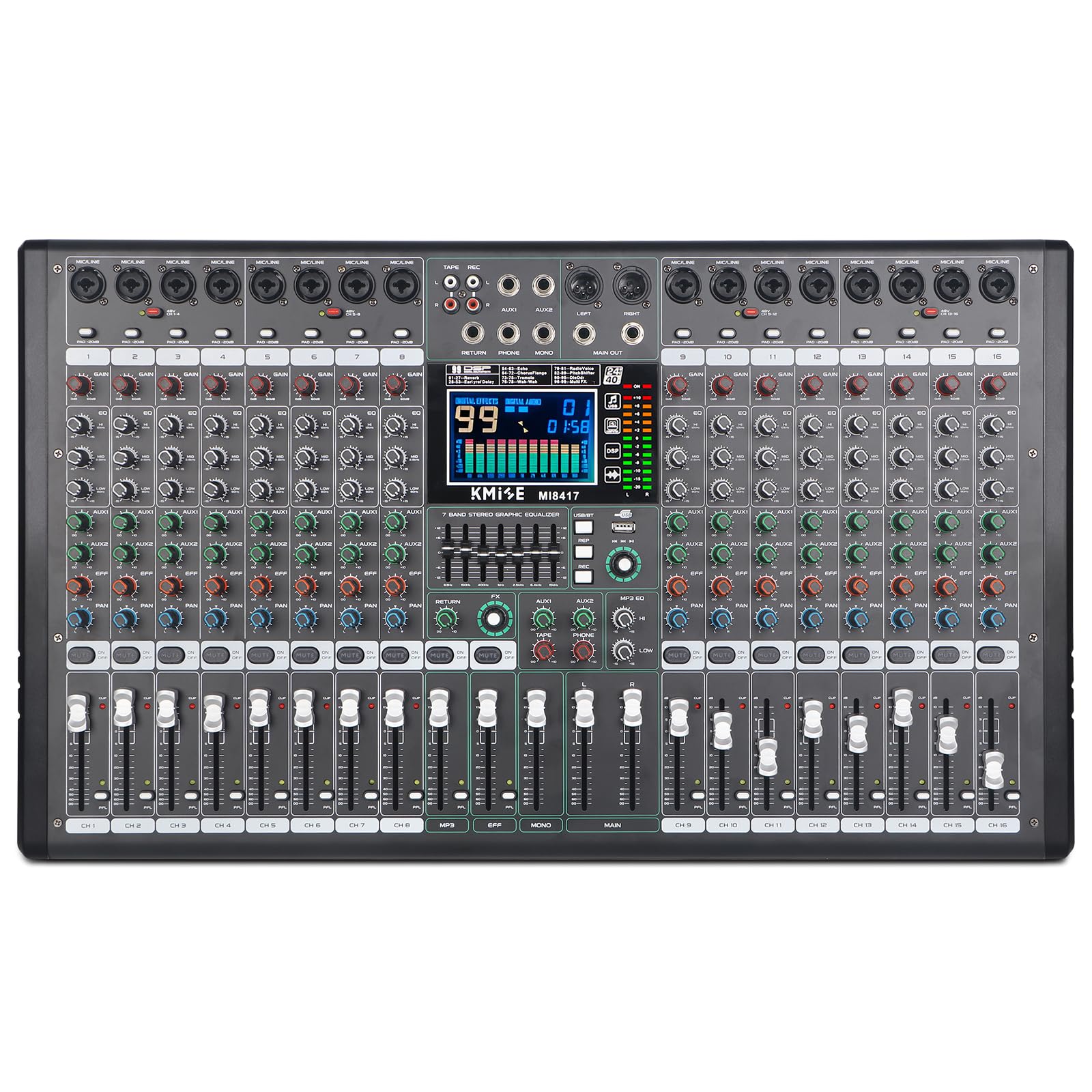
Figura 1: Davanti view of the Kmise 16 Channel Digital Audio Mixer, highlighting the 48V phantom power feature and overall layout. This mixer supports various condenser microphones for high-performance sound reduction.
Caratteristiche principali:
- 16 canali: Multiple inputs for microphones and line-level instruments.
- Alimentazione Phantom 48V: Per microfoni a condensatore.
- Equalizzatore a 7 bande: On each channel for precise frequency adjustments.
- 24-bit DSP Multi-Effects Processor: With 99 built-in effects.
- Connettività Bluetooth: Per lo streaming audio wireless.
- USB/SD/FM/WMA Output: Versatile media playback and recording options.
- I/O completo: XLR, 1/4'' inputs/outputs, RCA, Send/Return, Headphone jack.
- Display a LED: For monitoring levels and settings.
Guida all'installazione
- Disimballaggio: Carefully remove the mixer from its packaging. Inspect for any signs of damage. Ensure all accessories, including the power cable, are present.
- Collegamento elettrico: Collegare il cavo di alimentazione in dotazione all'ingresso di alimentazione del mixer e quindi a una presa elettrica idonea. Assicurarsi che l'interruttore di alimentazione del mixer sia in posizione OFF prima di effettuare il collegamento.
- Accensione iniziale: Turn on the mixer using the power switch. The LED display should illuminate.
- Collegamento dei microfoni:
- For dynamic microphones, connect via XLR or 1/4" input.
- For condenser microphones, connect via XLR and activate the ALIMENTAZIONE PHANTOM +48V button for the respective channel. Ensure the microphone is connected before activating phantom power.
- Collegamento di dispositivi a livello di linea: Connect instruments, media players, or other line-level devices to the 1/4" or RCA inputs as appropriate.
- Connessioni di uscita: Connect your main speakers or recording devices to the XLR or 1/4" (L/R) main outputs. Use the headphone jack for monitoring.

Figura 2: Connectivity diagram illustrating how to connect microphones, instruments (guitar, drums, keyboard), and external devices like computers, phones, and audio interfaces to the mixer.
Istruzioni per l'uso
Controlli del canale:
Each channel on the mixer features dedicated controls for precise audio adjustment:
- GUADAGNO: Regola la sensibilità di ingresso per il microfono o lo strumento collegato.
- EQ (alto, medio, basso): Equalizzatore a 3 bande per modellare il tono di ciascun canale.
- AUSILIARI: Sends signal to external effects processors or monitor mixes.
- Effetti: Sends signal to the internal DSP effects processor.
- PADELLA: Regola la posizione stereo del canale.
- FADER DEL VOLUME: Controlla il livello di uscita del canale verso il mix principale.
- LED DI PICCO: Indica quando il segnale di ingresso è troppo alto, causando potenzialmente distorsione. Regolare il GAIN per evitare il clipping.
Equalizzatore grafico a 7 bande:

Figura 3: Dettagliato view of the 7-band stereo graphic equalizer, allowing precise frequency shaping from 63Hz to 15kHz.
The mixer features a 7-band stereo graphic equalizer. Use the faders to boost or cut specific frequency bands (63Hz, 150Hz, 400Hz, 1KHz, 2.5KHz, 6.4KHz, 15KHz) to fine-tune the overall sound of your mix.
Connessione Bluetooth (BT):

Figura 4: The mixer's built-in wireless Bluetooth playback feature, enabling easy connection to mobile phones and other devices for audio streaming.
- Press the "MODE" button on the media player section until "BT" appears on the LED display.
- Cerca i dispositivi Bluetooth disponibili sul tuo smartphone o dispositivo abilitato Bluetooth.
- Select "Kmise Mixer" (or similar name) from the list to pair.
- Once connected, you can stream audio wirelessly from your device to the mixer. Adjust the media player volume and main mix volume as needed.
USB/SD/FM/WMA Playback and Recording:

Figura 5: The mixer's USB/Computer support, allowing connection of external USB drives, computers, or flash memory devices for mixing and recording.
- Riproduzione USB/SD: Insert a USB flash drive or SD card into the respective slot. Use the media player controls (Play/Pause, Next, Previous, Mode) to navigate and play audio file(MP3, WMA).
- Registrazione USB: Connect the mixer to a computer via a USB cable. The mixer will be recognized as an audio interface. Use your preferred Digital Audio Workstation (DAW) software to record the main mix output.
- FM Radio: Select FM mode on the media player. The mixer can tune into FM radio stations.
Processore di effetti DSP:

Figura 6: A visual representation of the 99 DSP effects, categorized into Reverb, Delay, Echo, Chorus Flange, Tremolo, Wah-Wah, Radio Voice, Pitch Shifter, DisOdr, and Multi FX.
The mixer includes a 24-bit DSP multi-effects processor with 99 preset effects. To apply an effect:
- Use the "FX" knob on each channel to send the desired amount of signal to the effects processor.
- Use the "PROGRAM" knob on the main effects section to select an effect number (01-99) from the LED display.
- Adjust the "FX RETURN" fader to control the overall level of the effect in the main mix.
The effects include various reverbs, delays, echoes, chorus, flanger, tremolo, wah-wah, radio voice, pitch shifter, and multi-effects combinations.
Manutenzione
- Pulizia: Utilizzare un panno morbido e asciutto per pulire la superficie del mixer. Evitare detergenti abrasivi o solventi.
- Magazzinaggio: When not in use, store the mixer in a cool, dry place, away from dust and extreme temperatures.
- Gestione dei cavi: Assicurarsi che tutti i cavi siano ordinatamente disposti e non sottoposti a tensione per evitare danni ai connettori e alle porte.
- Ventilazione: Do not block the ventilation openings on the mixer to prevent overheating.
Risoluzione dei problemi
| Problema | Possibile causa | Soluzione |
|---|---|---|
| Nessun potere | Power cable not connected, faulty power cable, power outlet issue. |
|
| Nessuna uscita audio | Main volume fader down, channel fader down, incorrect input/output connections, mute engaged. |
|
| Suono distorto | Input gain too high, output level too high, faulty cable. |
|
| Bluetooth non si connette | Mixer not in BT mode, device too far, previously paired device interfering. |
|
| 48V Phantom Power Not Working | Phantom power not activated for the channel, faulty microphone. |
|
Specifiche
| Marca | Kmise |
| Numero di modello | J121-xxxyyyywz |
| Numero di canali | 16 |
| Tecnologia di connettività | USB, Bluetooth |
| Fonte di alimentazione | Elettrico con cavo |
| Peso dell'articolo | 17.71 libbre (8.05 chilogrammi) |
| Dimensioni del pacco | 28 x 17.8 x 5.8 pollici |
| Effetti DSP | 99 built-in effects (Reverb, Delay, Echo, Chorus, etc.) |
| EQ | 7-band graphic EQ on each channel, 3-band EQ on all channels |
| Potenza fantasma | +48V |

Figura 7: Dimensions of the mixer: approximately 25.9 inches wide by 15.1 inches deep. Note: Minor deviations may occur due to manual measurement.
Garanzia e supporto
Kmise products are designed for reliability and performance. For warranty information, please refer to the warranty card included with your product or visit the official Kmise websito.
For technical support, troubleshooting assistance, or inquiries about replacement parts, please contact Kmise customer service through their official channels. Please have your model number (J121-xxxyyyywz) and purchase information ready when contacting support.
Risorse online: For additional support and product updates, visit the Kmise Store on Amazon.