
Devoko 0457
Devoko L-Shaped Gaming Desk Instruction Manual
Modello: 0457
1. Introduzione
Thank you for choosing the Devoko L-Shaped Gaming Desk. This manual provides essential information for the safe assembly, proper use, and maintenance of your new desk. Please read these instructions carefully before beginning assembly and retain them for future reference.

Image 1.1: The Devoko L-Shaped Gaming Desk in a typical gaming setup.
2. Informazioni sulla sicurezza
Caution: Assembly required.
Ensure all tools and components are present before starting. Follow the instructions carefully to avoid injury or damage to the product. Keep small parts away from children. Do not stand or sit on the desk during assembly. Always place the desk on a flat, stable surface.
3. Contenuto della confezione
The package includes all necessary accessories and hardware for assembly. Please verify that all components are present and undamaged before proceeding. If any parts are missing or damaged, please contact customer support.
- Pannelli per scrivania (sezioni a L)
- Leg frames (Z-shaped design)
- Connecting hardware (screws, bolts, washers)
- Strumenti di montaggio (ad esempio, chiave a brugola)
- Pedane regolabili
4. Istruzioni per l'installazione e il montaggio
Assembly typically takes one person approximately 30 minutes. Follow these steps for a smooth installation:
- Disimballare e identificare le parti: Carefully remove all components from the packaging. Lay them out on a clean, soft surface to prevent scratches. Refer to the included parts list (if available) to identify each piece.
- Montare i telai delle gambe: Attach the Z-shaped leg frames to the designated support beams using the provided screws and tools. Ensure all connections are secure but do not overtighten initially.
- Fissare i pannelli della scrivania: Position the L-shaped desk panels onto the assembled leg frames. Align the pre-drilled holes and secure the panels to the frames using the appropriate hardware.
- Collegare le sezioni a forma di L: Join the two L-shaped desk sections together at the corner using the provided connectors and screws. Ensure a flush and stable connection.
- Stringere tutti i dispositivi di fissaggio: Once all parts are loosely assembled, carefully place the desk upright. Then, systematically tighten all screws and bolts to ensure maximum stability. Avoid overtightening to prevent damage.
- Installare i cuscinetti per i piedi: Screw the adjustable foot pads into the bottom of each leg. These pads help level the desk on uneven floors and protect your flooring.
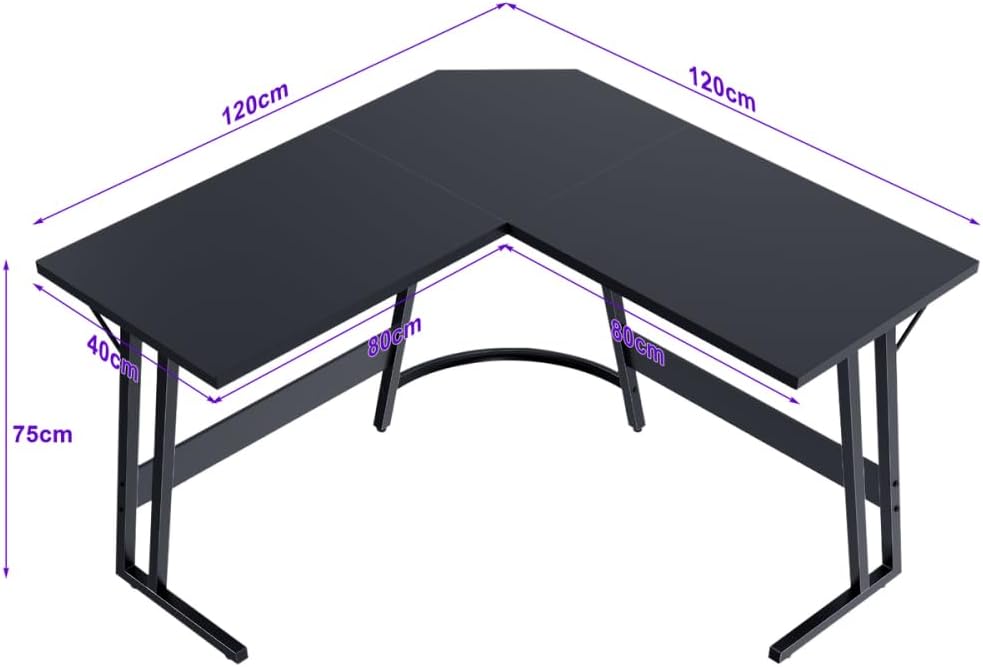
Immagine 4.1: Dimensioni della scrivania per pianificare lo spazio.
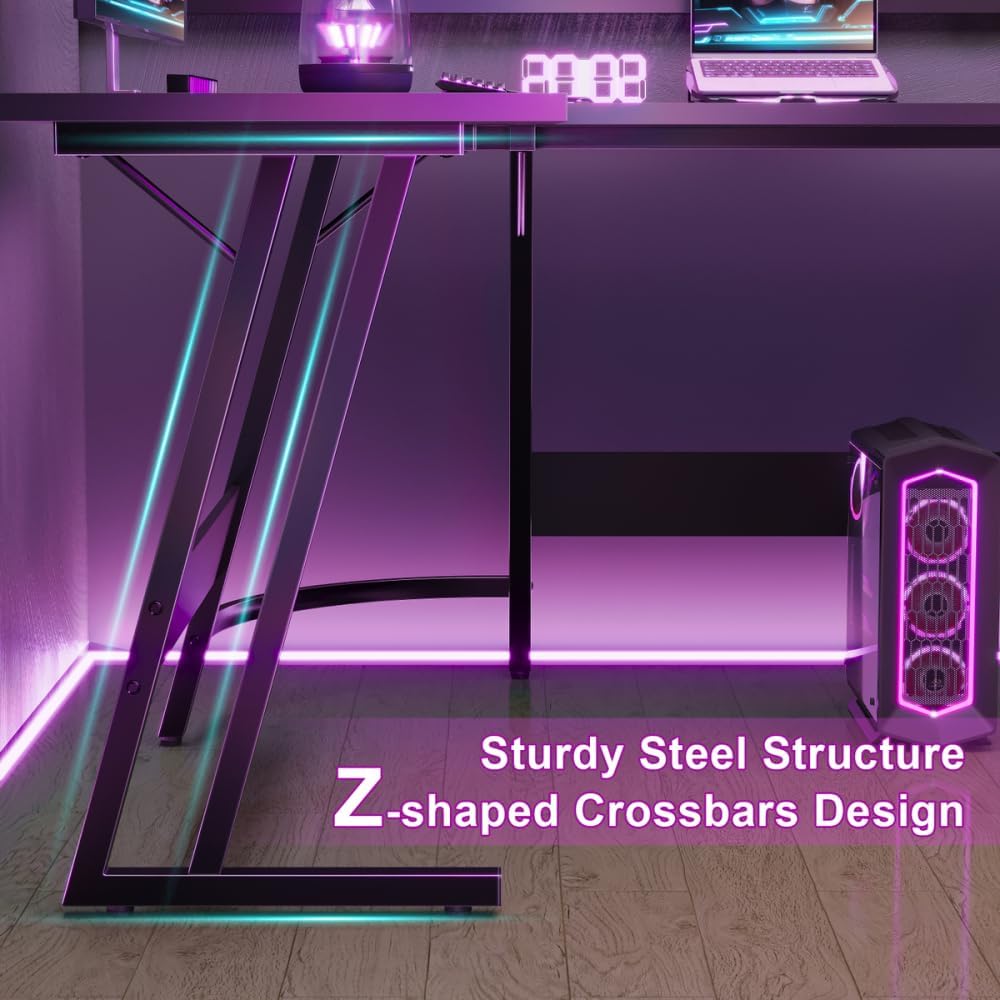
Image 4.2: Detail of the Z-shaped leg design for enhanced stability.
5. Istruzioni per l'uso
The Devoko L-Shaped Gaming Desk is designed to provide a spacious and ergonomic workspace for various activities, including gaming, studying, and office work.
- Spazioso spazio di lavoro: The 120 x 120 x 75 cm dimensions offer ample surface area to accommodate multiple monitors, a keyboard, mouse, PC tower, laptop, and other peripherals.
- Design ergonomico: The L-shape provides a comfortable setup, allowing for easy access to all your equipment and promoting better posture with generous legroom underneath.
- Utilizzo versatile: Utilize one side for your main gaming or work setup and the other for secondary tasks, storage, or additional display space.

Immagine 5.1: La scrivania fornisce ample legroom for comfortable use.
6. Manutenzione
To ensure the longevity and appearance of your Devoko L-Shaped Gaming Desk, follow these simple maintenance guidelines:
- Pulizia: Pulisci la superficie della scrivania con un panno morbido eamp cloth. Avoid abrasive cleaners or harsh chemicals that could damage the matt texture or finish.
- Fuoriuscite: Pulire immediatamente eventuali fuoriuscite per evitare macchie o danni al piano del tavolo in legno ingegnerizzato.
- Controllo hardware: Controllare periodicamente tutte le viti e i bulloni per assicurarsi che siano ben serrati. Serrarli nuovamente se necessario per mantenere la stabilità.
- Evitare il peso eccessivo: While sturdy, avoid placing excessively heavy items on the desk that could exceed its weight capacity.

Image 6.1: Detail of the matt texture and adjustable foot pads.
7. Risoluzione Dei Problemi
Se riscontri problemi con la tua scrivania, fai riferimento alle seguenti soluzioni comuni:
- La scrivania ondeggia:
- Assicurarsi che tutte le viti e i bulloni di montaggio siano ben serrati.
- Regolare i piedini nella parte inferiore delle gambe per livellare la scrivania su pavimenti irregolari.
- Verify that the desk is placed on a flat and stable surface.
- Parti mancanti/danneggiate: If you find any parts missing or damaged upon unboxing, do not proceed with assembly. Contact Devoko customer support immediately for assistance.
- Difficoltà di montaggio: Review the assembly instructions carefully. Ensure you are using the correct hardware for each step. If issues persist, consider seeking assistance from another person.
8. Specifiche
| Caratteristica | Dettaglio |
|---|---|
| Marca | Devoko |
| Numero di modello | 0457 |
| Colore | Nero |
| Dimensioni del prodotto (L x P x A) | Dimensioni: 120 x 120 x 75 cm |
| Materiale | Metal (Base), Engineered Wood (Top) |
| Peso dell'articolo | 19 chilogrammi |
| Forma | Forma a L. |
| Progettazione della scrivania | Scrivania per computer |
| Stile | Moderno |
| Tipo di finitura | Frosted |
| Caratteristica speciale | L-shaped, Z-shaped reinforced legs, Scratch-resistant tabletop |
9. Garanzia e supporto
Information regarding specific warranty terms and customer support contact details for the Devoko L-Shaped Gaming Desk Model 0457 is not provided in this manual. Please refer to the product packaging or the retailer's websito per informazioni sulla garanzia e contatti del servizio clienti.
Ask a question about this manual
Ask about setup, troubleshooting, compatibility, parts, safety, or missing instructions. Manuals+ will review the question and use this page’s manual context to help answer it.