
AFK BT528
Manuale utente dell'altoparlante wireless Bluetooth portatile AFK
Modello: BT528
1. Introduzione
Grazie per l'acquistoasing the AFK Portable Bluetooth Wireless Speaker. This manual provides detailed instructions on how to set up, operate, and maintain your speaker to ensure optimal performance and longevity. Please read this manual thoroughly before using the product.

Image: The AFK Portable Bluetooth Wireless Speaker, showcasing its sleek black cylindrical design and top-mounted control panel.
2. Prodotto finitoview
2.1 Contenuto della confezione
Si prega di controllare il contenuto della confezione dopo averla disimballata:
- AFK Portable Bluetooth Wireless Speaker (Model: BT528) with built-in microphone
- Cavo di ricarica USB-C
- Manuale dell'utente (questo documento)
2.2 Caratteristiche principali
- Audio potente: Dual speaker drivers and a powerful amplifier module deliver up to 15W room-filling sound with punchy bass, strong midranges, and crisp highs.
- Connettività Bluetooth 5.3: Offers fast and stable wireless connections up to 100 feet (30 meters).
- Illuminazione dinamica: Features 5 colorful light colors and 6 light modes, including mixed color flashes that sync with the beat, creating an immersive audio-visual experience.
- Tempo di riproduzione esteso: Enjoy up to 18 hours of non-stop playback at 50% volume, or up to 4 hours at 100% volume. Lights can be turned off to conserve battery.
- Molteplici opzioni di riproduzione: Supports wireless playback via Bluetooth, TF card, or USB.
- Microfono incorporato: Allows for clear hands-free calls within the Bluetooth range.
- Design portatile: Lightweight and easy to carry for indoor and outdoor use.
- Ricarica USB-C: Convenient and modern USB-C port for charging.
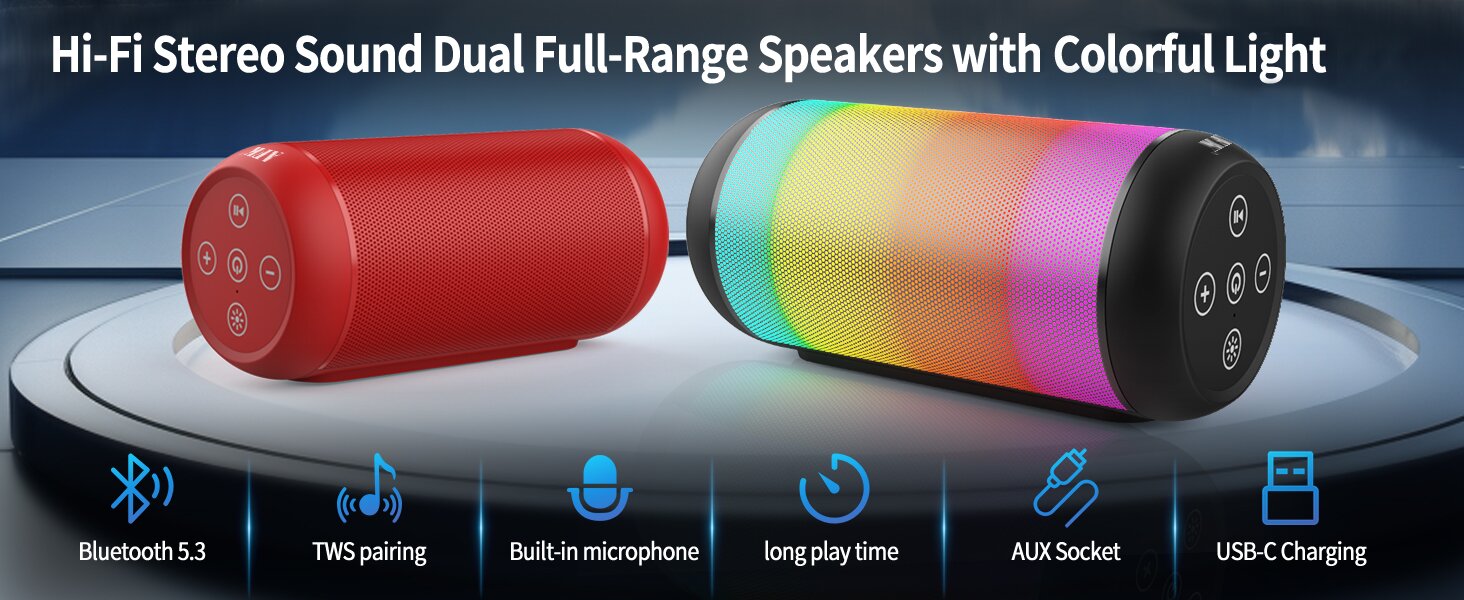
Image: An illustration highlighting key features such as Bluetooth 5.3, TWS pairing, built-in microphone, long playtime, AUX socket, and USB-C charging.

Immagine: uno spaccato view illustrating the dual speaker drivers responsible for deep bass stereo sound.

Image: The speaker positioned on a table, demonstrating its 360-degree stereo surround sound capability.
3. Impostazione
3.1 Ricarica dell'altoparlante
Prima del primo utilizzo, caricare completamente l'altoparlante. Collegare il cavo di ricarica USB-C in dotazione alla porta USB-C dell'altoparlante e l'altra estremità a un adattatore di alimentazione USB compatibile (non incluso) o alla porta USB di un computer. La spia di carica mostrerà lo stato di carica e si spegnerà a carica completa.
3.2 Accensione/Spegnimento
- Per accendere: tenere premuto il pulsante di accensione (⏻) for a few seconds until you hear an audible prompt and the indicator lights turn on.
- Per spegnere: tenere premuto il pulsante di accensione (⏻) again for a few seconds until you hear an audible prompt and the indicator lights turn off.
4. Istruzioni per l'uso
4.1 Associazione Bluetooth
Per connettere l'altoparlante a un dispositivo abilitato Bluetooth:
- Ensure the speaker is powered on and in Bluetooth pairing mode (indicated by a flashing blue light, or similar).
- Sul tuo dispositivo (smartphone, tablet, computer), attiva il Bluetooth e cerca i dispositivi disponibili.
- Select "AFK Speaker" (or similar name) from the list of found devices.
- Once paired, the speaker will indicate a successful connection (e.g., a solid blue light or an audible prompt).
The speaker will automatically attempt to reconnect to the last paired device when powered on, if the device is within range and Bluetooth is enabled.

Image: The speaker in an outdoor setting, demonstrating its stable Bluetooth connection range of up to 100 feet.
4.2 Riproduzione di musica
- Modalità Bluetooth: Once paired, play music from your connected device. Use the speaker's control buttons or your device to control playback (play/pause, next/previous track, volume).
- Modalità scheda TF/USB: Inserire una scheda TF o un'unità USB contenente audio files into the respective port on the speaker. The speaker will automatically switch to the corresponding mode and begin playback. Use the speaker's control buttons for navigation.
4.3 Controlling Lights
The speaker features dynamic lighting modes. Press the Light button (💡) to cycle through the available light modes:
- Tarry Sky Light
- Respirazione
- Fluente
- Salto veloce
- Rhythm Jump
- Luce spenta

Immagine: Un overview of the six dynamic light modes available on the speaker, including options to turn the lights off.
4.4 Gestione delle chiamate
With the built-in microphone, you can manage calls when connected via Bluetooth:
- Rispondi/Termina chiamata: Premere il pulsante Riproduci / Pausa (⏸) una volta.
- Rifiuta chiamata: Premere e tenere premuto il pulsante Riproduci/Pausa (⏸) per 2 secondi.

Image: The speaker being used for a hands-free call, demonstrating the functionality of its built-in microphone.
5. Manutenzione
5.1 Pulizia
To clean your speaker, use a soft, dry, lint-free cloth. Do not use abrasive cleaners, alcohol, or chemical solvents, as these may damage the surface or internal components. Avoid getting moisture into any openings.
5.2 Conservazione
Store the speaker in a cool, dry place away from direct sunlight, extreme temperatures, and humidity. If storing for an extended period, charge the battery periodically (e.g., every 3 months) to maintain battery health.
6. Risoluzione Dei Problemi
If you encounter issues with your AFK Portable Bluetooth Wireless Speaker, please refer to the following common problems and solutions:
| Problema | Possibile causa | Soluzione |
|---|---|---|
| L'altoparlante non si accende. | Batteria scarica; il pulsante di accensione non è premuto correttamente. | Caricare completamente l'altoparlante. Tenere premuto il pulsante di accensione per alcuni secondi. |
| Nessun suono. | Volume troppo basso; Dispositivo non connesso; Modalità di input non corretta. | Increase speaker and device volume. Ensure Bluetooth is connected or TF/USB is inserted correctly. |
| Impossibile effettuare l'associazione tramite Bluetooth. | Altoparlante non in modalità di associazione; Bluetooth del dispositivo disattivato; Troppo lontano dall'altoparlante; Interferenza. | Ensure speaker is in pairing mode. Turn device Bluetooth off/on. Move device closer to speaker. Avoid strong electromagnetic interference. |
| Durata breve della batteria. | High volume usage; Lights constantly on; Battery degradation. | Reduce volume. Turn off lights when not needed. Battery life naturally decreases over time. |
7. Specifiche
| Caratteristica | Dettaglio |
|---|---|
| Nome del modello | BT528-BLK-US |
| Tipo di altoparlante | Doppio altoparlante |
| Tecnologia di connettività | Bluetooth 5.3 |
| Tecnologia di comunicazione wireless | Bluetooth |
| Portata massima | 30 metri (100 piedi) |
| Potenza massima in uscita dell'altoparlante | 11 Watts (RMS) / 15 Watts (Peak) |
| Risposta in frequenza | 20 KHz (Nota: questo è probabilmente il limite superiore, l'intervallo tipico è 20 Hz-20 kHz) |
| Modalità di uscita audio | Stereo |
| Configurazione del canale audio surround | 2.0 |
| Caratteristica speciale | Built-in Microphone, Dynamic LED Lights |
| Usi consigliati | Indoor/Outdoor, Sport, Outdoor Events, Parties, Camping, escursionismo |
| Dispositivi compatibili | Desktop, Smartphone, Tablet, Television |
| Fonte di alimentazione | Alimentato a batteria (1 batteria agli ioni di litio inclusa) |
| Metodo di controllo | Pulsanti touch |
| Colore | Nero |
| Dimensioni del prodotto | 6.6 cm P x 15.5 cm L x 6.6 cm A (2.6" P x 6.1" L x 2.6" A) |
| Peso dell'articolo | 1.26 libbre (0.57 chilogrammi) |
| È impermeabile | FALSO |
8. Garanzia e supporto
8.1 Garanzia limitata
This AFK Portable Bluetooth Wireless Speaker comes with a limited warranty. Please refer to the warranty card included in your package or contact AFK customer support for specific terms and conditions. The warranty typically covers manufacturing defects and malfunctions under normal use.
8.2 Assistenza clienti
For further assistance, technical support, or warranty claims, please contact AFK customer service. Contact information can usually be found on the product packaging, the official AFK websito o tramite i canali di supporto del tuo rivenditore.
Ask a question about this manual
Ask about setup, troubleshooting, compatibility, parts, safety, or missing instructions. Manuals+ will review the question and use this page’s manual context to help answer it.