
Benvenuto
Thank you for choosing the BYTECH BICONIC True Wireless Earbuds. This manual provides essential information on how to set up, operate, maintain, and troubleshoot your new earbuds. Please read this manual thoroughly before use to ensure optimal performance and longevity of your device.
Importanti istruzioni di sicurezza
- Non esporre gli auricolari o la custodia di ricarica a temperature estreme, umidità o liquidi.
- Evitare di far cadere, urtare o smontare il dispositivo.
- Do not use abrasive cleaners or harsh chemicals to clean the earbuds or case.
- Ascoltare a volume moderato per prevenire danni all'udito. L'esposizione prolungata a suoni forti può causare una perdita irreversibile dell'udito.
- Tenere fuori dalla portata dei bambini e degli animali domestici.
- Smaltire il dispositivo in modo responsabile, nel rispetto delle normative locali. Non smaltire con i rifiuti domestici.
Cosa è incluso
Si prega di controllare il contenuto della confezione per assicurarsi che siano presenti tutti gli articoli:
- BYTECH BICONIC True Wireless Earbuds (Left and Right)
- Custodia di ricarica
- Cavo di ricarica
- Manuale d'uso
Prodotto finitoview
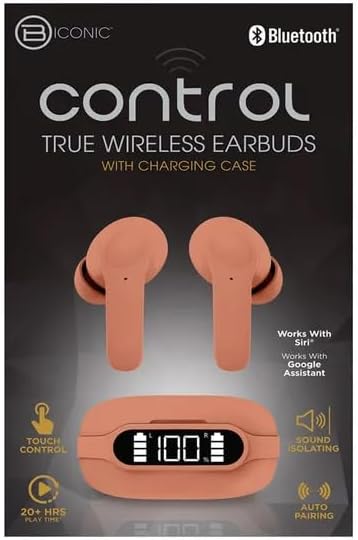
Familiarize yourself with the components of your BYTECH BICONIC True Wireless Earbuds.

Iniziare
Ricarica degli auricolari e della custodia
The BYTECH BICONIC earbuds come with a rechargeable battery in both the earbuds and the charging case. Ensure both are fully charged before first use.
- Inserire gli auricolari nella custodia di ricarica, assicurandosi che siano correttamente inseriti nei rispettivi alloggiamenti (L per sinistro, R per destro).
- Connect the provided charging cable to the charging port on the case and the other end to a USB power source (e.g., computer USB port, wall adapter).
- Il display digitale sulla custodia di ricarica mostrerà il livello della batteria. Lasciare trascorrere il tempo necessario per una ricarica completa.
- Una volta caricata completamente, scollegare il cavo di ricarica.
Accoppiamento Bluetooth
Per associare gli auricolari al tuo dispositivo abilitato Bluetooth, segui questi passaggi:
- Assicurarsi che gli auricolari siano carichi e all'interno della custodia di ricarica.
- Aprire la custodia di ricarica. Gli auricolari entreranno automaticamente in modalità di associazione e una spia luminosa sugli auricolari lampeggerà.
- Sul tuo dispositivo (smartphone, tablet, ecc.), vai alle impostazioni Bluetooth e attiva il Bluetooth.
- Cercare available devices. You should see "BYTECH BICONIC" or a similar name appear in the list.
- Select "BYTECH BICONIC" to connect. Once connected, a voice prompt will confirm the successful pairing, and the indicator lights on the earbuds will stop flashing.
- Una volta estratti dalla custodia, gli auricolari si riconnetteranno automaticamente all'ultimo dispositivo associato, a condizione che il Bluetooth sia abilitato sul dispositivo.
Istruzioni per l'uso
Controlli touch
The BYTECH BICONIC earbuds feature intuitive touch controls for easy management of your audio and calls.
| Azione | Funzione |
|---|---|
| Singolo tocco (auricolare sinistro/destro) | Riproduci/Metti in pausa la musica, Rispondi/Termina chiamata |
| Doppio tocco (auricolare destro) | Traccia successiva |
| Doppio tocco (auricolare sinistro) | Traccia precedente |
| Triplo tocco (auricolare sinistro/destro) | Attiva l'Assistente Vocale (Siri/Assistente Google) |
| Pressione prolungata (auricolare sinistro/destro) | Rifiuta chiamata |
Accensione e spegnimento
- Accensione: Gli auricolari si accendono automaticamente quando vengono rimossi dalla custodia di ricarica.
- Spegni: Riponi gli auricolari nella custodia di ricarica e chiudi il coperchio. Si spegneranno automaticamente e inizieranno a caricarsi.
Manutenzione e cura
Proper care will extend the life of your BYTECH BICONIC True Wireless Earbuds.
- Pulizia: Use a soft, dry, lint-free cloth to clean the earbuds and charging case. Do not use liquids or aerosol cleaners.
- Magazzinaggio: Quando non li usi, riponi sempre nella custodia di ricarica per proteggerli e mantenerli carichi.
- Evitare condizioni estreme: Do not expose the device to extreme heat, cold, or direct sunlight.
- Resistenza all'acqua: These earbuds are not waterproof. Avoid contact with water or excessive moisture.
Risoluzione dei problemi
Se riscontri problemi con gli auricolari, fai riferimento alle seguenti soluzioni comuni:
| Problema | Soluzione |
|---|---|
| Gli auricolari non si accoppiano | Assicurati che gli auricolari siano carichi. Disattiva e riattiva il Bluetooth sul tuo dispositivo. Elimina il dispositivo dalle impostazioni Bluetooth e riesegui l'associazione. |
| Un solo auricolare funzionante | Riponi entrambi gli auricolari nella custodia di ricarica, chiudi il coperchio, attendi qualche secondo, quindi estraili nuovamente. Assicurati che entrambi gli auricolari siano carichi. |
| Nessun suono | Controlla i livelli del volume sia sul dispositivo che sugli auricolari. Assicurati che gli auricolari siano collegati correttamente. Prova a riprodurre audio diversi. |
| La custodia di ricarica non si ricarica | Assicurati che il cavo di ricarica sia collegato saldamente sia alla custodia che alla fonte di alimentazione. Prova una porta USB diversa o un adattatore di alimentazione diverso. |
Specifiche tecniche
Detailed specifications for your BYTECH BICONIC True Wireless Earbuds:
| Caratteristica | Dettaglio |
|---|---|
| Numero di modello | BC-AU-BE-144-TN |
| Tecnologia di connettività | Wireless (Bluetooth) |
| Fattore di forma | Intraurali (intrauricolari) |
| Colore | Caffè |
| Caratteristiche speciali | Rechargeable Battery, Touch Control, Sound Isolating, Auto Pairing |
| Componenti inclusi | Cavo |
| Tempo di gioco stimato | 20+ Hours (with charging case) |
Informazioni sulla garanzia e assistenza clienti
BYTECH products are designed and manufactured to the highest quality standards. For information regarding warranty coverage, please refer to the warranty card included with your purchase or visit the official BYTECH websito.
If you require further assistance or have questions not covered in this manual, please contact BYTECH customer support through their official channels. Please have your model number (BC-AU-BE-144-TN) and purchase details ready when contacting support.