
1. Introduzione
The Zunate 5G Dual-Band Portable WiFi Router is a mobile hotspot device designed to provide high-speed internet access for multiple users on the go. It supports 5G and Wi-Fi 6 standards, offering a reliable and fast connection for up to 16 devices simultaneously. This manual provides essential information for setting up, operating, and maintaining your device.
2. Caratteristiche del prodotto
- Rete ad alta velocità: Supports 5G and Wireless Fidelity 6 (802.11ax) for faster speeds, extended range, and improved performance.
- Compatto e portatile: Designed for easy transport, fitting conveniently into a pocket for internet access anywhere.
- Connettività doppia banda: Operates on both 2.4 GHz and 5.8 GHz bands, supporting 802.11 a/b/g/n/ac/ax protocols for smooth data transfer.
- Shared Connection: Allows up to 16 devices (mobile phones, laptops, tablets, gaming consoles) to connect simultaneously while maintaining a private and secure network.
- Batteria a lunga durata: Equipped with a built-in 4400 mAh high-capacity battery for extended usage without frequent recharging.
- Visualizzazione intuitiva: Features an LCD screen for easy monitoring of network status, battery level, and connected devices.
3. Contenuto della confezione
Si prega di controllare la confezione per verificare la presenza dei seguenti elementi:
- 1 x Zunate 5G Mobile Hotspot
- 1 cavo di ricarica USB
- 1 x Manuale utente
- 1 x pellicola protettiva

Image: The Zunate 5G Mobile Hotspot device shown alongside its USB charging cable and a protective film.
4. Disposizione del dispositivo

Image: A diagram illustrating the Zunate 5G Mobile Hotspot from multiple angles, highlighting key components such as the SIM card insertion port, Type-C port, Force power off button, Power on button, Menu Button, and Display.
- SIM Card Insertion Port: Slot for inserting your Nano SIM card.
- Porta di tipo C: Used for charging the device and USB network sharing.
- Force Power Off Button: For emergency shutdown.
- Pulsante di accensione: Per accendere o spegnere il dispositivo.
- Pulsante Menu: For navigating the device's on-screen menu.
- Display: LCD screen showing device status and information.
5. Guida all'installazione
5.1. Inserimento della scheda SIM
- Locate the SIM card insertion port on the side of the device (refer to Device Layout).
- Carefully insert a Nano SIM card into the slot with the gold contacts facing down and the notched corner aligned correctly.
- Assicurarsi che la scheda SIM sia inserita completamente.
5.2. Carica del dispositivo
- Connect the provided USB charging cable to the Type-C port on the device.
- Connect the other end of the USB cable to a compatible 5V 2A USB power adapter (not included) or a computer's USB port.
- The display will indicate charging status. Fully charge the device before first use.
5.3. Accensione/Spegnimento
- Per accendere: Press and hold the Power On button until the display lights up.
- Per spegnere: Press and hold the Power On button until the power-off option appears on the screen, then confirm. Alternatively, a short press might bring up a menu to power off.
- Force Power Off: In case of unresponsiveness, use a pin to press the Force Power Off button.
6. Istruzioni per l'uso
6.1. Connessione dei dispositivi al Wi-Fi
- Ensure the Zunate 5G Mobile Hotspot is powered on and has an active SIM card with a data plan.
- On your device (phone, laptop, tablet), open the Wi-Fi settings.
- Cercare available Wi-Fi networks. The hotspot's network name (SSID) and password will be displayed on the device's LCD screen.
- Select the hotspot's SSID and enter the password to connect.
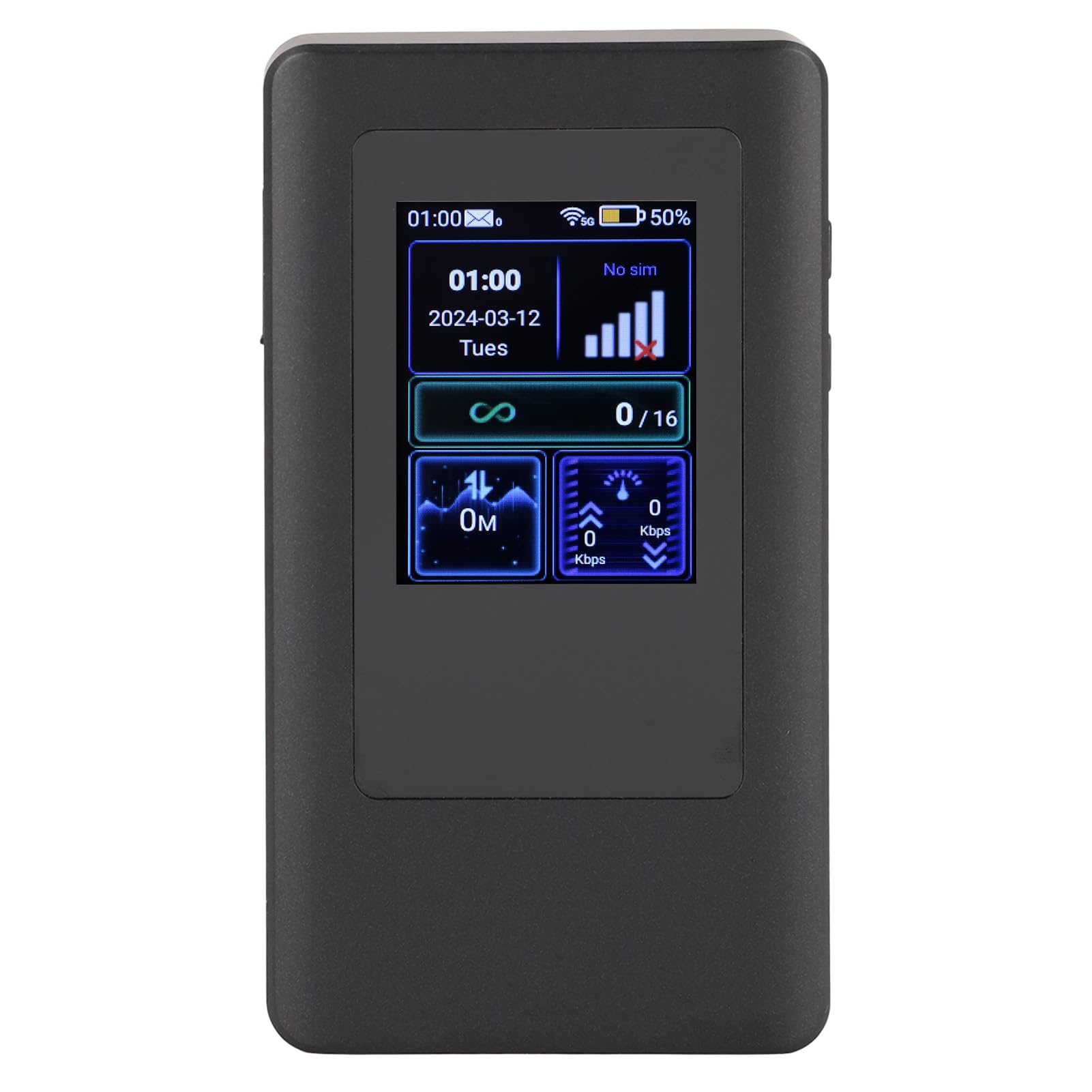
Image: The Zunate 5G Mobile Hotspot's color display showing current time, date, network signal strength, battery percentage, SIM status, and the number of connected users (e.g., 0/16).
6.2. Comprensione del display
The LCD display provides real-time information about your hotspot's status:
- Ora e data: Ora e data attuali.
- Potenza del segnale: Indica la potenza del segnale cellulare 5G/4G.
- Livello della batteria: Mostra la percentuale residua della batteriatage.
- Stato della SIM: Indicates if a SIM card is detected and active.
- Utenti connessi: Displays the number of devices currently connected to the hotspot (e.g., 0/16).
- Utilizzo dei dati: Shows current upload and download speeds.
6.3. USB Network Sharing
You can also share the internet connection via the Type-C USB port:
- Connect the hotspot to a computer using the USB charging cable.
- On the hotspot's display, navigate to the USB sharing option (if available) and enable it.
- Your computer should detect the hotspot as a network adapter and connect to the internet.
7. Manutenzione
- Cura della batteria: Per prolungare la durata della batteria, evitare di esporre il dispositivo a temperature estreme. Caricare il dispositivo regolarmente ed evitare di scaricare completamente la batteria frequentemente.
- Pulizia: Per pulire il dispositivo, utilizzare un panno morbido e asciutto. Non utilizzare detergenti liquidi o materiali abrasivi.
- Magazzinaggio: Quando non si utilizza il dispositivo per lunghi periodi, conservarlo in un luogo fresco e asciutto.
- Aggiornamenti software: Controllare il produttore website or device settings for any available software updates to ensure optimal performance and security.
8. Risoluzione Dei Problemi
- Nessun segnale/Segnale scarso: Ensure the SIM card is correctly inserted and active. Move to an area with better cellular coverage.
- Impossibile connettersi al Wi-Fi: Verify the Wi-Fi password. Ensure the hotspot is powered on and broadcasting its network. Restart both the hotspot and the connecting device.
- Bassa velocità di Internet: Check your data plan and ensure you haven't exceeded any limits. Move to an area with better signal. Reduce the number of connected devices.
- Il dispositivo non risponde: If the device freezes, press the Force Power Off button using a small pin to restart it.
- Batteria non in carica: Ensure the charging cable and adapter are working correctly. Check the Type-C port for any debris.
9. Specifiche
| Caratteristica | Descrizione |
|---|---|
| Tipo di articolo | 5G Mobile Hotspot |
| Materiale | addominali |
| Sistema operativo | For Android 11 (Controller: MediaTek Dimensity900, 6nm) |
| Magazzinaggio | LPDDR4X 2GB RAM, EMMC 32GB ROM |
| Wireless Fidelity Chip | MT6635 |
| Bluetooth | Bluetooth 5.1 |
| Tipo di rete | 3GPP Rel15, 5G NR, SA NSA, Sub 6G, Category 18 |
| Supported 5G Bands (EAU) | n1 n3 n5 n7 n8 n20 n28 n40 n41 n77 n78 n79 |
| Supported 4G Bands (EAU) | B1 B3 B5 B7 B8 B20 B28 B34 B38 B39 B40 B41 |
| Supported 5GNR Bands (LAM) | n2 n5 n12 n25 n66 n41 n48 n77 n78 |
| Supported 4G Bands (LAM) | b2 b4 b5 b7 b12 b13 b14 b17 b25 b26 b30 b41 b6 |
| NR Downlink/Uplink Speed | Up to 2.77 Gbps / 1.25 Gbps |
| LTE Downlink/Uplink Speed | Up to 1.2 Gbps / 150 Mbps |
| Wireless Fidelity Protocol | 802.11a/b/g/n/ac/ax |
| Theoretical Wireless Fidelity Speed | 802.11a: 54 Mbps, 802.11b: 11 Mbps, 802.11g: 54 Mbps, 802.11n: 300 Mbps, 802.11ac: 866 Mbps, 802.11ax: 1201 Mbps |
| Slot per scheda SIM | Single Nano SIM (eSIM customizable) |
| Porta USB | Type-C (USB2.0) for charging and network sharing |
| Display | LCD (Red, Green, Blue compatible) |
| Pulsanti fisici | 1 Power On/Off, 1 Reset |
| Ricarica | 5V 2A |
| Batteria | 4400 mAh Polymer (built-in) |
| Numero di modello | Zunateiaxyrsohk2 |
10. Garanzia e supporto
10.1. Informazioni sulla garanzia
Specific warranty details for this product may vary by region and retailer. Please refer to the warranty card included with your purchase or contact your point of sale for detailed information regarding warranty coverage and terms.
10.2. Assistenza clienti
If you encounter any issues not covered in this manual or require further assistance, please contact the retailer or manufacturer's customer support. Keep your purchase receipt and product model number (Zunateiaxyrsohk2) handy when seeking support.