
Introduzione
This manual provides detailed instructions for the installation, operation, and maintenance of your Wengart Smart WiFi Relay Switch. Please read this manual thoroughly before using the device to ensure proper function and safety. This 4-channel dry contact relay switch module is designed for smart home integration, offering remote control, voice control, and various timing functions.
Informazioni sulla sicurezza
Avvertimento: Electrical installation should only be performed by qualified personnel. Incorrect wiring can lead to electric shock, fire, or device damage. Always disconnect power before installation or maintenance.
- Assicurarsi che l'alimentazione rientri nel volume specificatotage range (AC 85-250V or USB 5V).
- Non superare la corrente massima nominale di 10 Amps per channel or 16 Ampè totale.
- Tenere il dispositivo lontano dall'acqua e da ambienti ad alta umidità.
- Non tentare di smontare o riparare il dispositivo da soli. In caso di problemi, contattare l'assistenza.
- Garantire un'adeguata ventilazione intorno al dispositivo.
Prodotto finitoview
The Wengart Smart WiFi Relay Switch is a versatile device designed to integrate traditional electrical appliances into your smart home system. It features four independent channels, allowing control of multiple devices. Key features include:
- Tre modalità di lavoro: Self-locking, Interlocking, and Inching modes for flexible control.
- Telecomando: Manage devices from anywhere using the eWeLink App.
- Controllo vocale: Compatible with Amazon Echo and Google Home for hands-free operation.
- Tempistica intelligente: Supports timing, delay, and cycle timing functions.
- Gestione della scena: Create custom scenes for automated control.
- Shared Control: Condividi il controllo del dispositivo con i membri della famiglia.
- Customizable Power-on State: Define the device's state after a power outage.
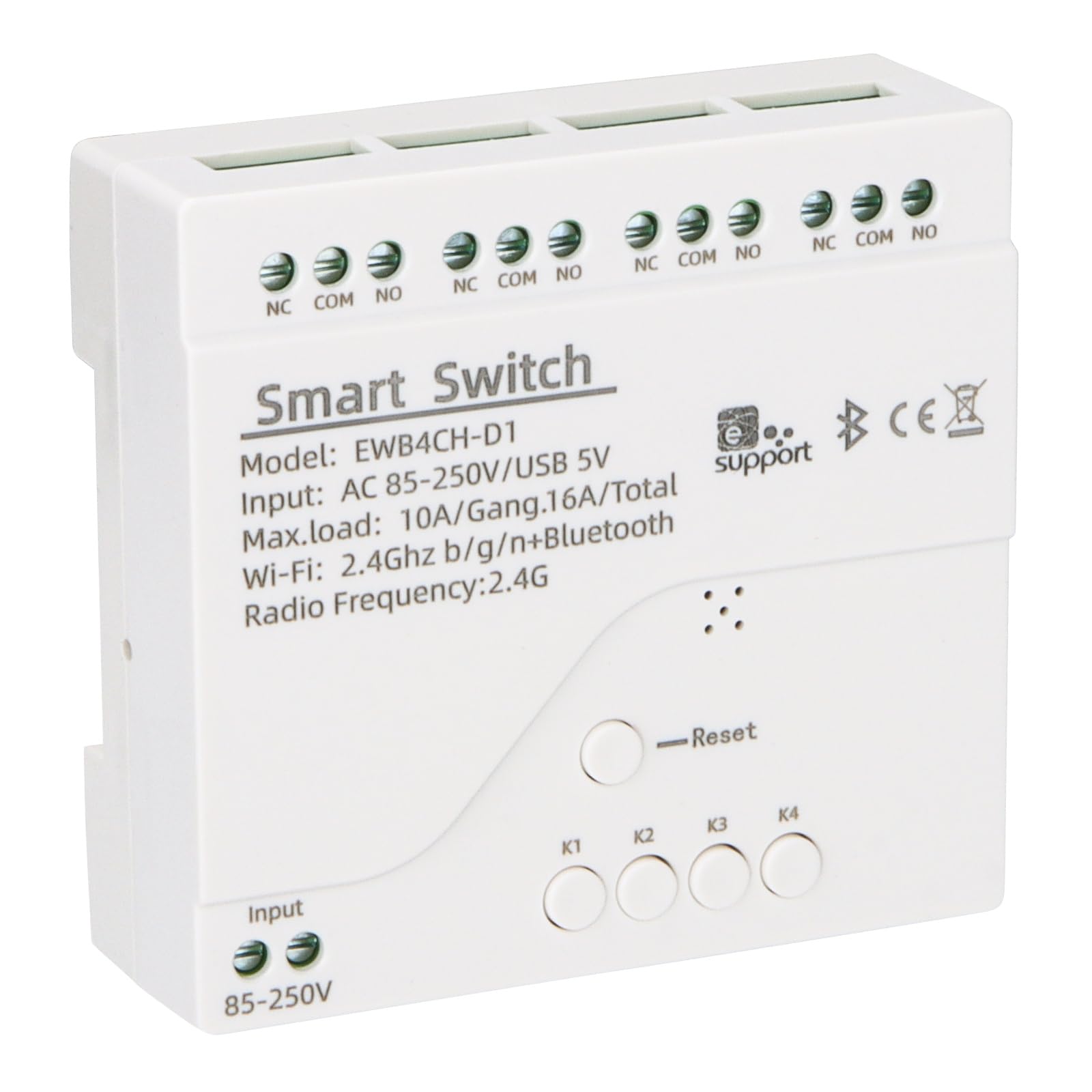
Immagine: Frontale view of the Wengart Smart WiFi Relay Switch, highlighting its smart features like app control, voice control, and scheduling.
Specifiche
| Caratteristica | Specificazione |
|---|---|
| Modello | WiFi Switch Relay-4 CH |
| Ingresso volumetage | AC 85-250V or USB 5V |
| Max. Current (per gang) | 10 Amps |
| Max. Load (total) | 16 Amps / 3500W (4 gangs) |
| Connettività wireless | Wi-Fi 2.4 GHz b/g/n + Bluetooth |
| Modalità di funzionamento | ACCESO SPENTO |
| Tipo di montaggio | Wall Mount (DIN rail compatible) |
| Tipo di contatto | Normalmente aperto (NO) |
| Materiale di contatto | Plastica |
| Temperatura di lavoro | Temperatura ambiente -20°C ~ 70°C |
| Dimensioni | 81 mm x 76 mm x 28 mm (circa 3.19" x 2.99" x 1.1") |
| Certificazione | CE, RoHS |
| Componenti inclusi | WiFi smart switch |
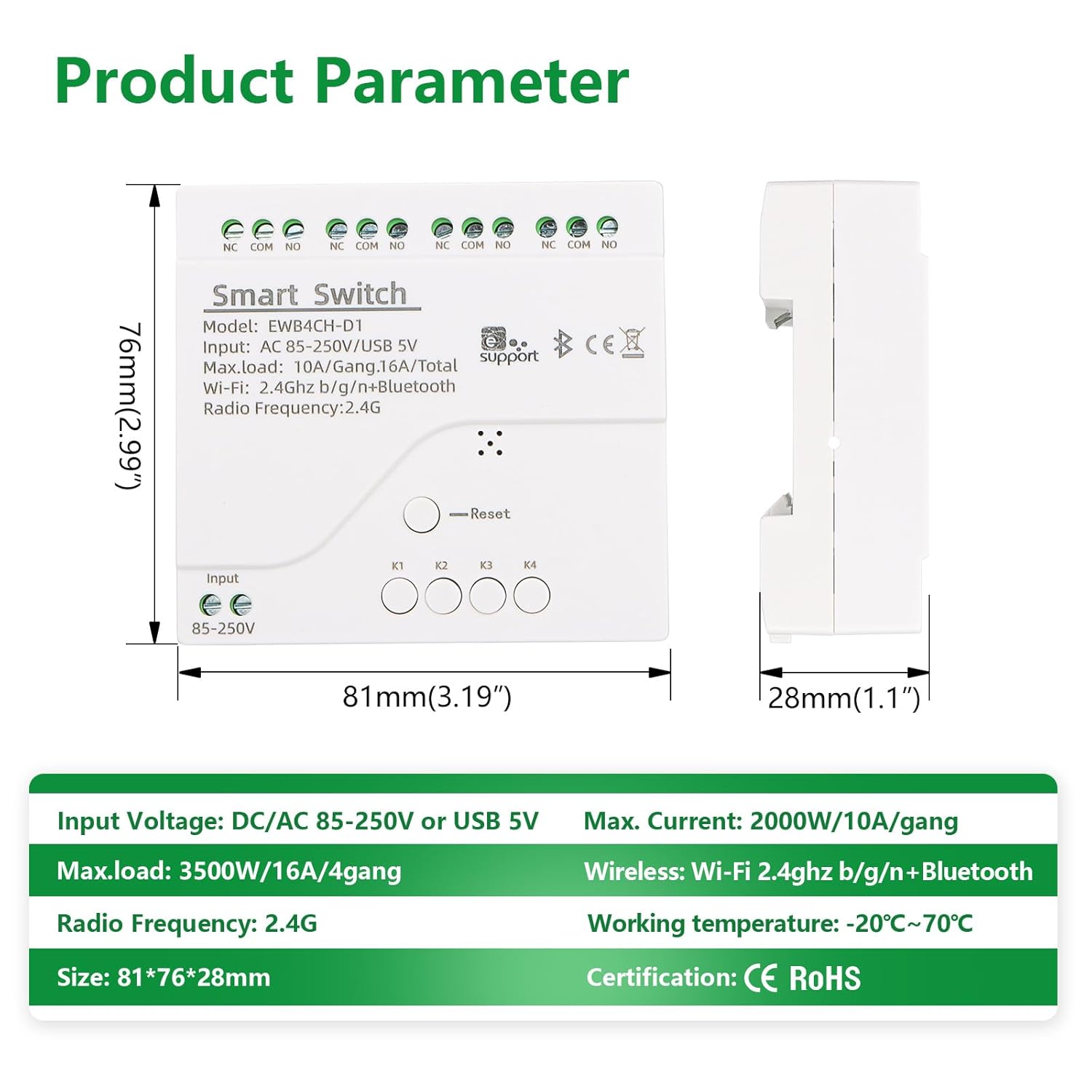
Immagine: dettagliata view of the Wengart Smart WiFi Relay Switch showing its dimensions and key electrical specifications.
Impostare
1. Istruzioni per il cablaggio
Before wiring, ensure the main power supply is disconnected to prevent electric shock. The device supports both AC 85-250V and USB 5V input. Connect your devices to the relay outputs (NO, COM, NC) as required.

Image: Wiring diagram illustrating how to connect the input power (AC 85-250V or USB 5V) and the output to a load (e.g., a light bulb) using the NO and COM terminals.
- Potenza in ingresso: Connect AC 85-250V to the "Input AC 85-250V" terminals or connect a 5V USB power supply to the USB port.
- Connessioni di uscita: Each channel has NO (Normally Open), COM (Common), and NC (Normally Closed) terminals. Connect your load (e.g., light, motor) between COM and NO for standard switching.
- Manual Switch Inputs (K1-K4): These terminals allow for external manual switches to control each channel.
2. App Pairing (eWeLink)
To control the switch via your smartphone, you need to pair it with the eWeLink app.
- Scarica l'app eWeLink dall'App Store (iOS) o dal Google Play Store (Android).
- Registrati o accedi al tuo account eWeLink.
- Power on the Wengart Smart WiFi Relay Switch.
- Press and hold the "Reset" button on the device for approximately 5-7 seconds until the network indicator LED blinks rapidly. This indicates pairing mode.
- In the eWeLink App, tap the "+" icon to add a device.
- Segui le istruzioni sullo schermo per connettere il dispositivo alla rete Wi-Fi a 2.4 GHz.
- Una volta completata l'associazione, è possibile rinominare il dispositivo e i singoli canali all'interno dell'app.
Modalità operative
The Wengart Smart WiFi Relay Switch supports three distinct working modes, configurable via the eWeLink app:

Image: Visual representation of the three operating modes: Self-locking (independent control), Interlock (only one channel active), and Inching (timed pulse).
- Modalità autobloccante: In this mode, each of the four channels operates independently. Turning one channel ON or OFF does not affect the state of the other channels. This is suitable for controlling individual lights or appliances.
- Modalità di interblocco: This mode ensures that only one channel can be active (ON) at any given time. If one channel is turned ON, any previously ON channel will automatically turn OFF. This is useful for applications where only one output should be active, such as motor direction control.
- Modalità di avanzamento lento: Also known as momentary mode, this allows a channel to turn ON for a set duration (e.g., 0.5 to 3600 seconds) and then automatically turn OFF. This is ideal for triggering short actions like opening a gate or pressing a button. The duration can be customized in the eWeLink app.
Remote Control and Voice Control
Controllo remoto tramite l'app eWeLink
Once paired, you can control your Wengart Smart WiFi Relay Switch from anywhere with an internet connection using the eWeLink App. The app provides real-time status updates for each channel.

Image: A person using the eWeLink app on a smartphone to remotely control the smart switch, showing the interface with four channel buttons.
Controllo vocale con assistenti intelligenti
The switch is compatible with Amazon Echo (Alexa) and Google Home, allowing for convenient voice commands.

Image: A woman interacting with smart speakers (Amazon Echo and Google Home) to control a light, demonstrating voice control functionality.
- Ensure your eWeLink account is correctly linked to your Amazon Alexa or Google Home account through their respective apps.
- Scopri i dispositivi nella tua app assistente intelligente.
- Utilizzare comandi come:
- "Alexa, accendi [Nome dispositivo]"
- "Ehi Google, disattiva [Nome dispositivo]"
- "Alexa, set [Channel Name] to on"
Intelligent Timing and Scene Management
Enhance your home automation with the timing and scene features available in the eWeLink App.
- Tempistiche: Set specific ON/OFF times for your devices.
- Delay Timing: Schedule a device to turn ON or OFF after a specified delay.
- Temporizzazione del ciclo: Automate devices to repeat ON/OFF cycles at regular intervals.
- Gestione della scena: Create custom scenes to control multiple devices simultaneously with a single tap or based on specific conditions (e.g., "Good Morning" scene turns on lights and coffee maker).
Manutenzione
To ensure the longevity and optimal performance of your Wengart Smart WiFi Relay Switch, follow these maintenance guidelines:
- Pulizia: Pulire delicatamente il dispositivo con un panno asciutto e morbido. Non utilizzare detergenti liquidi o materiali abrasivi.
- Ambiente: Keep the device in a dry, well-ventilated area, away from direct sunlight, extreme temperatures, and corrosive substances.
- Aggiornamenti del firmware: Periodically check the eWeLink App for available firmware updates for your device. Updates can improve performance and add new features.
- Verifica della connessione: Ensure all wiring connections remain secure. Loose connections can cause intermittent operation or safety hazards.
Risoluzione dei problemi
If you encounter issues with your Wengart Smart WiFi Relay Switch, refer to the following common problems and solutions:
- Dispositivo non connesso al Wi-Fi:
- Assicurati che la tua rete Wi-Fi sia a 2.4 GHz. Il dispositivo non supporta la rete Wi-Fi a 5 GHz.
- Controlla se la password del tuo Wi-Fi è corretta.
- Avvicina il dispositivo al router Wi-Fi.
- Reset the device by holding the reset button for 5-7 seconds and attempt pairing again.
- Riavvia il router Wi-Fi.
- Device offline in eWeLink App:
- Controlla la tua connessione Internet.
- Verificare che il dispositivo sia alimentato.
- Riavviare il dispositivo spegnendolo e riaccendendolo.
- Se il problema persiste, prova ad associare nuovamente il dispositivo.
- Il controllo vocale non funziona:
- Assicurati che il tuo account eWeLink sia correttamente collegato ad Alexa/Google Home.
- Check if the device is online in the eWeLink App.
- Try rediscovering devices in your Alexa/Google Home app.
- Use the exact device and channel names configured in eWeLink.
- Il relè non commuta:
- Verify the wiring connections are secure and correct.
- Ensure the load connected does not exceed the maximum current rating.
- Controlla se il dispositivo riceve alimentazione.
- Test the channel manually via the eWeLink app.
Garanzia e supporto
WENGART products are designed for reliability and performance. For warranty information, please refer to the documentation provided at the time of purchase or contact your retailer. If you encounter any issues not covered in this manual or require further assistance, please contact WENGART customer support through the official websito o sulla tua piattaforma di acquisto.
Informazioni sui contatti: Please refer to the WENGART official website or your product packaging for the most up-to-date support contact details.