
1. Introduzione
The Universal Audio ANTI 1992 High Gain Amp Pedal is a stereo amp and cab emulation pedal designed to deliver high-gain guitar tones. It features six famous mic/speaker pairs, built-in boosts, and offers both live and preset modes. Customization is available through the UAFX mobile app. This pedal emulates the sound of a 120-watt tube amplifier, providing aggressive, 'scooped' guitar tones suitable for modern metal, bone-crushing riffs, searing leads, and crystalline cleans.
2. Caratteristiche principali
- Authentic emulation of early '90s 120-watt high-gain amp toni.
- Powerful UAFX dual-engine for realistic sound.
- Integrated noise gate, TS-style overdrive, and boost for album-ready sounds.
- Dynamic Room Modeling technology derived from UA’s OX Amp Bauletto superiore.
- Six classic mic/speaker pairings for diverse tonal options.
3. Cosa c'è nella scatola
Upon unboxing your Universal Audio ANTI 1992 High Gain Amp Pedal, you should find the following components:
- Universal Audio ANTI 1992 High Gain Amp Pedale
- Power supply (may be sold separately, check product packaging)
- Cavo USB
- Manuale d'uso
4. Impostazione
- Collegamento elettrico: Connect a compatible 9V DC power supply (20 Milliamps, center-negative) to the 9VDC input on the rear of the pedal.
- Collegamento dello strumento: Connect your guitar to the IN 1/MONO input using a standard 1/4-inch instrument cable. For stereo input, use both IN 1/MONO and IN 2/STEREO.
- Connessione di uscita: Connect the OUT 1/MONO output to your amplifier or audio interface. For stereo output, use both OUT 1/MONO and OUT 2/STEREO.
- Connessione USB: For app control or firmware updates, connect a USB-C cable from the pedal's USB port to your computer or mobile device.
- Accoppiamento Bluetooth: To use the UAFX mobile app wirelessly, ensure Bluetooth is enabled on your device and follow the app's instructions to pair with the pedal.
5. Controlli operativi
The ANTI 1992 pedal features a range of knobs and switches for precise tone shaping:
- PRE GAIN: Regola il livello del guadagno in ingresso.
- PRESENZA: Controlla la risposta alle alte frequenze.
- USCITA: Imposta il volume di uscita complessivo.
- LOW [OVERDRIVE]: Adjusts low frequencies and can engage overdrive.
- MID [OD TONE]: Controls mid-range frequencies and overdrive tone.
- HIGH [OD LEVEL]: Adjusts high frequencies and overdrive level.
- CAB Switch: Selects between different cabinet emulations (e.g., UK V30, CA V30, WHITE 75).
- Interruttore CANALE: Alterna tra diverse amp channels (e.g., RTHM, CRNCH, LEAD).
- Interruttore a pedale ON: Activates or bypasses the pedal effect.
- Interruttore a pedale PREIMPOSTATO: Cycles through saved presets.
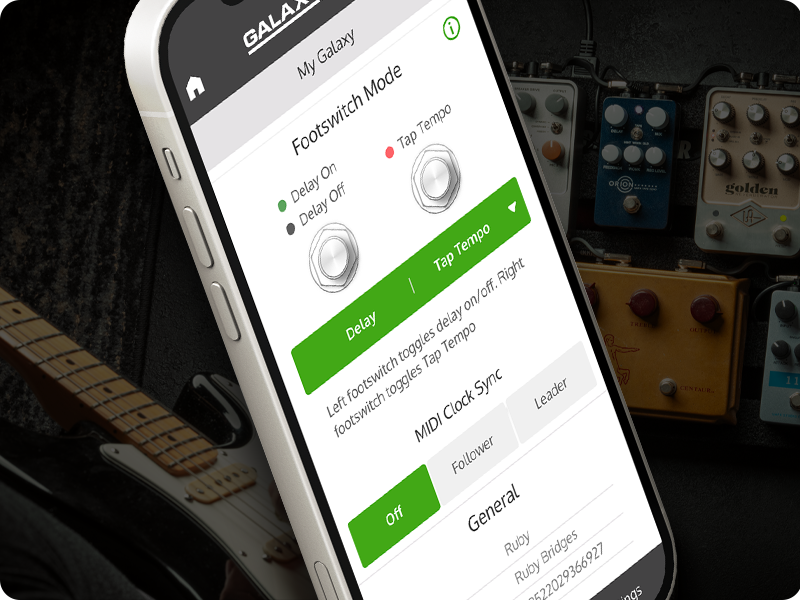
For advanced control and additional parameters, utilize the UAFX mobile app via Bluetooth or USB-C connection.
6. Connettività
The ANTI 1992 pedal offers versatile connectivity options:
- 1/4-inch Audio Inputs/Outputs: Supports both mono and stereo configurations for instrument and ampcollegamenti del filtro.
- USB di tipo C: Used for connecting to a computer or mobile device for firmware updates and app control.
- Bluetooth: Enables wireless control and customization via the UAFX mobile app.
- Ingresso alimentazione CC 9 V: Standard power input for the pedal.
7. Media del prodotto





Video del prodotto
8. Specifiche
| Caratteristica | Dettaglio |
|---|---|
| Marca | Audio universale |
| Nome del modello | ANTI 1992 |
| Numero di modello | GPM-ANTI |
| Dimensioni del prodotto | 5.55 cm L x 3.62 cm P x 2.52 cm A |
| Peso dell'articolo | 567 grammi |
| Voltage | 9 Volt (CC) |
| Amprabbia | 20 milioneamps |
| Effetti di uscita audio | Distorsione, Overdrive |
| Tipo di controlli | Manopola |
| Fonte di alimentazione | Elettrico con cavo |
| Interfaccia Hardware | 1/4-inch Audio, Bluetooth, USB Type C |
| Formato del segnale | Analogico |
| Colore | Rosso |
| Codice UPC | 819937004629 |
9. Manutenzione
To ensure the longevity and optimal performance of your Universal Audio ANTI 1992 High Gain Amp Pedal, follow these maintenance guidelines:
- Pulizia: Use a soft, dry cloth to clean the pedal's exterior. Avoid abrasive cleaners or solvents, which can damage the finish and internal components.
- Magazzinaggio: Conservare il pedale in un luogo fresco e asciutto, lontano dalla luce solare diretta, da temperature estreme e da elevata umidità.
- Connessioni: Controllare periodicamente tutti i collegamenti dei cavi per verificare che non siano usurati. Assicurarsi che i jack siano privi di polvere e detriti.
- Aggiornamenti del firmware: Controllare regolarmente l'Universal Audio website or UAFX app for available firmware updates to ensure your pedal has the latest features and bug fixes.
10. Risoluzione Dei Problemi
If you encounter issues with your ANTI 1992 pedal, consider the following common troubleshooting steps:
- Nessun suono:
- Assicurarsi che l'alimentatore sia collegato correttamente e che fornisca la tensione CC da 9 V specificata.
- Controllare tutti i cavi degli strumenti per verificarne il corretto collegamento e la funzionalità.
- Verificare che il pedale sia inserito (il LED dell'interruttore a pedale ON è acceso).
- Conferma il tuo amplifier or audio interface is powered on and correctly configured.
- Scarsa qualità del suono:
- Adjust the PRE GAIN, OUTPUT, and EQ knobs to find a balanced tone.
- Experiment with different CAB and CHANNEL settings.
- Ensure your instrument's pickups and wiring are functioning correctly.
- Problemi di connettività dell'app:
- Make sure Bluetooth is enabled on your mobile device and the pedal.
- Try connecting via USB-C cable to establish a connection.
- Restart both the pedal and your mobile device.
- Ensure the UAFX app is updated to the latest version.
- Rumore/ronzio indesiderato:
- Utilizzare un alimentatore isolato e di alta qualità.
- Check for faulty cables or ground loops.
- Engage the built-in noise gate feature and adjust its settings via the app.
If these steps do not resolve the issue, please contact Universal Audio customer support.
11. Garanzia e supporto
The Universal Audio ANTI 1992 High Gain Amp Pedal comes with a Garanzia a vita limitata. For detailed terms and conditions, please refer to the warranty information provided with your product or visit the official Universal Audio websito.
For technical support, service, or further inquiries, please visit the Universal Audio support page or contact their customer service directly. Keep your purchase receipt and product serial number handy when seeking support.