
1. Introduzione
The ORICO 9828U3 is a 2-bay external enclosure designed for 3.5-inch SATA Hard Disk Drives (HDDs). It provides a reliable and efficient solution for expanding your storage capacity, backing up data, and managing large files. Featuring a USB 3.0 interface, it offers high-speed data transfer and broad compatibility with various operating systems. This manual will guide you through the installation, operation, and maintenance of your device.

Image: The ORICO 9828U3 2-Bay HDD Enclosure, showcasing its sleek design and dual drive bays.
2. Contenuto della confezione
Si prega di controllare il contenuto della confezione al momento dell'apertura per assicurarsi che siano presenti tutti gli articoli:
- ORICO 9828U3 HDD Enclosure
- Cavo USB-A a B
- Adattatore di alimentazione (12V/4A)
- Screws (for HDD mounting, if applicable)
- Manuale di istruzioni (questo documento)
- Driver (if required, typically for specific RAID modes or older OS)
3. Impostazione
3.1. Installazione dell'HDD
The ORICO 9828U3 features a tool-free design for easy installation of 3.5-inch SATA HDDs. Follow these steps:
- Assicurarsi che il contenitore sia spento e scollegato dal computer.
- Locate the drive bay doors on the front of the enclosure.
- Gently pull the lever on the drive bay door to open it.
- Slide your 3.5-inch SATA HDD into the open bay until it is securely seated. Ensure the SATA connectors align properly.
- Close the drive bay door until it clicks into place.
- Repeat for the second HDD if installing two drives.
- Utilize the integrated safety lock mechanism to prevent accidental drive ejection. Insert the key and turn to lock the drive bays.

Image: Illustrates the push-pull installation of a 3.5-inch HDD into the enclosure and the safety lock mechanism.
3.2. Connessione al computer
After installing the HDDs, connect the enclosure to your computer:
- Connect one end of the provided USB-A to B cable to the USB 3.0 port on the back of the enclosure.
- Connect the other end of the USB-A to B cable to an available USB 3.0 port on your computer.
- Connect the power adapter to the DC IN port on the back of the enclosure.
- Collegare l'adattatore di corrente a una presa a muro.
- Turn on the power switch on the back of the enclosure. The LED indicators on the front will illuminate, indicating power and drive activity.

Image: Shows the power adapter and USB cable connected to the rear ports of the ORICO HDD enclosure.
4. Istruzioni per l'uso
4.1. Accensione/spegnimento
- To power on: Ensure all cables are connected, then flip the power switch on the back of the enclosure to the "ON" position.
- To power off: Safely eject the drives from your operating system first, then flip the power switch to the "OFF" position.
4.2. Trasferimento dei dati
Once connected and powered on, your computer should recognize the installed HDDs. You can then drag and drop files, copy, or move data to and from the drives as you would with any other external storage device. The USB 3.0 interface supports data transfer speeds up to 5Gbps, with mechanical hard drives typically achieving around 230 MB/s.

Image: Depicts data being transferred from a computer to the ORICO enclosure at high speed (230MB/s).
4.3. Modalità di sospensione intelligente
The enclosure features an intelligent sleep mode. If there is no data activity for 10 minutes, the device will automatically enter sleep mode to conserve power and extend the lifespan of your hard drives. It will wake up automatically upon data access.

Image: Shows the enclosure connected to a laptop, with an overlay indicating the 10-minute intelligent sleep feature.
5. Caratteristiche principali
5.1. Large Storage Capacity
The ORICO 9828U3 supports two 3.5-inch SATA hard drives, with each bay accommodating up to 22TB. This provides a total storage capacity of up to 44TB, ideal for large engineering projects, high-resolution video storage, and other extensive data needs.

Image: Illustrates the 44TB storage capacity of the 2-bay enclosure, showing various data types like HD photos, 3.6K videos, and music files.
5.2. Efficiente dissipazione del calore
To ensure stable and long-term operation, the enclosure is equipped with excellent heat dissipation features. It includes front and rear ventilation slots, a built-in 50mm silent cooling fan, and an aluminum alloy body that effectively accelerates heat transfer. This design improves internal airflow and maintains optimal operating temperatures for your HDDs.
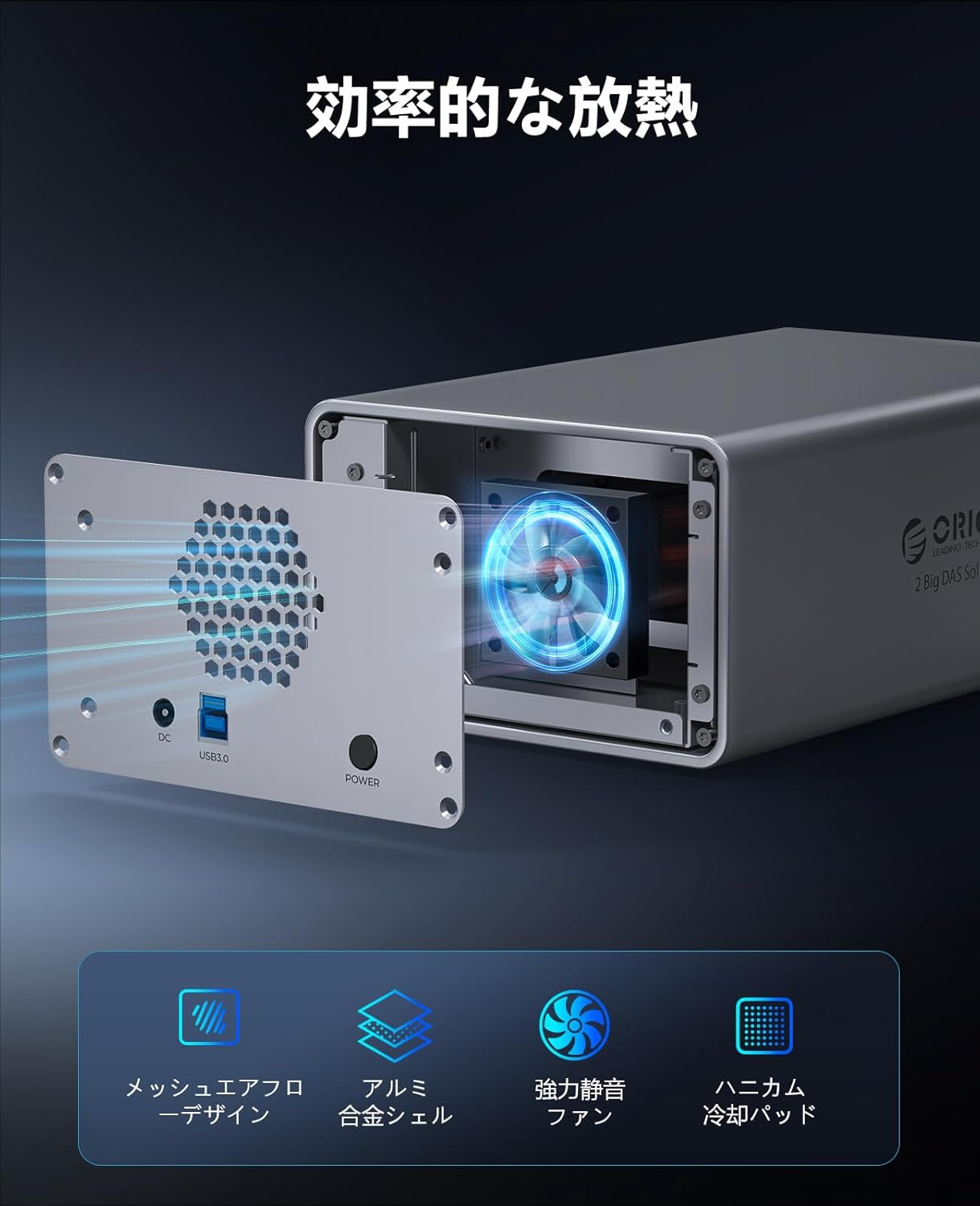
Image: Shows the rear of the enclosure with the cooling fan and ventilation mesh, highlighting the airflow for efficient heat dissipation.
5.3. Trasferimento dati ad alta velocità
The USB 3.0 interface is fully compatible with the SATA protocol, enabling high-speed data transfer. Mechanical hard drives can achieve transfer speeds of up to 230 MB/s, making it efficient for moving large files and performing backups.
5.4. Stable 48W Power Supply
Equipped with a 12V/4A (48W) power adapter, the enclosure provides sufficient and stable power for simultaneous reading and writing operations on multiple hard drives. This enhances the safety and extends the operational life of the device and its installed drives.

Image: Illustrates the 12V4A power supply connected to the enclosure, emphasizing its 48W output for stable operation.
5.5. Ampia compatibilità
The ORICO 9828U3 is compatible with common operating systems including Windows, Mac OS, and Linux. It can be used with various devices such as desktop computers, laptops, and other compatible systems.

Image: Displays various operating system logos (Windows, Mac OS, Linux, Android) and device types (laptops, desktops, NAS, monitoring systems) indicating broad compatibility.
5.6. Safety Lock Design
An independent safety lock mechanism is integrated into each drive bay to effectively prevent accidental ejection of hard drives, ensuring data security and reliability.
5.7. Indicatori luminosi a LED
Each drive bay is equipped with an LED indicator light, allowing you to monitor the operational status of your hard drives at a glance.

Image: Close-up of the enclosure's front, showing the LED indicator lights on each drive bay.
6. Specifiche
| Caratteristica | Dettaglio |
|---|---|
| Marca | ORICO |
| Numero di modello | 9828U3 |
| Interfaccia Hardware | USB 3.0 |
| Colore | Grigio siderale |
| Dimensioni del prodotto (L x P x A) | Dimensioni: 23.3 x 14.3 x 9 cm |
| Piattaforma hardware | Universale |
| Capacità massima di memoria | 44 TB (2 x 22 TB) |
| Dispositivi compatibili | Desktop, portatile |
| Fattore di forma del disco rigido | 3.5 pollici |
| Numero di dispositivi supportati | 2 |
| Velocità di trasferimento dati | 5 Gigabit al secondo (USB 3.0) |
| Materiale esterno | Lega di alluminio |
| Numero di modello del produttore | ORICO-9828U3-JP-GY-BP |
7. Risoluzione Dei Problemi
- HDD Not Recognized:
- Assicurarsi che l'adattatore di alimentazione sia collegato saldamente e che l'alloggiamento sia acceso.
- Verificare che il cavo USB sia saldamente collegato sia all'alloggiamento che al computer.
- Check if the HDDs are properly seated in their bays.
- For new HDDs, they may need to be initialized, partitioned, and formatted in your operating system's Disk Management (Windows) or Disk Utility (Mac OS) before they appear.
- Try connecting the enclosure to a different USB port or computer to rule out port or system issues.
- Velocità di trasferimento dati lenta:
- Assicurati di essere collegato a una porta USB 3.0 del tuo computer. Le porte USB 2.0 comporteranno velocità notevolmente inferiori.
- Check the condition of your USB cable; a faulty cable can affect performance.
- The performance of mechanical HDDs can vary. Ensure your HDDs are healthy and not fragmented.
- Il contenitore si disconnette in modo casuale:
- Ensure the power supply is stable. Avoid connecting to overloaded power strips.
- Controllare che il cavo USB non sia danneggiato.
- Disable USB selective suspend settings in your computer's power options (Windows) or energy saver settings (Mac OS) if applicable.
- Rumori insoliti:
- A slight hum from the cooling fan is normal.
- Loud clicking or grinding noises from the HDDs may indicate a drive failure. Back up your data immediately and replace the drive.
8. Garanzia e supporto
The ORICO 9828U3 HDD Enclosure comes with a Garanzia di 1 anno dalla data di acquisto. La presente garanzia copre difetti di fabbricazione e malfunzionamenti in condizioni di normale utilizzo.
For technical support, warranty claims, or further assistance, please contact ORICO customer service through the retailer where you purchased the product or visit the official ORICO websito per le informazioni di contatto.
Si prega di conservare la prova d'acquisto ai fini della garanzia.
9. Prodotto finitoview Video
Guarda questo video per una panoramica visivaview of the ORICO 9828U3 HDD Enclosure, demonstrating its design and features.
Video: Un prodotto ufficialeview video from ORICO, showcasing the 9828U3 HDD enclosure and its various features and applications.