
1. Introduzione e informazioni sulla sicurezza
Thank you for choosing the CHAOKE Exercise Bike Model 520A. To ensure your safety and optimize your workout experience, please read this manual thoroughly before assembly and use. Keep this manual for future reference.
Avvertenze di sicurezza importanti:
- Consultare il proprio medico prima di iniziare qualsiasi programma di esercizi.
- Il peso massimo dell'utente per questa cyclette è 150 kg (330 libbre).
- L'altezza massima consigliata per l'utente è 185 centimetri.
- Prima di ogni utilizzo, assicurarsi che tutti i bulloni e i dadi siano ben serrati.
- Tenere i bambini e gli animali domestici lontani dall'apparecchiatura durante il funzionamento.
- Posizionare la cyclette su una superficie piana e stabile.
- Indossare abbigliamento e calzature sportive adeguati.
- Interrompere immediatamente l'esercizio se ci si sente deboli, storditi o si avverte dolore.
2. Contenuto della confezione
Carefully unpack all components and verify that you have received all parts listed below. If any parts are missing or damaged, please contact customer support.
- Telaio principale
- Barre stabilizzatrici (anteriore e posteriore)
- Pedali (sinistro e destro)
- Reggisella e sella
- Reggimanubrio e manubrio
- Monitor LCD
- Porta tablet
- Kit hardware (bulloni, rondelle, dadi)
- Strumenti di assemblaggio
- Manuale d'uso
3. Istruzioni di montaggio
Assembly typically takes approximately 25 minutes. All necessary tools are included. For a visual guide, scan the QR code in your printed manual for an assembly video tutorial.
Assemblaggio passo dopo passo:
- Fissare le barre stabilizzatrici: Fissare le barre stabilizzatrici anteriore e posteriore al telaio principale utilizzando i bulloni e le rondelle forniti. Assicurarsi che siano saldamente fissate per garantire la stabilità.
- Installa i pedali: Identificare il pedale sinistro (L) e quello destro (R). Le viti del pedale sinistro vanno avvitate in senso antiorario, quelle del pedale destro in senso orario. Serrarle saldamente.
- Montare il reggisella e la sella: Insert the seat post into the main frame and adjust to your desired height. Attach the seat to the seat post.
- Installare il reggimanubrio e il manubrio: Insert the handlebar post into the main frame. Attach the handlebar to the post and connect any necessary sensor wires to the LCD monitor.
- Attach LCD Monitor and Tablet Holder: Secure the LCD monitor to the handlebar post. Attach the tablet holder above the LCD monitor.

Image: Attaching the front and rear stabilizer bars to the main frame for a stable base.

Image: Correctly installing the left and right pedals onto the crank arms.

Image: Inserting the seat and handlebar posts into their respective slots on the main frame.
4. Componenti del prodotto oltreview
Familiarize yourself with the main parts of your CHAOKE Exercise Bike.
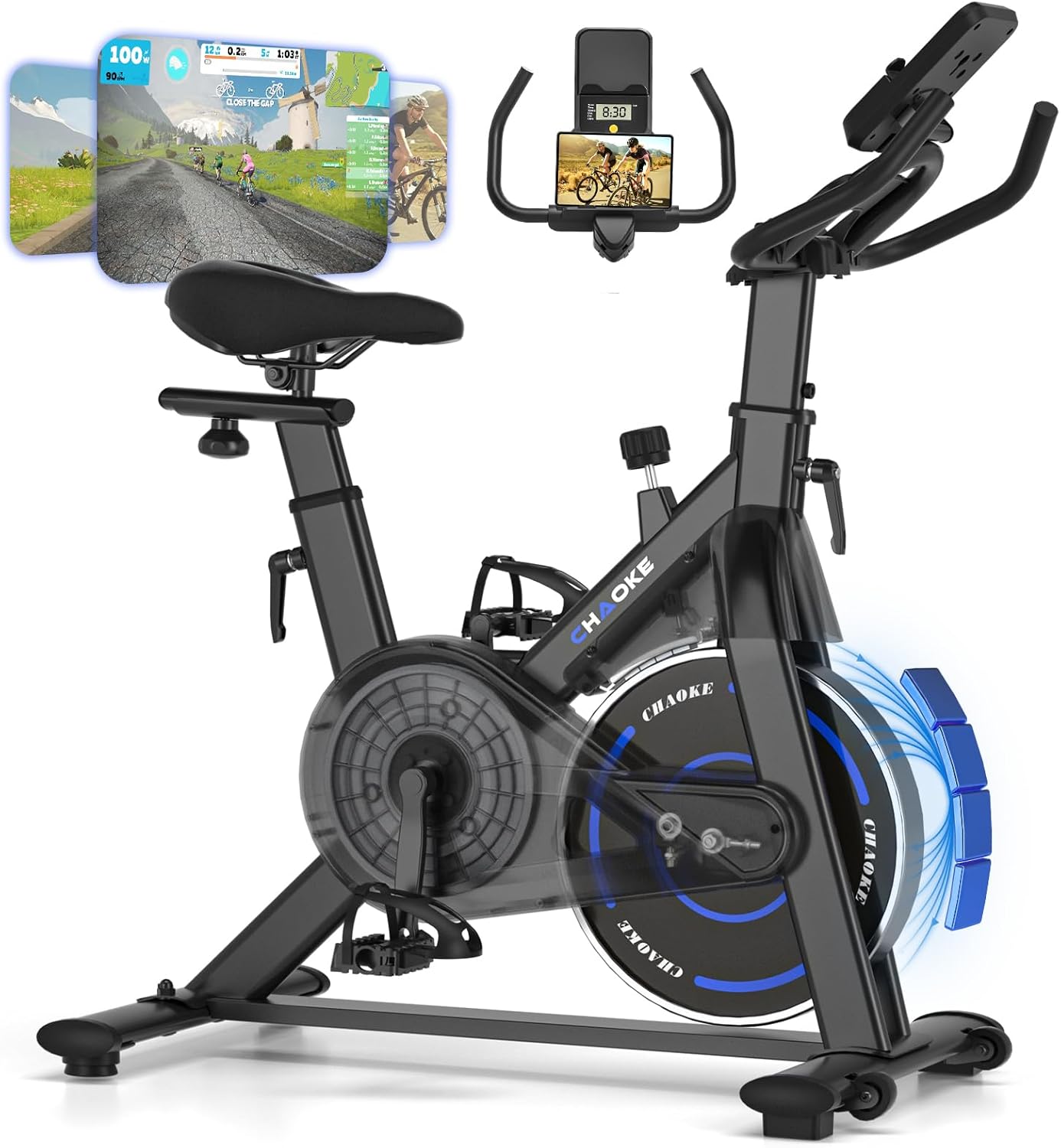
Image: The CHAOKE Exercise Bike Model 520A, showcasing its design and key features like the flywheel, seat, and handlebars.

Image: Detail of the console, featuring the tablet holder for devices and the LCD screen for workout data.
Image: Diagram illustrating the robust, high-density steel pipe construction of the bike frame, ensuring durability and stability.
- Telaio principale: Constructed from high-density steel for stability and durability.
- Volano: Provides smooth and consistent resistance.
- Sistema di resistenza magnetica: Offers quiet and adjustable resistance levels.
- Posto a sedere: Imbottito per il massimo comfort, regolabile orizzontalmente e verticalmente.
- Manubrio: Multi-grip design, adjustable vertically.
- pedali: Dotato di cinghie regolabili per un posizionamento sicuro del piede.
- Monitor LCD: Displays workout data such as time, speed, distance, and calories.
- Supporto per tablet: Securely holds your smartphone or tablet for entertainment or app use.
- Manopola di resistenza: Used to adjust the intensity of your workout.
5. Configurazione iniziale e regolazioni
La corretta regolazione del sedile e del manubrio è fondamentale per garantire il comfort e l'efficacia dell'esercizio.
5.1 Regolazione del sedile
The seat can be adjusted both vertically (7 positions) and horizontally (forward/backward) to accommodate users between 140 cm and 185 cm in height.
- Regolazione verticale: Loosen the adjustment knob on the seat post, raise or lower the seat to your desired height, and then tighten the knob securely.
- Regolazione orizzontale: Loosen the knob beneath the seat, slide the seat forward or backward, and then tighten the knob.
5.2 Regolazione del manubrio
The handlebars can be adjusted vertically (5 positions) for optimal comfort.
- Allentare la manopola di regolazione sul reggisella.
- Raise or lower the handlebars to a comfortable position that allows for a slight bend in your elbows.
- Stringere saldamente la manopola.
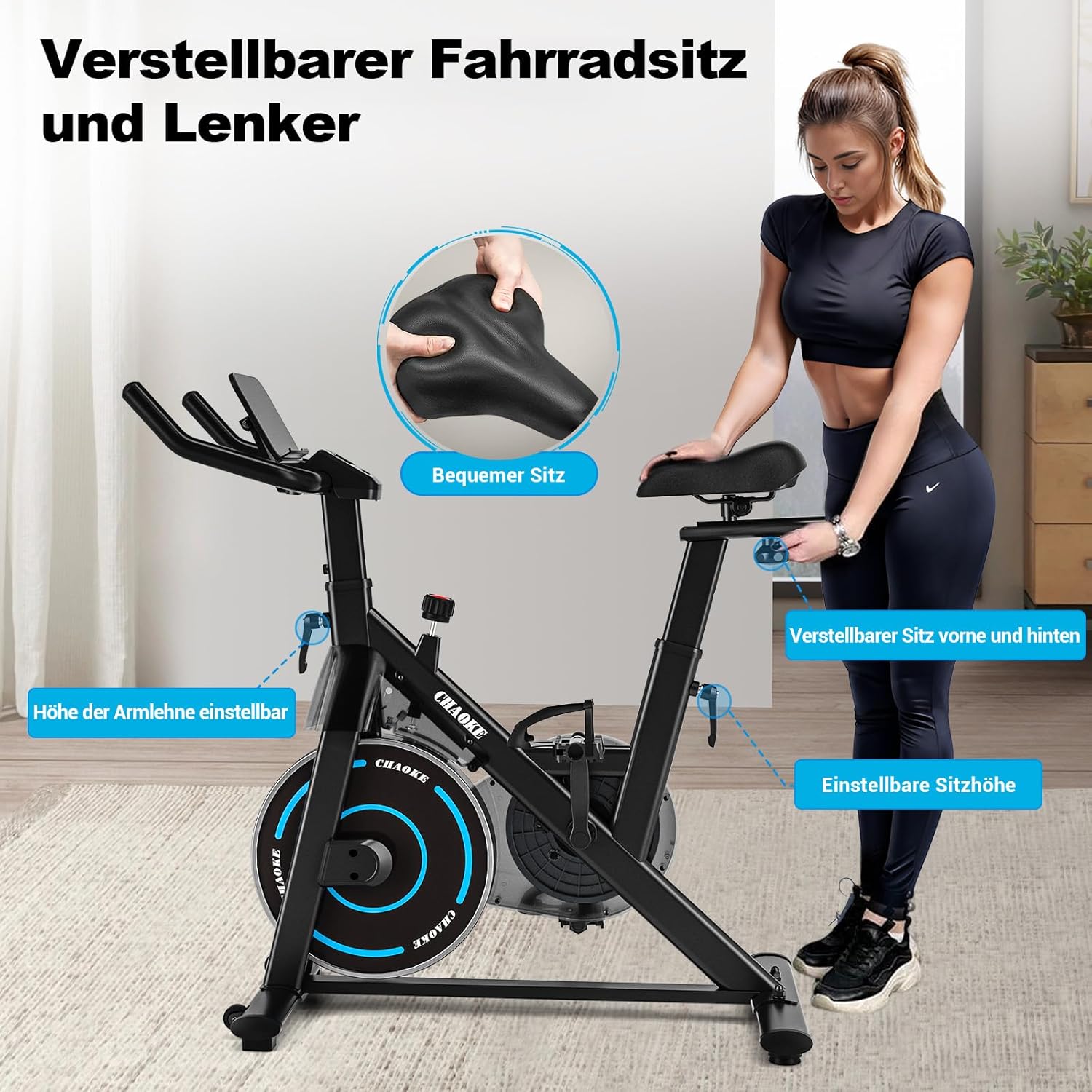
Image: Visual guide demonstrating how to adjust the seat (height and fore/aft) and handlebar height for personalized comfort.
5.3 Cinghie per pedali
Adjust the pedal straps to ensure your feet are securely in place during your workout. This prevents slipping and ensures efficient power transfer.
5.4 Porta tablet
Place your tablet or smartphone securely in the integrated holder for easy viewing during your exercise session.
6. Utilizzo della cyclette
6.1 Funzioni del monitor LCD
Il monitor LCD visualizza i parametri chiave dell'allenamento:
- TEMPO: Durata del tuo allenamento.
- VELOCITÀ: Velocità attuale del ciclismo.
- DISTANZA: Distanza percorsa durante l'allenamento.
- CALORIE: Calorie bruciate stimate.
The monitor is battery-powered. Ensure batteries are correctly installed if the display is not active.
6.2 Regolazione della resistenza
The CHAOKE Exercise Bike features a magnetic resistance system with 0-100% adjustable levels. This system ensures a smooth and quiet operation, typically below 10 decibels.

Image: A user demonstrating the adjustment of the magnetic resistance knob to increase or decrease workout intensity.
- Turn the resistance knob clockwise to increase resistance and make your workout more challenging.
- Turn the resistance knob counter-clockwise to decrease resistance for an easier workout.
- Press the knob down to engage the emergency brake, stopping the flywheel immediately.
6.3 Connettività dell'app (Bluetooth)
This exercise bike supports Bluetooth connectivity, allowing you to sync with fitness applications like Zwift and Kinomap for an enhanced training experience.

Image: The exercise bike integrated with popular fitness applications, displaying virtual cycling routes and workout data.
- Assicurati che il Bluetooth sia abilitato sul tuo smartphone o tablet.
- Download and open your preferred fitness app (e.g., Zwift, Kinomap).
- Follow the app's instructions to connect to your CHAOKE Exercise Bike via Bluetooth.
- Begin your interactive workout.
7. Cura e manutenzione
Una manutenzione regolare garantisce la longevità e le prestazioni ottimali della tua cyclette.
- Pulizia: Pulisci la bici con la pubblicitàamp Dopo ogni utilizzo, pulire con un panno per rimuovere sudore e polvere. Evitare detergenti abrasivi.
- Check Bolts and Nuts: Periodically inspect all bolts, nuts, and connections to ensure they are tight. Tighten if necessary.
- pedali: Controllare i pedali per eventuali segni di usura o allentamento.
- Magazzinaggio: Conservare la bicicletta in un luogo asciutto e fresco, lontano dalla luce solare diretta e da temperature estreme.
8. Risoluzione Dei Problemi
In caso di problemi, fare riferimento ai seguenti problemi comuni e alle relative soluzioni:
| Problema | Possibile causa | Soluzione |
|---|---|---|
| Il display LCD non funziona | Batterie scariche o collegamento allentato. | Replace batteries. Check sensor wire connections to the monitor. |
| La resistenza non cambia | Resistance mechanism issue or knob not properly engaged. | Ensure the resistance knob is fully functional. Contact customer support if the issue persists. |
| Rumore insolito durante il funzionamento | Loose bolts, friction, or internal component issue. | Check and tighten all assembly bolts. Ensure the bike is on a level surface. If noise persists, contact customer support. |
| Errore di connessione Bluetooth | Bluetooth non abilitato, problemi con l'app o interferenze. | Ensure Bluetooth is on. Restart the app and your device. Move closer to the bike. |
9. Specifiche tecniche
| Caratteristica | Specificazione |
|---|---|
| Numero di modello | 520A |
| Marca | CHAOKE |
| Dimensioni (L x P x A) | Dimensioni: 101 x 49.5 x 110 cm |
| Peso del prodotto | 20 chilogrammi |
| Peso massimo dell'utente | 150 chilogrammi (330 libbre) |
| Maximum Recommended User Height | 185 centimetri |
| Meccanismo di resistenza | Magnetico |
| Sistema di azionamento | Cintura |
| Livello di rumore | Sotto i 10 dB |
| Fonte di alimentazione | Alimentato a batteria (per LCD) |
| Caratteristiche speciali | Padded seat, Speedometer, App connectivity, Adjustable resistance level, Tablet holder |
| Materiale | High-density Steel, Plastic |
10. Garanzia e assistenza clienti
Informazioni sulla garanzia
CHAOKE offers a Garanzia di 5 anno on this exercise bike, ensuring confidence in your purchase and use. Please retain your proof of purchase for warranty claims.
Assistenza clienti
Our professional customer service team is available to assist you with any questions or concerns. If you require technical support or have inquiries regarding assembly, operation, or maintenance, please do not hesitate to contact us. Our technicians can also provide professional video support if needed.
For support, please refer to the contact information provided on your purchase receipt or the official CHAOKE websito.