
1. Introduzione
This instruction manual provides essential information for the safe and effective use of your BoxWave Wall Charger Direct (15W). This charger is specifically designed to provide rapid charging for your Sky Devices Elite A65. Please read this manual thoroughly before use and retain it for future reference.
2. Informazioni sulla sicurezza
Per garantire un funzionamento sicuro ed evitare danni, osservare le seguenti precauzioni:
- Use the charger only indoors and in dry conditions.
- Non esporre il caricabatterie ad acqua, umidità o temperature estreme.
- Non tentare di smontare, modificare o riparare il caricabatterie. Per qualsiasi intervento di assistenza, rivolgersi a personale qualificato.
- Evitare di far cadere o di sottoporre il caricabatterie a forti urti.
- Assicurarsi che la presa a muro voltage matches the charger's specifications (100-240V).
- Tenere fuori dalla portata dei bambini.
3. Prodotto finitoview
The BoxWave Wall Charger Direct (15W) is a compact and efficient charging solution featuring a built-in 3-foot Micro USB cable. It is designed for direct wall outlet connection, eliminating the need for separate cables.

Image of the BoxWave Wall Charger Direct (15W) alongside a Sky Devices Elite A65 smartphone, illustrating the product's compatibility and design.
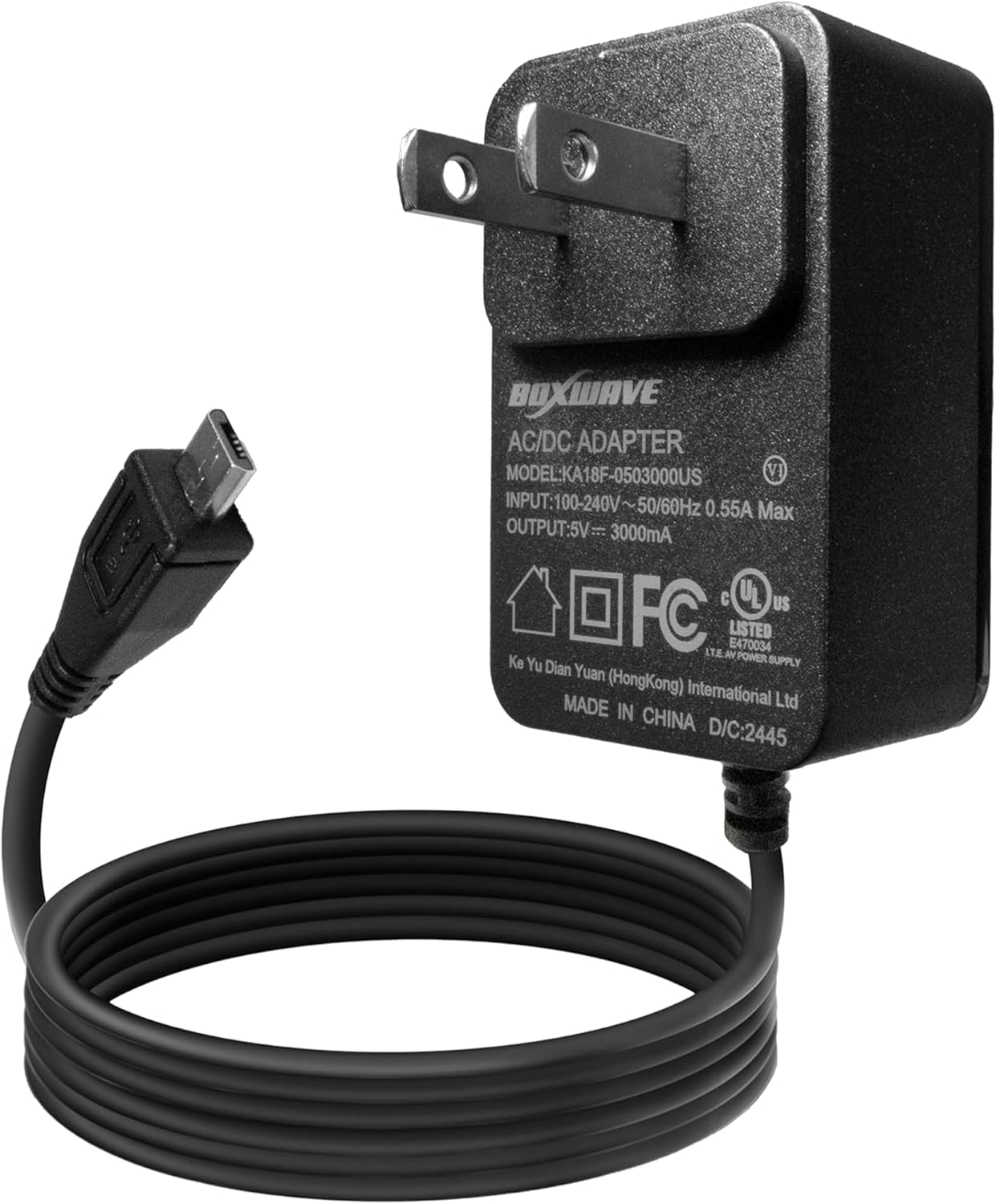
Avvicinamento view of the BoxWave Wall Charger Direct (15W) showing the AC adapter unit with its specifications label and the attached Micro USB cable.

Spese generali view of the BoxWave Wall Charger Direct (15W) with a magnified inset showing the Micro USB connector, highlighting its specific port type.
4. Impostazione
Setting up your BoxWave Wall Charger Direct (15W) is a straightforward process:
- Collegare alla presa a muro: Insert the charger's prongs into a standard AC wall outlet (100-240V).
- Connetti al dispositivo: Plug the Micro USB connector of the built-in cable into the charging port of your Sky Devices Elite A65.
The device should indicate that it is charging. No additional adapters or cables are required.

Image demonstrating the simple plug-and-play functionality of the BoxWave Wall Charger Direct (15W), showing the charger plugged into a wall outlet.
5. Istruzioni per l'uso
Once connected, the BoxWave Wall Charger Direct (15W) will begin charging your Sky Devices Elite A65. This charger delivers 15W of power for rapid charging.
- Indicazione di carica: Your Sky Devices Elite A65 will typically display a charging icon (e.g., a lightning bolt or battery animation) on its screen to confirm that it is receiving power.
- Ricarica rapida: The 15W output ensures your device charges quickly and efficiently. Charging times may vary based on your device's battery level and usage during charging.
- Carica completa: Disconnect the charger once your device indicates a full charge to conserve energy.

Image depicting a smartphone screen displaying a 95% charge level and a lightning bolt icon, indicating the 15W fast charging capability of the BoxWave Wall Charger Direct.
6. Manutenzione e cura
Una cura adeguata prolungherà la durata del tuo caricabatterie:
- Pulizia: Scollegare il caricabatterie dalla presa di corrente prima di pulirlo. Utilizzare un panno morbido e asciutto per pulire la superficie. Non utilizzare detergenti liquidi o spray.
- Cura del cavo: Avoid sharp bends, kinks, or excessive pulling on the cable, especially near the connectors. The charger features reinforced strain relief to minimize damage, but careful handling is still recommended.
- Magazzinaggio: Quando non in uso, conservare il caricabatterie in un luogo fresco e asciutto, lontano dalla luce solare diretta e da temperature estreme.

Image illustrating the reinforced strain relief design at the base of the Micro USB connector, designed to prevent kinking and tearing of the cable.
7. Risoluzione Dei Problemi
Se riscontri problemi con il caricabatterie, fai riferimento alle seguenti soluzioni comuni:
- Dispositivo non in carica:
- Assicurarsi che il caricabatterie sia collegato saldamente a una presa a muro funzionante.
- Verify that the Micro USB connector is fully inserted into your Sky Devices Elite A65's charging port.
- Prova a collegare il caricabatterie a una presa a muro diversa.
- Check the cable and connectors for any visible damage.
- Ricarica lenta:
- Confirm that your device is not running power-intensive applications during charging.
- Ensure the charger is connected directly to a wall outlet, not a USB hub or extension cord that may limit power delivery.
- Surriscaldamento del caricabatterie:
- It is normal for chargers to become slightly warm during use. However, if the charger becomes excessively hot, disconnect it immediately from the wall outlet and your device. Allow it to cool down. If overheating persists, discontinue use and contact customer support.
8. Specifiche
| Caratteristica | Dettaglio |
|---|---|
| Numero di modello | KA18F-0503000US |
| Ingresso | 100-240V ~ 50 / 60Hz 0.55A max |
| Produzione | 5V === 3000mA (3A) |
| Potenza in uscita | 15W |
| Tipo di cavo | Built-in Micro USB |
| Lunghezza del cavo | 3 piedi |
| Materiale | Policarbonato |
| Peso dell'articolo | 2.3 once |
9. Assistenza clienti
For any questions, concerns, or technical assistance regarding your BoxWave Wall Charger Direct (15W), please contact BoxWave customer support through their official websito o rivenditore presso cui è stato acquistato il prodotto.