
1. Prodotto finitoview
The KAWA Dash Cam D5 is a compact 2K 1296P QHD front dash camera designed to record your driving journey. It features hands-free voice control, built-in Wi-Fi for app connectivity, continuous loop recording, G-Sensor for emergency event detection, and enhanced night vision for clear footage in low-light conditions. The discreet design ensures it does not obstruct your view durante la guida.
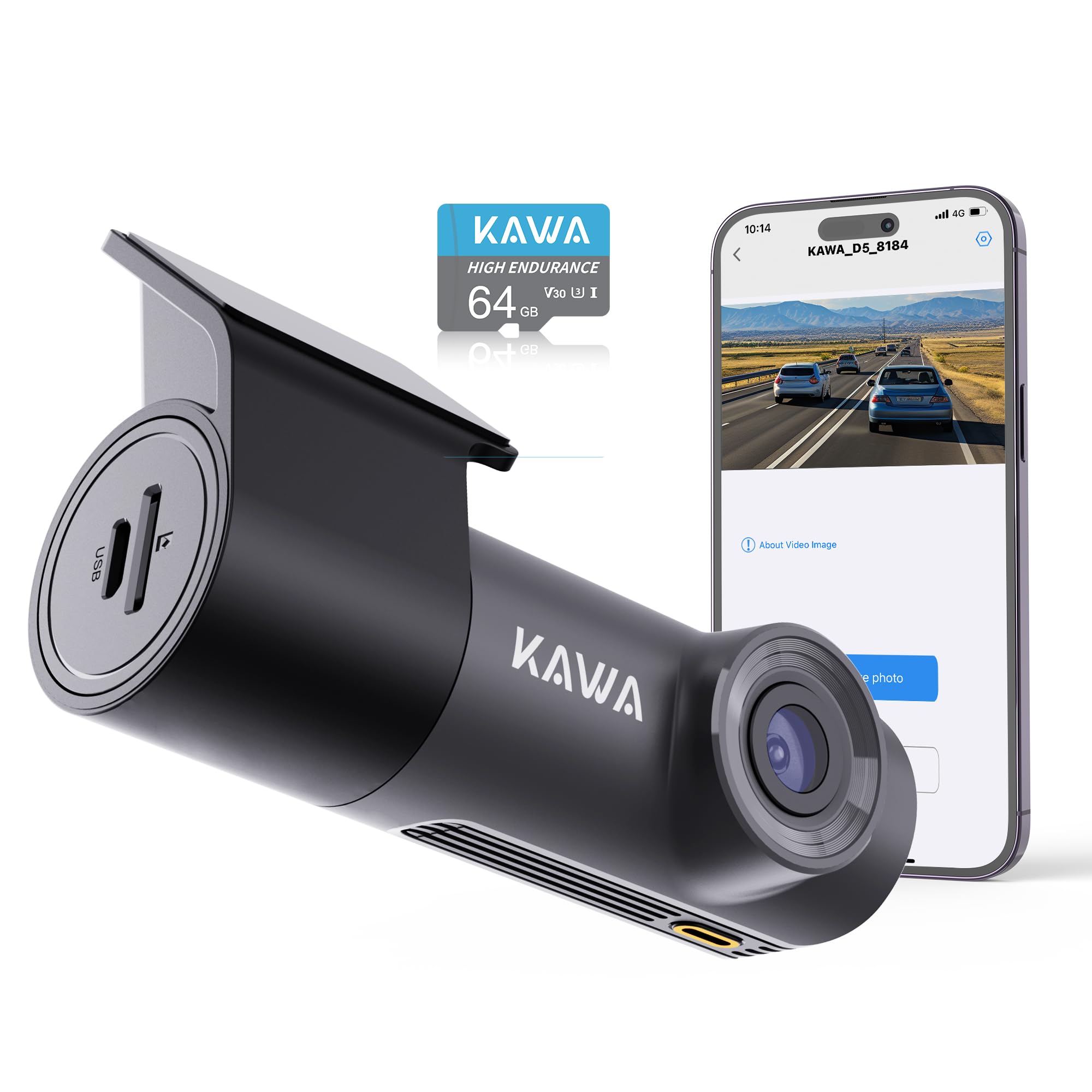
Image: The KAWA Dash Cam D5, showcasing its compact and hidden design when installed in a vehicle, with a visual guide for cable management.

Immagine: Oltreview of key features including 2K QHD resolution, voice control, Wi-Fi, 360-degree rotation, 24-hour parking monitor, night vision, emergency recording, and loop recording.
2. Informazioni sulla sicurezza
- Non utilizzare la dash cam durante la guida. Regolare le impostazioni solo quando il veicolo è parcheggiato in sicurezza.
- Assicurarsi che la dash cam sia installata in una posizione che non ostruisca la visuale del conducente view o interferire con le funzioni di sicurezza del veicolo.
- Utilizzare solo l'adattatore di alimentazione e i cavi forniti per evitare danni o rischi di incendio.
- Evitare di esporre il dispositivo a temperature estreme, alla luce solare diretta per periodi prolungati o all'umidità.
- Tenere il dispositivo lontano dalla portata dei bambini.
3. Contenuto della confezione
Verificare che tutti gli articoli siano presenti nel pacco:
- KAWA Dash Cam D5
- Caricabatterie per auto
- Manuale d'uso
- Carta adesiva resistente al calore
- Pellicola antistatica

Image: Visual representation of the items included in the KAWA Dash Cam D5 package.
4. Diagramma del prodotto
The KAWA Dash Cam D5 features a compact design. Refer to the image below for approximate dimensions.

Image: Physical dimensions of the KAWA Dash Cam D5, indicating its compact size for discreet installation.
5. Configurazione e installazione
5.1 Installazione della scheda Micro SD
- Assicurarsi che la dash cam sia spenta.
- Individuare lo slot per la scheda Micro SD sul lato della dash cam.
- Insert a Class 10 or higher Micro SD card (32GB or above recommended) into the slot until it clicks into place.
- Per rimuoverla, spingere delicatamente la scheda finché non scatta fuori.
Nota: A Micro SD card is not included and must be purchased separately. Using a reputable brand's high-speed Class 10 card is essential to avoid system crashes or video frame drops. For optimal compatibility, consider the official KAWA Micro SD card (ASIN: B0BNPKSJMX).

Image: Guidance on selecting and installing a Micro SD card for the dash cam.
5.2 Montaggio della Dash Cam
- Clean the windshield surface where the dash cam will be mounted.
- Apply the anti-static film to the desired location on the windshield. Ensure it is smooth and free of air bubbles.
- Press the 3M adhesive of the dash cam mount firmly onto the dotted line in the center of the electrostatic sticker. This ensures a stable and secure attachment.
- Adjust the dash cam's angle for optimal view. The mount allows for multi-angle 360° rotation adjustment.

Image: The dash cam's mini hidden design and suggested cable routing for a clean installation.

Image: Instructions for securing the dash cam mount and its 360-degree rotation capability.
5.3 Collegamento di alimentazione
- Collegare il caricabatteria per auto alla porta di ingresso dell'alimentazione della dash cam.
- Collega il caricabatteria per auto alla presa accendisigari del tuo veicolo.
- Instradare il cavo di alimentazione ordinatamente lungo il parabrezza e il cruscotto per evitare di ostruire il view o interferire con la guida.
6. Istruzioni per l'uso
6.1 Accensione/Spegnimento
- La dash cam si accenderà automaticamente e inizierà a registrare quando il motore del veicolo verrà acceso (e l'alimentazione verrà fornita alla presa accendisigari).
- Si spegnerà automaticamente quando si spegne l'accensione.
6.2 Registrazione in loop
The dash cam records video in continuous loops (1, 2, or 3-minute segments). When the Micro SD card is full, the oldest video files will be overwritten by new recordings, ensuring continuous operation.

Image: Explanation of the loop recording feature, which ensures continuous recording by overwriting the oldest files.

Image: Details on endless loop recording and how storage capacity affects recording duration.
6.3 Registrazione di emergenza (G-Sensor)
The built-in G-Sensor detects sudden impacts or collisions. When triggered, it automatically initiates emergency recording and locks the video file, impedendo che venga sovrascritto dalla registrazione in loop. Questi filevengono archiviati in una cartella separata.

Image: Visual explanation of how emergency recording functions during impacts or collisions.
6.4 Controllo vocale a mani libere
Control your dash cam using simple voice commands for safer operation while driving. Available commands include:
- "Blocca il video"
- "Scatta una foto"
- "Attiva audio" / "Disattiva audio"
- "Attiva il Wi-Fi" / "Disattiva il Wi-Fi"
- "Turn on hotspot" / "Turn off hotspot"

Image: Demonstrates the various voice commands available for hands-free operation of the dash cam.

Image: Further illustration of the voice control feature, emphasizing its convenience and safety benefits.
6.5 Controllo Wi-Fi e app
The KAWA Dash Cam D5 features built-in Wi-Fi, allowing you to connect to the KAWA AUTO app on your iOS or Android mobile device. Through the app, you can:
- View feed video in diretta.
- Scarica i video registrati sul tuo telefono.
- Regola le impostazioni della dash cam.
- Eseguire aggiornamenti del firmware OTA (Over-The-Air).
Download the "KAWA AUTO" app from the App Store (iOS) or Google Play Store (Android).

Image: Demonstrates Wi-Fi connectivity and app control for viewscaricare, condividere e guardare video.

Image: Details on the built-in Wi-Fi functionality and the KAWA AUTO app for managing the dash cam.
6.6 Monitoraggio del parcheggio 24 ore su 24, 7 giorni su 7
With the optional parking monitoring cable (not included, ASIN: B0BKPKV72H), the dash cam can provide 24-hour surveillance for your parked vehicle. It supports G-Sensor emergency recording and time-lapse mode to capture incidents or save storage space.
- Registrazione di emergenza del sensore G: Automatically records and locks video upon detecting impacts while parked.
- Modalità Time-lapse: Shrinks real-time footage (e.g., 30 minutes to 1 minute) to save storage space while maintaining continuous surveillance.

Image: Illustrates the 24/7 parking monitor feature, including G-Sensor and time-lapse capabilities.

Image: Further explanation of 24/7 parking surveillance and its features.
6.7 Night Vision and Wide Dynamic Range (WDR)
The dash cam is equipped with advanced features for clear nighttime footage and balanced exposure:
- Crystal-Clear Nighttime Footage: Captures license plates, road signs, and critical details with high clarity in low-light conditions.
- Ampia gamma dinamica (WDR): Automatically adjusts exposure to balance bright and dark areas, preventing overexposure in strong light and underexposure in shadows, ensuring clear images in various lighting conditions.

Image: Demonstrates the dash cam's capability to record clear footage di notte.

Image: Further illustration of the dash cam's night vision performance.

Image: Visual comparison demonstrating the effectiveness of Wide Dynamic Range (WDR) in balancing exposure.
6.8 Riproduzione video
Videos are recorded in MP4 format. For playback on your computer, we recommend using Potplayer or VLC Media Player for optimal experience.

Image: Recommended software for playing back dash cam video files su un computer.
7. Manutenzione
7.1 Pulizia della lente
Regularly clean the dash cam lens with a soft, lint-free cloth to ensure clear video quality. Avoid using abrasive cleaners or solvents.
7.2 Gestione della scheda Micro SD
- Formattazione: It is recommended to format the Micro SD card periodically (e.g., once a month) through the dash cam's app settings to maintain optimal performance and prevent data corruption. Formatting will erase all data on the card, so back up important fileè il primo.
- Sostituzione: Micro SD cards have a limited lifespan. If you experience frequent recording errors or data corruption, consider replacing the card.
7.3 Aggiornamenti firmware
Firmware updates may be released to improve performance, add features, or fix bugs. Check for and install updates via the KAWA AUTO mobile app to ensure your dash cam has the latest software.
8. Risoluzione Dei Problemi
| Problema | Possibile causa | Soluzione |
|---|---|---|
| La dash cam non si accende. | Nessuna alimentazione; caricabatteria per auto difettoso; collegamento allentato. | Controllare il collegamento del caricabatteria dell'auto; assicurarsi che la presa accendisigari del veicolo funzioni; provare una fonte di alimentazione diversa, se disponibile. |
| La registrazione si interrompe o si blocca. | Micro SD card issue (full, corrupted, slow speed); firmware issue. | Format the Micro SD card; replace with a high-speed Class 10 card; check for firmware updates. |
| Wi-Fi connection unstable or fails. | Interference; distance from phone; app issue. | Ensure phone is close to the dash cam (within 1.5 meters); restart dash cam and phone; reinstall the KAWA AUTO app. |
| Il controllo vocale non risponde. | Loud environment; incorrect commands; microphone obstruction. | Speak clearly and directly towards the dash cam; reduce background noise; ensure microphone is not blocked. |
| Scarsa qualità video di notte. | Lente sporca; condizioni di luce estremamente scarsa. | Clean the lens; ensure no obstructions on the windshield. |
9. Specifiche
| Caratteristica | Specificazione |
|---|---|
| Nome del modello | D5 |
| Risoluzione di acquisizione video | 1296p (2K QHD) |
| Tecnologia di connettività | Wifi |
| Caratteristiche speciali | App Control, Voice Control, Loop Recording, G-Sensor, Night Vision, 24/7 Parking Monitor (requires separate cable) |
| Tipo di montaggio | Supporto per parabrezza |
| Dimensioni del prodotto | 7 x 14 x 11 inches (approx. 3.7"L x 2.36"H x 1.18"D for camera unit) |
| Peso dell'articolo | 8.8 once |
| Fonte di alimentazione | Super Capacitor (no lithium-ion battery) |
| Temperatura di esercizio | -4°F (-20°C) ~ 149°F (65°C) |
| Temperatura di conservazione | -22°F (-30°C) ~ 176°F (80°C) |

Image: Information about the dash cam's Super Capacitor, which provides enhanced durability and temperature resistance compared to traditional batteries.
10. Garanzia e supporto
For warranty information, technical support, or service inquiries, please refer to the official KAWA website or contact KAWA customer support directly. Keep your purchase receipt as proof of purchase for warranty claims.
Per informazioni e risorse di supporto aggiornate, visitare: Negozio KAWA su Amazon