
Introduzione
This manual provides detailed instructions for the installation, operation, maintenance, and troubleshooting of your MekedeTech Android Car Radio Stereo. Please read this manual thoroughly before using the product to ensure proper function and safety. This unit is specifically designed for Alfa Romeo 159 models manufactured before 2008.
Configurazione e installazione
1. Package Contents and Compatibility
Verify that all accessories required for installation are included, such as the dash kit, power cable, RCA cable, reversing camera cable, and USB cables. This unit is a plug-and-play solution for compatible vehicles.

Immagine: Comparison of the car dashboard before and after the installation of the MekedeTech Android Car Radio Stereo, showing the integrated display.
Before installation, confirm your vehicle's dashboard opening size matches the unit's dimensions: 193mm x 116mm. Incompatible dimensions may prevent proper fitment.

Immagine: Visual guide for checking dashboard dimensions (193mm x 116mm) and compatibility with various Alfa Romeo 159 models (159, Sportwagon, Spider). Examples of compatible and incompatible dashboard layouts are shown.
2. Cooling Fan Setup
The unit includes a cooling fan designed to manage high temperatures during extended use, preventing performance issues. Ensure the cooling fan is properly connected and functional during installation.

Immagine: An illustration detailing the unit's internal components (Octa-core CPU, 8GB RAM, 128GB ROM), the function of the cooling fan in temperature regulation, and a four-step setup process for activating the cooling fan.
Cooling Fan Activation Steps:
- Connect the cooling fan cable.
- Navigate to Settings > Device > Sound.
- Select "Device" and ensure "AMP ON" is enabled.
- The cooling fan will start automatically when needed.
3. Installazione della scheda SIM 4G
The unit supports 4G LTE connectivity. Insert a 4G SIM card into the designated slot to access the internet without relying on a Wi-Fi hotspot.
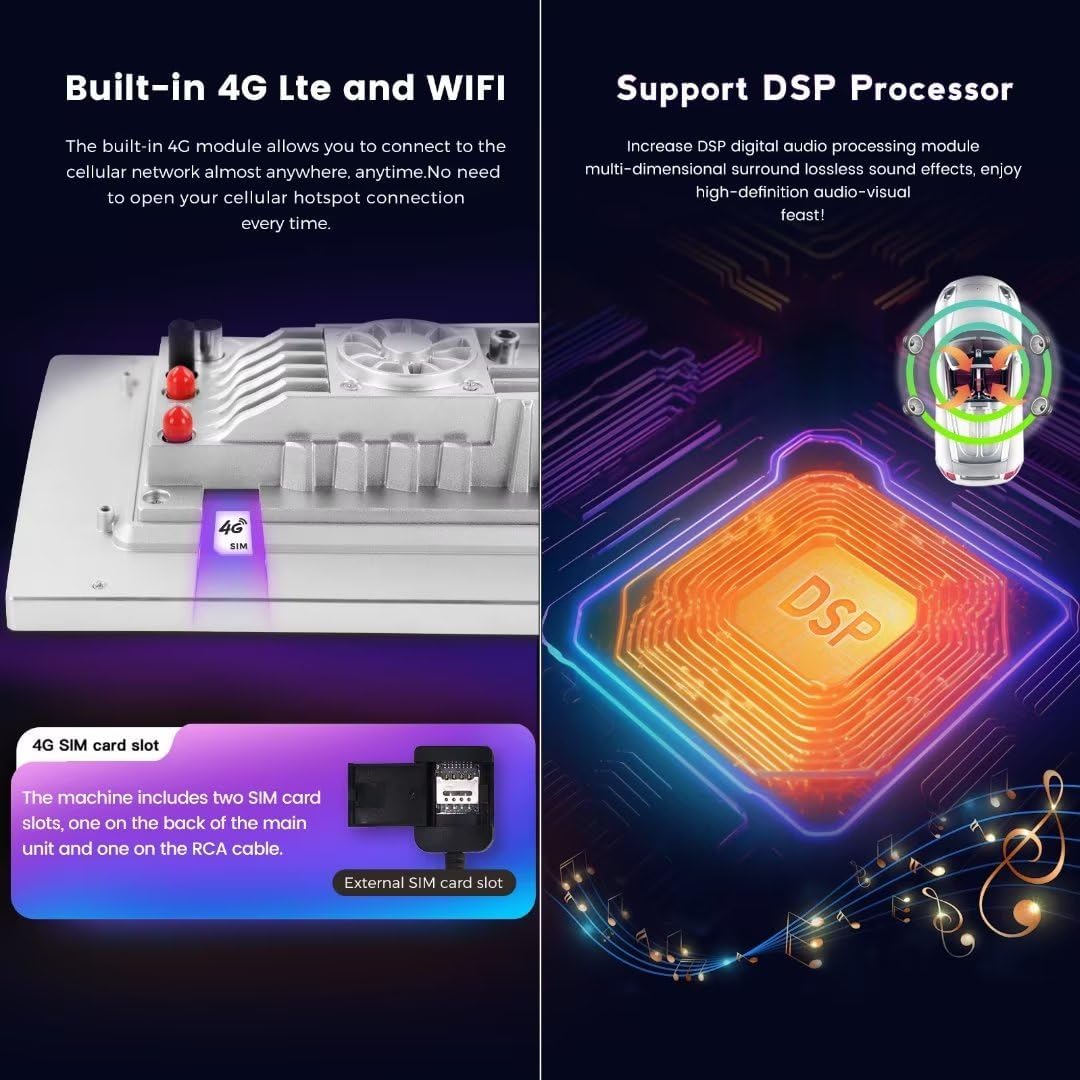
Immagine: A visual representation of the built-in 4G LTE module and SIM card slot, indicating two SIM card slots (one on the back of the main unit, one on the RCA cable). Also highlights the DSP processor for enhanced audio quality.
The machine includes two SIM card slots: one on the back of the main unit and one on the RCA cable. Use the external SIM card slot for easier access.
Istruzioni per l'uso
1. Funzionamento di base
The unit runs on Android 12 OS, providing a familiar and intuitive touch screen interface. Navigate through menus and applications using the 9-inch IPS touch screen with 1280x720 resolution.
- Accensione/spegnimento: Premere e tenere premuto il pulsante di accensione.
- Controllo del volume: Regolare tramite i pulsanti fisici o i controlli sullo schermo.
- Controllo del volante: The unit supports original steering wheel control functions, allowing you to switch songs, channels, and adjust volume without removing your hands from the steering wheel.
2. CarPlay wireless e Android Auto
The unit features built-in wireless CarPlay and wired Android Auto for seamless smartphone integration.

Immagine: Visual guide showing the user interface for CarPlay and Android Auto, along with step-by-step instructions for connecting both wireless CarPlay (iOS system) and wireless Android Auto (Android system) via Bluetooth and the "Car Link" application.
Wireless CarPlay (iOS System) Connection Steps:
- Connetti il Bluetooth.
- Click on "Car Link" application.
- Wait for connection. (CarPlay can also be connected via USB Cable).
Wireless Android Auto (Android System) Connection Steps:
- Connetti il Bluetooth.
- Click on "Car Link" application.
- Wait for connection. (Android Auto can also be connected via USB Cable).
3. Internet Connectivity (4G LTE & WiFi)
Access the internet using either a 4G SIM card or by connecting to a Wi-Fi hotspot.
- 4G LTE: Insert a 4G SIM card into the designated slot. The unit will automatically connect to the cellular network.
- Wifi: Go to Settings > Network & Internet > Wi-Fi, then select your desired network and enter the password.
4. Navigazione GPS
The unit has built-in GPS navigation. Access pre-installed maps or download your preferred navigation applications from the Google Play Store.
5. Bluetooth 5.0
Connect your smartphone via Bluetooth 5.0 for hands-free calls and audio streaming. Pair your device through the Bluetooth settings menu on the head unit.
6. Sistema audio DSP
The built-in DSP (Digital Signal Processor) provides enhanced audio quality. Adjust sound settings, equalizer, and other audio parameters through the sound settings menu to customize your listening experience.
Manutenzione
- Pulizia dello schermo: Utilizzare un panno morbido e privo di lanugine per pulire il touchscreen. Evitare detergenti abrasivi o solventi.
- Aggiornamenti software: Controlla periodicamente la presenza di aggiornamenti di sistema nel menu delle impostazioni per garantire prestazioni ottimali e l'accesso a nuove funzionalità.
- Sistema di raffreddamento: Assicurarsi che le prese d'aria della ventola di raffreddamento non siano ostruite per garantire un flusso d'aria adeguato ed evitare il surriscaldamento.
- Cura generale: Evitare di esporre l'unità a temperature estreme, alla luce solare diretta per periodi prolungati o a umidità eccessiva.
Risoluzione dei problemi
If you encounter issues with your MekedeTech car stereo, refer to the following common solutions:
- Nessun potere:
- Controllare tutti i collegamenti elettrici e i fusibili.
- Assicurarsi che l'accensione dell'auto sia accesa.
- Nessun suono:
- Verificare che i livelli del volume non siano disattivati o impostati troppo bassi.
- Controllare i collegamenti degli altoparlanti.
- Ensure the "AMP ON" setting is enabled (refer to Cooling Fan Setup, step 3).
- Touchscreen che non risponde:
- Riavvia l'unità.
- Assicurarsi che lo schermo sia pulito e privo di detriti.
- Perdita del segnale GPS:
- Assicurarsi che l'antenna GPS sia installata correttamente e abbia una visuale libera view del cielo.
- Controllare le impostazioni GPS nel sistema.
- Problemi di connessione CarPlay/Android Auto:
- Assicurati che il Bluetooth sia abilitato sia sull'unità che sullo smartphone.
- Verify the "Car Link" app is running.
- Try connecting via USB cable if wireless connection fails.
- Riavviare sia l'unità principale che lo smartphone.
- 4G LTE Not Working:
- Assicurarsi che la scheda SIM 4G sia inserita correttamente.
- Check your SIM card's data plan and activation status.
- Verify network settings in the unit.
For persistent issues, contact MekedeTech customer support.
Specifiche
| Sistema | Sistema operativo Android 12 |
| processore | 8-Core A53 1.8GHz |
| Memoria | 8GB RAM, ROM 128GB |
| Dimensioni dello schermo | 9 pollici |
| Risoluzione dello schermo | 1280 x 720 (HD IPS Touch Screen) |
| Potenza in uscita | 4 * 50 W. |
| Connettività | Built-in 4G LTE, WiFi Module, Bluetooth 5.0 |
| Caratteristiche speciali | Wireless CarPlay, Wired Android Auto, Built-in GPS Navigation, DSP Sound System, Steering Wheel Control Support |
| Formati audio | APE, FLAC, WAV, MP3, WMA, ecc. |
| Formati video | MKV, RMVB, AVI, MP4, MDV, ecc. |
| Formati immagine | PNG, JPEG, JPG, GIF, WBMP, BNP, ecc. |
Informazioni sulla garanzia
This MekedeTech product comes with a Garanzia di 1 anno dalla data di acquisto. La presente garanzia copre difetti di fabbricazione e malfunzionamenti in condizioni di normale utilizzo. Si prega di conservare la prova d'acquisto per eventuali reclami in garanzia. La garanzia non copre danni causati da installazione impropria, uso improprio, incidenti o modifiche non autorizzate.
Assistenza clienti
For technical assistance, troubleshooting not covered in this manual, or warranty inquiries, please contact MekedeTech customer support. You may also visit the official MekedeTech store on Amazon for additional resources and contact information.
MekedeTech Official Store: Visita il negozio