
1. Prodotto finitoview
The QRD Wireless Controller (Model: US-T5-JB02) is a high-performance replacement controller designed for Nintendo Switch, Switch Pro, Lite, and OLED models. It features advanced technologies such as Hall Effect joysticks for precise, drift-free control, dual vibration motors for immersive feedback, and a 6-axis gyroscope for accurate motion sensing. This controller also includes programmable back buttons and customizable LED backlighting, enhancing your gaming experience.
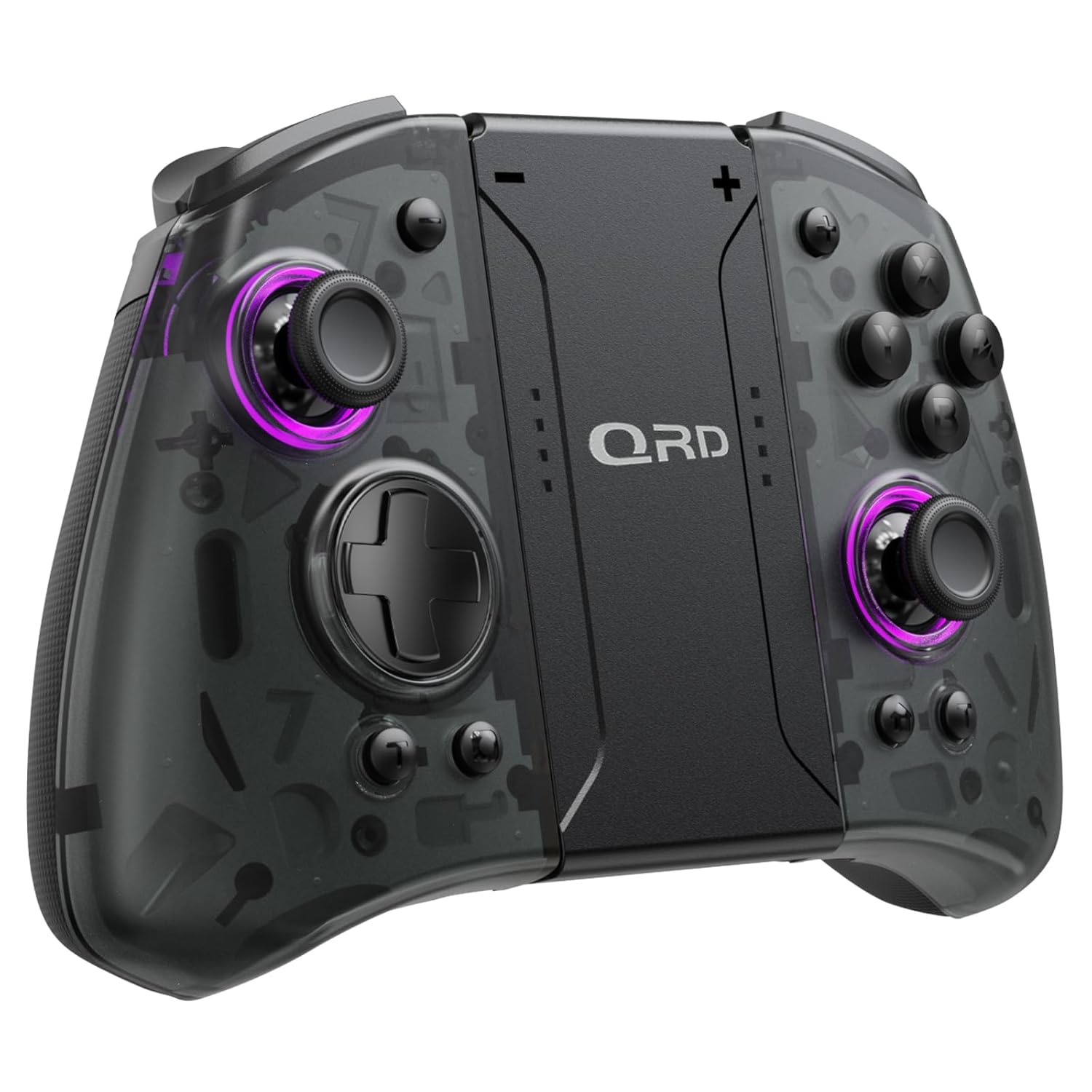
Immagine 1.1: anteriore view of the QRD Wireless Controller, showcasinil suo design ergonomico e la disposizione dei pulsanti.
2. Caratteristiche principali
- Connettività wireless Bluetooth 5.3: Ensures stable, lag-free connection for seamless gameplay.
- Joystick ad effetto Hall: Provides 360° precise, drift-free control and extended lifespan.
- Motori a doppia vibrazione: Offers 3 levels of adjustable vibration for enhanced tactile feedback.
- Rilevamento del movimento tramite giroscopio a 6 assi: Enables accurate tilt detection for precise aiming and movement in compatible games.
- Pulsanti posteriori programmabili: Customize controls with single or multiple mappings for efficient combo execution.
- Funzione Turbo: Allows for rapid firing of buttons.
- Retroilluminazione a LED: Features 8 different colors with static, breathing, and flashing modes for personalized aesthetics.
- Batteria a lunga durata: Up to 10 hours of uninterrupted gameplay on a single charge (2 hours charging time).
- Design ergonomico: Comfortable grip for extended gaming sessions, includes a screenshot function.

Image 2.1: Diagram highlighting key features such as Bluetooth 5.3, Dual Vibration, 6-Axis Gyro, Turbo, Macro Back Paddles, and Colorful Options.

Image 2.2: Illustration demonstrating the Hall Effect Joysticks, emphasizing drift-free and accurate control.
3. Configurazione e connessione
3.1 Abbinamento iniziale con Nintendo Switch
- Assicurati che la tua console Nintendo Switch sia accesa e aggiornata all'ultima versione del sistema.
- Dal menu HOME, seleziona "Controller" > "Cambia impugnatura/ordine".
- On the QRD Wireless Controller, press and hold the Pulsante HOME (usually located in the center) for 3-5 seconds until the LED indicators start flashing rapidly.
- Una volta che il controller è stato associato correttamente, i LED del lettore corrispondente sul controller si illumineranno in modo fisso.
- The controller can also be connected by sliding it into the Nintendo Switch Dock while the console is attached.
3.2 Riconnessione del controller
Per ricollegare un controller precedentemente associato, premere semplicemente il tasto Pulsante HOME once. The controller will automatically attempt to connect to the last paired console.
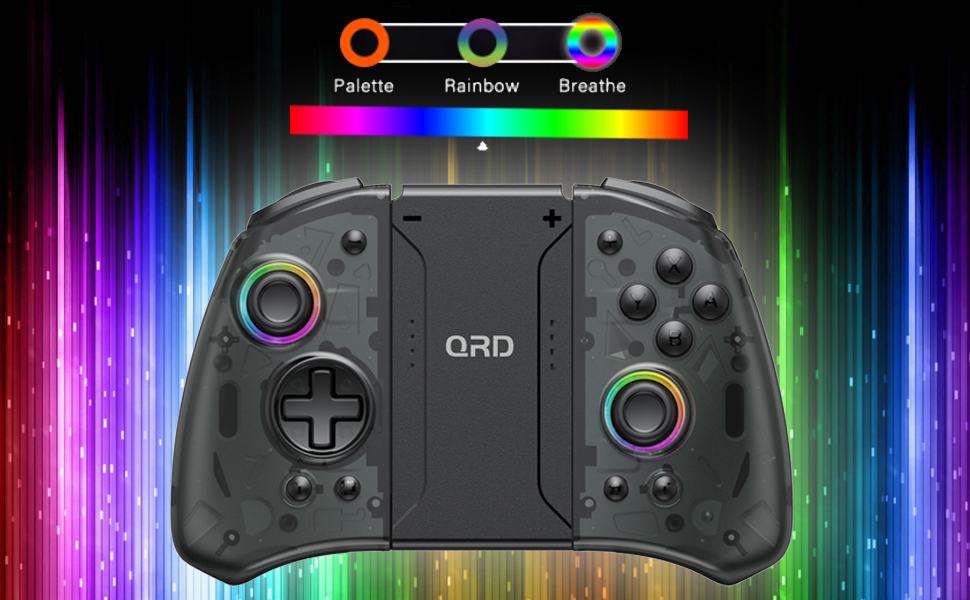
Image 3.1: Visual representation of controller compatibility with Nintendo Switch and Switch OLED models. Note: Not compatible with Switch Lite.
4. Istruzioni per l'uso
Disposizione dei 4.1 pulsanti
Prendi familiarità con la disposizione dei pulsanti del controller:
- Joystick sinistro: Controllo del movimento.
- Joystick destro: Controllo della telecamera o della mira.
- Tasto direzionale: Input direzionale.
- Pulsanti A/B/X/Y: Pulsanti di azione.
- Pulsanti L/R: Bottoni sulle spalle.
- Pulsanti ZL/ZR: Pulsanti di attivazione.
- Tasto CASA: Returns to the HOME Menu, powers on/off the controller.
- Pulsante Screenshot: Cattura schermate.
- +/- Pulsanti: Plus and Minus buttons for in-game functions.
- M1/M2 (Back Buttons): Programmable macro buttons.
4.2 Regolazione dell'intensità della vibrazione
The controller supports 3 levels of vibration intensity. To adjust, press and hold the Pulsante turbo e poi premere il tasto D-Pad su or D-Pad giù to cycle through intensity levels (Low, Medium, High, Off).
4.3 Turbo Function Setup
To set a button to Turbo mode:
- Premere e tenere premuto il tasto Pulsante turbo.
- While holding Turbo, press the desired action button (e.g., A, B, X, Y, L, R, ZL, ZR). The button will now continuously register input when held down.
- To clear Turbo for a specific button, repeat the process. To clear all Turbo settings, press and hold the Pulsante turbo per 5 secondi.
4.4 Programming Back Buttons (Macro)
The M1 and M2 back buttons can be programmed to execute a sequence of button presses (macro). Each macro can store up to 16 button presses.
- Premere e tenere premuto il tasto M1 or M2 pulsante che si desidera programmare.
- While holding the M button, press the Pulsante SET (refer to manual diagram for location, typically a small button on the back). The indicator light will flash slowly.
- Enter the desired sequence of button presses (e.g., A, B, X, Y, D-Pad directions).
- Premere il tasto Pulsante SET again to save the macro. The indicator light will stop flashing.
- To clear a macro, press and hold the programmed M button and then press the Pulsante SET due volte.
4.5 LED Backlight Adjustment
The controller features customizable RGB lighting. To cycle through modes and colors:
- Premere il tasto Pulsante LED (refer to manual diagram for location) to change between static color, breathing, and flashing modes.
- In static mode, press the Pulsante LED repeatedly to cycle through the 8 available colors.

Image 4.1: Display of the controller's LED backlight options, including Palette (static colors), Rainbow, and Breathe modes.
5. Ricarica e durata della batteria
The QRD Wireless Controller is equipped with a built-in rechargeable Lithium Polymer battery. A 2.5m USB-C cable is included for charging.
- Connect the USB-C end of the cable to the controller's charging port and the USB-A end to a power source (e.g., Nintendo Switch Dock, USB wall adapter, computer USB port).
- La ricarica richiede circa 2 ore per una carica completa.
- Una carica completa garantisce fino a 10 ore di gioco continuo.
- The LED indicators on the controller will show charging status and battery level.
6. Manutenzione
To ensure the longevity and optimal performance of your QRD Wireless Controller, follow these maintenance guidelines:
- Pulizia: Utilizzare un panno morbido e asciutto per pulire il controller. Per lo sporco ostinato, leggermente dampLavare il panno con acqua. Evitare l'uso di prodotti chimici aggressivi, solventi o detergenti abrasivi.
- Magazzinaggio: Conservare il controller in un luogo fresco e asciutto, lontano dalla luce solare diretta, da temperature estreme e da elevata umidità.
- Gestione: Avoid dropping the controller or subjecting it to strong impacts. Do not disassemble the controller, as this may void the warranty and cause damage.
- Ricarica: Do not leave the controller charging for excessively long periods after it is fully charged.
7. Risoluzione Dei Problemi
| Problema | Possibile causa | Soluzione |
|---|---|---|
| Il controller non si connette. | Batteria scarica; Non associato; Interferenza. | Charge the controller; Re-pair the controller following Section 3.1; Move closer to the console or away from other wireless devices. |
| Input lag or disconnection during gameplay. | Wireless interference; Distance from console; Low battery. | Ensure no strong wireless signals are nearby; Reduce distance to console; Charge the controller. |
| Joysticks drift or are unresponsive. | Calibration issue; Physical debris. | Go to Switch System Settings > Controllers and Sensors > Calibrate Control Sticks. Clean around the joystick base. |
| I pulsanti non rispondono. | Stuck button; Software glitch. | Ensure buttons are not physically stuck. Try resetting the controller (if a reset button is present, otherwise power cycle). |
| La vibrazione non funziona. | Vibration setting off; Game does not support vibration. | Adjust vibration intensity (Section 4.2). Verify game compatibility. |
8. Specifiche
| Caratteristica | Dettaglio |
|---|---|
| Numero di modello | US-T5-JB02 |
| Connettività | Bluetooth 5.3 |
| Compatibilità | Nintendo Switch, Switch Pro, Switch OLED |
| Tipo di joystick | Effetto Hall |
| Vibrazione | Doppi motori, 3 livelli regolabili |
| Controllo del movimento | Giroscopio ad asse 6 |
| Pulsanti programmabili | Yes (Back Buttons) |
| Tipo di batteria | Polimero di litio |
| Tempo di ricarica | Circa 2 ore |
| Tempo di gioco | Fino a 10 ore |
| Porta di ricarica | USB-C |
| Dimensioni | 7.95 x 5.51 x 2.36 pollici (circa) |
| Peso | 12.35 once (circa) |
9. Garanzia e supporto
9.1 Informazioni sulla garanzia
QRD products are manufactured with high-quality materials and undergo rigorous testing. This product comes with a standard manufacturer's warranty against defects in materials and workmanship. Please refer to the product packaging or the official QRD websito per termini e durata specifici della garanzia.
9.2 Assistenza clienti
For technical assistance, troubleshooting, or warranty claims, please contact QRD Customer Support. Have your product model number (US-T5-JB02) and purchase information ready when contacting support.
- Supporto online: Visit the official QRD website for FAQs, updated manuals, and support contact forms.
- Supporto via e-mail: [Insert QRD Support Email Address Here - if available, otherwise omit]
- Supporto telefonico: [Insert QRD Support Phone Number Here - if available, otherwise omit]
We are committed to providing excellent customer service and ensuring your satisfaction with QRD products.