
1. Introduzione
Thank you for choosing the Devoko Electric Standing Desk. This manual provides essential information for the safe assembly, operation, and maintenance of your new height-adjustable desk. Please read these instructions carefully before use and retain them for future reference.

Image: Devoko Electric Standing Desk 140x80cm. This image displays the overall design of the black electric standing desk with its spacious desktop and sturdy frame.
2. Informazioni sulla sicurezza
- This desk has a maximum load capacity of 80 kgNon superare questo limite di peso.
- For stability, ensure the desk is placed on a level and even surface.
- Avoid overloading the desk, especially on one side, to maintain balance.
- La scrivania è dotata di anti-collision technology to prevent accidents. However, always be aware of your surroundings during height adjustments.
- Always supervise children when the desk is in use or being adjusted to prevent accidental touching and potential injuries.
- Durante la regolazione dell'altezza, tenere mani e oggetti lontani dalle parti in movimento.
3. Contenuto della confezione
Prima del montaggio, verificare che tutti i componenti siano presenti e integri. Se qualche componente risulta mancante o danneggiato, contattare l'assistenza clienti.
- Desktop (140x80cm)
- Colonne di sollevamento elettriche (gambe)
- Componenti del telaio della scrivania
- Pannello di controllo con display a LED
- Adattatore di alimentazione e cavi
- 2 x ganci
- 1 x vassoio per la gestione dei cavi
- Ferramenta di montaggio (viti, utensili)
- Manuale d'uso
4. Istruzioni di montaggio
Per questo prodotto è richiesto il montaggio. Si consiglia di due persone eseguire l'assemblaggio per garantire sicurezza e facilità di installazione.
- Disimballare i componenti: Estrarre con cautela tutti i componenti dall'imballaggio e disporli su una superficie pulita e morbida per evitare graffi.
- Montare la struttura della scrivania: Attach the crossbars to the lifting columns. Ensure all screws are tightened securely.
- Connect Drive Shaft: Insert the drive shaft to connect the two lifting columns. Ensure it is properly aligned and secured for synchronized movement.
- Fissare i piedi: Secure the stabilizing footrests to the bottom of the lifting columns. The leg width is 80x50mm, and the rounded spacers on the bottom are 8cm in diameter. Silent wheels are also available for replacement if desired.

Image: Sturdy Steel Construction. This image highlights the robust steel frame of the desk, showing the dimensions of the leg (80x50mm) and the base (6cm height, 70cm length), emphasizing stability.
- Montare il desktop: Posizionare con cautela il desktop sul telaio assemblato e fissarlo utilizzando le viti fornite.
- Installare gli accessori: Attach the 2 hooks and the cable management tray as desired. Utilize the wire collecting hole for cable routing.

Image: Desk Features. This image illustrates the wire collecting hole for cable organization, the two hooks for hanging items, the cable management tray for tidiness, and the integrated USB charging port.
- Installa il Pannello di controllo: Connect the control panel to the desk frame. It is recommended to fix the controller at the end of the assembly process to avoid damage during movement.
- Connetti alimentazione: Collegare l'adattatore di corrente alla scrivania e poi a una presa a muro.
5. Istruzioni per l'uso
Your Devoko Electric Standing Desk is equipped with a smart control panel for easy height adjustment and personalized settings.
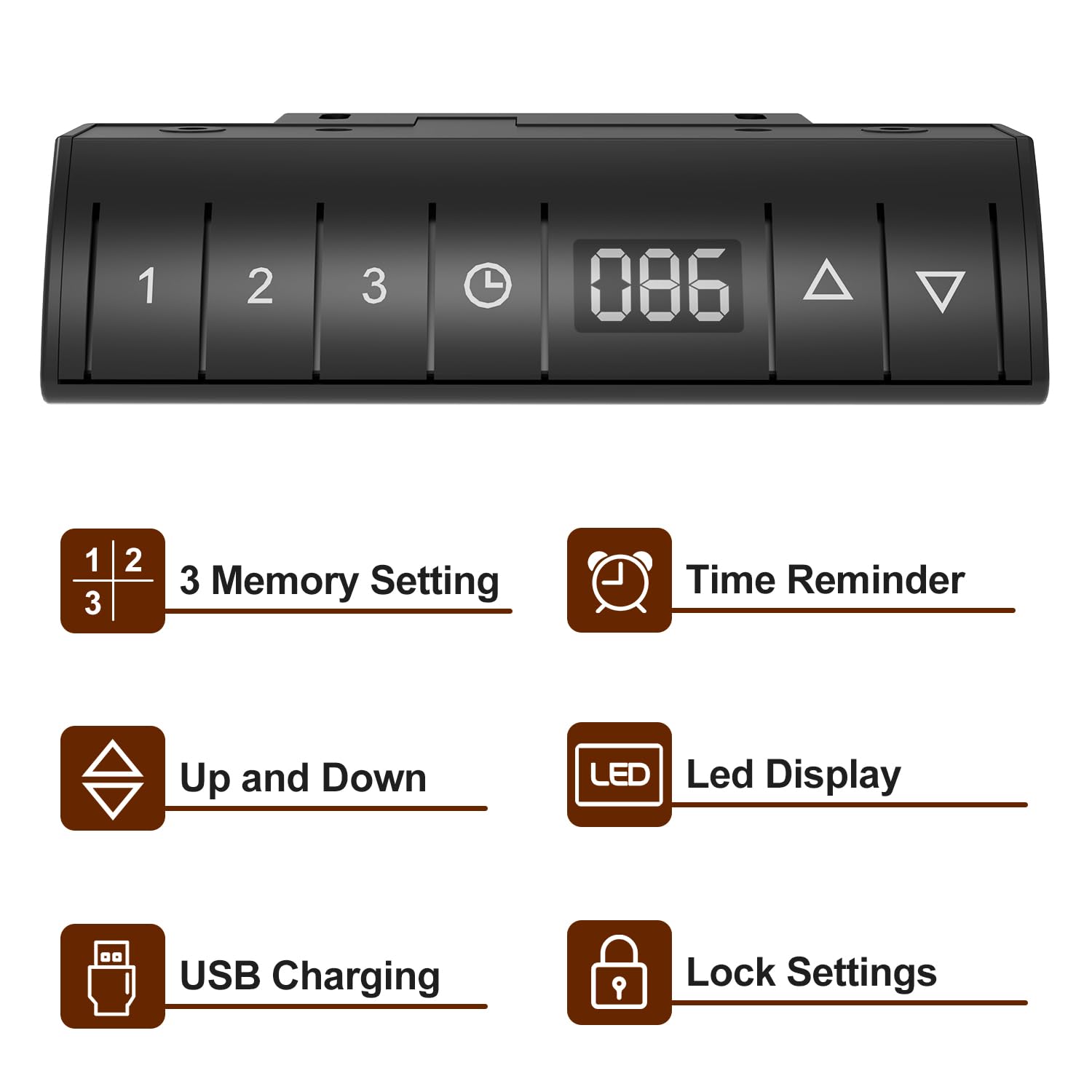
Image: Devoko Desk Control Panel. This image shows the control panel with buttons for 3 memory settings, time reminder, up/down adjustment, LED display, USB charging port, and lock settings.
- Regolazione dell'altezza: Utilizzare il Su (▲) E Giù (▼) buttons on the control panel to adjust the desk to your desired height. The current height will be displayed on the Schermo LED.
- Memory Settings (1, 2, 3):
- Adjust the desk to a desired height.
- Premere il tasto Memoria (M) pulsante, quindi premere uno dei pulsanti numerati (1, 2 o 3) per salvare l'altezza corrente.
- Per richiamare un'altezza salvata, è sufficiente premere il pulsante numerato corrispondente.
- Time Reminder: Set reminders for standing or sitting intervals (0.5, 1.0, 1.5, 2.0 hours) to promote healthier work habits. Consult the full manual for specific programming steps.
- Ricarica USB: The integrated USB port allows convenient charging of your devices.
- Impostazione blocco: Activate the lock function to prevent accidental height adjustments, especially useful in households with children. Consult the full manual for activation/deactivation steps.
- Tecnologia anticollisione: The desk is designed to stop movement if it encounters an obstruction during adjustment.

Image: Anti-collision Technology and Stabilizing Footrests. This image demonstrates the anti-collision feature, where the desk stops if an object is detected, and also shows the design of the stabilizing footrests.
6. Manutenzione
- Pulizia: Pulisci la superficie e la struttura della scrivania con un panno morbido e asciutto.amp panno. Evitare prodotti chimici aggressivi o detergenti abrasivi.
- Gestione dei cavi: Regularly check and organize cables to prevent tangles and damage. Use the provided cable management tray and stickable storage design to keep cables tidy.
- Elementi di fissaggio: Controllare periodicamente tutte le viti e gli elementi di fissaggio per assicurarsi che siano ben serrati. Serrarli nuovamente se necessario.
- Cura del motore: Do not attempt to open or service the motor or control unit. Refer to qualified personnel for any repairs.
7. Risoluzione Dei Problemi
| Problema | Possibile causa | Soluzione |
|---|---|---|
| La scrivania non si muove | Cavo di alimentazione scollegato; Sovraccarico; Errore motore | Check power connections; Reduce weight on desk; Unplug for 30 seconds and plug back in to reset. |
| Regolazione dell'altezza non uniforme | Drive shaft not properly connected; Obstruction | Ensure drive shaft is securely installed; Check for obstructions under the desk. |
| Il pannello di controllo non risponde | Lock function activated; Cable connection issue | Deactivate lock function; Check control panel cable connection. |
| L'anticollisione si attiva frequentemente | Sensitivity too high; Obstruction | Check for objects near the desk's path; Refer to the full manual for anti-collision sensitivity adjustment. |
8. Specifiche
- Marca: Devoko
- Modello: Electric Standing Desk 140x80cm
- Dimensioni del prodotto (P x L x A): 140D x 80W x 116H Centimeters (Maximum Height)
- Altezza minima: 72 centimetri
- Altezza massima: 116 centimetri
- Capacità di carico massima: 80 kg
- Materiale di base: Acciaio legato
- Materiale superiore: Legno (finitura laminata)
- Colore: Nero
- Meccanismo di sollevamento: Elettrico
- Caratteristiche speciali: Adjustable Height, Built-In USB Outlet, Electric, Ergonomic, Hooks, 3 Memory Settings, Time Reminder, LED Display, Lock Setting, Anti-Collision Technology, Cable Management Tray.
- Assemblaggio richiesto: Sì (consigliato 2 persone)
9. Garanzia e supporto
This Devoko Electric Standing Desk comes with a Garanzia limitata. For specific details regarding warranty coverage, terms, and conditions, please refer to the warranty card included with your product or contact Devoko customer support.
For technical assistance, troubleshooting, or to inquire about replacement parts, please contact Devoko customer service through the retailer where the product was purchased or via the official Devoko websito.