
H3C H3C Magic NX15-UK
Manuale utente del router Wi-Fi 6 Gigabit Dual Band H3C Magic NX15 AX1500
Model: H3C Magic NX15-UK
1. Introduzione
The H3C Magic NX15 is a high-performance Gigabit Wi-Fi 6 router designed to provide a fast and reliable internet experience. Featuring a vertical design, full gigabit network ports, and Wi-Fi 6 (802.11ax) technology on the 5GHz band, it ensures high-speed connectivity. Equipped with four high-gain external antennas and EasyMesh compatibility, it offers wide and flexible network signal coverage. Enhanced security is provided through WPA3 encryption. This manual provides essential information for setting up, operating, and maintaining your H3C Magic NX15 router.
2. Contenuto della confezione
Si prega di controllare attentamente il contenuto della confezione. Se qualche articolo risulta mancante o danneggiato, contattare il rivenditore.
- H3C Magic NX15 AX1500 Dual Band Gigabit Wi-Fi 6 Router
- Adattatore di alimentazione
- Cavo Ethernet
- Guida di installazione rapida (questo manuale)
3. Prodotto finitoview
Familiarize yourself with the components and interfaces of your H3C Magic NX15 router.
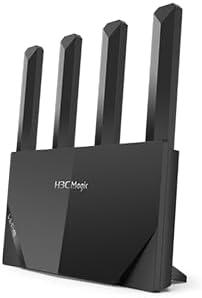
Figura 3.1: Davanti view of the H3C Magic NX15 router, showcasing its vertical design and four external antennas.
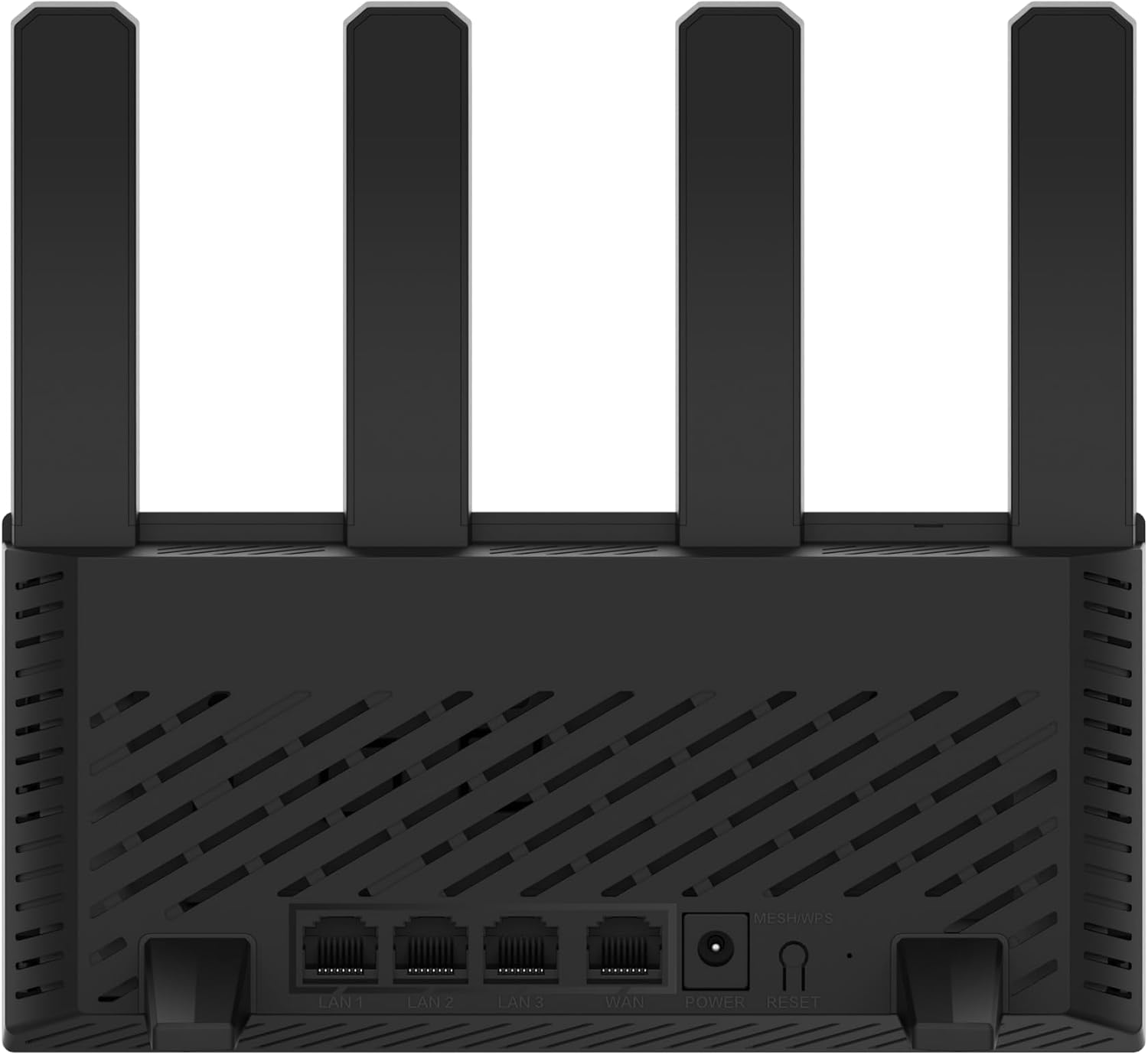
Figura 3.2: Posteriore view of the H3C Magic NX15 router, displaying the LAN ports, WAN port, power input, and Reset/WPS button.

Figura 3.3: Superiore view of the H3C Magic NX15 router, highlighting the ventilation design for heat dissipation.

Figura 3.4: Lato view of the H3C Magic NX15 router, showing the sleek profile and additional ventilation slots.
Port and Button Descriptions:
- Porta WAN: Si collega al modem o alla rete del tuo provider di servizi Internet (ISP).
- Porte LAN (LAN1, LAN2, LAN3): Collegati a dispositivi cablati come computer, console di gioco o smart TV.
- Porta di alimentazione: Si collega all'adattatore di alimentazione incluso.
- Pulsante Reset/WPS:
- Press briefly to activate WPS (Wi-Fi Protected Setup) for easy connection of compatible devices.
- Press and hold for approximately 5-10 seconds to restore the router to factory default settings.
- antenne: Four high-gain external antennas for optimal Wi-Fi signal coverage.
4. Guida all'installazione
Follow these steps to set up your H3C Magic NX15 router for the first time.
- Disimballare il router: Estrarre con cautela il router e tutti gli accessori dalla confezione.
- Posizionare il router: Place the router in a central location in your home or office, away from obstructions and sources of interference (e.g., microwaves, cordless phones). Ensure good ventilation.
- Connettiti all'alimentazione: Connect the included power adapter to the router's power port and then plug the adapter into a power outlet. Wait for the router to power on and its indicator lights to stabilize.
- Connetti al modem: Connect one end of the provided Ethernet cable to the WAN port on your H3C Magic NX15 router and the other end to your modem's LAN port.
- Connetti dispositivi (facoltativo): For wired connections, connect an Ethernet cable from one of the router's LAN ports to your computer or other network device.
- Connettiti al Wi-Fi:
- Sul tuo computer o dispositivo mobile, cerca le reti Wi-Fi disponibili.
- Selezionare il nome della rete Wi-Fi (SSID) stampato sull'etichetta nella parte inferiore del router.
- Enter the Wi-Fi password (also printed on the router's label) when prompted.
- Pagina di gestione del router di accesso:
- Aprire un web browser (ad esempio, Chrome, Firefox, Edge).
- Digitare l'indirizzo IP predefinito (di solito
192.168.1.1orh3cmagic.com) into the address bar and press Enter. Refer to the router's label for the exact address. - Follow the on-screen instructions to complete the initial setup, including setting a new administrator password and configuring your internet connection type (e.g., PPPoE, DHCP, Static IP).
5. Istruzioni per l'uso
This section details the key features and how to operate your H3C Magic NX15 router.
5.1 Dual-Band Wi-Fi Operation
The H3C Magic NX15 supports dual-band Wi-Fi (2.4GHz and 5GHz) for optimal performance. It features intelligent band steering, which automatically directs your devices to the best available band (2.4GHz for wider coverage, 5GHz for higher speeds) without manual selection.
- Banda da 2.4 GHz: Provides wider coverage and better penetration through walls, suitable for general browsing and devices further from the router.
- Banda da 5 GHz: Offers higher speeds and lower latency, ideal for streaming 4K video, online gaming, and high-bandwidth applications, typically for devices closer to the router.
5.2 Intelligent Management via Mobile App
Manage your router conveniently using the dedicated H3C mobile application. The app allows for easy network settings configuration, network speed optimization, and various other operations.
- Scarica l'App: Cercare the "H3C Magic" app in your device's app store (Google Play Store for Android or Apple App Store for iOS).
- Installa e avvia: Installa l'app e aprila.
- Login: Use your router's administrator credentials to log in to the app.
- Gestisci impostazioni: Dall'app puoi:
- Change Wi-Fi names and passwords.
- Monitorare i dispositivi connessi.
- Imposta il controllo parentale.
- Configure guest Wi-Fi networks.
- Optimize network performance.
5.3 EasyMesh for Whole-Home Wi-Fi
The H3C Magic NX15 supports EasyMesh technology, allowing you to expand your Wi-Fi coverage by adding additional compatible H3C mesh units. This creates a seamless whole-home Wi-Fi network, eliminating dead zones in large or complex house types.
- Refer to the EasyMesh setup guide provided with your additional mesh units for detailed instructions on expanding your network.
- Ensure all mesh units are compatible with the EasyMesh standard.
5.4 Funzionalità di sicurezza della rete
The router includes multiple functions to enhance your private network's security:
- Crittografia WPA3: Provides the latest and strongest Wi-Fi security protocol.
- Access Allowlist/Denylist: Controlla quali dispositivi possono connettersi alla tua rete in base ai loro indirizzi MAC.
- Wi-Fi per gli ospiti: Crea una rete Wi-Fi separata per gli ospiti, mantenendo la tua rete principale sicura e privata.
- Controllo genitori: Gestisci gli orari di accesso a Internet e blocca i contenuti inappropriati per dispositivi specifici.
These security features can be configured via the router's web management interface or the H3C mobile app.
6. Manutenzione
Proper maintenance ensures the longevity and optimal performance of your H3C Magic NX15 router.
- Posizionamento: Keep the router in a well-ventilated area, away from direct sunlight, heat sources, and moisture. The stereoscopic heat dissipation design with a large metal heat sink helps maintain stable operation.
- Pulizia: Regularly dust the router's exterior and ventilation slots with a soft, dry cloth. Do not use liquid cleaners or aerosols.
- Aggiornamenti del firmware: Controllare periodicamente e installare gli aggiornamenti del firmware tramite il router web management interface or the mobile app. Firmware updates often include performance improvements, new features, and security patches.
- Riavvio: Se riscontri problemi di rete, prova a riavviare il router scollegando l'adattatore di alimentazione per 10 secondi e ricollegandolo poi.
- Sicurezza: Regularly change your Wi-Fi password and router administrator password to strong, unique combinations.
7. Risoluzione Dei Problemi
Questa sezione affronta i problemi più comuni che potresti incontrare e fornisce soluzioni.
| Problema | Possibile causa | Soluzione |
|---|---|---|
| Nessun accesso a Internet |
|
|
| Wi-Fi Signal Weak or Unstable |
|
|
| Impossibile accedere alla pagina di gestione del router |
|
|
| Forgot Router Administrator Password | Password dimenticata | Press and hold the Reset/WPS button on the router for 5-10 seconds to restore factory default settings. You will then need to reconfigure the router. |
8. Specifiche
Detailed technical specifications for the H3C Magic NX15 router.
| Caratteristica | Dettaglio |
|---|---|
| Nome del modello | H3C Magic NX15 |
| Numero modello articolo | H3C Magic NX15-UK |
| Marca | H3C |
| standard wireless | 802.11ax (Wi-Fi 6) |
| Classe di banda di frequenza | Doppia banda (2.4 GHz e 5 GHz) |
| Antenne | 4 antenne esterne ad alto guadagno |
| Porti | Gigabit WAN, Gigabit LAN (x3) |
| Caratteristiche speciali | Access Point Mode, EasyMesh, WPA3 Security, Parental Control, Guest Wi-Fi, App Management |
| Dimensioni (confezione) | Dimensioni: 21 x 19.4 x 6.3 cm |
| Peso (confezione) | 500 grammi |
| Produttore | H3C |
| Paese di origine | Cina |
| Prima data disponibile | 24 agosto 2024 |
9. Garanzia e supporto
The H3C Magic NX15 router comes with a standard manufacturer's warranty. For specific warranty terms and conditions, please refer to the warranty card included in your product packaging or visit the official H3C websito.
Supporto tecnico:
If you encounter any issues or have questions regarding your H3C Magic NX15 router, please contact H3C technical support.
- Supporto online: Visit the official H3C support websito per FAQ, guide alla risoluzione dei problemi e download di driver/firmware.
- Informazioni sui contatti: Refer to the H3C websito o nella documentazione del prodotto per i numeri di contatto regionali e l'assistenza via e-mail.
Please have your product model number (H3C Magic NX15-UK) and serial number ready when contacting support.
Ask a question about this manual
Ask about setup, troubleshooting, compatibility, parts, safety, or missing instructions. Manuals+ will review the question and use this page’s manual context to help answer it.