Introduzione
This manual provides comprehensive instructions for the setup, operation, maintenance, and troubleshooting of your Lumote Replacement Remote Control, model Standard v1. This remote is designed as a direct replacement for the original DENON AVR-2311CI remote control, offering full functionality without the need for complex programming.
Prodotto finitoview

Figura 1: Frontale e laterale views of the Lumote Replacement Remote Control. This image displays the full layout of the remote, including all buttons and its ergonomic design.
The Lumote Replacement Remote Control is engineered to replicate all functions of the original DENON AVR-2311CI remote. It features a standard button layout for intuitive use.
Impostare
1. Installazione della batteria
- Individuare il vano batterie sul retro del telecomando.
- Far scorrere il coperchio del vano batteria verso il basso oppure premere il fermo e sollevarlo per aprirlo.
- Inserire due (2) batterie AAA, assicurandosi che i terminali positivo (+) e negativo (-) siano allineati correttamente con le marcature all'interno del vano.
- Richiudere il coperchio del vano batteria, facendolo scorrere in posizione finché non scatta in posizione.
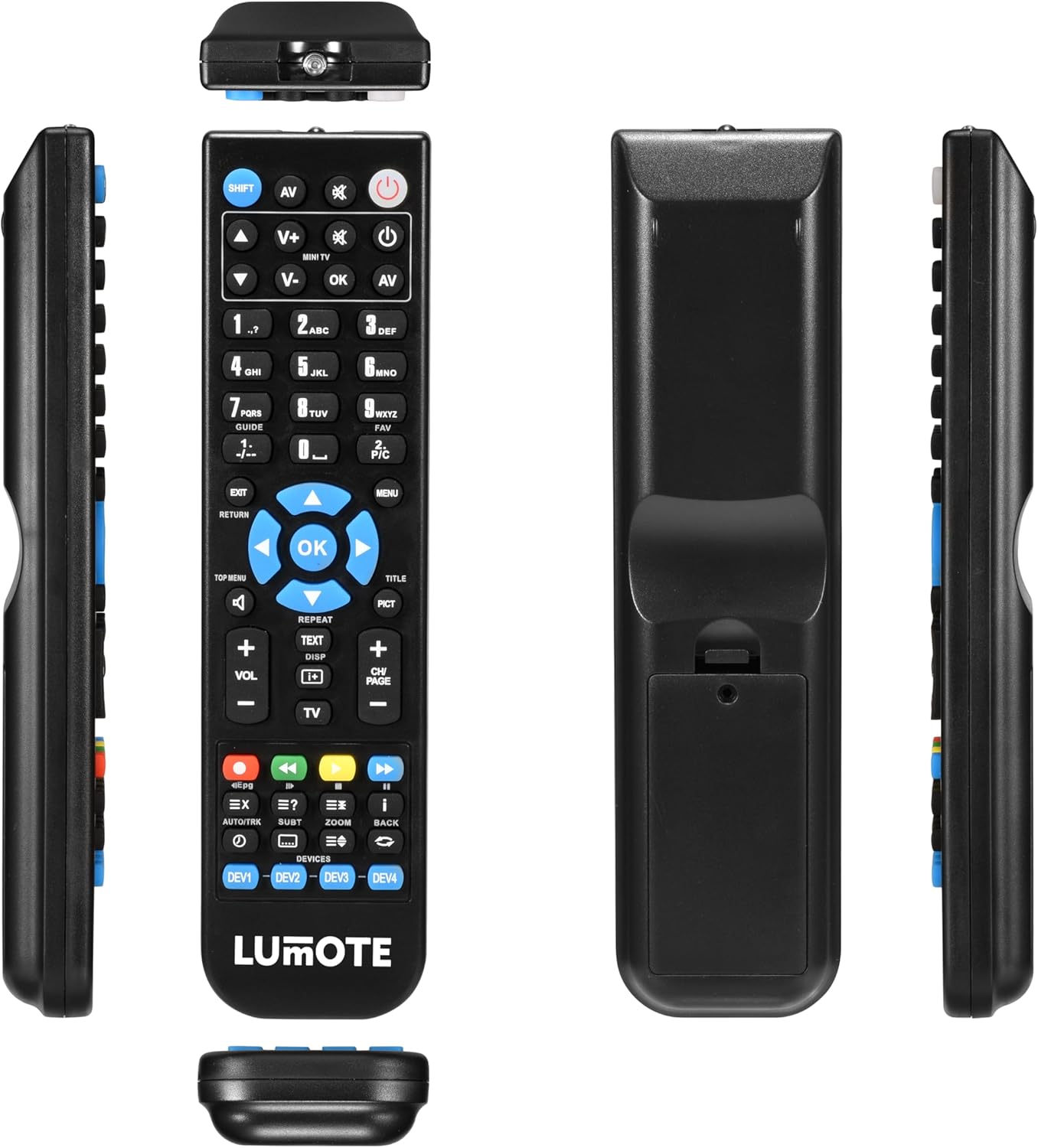
Figura 2: Indietro view of the remote control, highlighting the battery compartment. This shows where to insert the AAA batteries.
2. Utilizzo iniziale
Your Lumote Replacement Remote Control is pre-programmed for the DENON AVR-2311CI. No setup codes or programming are required. Simply install the batteries, and the remote is ready for immediate use.
Istruzioni per l'uso
This section details the functions of the buttons on your Lumote Replacement Remote Control.
- Pulsante di accensione (⑁): Turns the DENON AVR-2311CI receiver on or off.
- AV: Selects audio/video input sources.
- V+ / V-: Regola il volume su o giù.
- CH/PAGE + / -: Changes channels or navigates pages.
- OK / Frecce di navigazione: Confirms selections and navigates menus.
- Pulsanti numerici (0-9): Direct input for channels or menu options.
- SPOSTARE: Activates secondary functions of certain buttons (if applicable).
- EXIT: Esce dal menu o dalla funzione corrente.
- RITORNO: Ritorna alla schermata o al menu precedente.
- MENU: Accesses the main menu of the connected device.
- TOP MENU / TITLE: Accesses the top menu or title menu of a disc.
- IMMAGINE: Picture mode selection.
- RIPETERE: Repeats playback.
- TEXT / DISP: Displays text information or on-screen display.
- TV: Switches control to the television.
- Pulsanti di controllo multimediale (Riproduci, Pausa, Stop, Avanti veloce, Riavvolgi, Salta): Controlla la riproduzione multimediale.
- Pulsanti colorati (rosso, verde, giallo, blu): Access specific functions within menus or applications.
- DEVICES (DEV1, DEV2, DEV3, DEV4): Selects which device the remote is controlling (if programmed for multiple devices, though this remote is a direct replacement for one specific model).
- Other Buttons (e.g., EPG, EX, AUTO/TRK, SUBT, ZOOM, BACK): Perform specific functions as labeled, typically related to program guides, extra features, audio tracks, subtitles, zoom, and navigating back.
For detailed functionality of specific buttons, refer to the user manual of your DENON AVR-2311CI receiver.
Manutenzione
Sostituzione della batteria
Sostituire le batterie quando la risposta del telecomando diventa lenta o smette di funzionare. Sostituire sempre entrambe le batterie contemporaneamente con batterie alcaline AAA nuove. Non mischiare batterie vecchie e nuove o tipi diversi di batterie.
Pulizia
Wipe the remote control with a soft, dry cloth. Do not use abrasive cleaners, solvents, or chemical wipes, as these can damage the remote's surface or internal components.
Magazzinaggio
Conservare il telecomando in un luogo fresco e asciutto, lontano dalla luce solare diretta e da temperature estreme. Se il telecomando non viene utilizzato per un periodo prolungato, rimuovere le batterie per evitare perdite.
Risoluzione dei problemi
- Il telecomando non risponde:
- Controllare che le batterie siano inserite correttamente, rispettando la polarità corretta.
- Sostituisci le batterie con batterie AAA nuove.
- Ensure there are no obstructions between the remote control and the DENON AVR-2311CI receiver.
- Assicuratevi di trovarvi all'interno del raggio d'azione effettivo e di puntare il telecomando direttamente verso il sensore IR del ricevitore.
- Alcuni pulsanti non funzionano:
- Verify that the remote is pointed correctly at the receiver.
- Assicurarsi che le batterie abbiano potenza sufficiente.
- Some functions may be specific to the original DENON AVR-2311CI receiver's capabilities. Refer to your receiver's manual for specific button functions.
Specifiche
| Modello | Standard v1 |
| Marca | Lumote |
| Dispositivi compatibili | DENON AVR-2311CI |
| Batterie richieste | 2 x AAA (non incluso) |
| Dimensioni del pacco | 9 x 3 x 2 pollici |
| Peso dell'articolo | 6 once |
Garanzia e supporto
This Lumote Replacement Remote Control comes with a 12 mesi di garanzia from the date of purchase. For any issues or support inquiries, please refer to your purchase documentation or contact the retailer.