
1. Introduzione
This manual provides detailed instructions for the setup, operation, maintenance, and troubleshooting of your Trueque 2 Pack Backlit Wireless Full-Sized Ergonomic Keyboard and Mouse Combo. Please read this manual thoroughly before use to ensure optimal performance and longevity of your devices.
Contenuto della confezione:
- Wireless Keyboard (x1)
- Mouse senza fili (x1)
- USB Receiver (x1)
- Type-C Adapter (x1)
- Manuale dell'utente (questo documento)
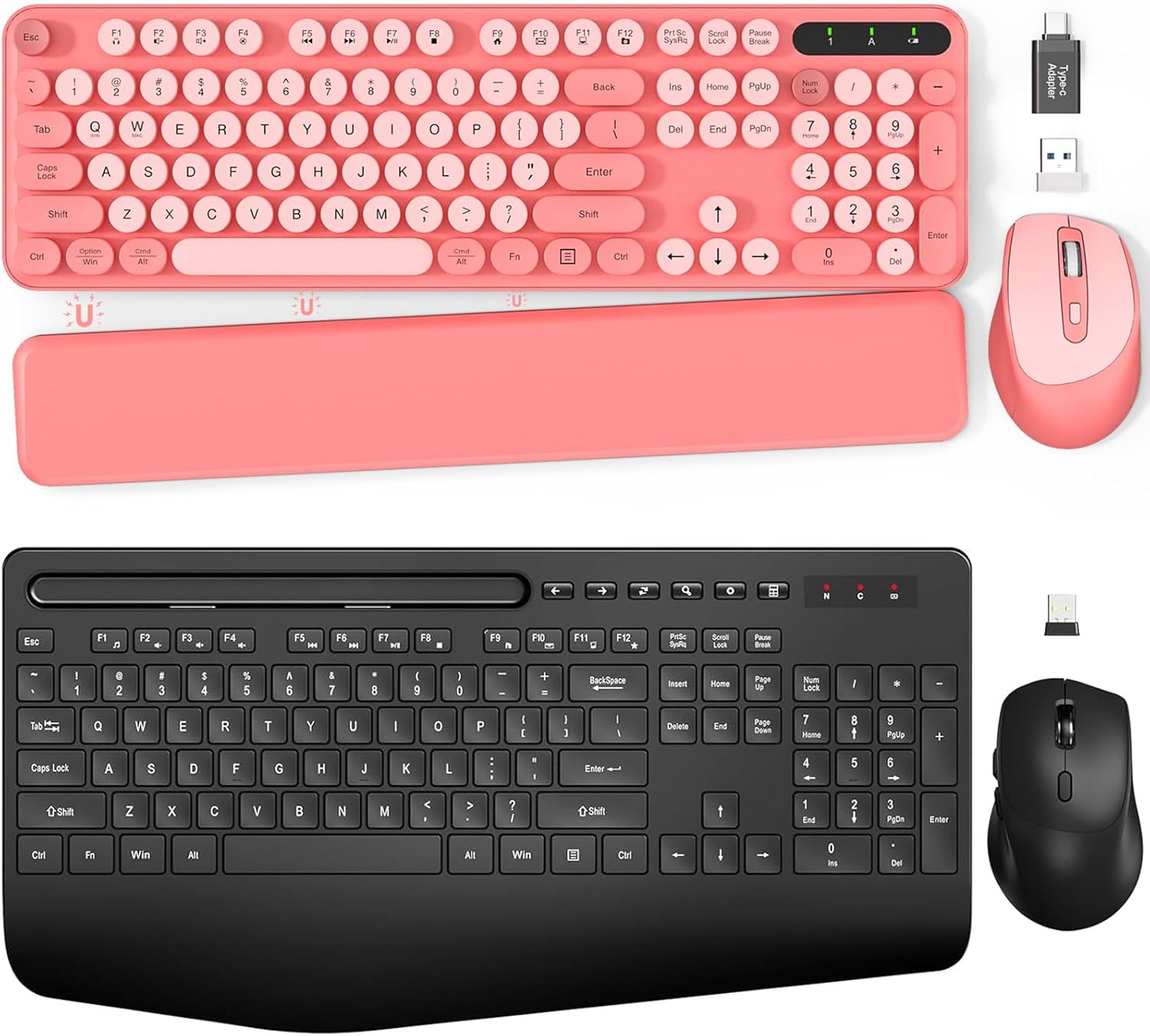
Immagine 1.1: Passoview of the Trueque Wireless Keyboard and Mouse Combo (Pink version).
2. Impostazione
2.1 Installazione della batteria
The keyboard requires two (2) AAA batteries, and the mouse requires one (1) AA battery (batteries are not included).
- Per la tastiera: Locate the battery compartment on the underside of the keyboard. Open the cover, insert two AAA batteries according to the polarity indicators (+/-), and close the cover.
- Per il topo: Locate the battery compartment on the underside of the mouse. Open the cover, insert one AA battery according to the polarity indicators (+/-), and close the cover.

Image 2.1: Battery compartments and ON/OFF switches for the keyboard and mouse.
2.2 Collegamento del ricevitore USB
La tastiera e il mouse condividono un singolo ricevitore USB da 2.4 GHz per la connettività wireless.
- Locate the USB receiver, typically stored in the mouse's battery compartment or packaged separately.
- Plug the USB receiver into an available USB port on your computer (PC or Laptop). If your computer only has USB-C ports, use the provided Type-C adapter.
- Turn on the keyboard and mouse using their respective ON/OFF switches. The devices should automatically connect to your computer.

Image 2.2: USB receiver and Type-C adapter for wireless connection.
3. Istruzioni per l'uso
3.1 Caratteristiche della tastiera
- Tasti retroilluminati: The keyboard features backlighting for improved visibility in low-light conditions. Refer to the keyboard's function keys for backlight control (e.g., Fn + specific key for brightness adjustment or on/off toggle).
- Tasti rotondi retrò: The keyboard is equipped with detachable round keycaps, offering a distinct tactile experience and ease of cleaning.
- Supporto integrato per telefono/tablet: A built-in cradle allows you to prop up your smartphone or tablet (under 11.9 inches) for convenient viewmentre si lavora.

Image 3.1: Keyboard with a tablet securely placed in the integrated holder.
- Gambe pieghevoli: The keyboard includes foldable legs on the underside, allowing you to adjust the typing angle for improved ergonomics.
- Magnetic Palm Rest: A detachable magnetic palm rest is provided to reduce wrist fatigue during extended use. It can be positioned to suit individual preferences.

Image 3.2: Foldable stands and magnetic palm rest for ergonomic adjustment.
3.2 Caratteristiche del mouse
- Design ergonomico: The mouse is contoured to fit the hand comfortably, promoting a natural grip and reducing strain.

Image 3.3: Ergonomic design of the keyboard and mouse for comfortable use.
3.3 Modalità risparmio energetico
To conserve battery life, both the keyboard and mouse feature an automatic sleep mode:
- Tastiera: Enters sleep mode after 15 minutes of inactivity. Press any key to reactivate.
- Topo: Enters sleep mode after 10 minutes of inactivity. Double-click any button to reactivate.

Image 3.4: Details on smart power saving for extended battery life.
4. Manutenzione
4.1 Pulizia
Per pulire la tastiera e il mouse:
- Turn off both devices and disconnect the USB receiver from your computer.
- Per pulire le superfici della tastiera e del mouse, utilizzare un panno morbido, asciutto e privo di lanugine.
- For the keyboard, the retro round keycaps are detachable for easier cleaning. Gently pull them off, clean as needed, and then firmly press them back into place.
- Evitare l'uso di prodotti chimici aggressivi, detergenti abrasivi o umidità eccessiva, poiché potrebbero danneggiare i dispositivi.
4.2 Sostituzione della batteria
Replace batteries when performance degrades or devices become unresponsive. Follow the battery installation steps in Section 2.1. Always use new batteries of the specified type (AAA for keyboard, AA for mouse) and dispose of old batteries responsibly.
5. Risoluzione Dei Problemi
If you encounter issues with your Trueque wireless keyboard and mouse combo, please refer to the following common solutions:
| Problema | Possibile soluzione |
|---|---|
| Tastiera/mouse non rispondono |
|
| Connessione lenta o intermittente |
|
| La retroilluminazione della tastiera non funziona |
|
6. Specifiche
| Caratteristica | Dettaglio |
|---|---|
| Marca | Permuta |
| Numero di modello | B0DFGXN2JX |
| Tecnologia di connettività | Wireless a 2.4 GHz (ricevitore USB) |
| wireless Range | Fino a 33 piedi (10 metri) |
| Batteria della tastiera | 2 x AAA (non incluso) |
| Batteria del mouse | 1 x AA (non inclusa) |
| Dispositivi compatibili | Laptop, Personal Computer (Windows OS) |
| Caratteristiche speciali | Ergonomic Design, Foldable Legs, Wrist Rest, Backlit, Phone/Tablet Holder, Retro Round Keycaps |
7. Garanzia e supporto
For warranty information or technical support, please refer to the contact details provided with your purchase or visit the official Trueque websito. Conservare la ricevuta d'acquisto come prova d'acquisto per eventuali reclami in garanzia.