
1. Importanti istruzioni di sicurezza
Please read all instructions carefully before using the Genesis Designs GM1-B massage chair. Retain this manual for future reference.
- Sicurezza elettrica: Ensure the power cord is securely connected to a grounded outlet. Do not operate the chair with a damaged cord or plug. Keep the power cord away from heated surfaces.
- Condizioni mediche: Consult a physician before use if you have medical conditions, are pregnant, have a pacemaker, or are undergoing medical treatment. Discontinue use if you experience discomfort.
- Bambini e animali domestici: Keep children and pets away from the massage chair, especially during operation. This appliance is not intended for use by persons with reduced physical, sensory, or mental capabilities unless supervised.
- Uso corretto: Use the chair only for its intended purpose as described in this manual. Do not stand on or place heavy objects on the chair. Avoid prolonged use in one area to prevent over-stimulation.
- Ambiente: Non utilizzare la sedia in damp or wet environments. Keep it away from direct sunlight and heat sources.
2. Prodotto finitoview
The Genesis Designs GM1-B is a smart full-body massage chair designed for comprehensive relaxation and therapeutic massage. It features advanced 2D SL-Track rollers, zero gravity recline, voice activation, Bluetooth connectivity, and targeted heating.
Caratteristiche principali:
- Rulli 2D SL-Track: Provides massage from the neck down to the glutes, following the natural curve of your spine.
- Funzione di gravità zero: Reclines the chair to distribute body weight evenly, reducing pressure on the spine and enhancing relaxation.
- Attivazione vocale: Control various functions using simple voice commands.
- Altoparlanti Bluetooth: Connect your personal device to enjoy audio during your massage.
- Heated Lumbar Function: Gentle heat therapy for the lower back to soothe muscles.
- Massaggio tramite airbag: Compression massage for shoulders, arms, waist, legs, and feet.
- Rulli del piede: Targeted massage for the soles of your feet.
- Programmi multipli: 12 auto pre-programmed modes and 6 manual massage techniques.
- Tablet Remote Control & Quick Start Buttons: Intuitive control options for ease of use.
- Porta di ricarica USB: Convenient charging for your mobile devices.
Componenti:
- Massage Chair Main Unit
- Handheld Tablet Remote Control
- Cavo di alimentazione
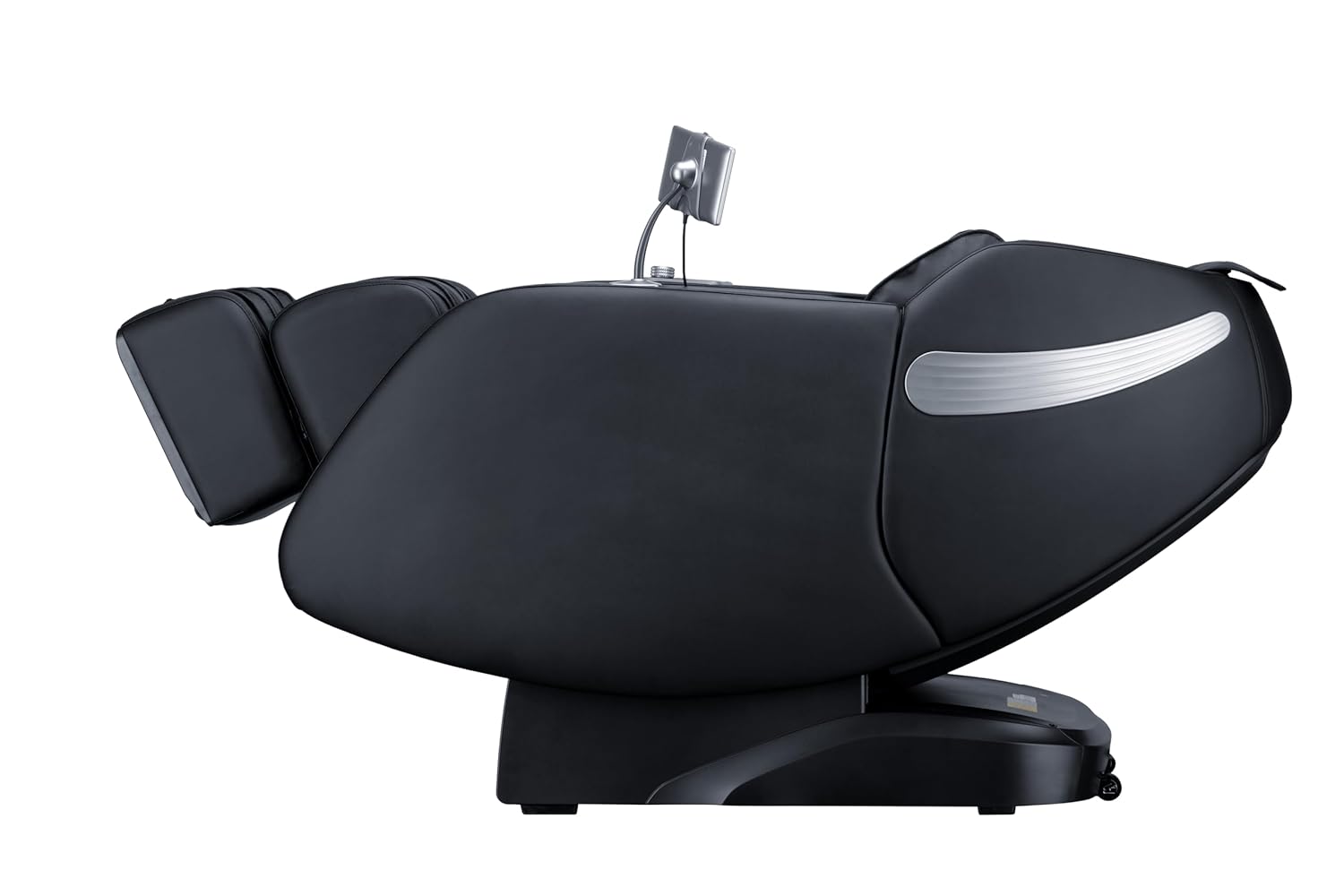
Figura 2.1: Fronte view of the Genesis Designs GM1-B Smart Full Body Massage Chair.

Figura 2.2: lato view of the Genesis Designs GM1-B Smart Full Body Massage Chair.

Figure 2.3: Key features of the GM1-B Massage Chair.
3. Impostazione
The Genesis Designs GM1-B massage chair requires minimal assembly. Follow these steps to prepare your chair for use.
3.1 Disimballaggio e posizionamento
- Rimuovere con cautela tutti i materiali di imballaggio dalla sedia.
- Place the massage chair on a flat, stable surface. Ensure there is sufficient space around the chair for reclining, especially for the zero gravity function.
- Evitare di posizionare la sedia alla luce diretta del sole o vicino a fonti di calore.

Figura 3.1: Esample of chair placement in a room.
3.2 Collegamento di alimentazione
- Locate the power input port on the back or bottom of the chair.
- Connect the power cord securely to the chair and then plug it into a standard grounded electrical outlet.
- Ensure the power switch (if present) is in the 'OFF' position before plugging in.
3.3 Tablet Remote Control Setup
- Connect the handheld tablet remote control to its designated port or stand on the chair.
- Ensure the tablet is charged or connected for power if it is not battery-operated.

Figure 3.2: Handheld tablet remote control.
4. Istruzioni per l'uso
Familiarize yourself with the control methods to fully utilize your massage chair's features.
4.1 Accensione/spegnimento
- Press the power button on the quick start panel (right armrest) or the tablet remote to turn the chair on.
- Press again to turn off the chair. The chair will return to its upright position.
4.2 Using the Tablet Remote Control
The tablet provides detailed control over all massage functions.
- Programmi automatici: Select from 12 pre-programmed massage modes tailored for different needs (e.g., relaxation, recovery, sleep).
- Tecniche manuali: Choose from 6 massage techniques (e.g., Kneading, Tapping, Shiatsu) and adjust intensity, speed, and roller width.
- Massaggio Mirato: Select specific body areas for massage (e.g., neck, back, lumbar, feet).
- Controllo airbag: Adjust the intensity of airbag compression for shoulders, arms, waist, legs, and feet.
- Funzione di riscaldamento: Attivare o disattivare il riscaldamento lombare.
- Gravità zero: Adjust the recline angle to one of the zero gravity positions.
4.3 Pulsanti di avvio rapido
Located on the right armrest, these buttons offer quick access to essential functions:
- Accensione/spegnimento
- Reclinazione a gravità zero
- Auto Program Start/Stop
- Legrest Up/Down
4.4 Voice Activation
To use voice control, ensure the feature is enabled via the tablet. Speak clearly and directly towards the chair's microphone.
- Activation Phrase: Say "Hello, Genesis" or a similar designated phrase to activate voice control.
- Comandi: Follow with commands such as "Start auto massage," "Recline to zero gravity," "Increase intensity," "Turn on heat," or "Stop massage."
4.5 Connettività Bluetooth
- Activate Bluetooth on your personal device (smartphone, tablet).
- On your device, search for available Bluetooth devices and select "Genesis Massage Chair" (or similar name).
- Once paired, audio from your device will play through the chair's built-in speakers.
4.6 Funzione di gravità zero
The zero gravity feature elevates your legs above your heart, promoting circulation and deeper relaxation.
- Press the Zero Gravity button on the tablet or quick start panel.
- The chair will recline to a preset zero gravity position. You may have options to adjust to different levels of recline.

Figure 4.1: Zero Gravity recline progression.
4.7 Foot Massage
The footrest features rollers and airbags for comprehensive foot and calf massage.
- The legrest can extend up to 6.25 inches to accommodate different user heights. Adjust manually or via the tablet.
- Foot rollers will activate during foot massage programs or can be manually controlled.

Figure 4.2: Footrest with foot rollers.
5. Manutenzione
Proper care ensures the longevity and optimal performance of your massage chair.
5.1 Pulizia
- Esterno: Wipe clean the leather and plastic surfaces with a soft, damp panno. Non utilizzare detergenti abrasivi, solventi o prodotti chimici aggressivi.
- Interno: Aspirare periodicamente la polvere e i detriti dalle fessure.
- Prima di pulire la sedia, assicurarsi che sia scollegata dalla presa di corrente.
5.2 Conservazione
- Quando non si utilizza la sedia per lunghi periodi, scollegarla dalla presa di corrente e riporla in un luogo fresco e asciutto, lontano dalla luce solare diretta.
- Avoid placing heavy objects on the chair during storage.
6. Risoluzione Dei Problemi
If you encounter issues with your massage chair, refer to the following common problems and solutions.
| Problema | Possibile causa | Soluzione |
|---|---|---|
| La sedia non si accende. | Cavo di alimentazione non collegato; Interruttore di alimentazione spento; Malfunzionamento della presa. | Assicurarsi che il cavo di alimentazione sia collegato saldamente. Verificare che l'interruttore principale sia acceso. Testare la presa con un altro dispositivo. |
| I rulli massaggianti non si muovono. | Program not selected; Safety sensor activated. | Select an auto program or manual massage technique. Ensure no obstructions are blocking the rollers. |
| Il controllo vocale non risponde. | Voice activation disabled; Microphone obstructed; Incorrect commands. | Check tablet settings to ensure voice activation is enabled. Speak clearly and ensure no objects are covering the microphone. Refer to the manual for correct commands. |
| Il Bluetooth non si associa. | Bluetooth not enabled on device; Chair not in pairing mode; Interference. | Ensure Bluetooth is active on your device. Restart both the chair and your device. Move closer to the chair. |
| La sedia emette rumori insoliti. | Rumori di funzionamento normali; componente allentato; ostruzione. | Some mechanical sounds are normal. Check for any loose parts or foreign objects. If the noise is persistent or loud, discontinue use and contact support. |
7. Specifiche
Detailed technical specifications for the Genesis Designs GM1-B massage chair.
| Caratteristica | Dettaglio |
|---|---|
| Numero di modello | GM1-B |
| Dimensioni del prodotto (verticale) | 57.67 x 29.72 x 44.33 pollici (L x L x A) |
| Dimensioni del prodotto (gravità zero) | 66.33 x 29.72 x 38.77 pollici (L x L x A) |
| Peso dell'articolo | 165 libbre |
| Tipo di materiale | Leather (Upholstery), Foam (Fill), Metal (Frame) |
| Percorso di massaggio | 2D SL-Track |
| Tecniche di massaggio | 6 Manual Techniques, 12 Auto Programs |
| Legrest Extension | Fino a 6.25 pollici |
| Alimentazione elettrica | Standard AC (Voltage not specified, refer to product label) |
| Certificazioni | Certificato ETL |
| Assemblaggio richiesto | No (è richiesta una configurazione minima) |

Figure 7.1: Chair dimensions in upright and zero gravity positions.
8. Garanzia e supporto
For warranty information, product support, or service inquiries, please refer to the warranty card included with your purchase or contact Genesis Designs customer service directly. Contact details are typically available on the manufacturer's official websito o tramite il tuo rivenditore.
Please have your model number (GM1-B) and purchase date available when contacting support.