
SJOYBRING 7-Inch Double Din Car Stereo
SJoyBring 7-Inch Double Din Car Stereo User Manual
Model: 7-Inch Double Din Car Stereo
Introduzione
Thank you for choosing the SJoyBring 7-Inch Double Din Car Stereo. This manual provides essential information for the proper installation, operation, and maintenance of your new car stereo. Please read it thoroughly before use to ensure optimal performance and safety.
Caratteristiche del prodotto
- CarPlay e Android Auto wireless: Seamless smartphone integration for navigation, music, and calls without cables.
- 4.2-Channel Audio Output: Supports 4 channels RCA audio out for aftermarket amplifiers and 2 separate subwoofer outputs for enhanced sound.
- Bluetooth 5.3 aggiornato: Independent Bluetooth module and antenna ensure stable, fast, and clear wireless streaming and hands-free calling.
- HD QLED Touchscreen: 7-inch screen with 1280x720 resolution, supporting 1920x1080P video playback and MirrorLink functionality.
- Posteriore e anteriore View Supporto per fotocamera: Automatically displays camera feed when reversing, includes an HD night vision rear view telecamera.
- AM/FM Car Radio: Built-in tuner for radio reception.
- Physical Buttons & Rotary Volume Control: For easy and safe operation while driving.
- Controllo vocale intelligente: Utilize intelligent voice assistants for calls, navigation, and music playback.
- Supporto per il controllo del volante: Integrate with your vehicle's steering wheel controls for convenience.
Cosa c'è nella scatola
All'apertura della confezione, verificare che tutti i componenti siano presenti e in buone condizioni:
- SJoyBring 7-Inch Double Din Car Stereo Unit
- Visione notturna HD posteriore View Telecamera
- Necessary Wiring Harnesses and Connectors
- Hardware di montaggio
- Manuale dell'utente (questo documento)
If any items are missing or damaged, please contact SJoyBring customer support.
Configurazione e installazione
Proper installation is crucial for the performance and longevity of your car stereo. It is highly recommended to have this unit installed by a professional car audio technician.
- Check Dash Opening Size: Before installation, ensure your vehicle's dashboard opening size is compatible with the double din stereo. An additional dash kit may be required for a proper fit.
- Collegamenti elettrici: Carefully follow the wiring diagram provided. Ensure all connections are secure to prevent electrical issues. Some vehicles may require a wire harness adapter and a radio antenna adapter.
- Montaggio: Utilize the plentiful mounting holes on the unit for secure installation and optimal cooling.
- Installazione della telecamera: Install the included rear view camera according to the instructions. Ensure proper routing of cables and secure mounting for a clear view.

Image: Detailed diagram showing the dimensions of the car stereo and various wiring connections for power, speakers, cameras, and external amplifiers. It also highlights the mounting holes for installation.
Istruzioni per l'uso
1. Accensione/spegnimento e controlli di base
- Pulsante di accensione: Press and hold to turn the unit on or off. A short press may mute/unmute audio.
- Manopola del volume: Ruotare in senso orario per aumentare il volume, in senso antiorario per diminuirlo.
- Pulsante Home: Ritorna al menu principale.
- Pulsante di reset (RST): A small pinhole button for factory reset if the unit malfunctions. Use a thin object to press.
2. CarPlay wireless e Android Auto
Connect your compatible smartphone wirelessly to access navigation, music, calls, and messages directly on the stereo's display.
- Assicurati che Bluetooth e Wi-Fi siano abilitati sul tuo smartphone.
- Sull'autoradio, seleziona l'icona "CarPlay" o "Android Auto".
- Segui le istruzioni sullo schermo per associare il telefono.
- Once connected, your phone's interface will be mirrored on the stereo, allowing for voice control and touch interaction.

Image: The car stereo screen showing both Apple CarPlay and Android Auto interfaces, demonstrating wireless connectivity for navigation, music, and voice commands.
3. Connettività Bluetooth
The upgraded Bluetooth 5.3 ensures stable connections for hands-free calls and audio streaming.
- Andare al menu "Bluetooth" sullo stereo.
- Attiva il Bluetooth sul tuo telefono e cerca i dispositivi disponibili.
- Select "SJoyBring" from the list and confirm pairing.
- Ora puoi effettuare/ricevere chiamate e ascoltare musica in streaming in modalità wireless.

Image: A visual representation of the car stereo's Bluetooth system, showing a phone call interface on the screen and a smartphone connected via Bluetooth, emphasizing stable and clear communication.
4. Audio Output and Equalizer
The unit features 4.2-channel audio output and a 10-band equalizer for customized sound.
- Access the "EQ Setup" menu to adjust frequency bands (30Hz to 16KHz).
- Select preset modes (Jazz, Classic, Rock, Pop, Soft) or create a custom "User" profile.
- Adjust subwoofer output and sound field balance for optimal listening experience.
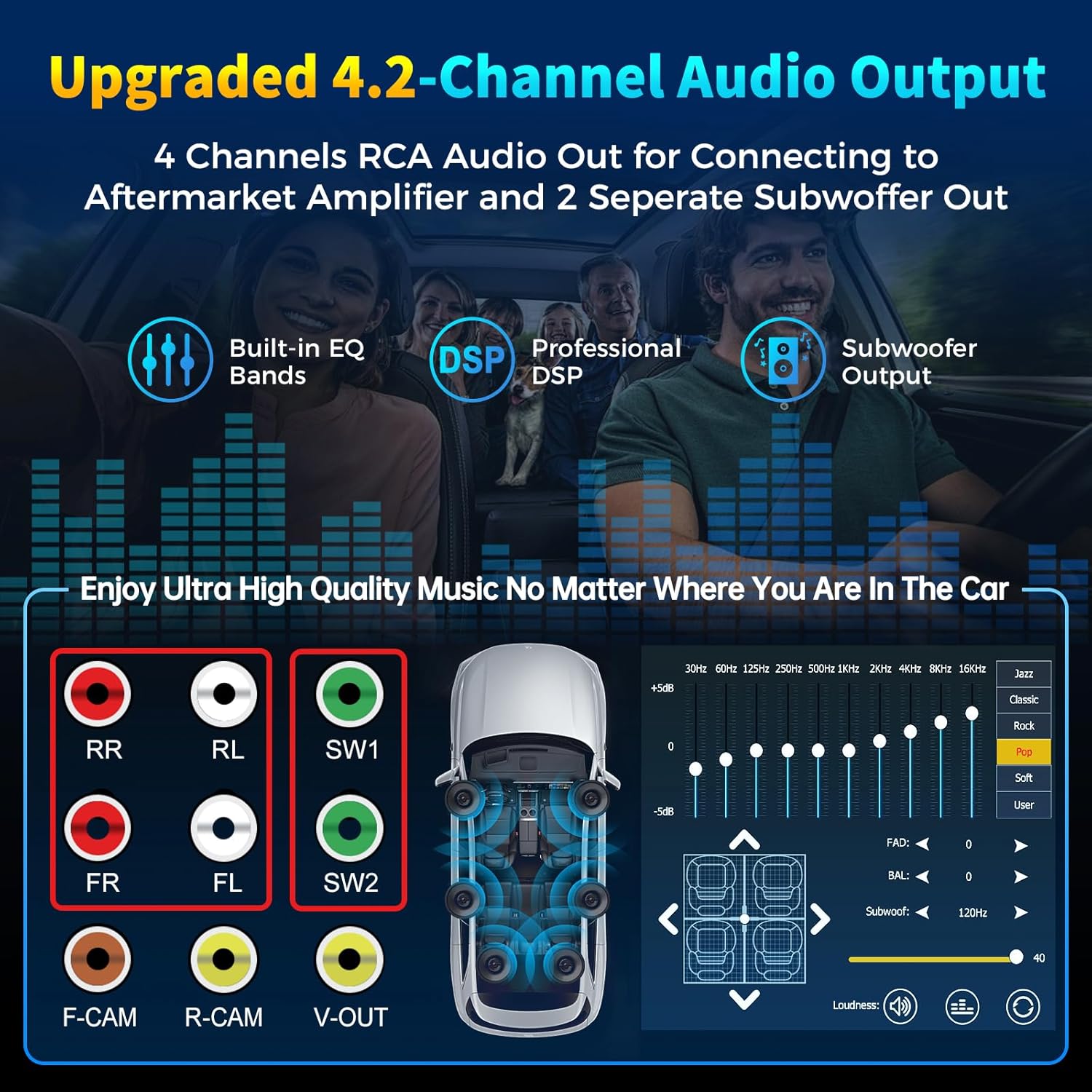
Image: Diagram illustrating the 4-channel RCA audio outputs and 2 subwoofer outputs on the back of the stereo, alongside a screen capture of the 10-band equalizer settings for sound customization.
5. HD QLED Touchscreen and MirrorLink
The 7-inch QLED screen offers high-definition visuals and supports MirrorLink for screen mirroring.
- Funzionamento touchscreen: È possibile navigare nei menu e controllare le funzioni toccando lo schermo.
- MirrorLink: Connect your iOS or Android phone via USB to mirror its screen content (e.g., Google Maps, Spotify, YouTube) onto the stereo display.

Image: An illustration detailing the layers of the QLED HD screen, emphasizing its 1280x720 resolution and touch capabilities, comparing it to other screens.
6. Camera Functionality (Rear and Front View)
The stereo supports both rear and front view cameras, automatically switching to the rear view in retromarcia.
- When the vehicle is shifted into reverse, the screen will automatically display the rear camera feed with parking guidelines.
- The included HD night vision camera provides a 170° ultra-wide viewing angle and is waterproof.
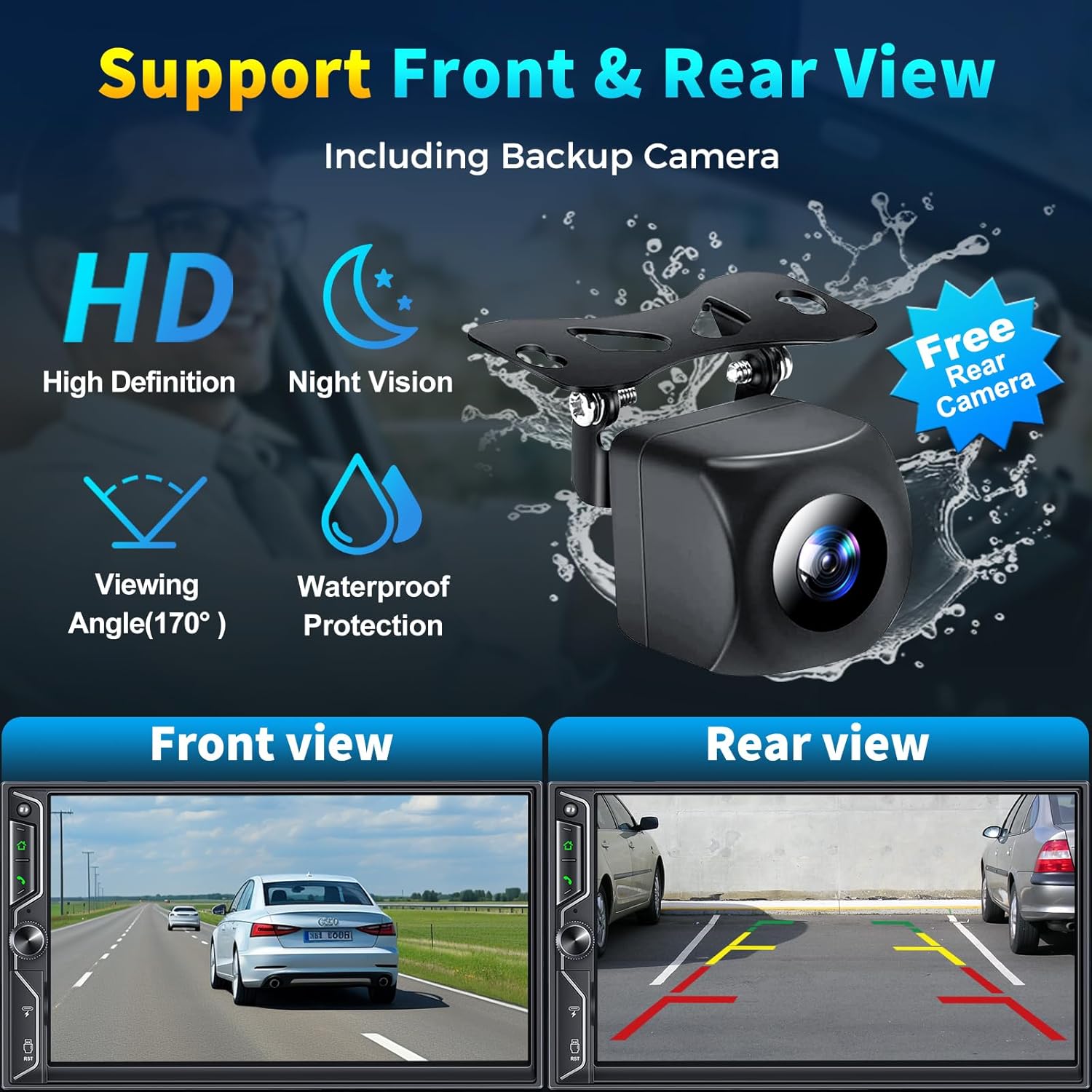
Image: A graphic demonstrating the car stereo's support for front and rear view cameras, showing example views from both perspectives and an image of the included HD night vision backup camera.
7. Radio AM/FM
Access the "Radio" application to tune into your favorite AM/FM stations.
- Utilizzare la funzione di scansione per trovare le stazioni disponibili.
- Salva le stazioni preferite come preset per accedervi rapidamente.
8. Controllo vocale intelligente
Utilize your smartphone's voice assistant (Siri, Google Assistant) through the car stereo for hands-free operation.
- Activate your voice assistant via the stereo's interface or a dedicated button (if available).
- Issue commands for navigation, making calls, playing music, and more.
9. Controllo del volante
Se il tuo veicolo lo supporta, puoi collegare lo stereo ai comandi al volante per un utilizzo più comodo senza togliere le mani dal volante.
- Refer to your vehicle's manual and the stereo's wiring diagram for proper connection.
- Potrebbe essere necessaria una configurazione nel menu delle impostazioni dello stereo per mappare i pulsanti del volante.
10. Riproduzione e ricarica USB
The unit includes USB ports for media playback and charging your devices.
- Insert a USB flash drive into the designated port to play audio or video files.
- The USB port can also be used to charge compatible smartphones.
Video ufficiale del prodotto
Video: An official product video demonstrating the SJoyBring Double Din Car Stereo's features, including its design, smart chip, independent Bluetooth module, audio outputs, QLED screen, CarPlay, Android Auto, voice control, steering wheel control, radio, charging, and MirrorLink capabilities.
Manutenzione
- Pulizia dello schermo: Use a soft, lint-free cloth to gently wipe the QLED touchscreen. Avoid abrasive cleaners or solvents.
- Pulizia generale: Keep the unit free from dust and debris. Use a dry cloth for exterior cleaning.
- Aggiornamenti software: Periodically check the SJoyBring official website or contact customer support for any available software or firmware updates to ensure optimal performance and compatibility.
- Ispezione dei cavi: Ispezionare regolarmente tutti i cavi collegati per verificare la presenza di eventuali segni di usura o danni.
Risoluzione dei problemi
| Problema | Possibile causa | Soluzione |
|---|---|---|
| Nessun potere | Cablaggio errato; fusibile bruciato; problema di alimentazione del veicolo. | Check power connections (ACC, B+); Inspect vehicle fuses; Consult a professional installer. |
| Nessun suono | Cablaggio degli altoparlanti non corretto; Volume troppo basso; Funzione mute attiva; Ampproblema del lificatore. | Verify speaker connections; Increase volume; Check mute status; Ensure external amplifier is powered (if applicable). |
| Bluetooth non si connette | Bluetooth off on phone/stereo; Incorrect pairing; Interference. | Assicurarsi che il Bluetooth sia attivo; eliminare gli abbinamenti precedenti e riassociarli; avvicinare il telefono all'unità. |
| CarPlay/Android Auto non funziona | Phone not compatible; Incorrect connection; Software glitch. | Ensure phone is compatible and updated; Reconnect wirelessly or via USB (for MirrorLink); Restart phone and stereo. |
| La telecamera posteriore non viene visualizzata | Cablaggio della telecamera errato; cavo di attivazione della retromarcia non collegato. | Check camera power and video input connections; Verify reverse trigger wire connection. |
| Touchscreen non responsivo | Problema software temporaneo; schermo danneggiato. | Perform a soft reset using the RST button; If issue persists, contact support. |
If you encounter issues not listed here or if the suggested solutions do not resolve the problem, please contact SJoyBring customer support for further assistance.
Specifiche
| Caratteristica | Dettaglio |
|---|---|
| Marca | GIOCARE |
| Numero di modello | 7-Inch Double Din Car Stereo |
| Dimensioni dello schermo | 7-Inch QLED HD Touchscreen |
| Risoluzione dello schermo | 1280x720 |
| Supporto per la riproduzione video | Up to 1920 x 1080P |
| Tecnologia di connettività | Auxiliary, Bluetooth, Wi-Fi, USB |
| Versione Bluetooth | 5.3 |
| Canali di uscita audio | 4.2 (4 Channels RCA Audio Out, 2 Subwoofer Out) |
| Potenza di uscita | 240 Watt |
| Dispositivi compatibili | Smartphone (iOS e Android) |
| Metodo di controllo | App, Remote, Touch, Steering Wheel Control |
| Media integrati | Car stereo, Backup camera |
| Peso dell'articolo | 2.64 libbre |
Garanzia e supporto
The SJoyBring 7-Inch Double Din Car Stereo comes with a Garanzia di 1 anno dalla data di acquisto.
For warranty claims, technical assistance, or any inquiries, please contact SJoyBring customer support. You can also visit the official SJoyBring store for more information and resources:
Ask a question about this manual
Ask about setup, troubleshooting, compatibility, parts, safety, or missing instructions. Manuals+ will review the question and use this page’s manual context to help answer it.