
1. Introduzione
The FREEWOLF A2 is a transparent wireless gaming mouse designed for versatility and performance. It features dual-mode connectivity (2.4G wireless and Bluetooth 5.0), a PixArt 3212 optical sensor with adjustable DPI, a built-in rechargeable battery with a digital display, and customizable RGB backlighting. Its ergonomic design ensures comfort during extended use across various operating systems like Windows, Mac, and Linux.

Image 1.1: The FREEWOLF A2 Transparent Wireless Gaming Mouse, showcasing its transparent shell and internal components.
2. Contenuto della confezione
Si prega di verificare che tutti gli articoli siano presenti nel pacco:
- FREEWOLF A2 Wireless Gaming Mouse
- USB Receiver (2.4G dongle)
- Cavo di ricarica USB-C
- Manuale dell'utente (questo documento)
3. Prodotto finitoview
Familiarize yourself with the various components and features of your FREEWOLF A2 mouse.

Image 3.1: Exploded diagram illustrating the internal components of the FREEWOLF A2 mouse, including the transparent shell, battery, PCB board, and switches.

Immagine 3.2: Dall'alto verso il basso view of the FREEWOLF A2 mouse with key components labeled, including the 2.4G receiver storage, DPI switch, power switch, and dimensions.
Caratteristiche principali:
- Dual Mode Connection: 2.4G Wireless and Bluetooth 5.0.
- PixArt 3212 Sensor: High sensitivity and accuracy.
- DPI regolabile: 5 levels up to 4000 DPI.
- Batteria ricaricabile: Batteria integrata da 400 mAh con ricarica USB-C.
- Schermo digitale: Visualizza la percentuale della batteriatage and DPI level.
- Retroilluminazione RGB: Effetti di luce personalizzabili.
- Design ergonomico: Comodo per vari stili di presa.
4. Impostazione
4.1. Ricarica del mouse
Before first use, it is recommended to fully charge the mouse. Connect the provided USB-C charging cable to the mouse's charging port and the other end to a USB power source (e.g., computer USB port, USB wall adapter). The digital screen will display the battery percentage durante la carica.
Note: The USB-C cable is for charging only and does not provide a wired connection for mouse operation.

Image 4.1: Close-up of the FREEWOLF A2 mouse showing the digital screen displaying battery percentage.
4.2. Connessione tramite wireless 2.4G
- Locate the USB receiver (dongle) stored in the compartment on the underside of the mouse.
- Collega il ricevitore USB a una porta USB disponibile sul tuo computer.
- Slide the power switch on the underside of the mouse to the '2.4G' position.
- The mouse should connect automatically. Your computer will typically install the necessary drivers.
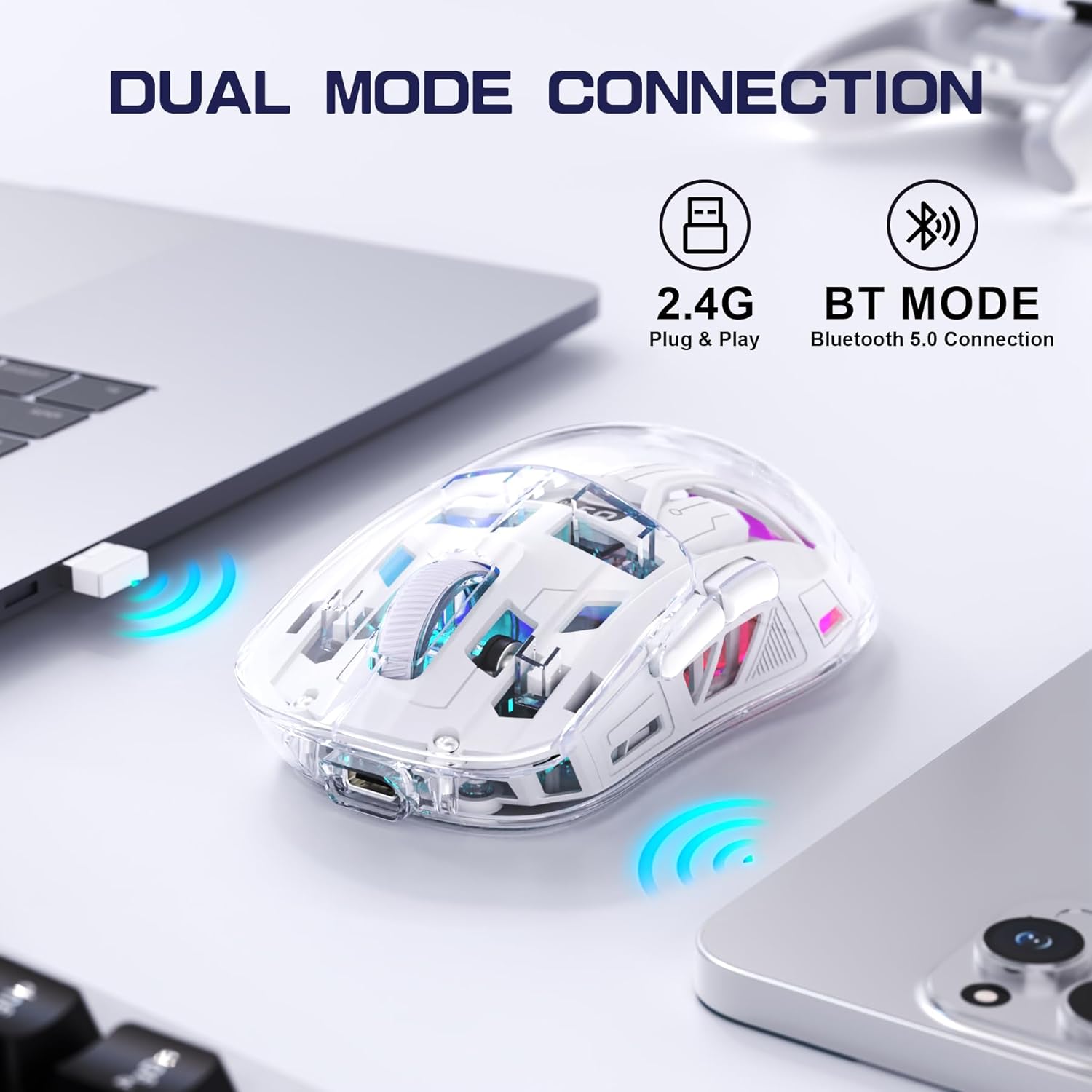
Image 4.2: The FREEWOLF A2 mouse connected to a laptop via its 2.4G wireless USB receiver.
4.3. Connessione tramite Bluetooth 5.0
- Slide the power switch on the underside of the mouse to the 'BT' (Bluetooth) position.
- Sul tuo computer o dispositivo, apri le impostazioni Bluetooth.
- Cercare new devices. The mouse should appear as 'FREEWOLF A2' or similar.
- Seleziona il mouse da associare. Segui le istruzioni sullo schermo.
5. Istruzioni per l'uso
5.1. Regolazione DPI
The mouse features 5 adjustable DPI levels (1200-4000 DPI) to suit different tasks and preferences. To change the DPI, press the DPI button located on the underside of the mouse. The digital screen will briefly display the current DPI setting.

Image 5.1: Diagram illustrating the 5 adjustable DPI levels (1200, 1600, 2000, 2400, 4000) available on the FREEWOLF A2 mouse.
5.2. Controllo della retroilluminazione RGB
The FREEWOLF A2 mouse features vibrant RGB backlighting. To cycle through different lighting effects or turn the backlight off, press and hold the scroll wheel button for a few seconds.

Image 5.2: Two FREEWOLF A2 mice on a desk, showcasing their cool RGB lighting effects in a low-light environment.
5.3. Visualizzazione della batteria
The integrated digital screen on the mouse continuously displays the current battery percentage, allowing you to monitor power levels and recharge as needed.
5.4. Design ergonomico
The mouse is designed to conform to various hand grip styles (Palm Grip, Fingertip Grip, Claw Grip), reducing discomfort during prolonged use.
Image 5.3: A hand demonstrating a comfortable grip on the FREEWOLF A2 mouse, highlighting its ergonomic design.
6. Manutenzione
- Pulizia: Per pulire il mouse, utilizzare un panno morbido e asciutto. Evitare l'uso di prodotti chimici aggressivi o materiali abrasivi.
- Magazzinaggio: When not in use, store the mouse in a cool, dry place. If storing for an extended period, ensure the mouse is fully charged and turn off the power.
- Cura della batteria: To prolong battery life, avoid fully discharging the mouse frequently. Recharge when the battery level is low.
7. Risoluzione Dei Problemi
- Il mouse non risponde:
- Assicurarsi che il mouse sia acceso e che sia selezionata la modalità di connessione corretta (2.4G o BT).
- Check battery level on the digital screen and recharge if necessary.
- Per la modalità 2.4G, assicurati che il ricevitore USB sia collegato saldamente a una porta USB funzionante. Prova una porta USB diversa.
- For Bluetooth mode, ensure Bluetooth is enabled on your device and the mouse is paired correctly. Try unpairing and re-pairing.
- Riavvia il computer o il dispositivo.
- Cursor movement is erratic or frozen:
- Pulisci il sensore ottico sul lato inferiore del mouse.
- Assicurati di utilizzare il mouse su una superficie adatta (non molto riflettente o trasparente).
- Verificare la presenza di interferenze da altri dispositivi wireless.
- Regola le impostazioni DPI per vedere se il problema si risolve.
- La retroilluminazione RGB non funziona:
- Assicurarsi che la batteria del mouse abbia una carica sufficiente.
- Press and hold the scroll wheel button to cycle through lighting modes or turn the backlight on/off.
- Problemi di ricarica:
- Assicurarsi che il cavo USB-C sia collegato correttamente sia al mouse sia alla fonte di alimentazione.
- Prova un cavo USB-C o un adattatore di alimentazione diverso.
- Confermare che la fonte di alimentazione sia funzionante.
8. Specifiche
| Caratteristica | Dettaglio |
|---|---|
| Numero di modello | A2 |
| Tecnologia di connettività | Wireless 2.4G, Bluetooth 5.0 |
| Tecnologia di rilevamento del movimento | Ottico (PixArt 3212) |
| DPI regolabile | 1200-4000 (5 livelli) |
| Capacità della batteria | 400 mAh (integrato) |
| Porta di ricarica | USB-C |
| Caratteristiche speciali | Ergonomic Design, LED Lights (RGB), Portable, Rechargeable, Digital Battery Display |
| Dimensioni del prodotto | 6.89 x 4.53 x 0.04 pollici |
| Peso dell'articolo | 4.9 once |
| Produttore | FREEWOLF |
9. Garanzia e supporto
Specific warranty information for the FREEWOLF A2 Transparent Wireless Gaming Mouse is not provided in the available product data. Please refer to the product packaging or the retailer's websito per i dettagli riguardanti la copertura della garanzia.
For technical support or further assistance, please contact the manufacturer or your point of purchase. Contact information may be available on the product packaging or the official FREEWOLF websito.