
1. Prodotto finitoview
The Kmise USB Audio Interface MI8423-KUS is a versatile 2-channel audio interface designed for musicians, vocalists, podcasters, and content creators seeking studio-quality sound. It offers high-fidelity 24-bit/192kHz recording resolution, ensuring crystal-clear audio capture with minimal noise.

Caratteristiche principali:
- Crystal-clear sound quality: High-quality converters and preamps filter noise and enhance spatial awareness, achieving 24-bit/192kHz recording resolution for subtle vocal and instrument nuances.
- Low-Latency Driver: Professional drivers and hardware design enable ultra-low audio latency for real-time monitoring during recording, suitable for podcast production, cover recordings, and instrumental arrangements.
- Collega e usa: Connects effortlessly to Mac/PC or mobile devices without complex driver installation. Its compact size and simple operation make it beginner-friendly.
- Alimentazione Phantom 48V: Features a 48V phantom power switch to power professional condenser microphones, capturing crystal-clear vocals with broadcast-quality clarity.
- All-in-One USB Audio Interface: Integrates microphone input, instrument input, headphone output, and speaker output for centralized management of audio devices and a cleaner workspace.
2. Guida all'installazione
Follow these steps to set up your Kmise USB Audio Interface MI8423-KUS.
2.1 Connecting to Your Computer/Device
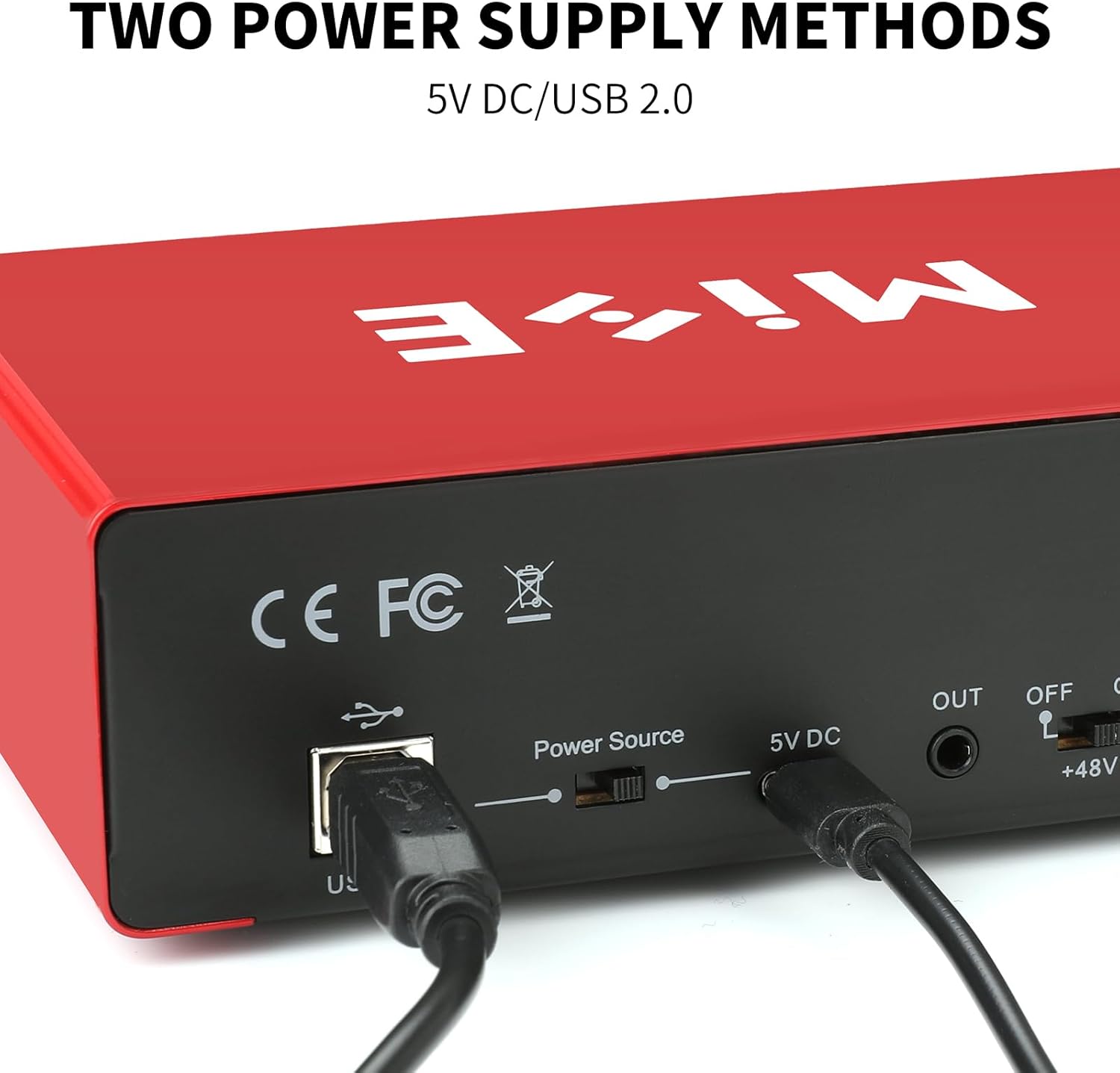
- Collegamento elettrico: Connect the provided USB cable from the interface's USB 3.0 port to an available USB port on your computer (Mac/PC) or mobile device. The interface is bus-powered, meaning it draws power directly from the USB connection. An optional 5V DC power source can be connected for additional power if needed, especially when using phantom power with certain devices.
- Installazione del driver: The Kmise USB Audio Interface is plug-and-play and typically does not require additional driver installation for most operating systems (Mac OS, Windows XP or later). Your system should automatically recognize the device.
- Uscita audio: Connect your studio monitors or speakers to the "LINE OUTPUTS" (Left/Right) on the rear of the interface using appropriate cables. For headphones, plug them into the "PHONE" jack on the front panel.

2.2 Collegamenti di ingresso
- Ingresso microfono: Use an XLR cable to connect your microphone to INPUT 1 or INPUT 2.
- Input dello strumento: For guitars or other instruments, use a 1/4-inch TS cable to connect to INPUT 1 or INPUT 2. Ensure the "Hi-Z" button is engaged for instruments.
- Alimentazione Phantom (48 V): If using a condenser microphone, press the "+48V" button to supply phantom power. The indicator light will illuminate.
3. Istruzioni per l'uso
Understand the controls and functions of your audio interface for optimal performance.
3.1 Controlli del pannello frontale
- GAIN 1/2: Adjusts the input level for Microphone/Line/Instrument inputs. Turn clockwise to increase gain. Monitor the "SIG" (signal) and "PK" (peak) indicators to avoid clipping.
- Hi-Z: Engages high-impedance mode for direct instrument connection (e.g., electric guitar).
- +48 V: Attiva l'alimentazione phantom per i microfoni a condensatore.
- Taglio basso: Filters out low-frequency rumble or noise from the input signal.
- INPUT/MON: Mix knob to balance the direct input signal with the playback from your computer (DAW).
- LoopBack: Enables the loopback function, allowing you to record audio playing from your computer along with your live input.
- USCITA: Main output level control for your studio monitors.
- TELEFONO: Controllo del livello di uscita delle cuffie.
- ENERGIA: Spia luminosa di alimentazione.

3.2 Registrazione e monitoraggio
- Monitoraggio in tempo reale: Use the "INPUT/MON" knob to adjust the blend between your live input and the audio playback from your computer. This allows for zero-latency monitoring of your performance.
- Funzione di loopback: Activate the "LoopBack" button to capture both your live microphone/instrument input and any audio playing from your computer simultaneously. This is useful for podcasts, live streams, or recording computer audio.
- Registrazione ad alta fedeltà: The interface supports up to 24-bit/192kHz resolution, ensuring professional-grade audio capture.

4. Manutenzione
To ensure the longevity and optimal performance of your Kmise USB Audio Interface MI8423-KUS, follow these maintenance guidelines:
- Pulizia: Utilizzare un panno morbido e asciutto per pulire l'esterno del dispositivo. Evitare l'uso di detergenti liquidi o solventi, poiché potrebbero danneggiare la finitura o i componenti interni.
- Magazzinaggio: Store the interface in a cool, dry place away from direct sunlight, extreme temperatures, and high humidity. When not in use, disconnect all cables to prevent strain on the ports.
- Gestione dei cavi: Ensure cables are not excessively bent or tangled, which can lead to damage over time.
- Aggiornamenti del firmware: Periodically check the official Kmise websito per eventuali aggiornamenti firmware disponibili. Seguire attentamente le istruzioni fornite con l'aggiornamento.
5. Risoluzione Dei Problemi
If you encounter issues with your Kmise USB Audio Interface MI8423-KUS, refer to the following common problems and solutions:
- Nessuna uscita audio:
- Controllare tutti i collegamenti dei cavi (USB, altoparlanti, cuffie).
- Ensure the interface is selected as the default audio input/output device in your computer's sound settings.
- Verify that the "OUTPUT" and "PHONE" volume knobs are turned up.
- Confirm that your DAW or audio software is configured to use the Kmise interface.
- Nessun segnale di ingresso:
- Controllare i collegamenti dei cavi del microfono/strumento.
- Ensure the "GAIN" knob for the respective input is turned up.
- If using a condenser microphone, verify that "+48V" phantom power is enabled.
- For instruments, ensure "Hi-Z" is engaged if applicable.
- Check your DAW or audio software for correct input selection and arming of tracks.
- Distorsione o ritaglio:
- Reduce the "GAIN" knob for the input channel until the "PK" (peak) indicator no longer lights up consistently.
- Ensure the input source (microphone, instrument) is not too loud.
- Problemi di latenza:
- Adjust the buffer size in your DAW's audio settings (lower buffer size reduces latency but requires more CPU).
- Use the direct monitoring function via the "INPUT/MON" knob to hear your input directly from the interface with zero latency.
- Dispositivo non riconosciuto:
- Try connecting the interface to a different USB port on your computer.
- Riavvia il computer.
- Assicurati che il tuo sistema operativo sia aggiornato.
- Se si utilizza un hub USB, provare a collegarlo direttamente al computer.
6. Specifiche
| Caratteristica | Dettaglio |
|---|---|
| Dimensioni del prodotto | 8.89 x 16.51 x 3.81 cm (3.5"P x 6.5"L x 1.5"A) |
| Peso dell'articolo | 1.5 libbre (0.68 kg) |
| Numero modello articolo | MI8423-KUS |
| Marca | Kmise |
| Dispositivi compatibili | Guitar, Laptop, Personal Computer, Smartphone, Tablet |
| Tecnologia di connettività | USB |
| Numero di canali | 2 |
| Risoluzione di registrazione | 24-bit / 192kHz |
| Potenza fantasma | +48V (commutabile) |
| Produttore | Kmise |
| Data prima disponibilità | 10 settembre 2024 |
7. Informazioni sulla garanzia
For detailed warranty information regarding your Kmise USB Audio Interface MI8423-KUS, please refer to the documentation included in your product packaging or visit the official Kmise websito. I termini di garanzia standard coprono in genere i difetti di fabbricazione per un periodo di tempo specificato a partire dalla data di acquisto.
Optional protection plans may be available for extended coverage. Please check with your retailer or the manufacturer for details on purchasing protezione aggiuntiva.
8. Assistenza clienti
Should you require further assistance or have questions not covered in this manual, please contact Kmise customer support:
- Supporto online: Visit the official Kmise websito per FAQ, articoli di supporto e moduli di contatto.
- Supporto via e-mail: Refer to your product packaging or the Kmise websito per l'indirizzo email di supporto appropriato.
When contacting support, please have your product model number (MI8423-KUS) and purchase information readily available.