
Introduzione
This manual provides instructions for the ZPSHYD Handheld Vacuum, Model JJ-107. This versatile 3-in-1 device functions as a vacuum cleaner, an air duster, and an inflator/vacuum sealer. Please read this manual thoroughly before operating the device to ensure safe and efficient use.
Istruzioni di sicurezza
- Leggere tutte le istruzioni prima di utilizzare l'apparecchio.
- Do not immerse the device, charging cable, or plug in water or other liquids.
- Non aspirare liquidi infiammabili o combustibili, ceneri calde o oggetti appuntiti.
- Tenere il dispositivo fuori dalla portata dei bambini.
- Utilizzare esclusivamente il cavo di ricarica fornito dal produttore.
- Do not operate the device if the charging cable or plug is damaged.
- Ensure the HEPA filter is properly installed before each use to prevent damage to the motor.
- Avoid blocking the air inlet or outlet during operation.
- Quando non viene utilizzato, conservare il dispositivo in un luogo asciutto.
Prodotto finitoview
Familiarize yourself with the components of your ZPSHYD Handheld Vacuum.
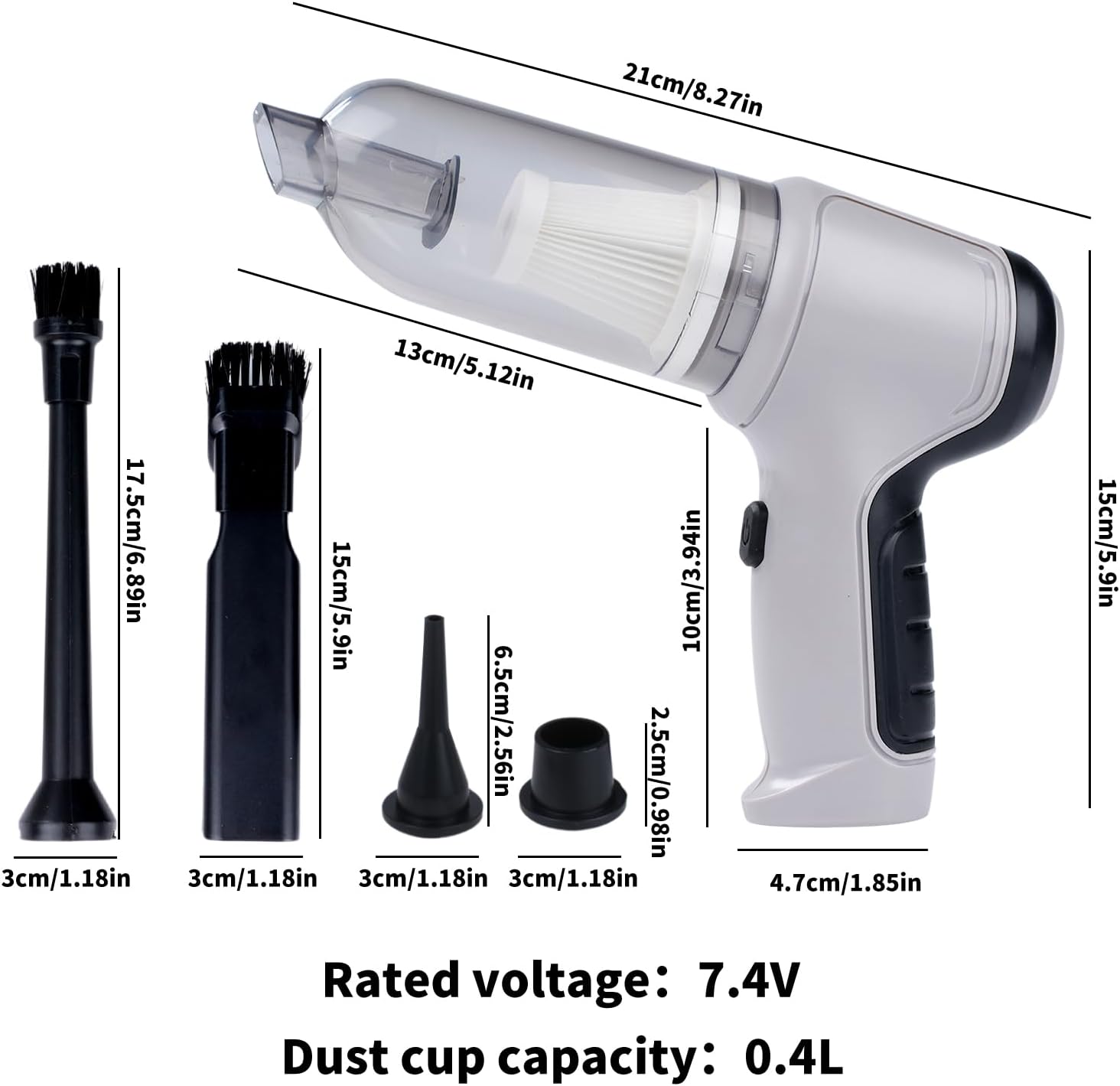
Figura 1: Main components of the ZPSHYD Handheld Vacuum.

Figura 2: Dettagliato view of key features including air outlet, handle, switch, and removable dustbin.
Componenti inclusi:
- 1 x Handheld Vacuum Cleaner Unit
- 1 x Dust Collector Cover
- 1 x Filtro HEPA
- 2 x Inflation Nozzles (various sizes)
- 2 x Suction Nozzles (one with removable brush)
- 1 cavo di ricarica USB
Impostare
1. Carica del dispositivo
Before first use, fully charge the vacuum cleaner. Connect the provided USB charging cable to the charging port on the device and plug the other end into a compatible USB power adapter (not included) or a USB port. The indicator light will show charging status (refer to device for specific light behavior, typically red for charging, green for full).
2. Fissaggio degli accessori
Depending on the desired function, select the appropriate nozzle and firmly attach it to the device's inlet (for vacuuming) or outlet (for blowing/inflating).
Istruzioni per l'uso
1. Funzione di aspirazione
- Ensure the dust collection bin and HEPA filter are securely in place.
- Attach the desired suction nozzle to the vacuum inlet. For car interiors or tight spaces, use the narrow nozzle. For surfaces requiring agitation, use the brush nozzle.
- Press the power button (one-button switch) to turn on the vacuum.
- Dirigere l'ugello verso la zona da pulire.
- After cleaning, press the power button again to turn off the device.

Figura 3: Using the vacuum for car interior cleaning.
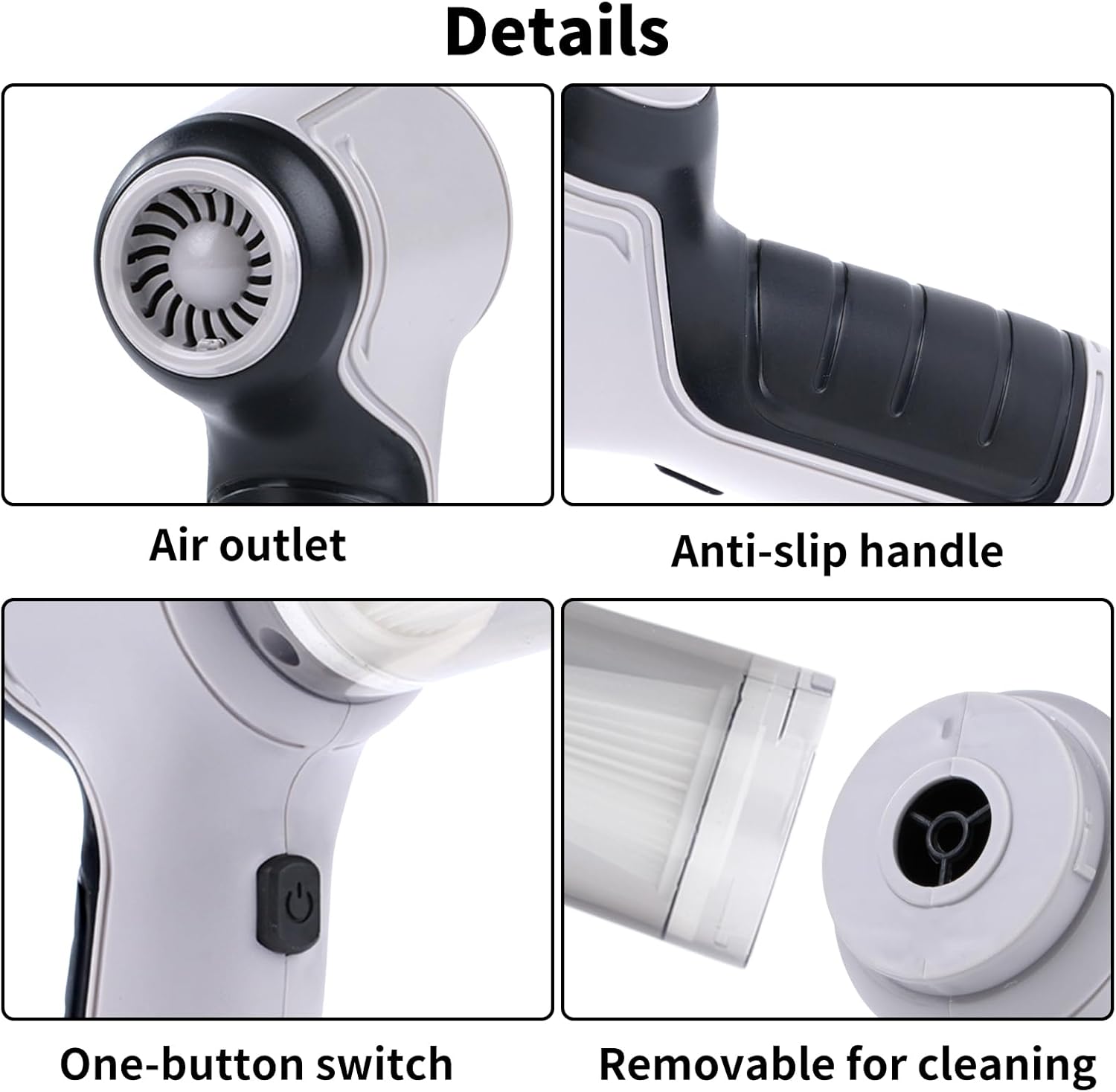
Figura 4: Demonstrating strong suction power for various debris.
2. Air Duster Function
- Attach a suitable nozzle to the air outlet of the device.
- Premere il pulsante di accensione per attivare la funzione di soffiaggio.
- Use the directed airflow to remove dust from keyboards, electronics, or other delicate surfaces.
- Premere il pulsante di accensione per spegnere.

Figura 5: Using the air duster for keyboard cleaning.
3. Inflator Function
- Select the appropriate inflation nozzle and attach it firmly to the air outlet.
- Insert the nozzle into the inflation valve of the item (e.g., swimming ring, small inflatable).
- Premere il pulsante di accensione per avviare il gonfiaggio.
- Monitor the inflation and turn off the device once the item is adequately inflated.

Figura 6: Inflating a swimming ring with the device.
4. Vacuum Sealer Function
- Attach the vacuum sealing nozzle to the air outlet.
- Place the nozzle over the air valve of a compatible vacuum storage bag.
- Press the power button to start extracting air from the bag.
- Turn off the device once the desired vacuum level is achieved.

Figura 7: Using the device for vacuum sealing.
Manutenzione
1. Svuotamento del contenitore di raccolta della polvere
The transparent dust collection bin allows for easy monitoring of its fill level. When full, detach the bin from the main unit and empty its contents into a waste receptacle. Reattach the bin securely.
2. Pulizia del filtro HEPA
The HEPA filter should be cleaned regularly to maintain optimal suction power. Remove the filter from the dust collection bin. Tap it gently to dislodge dust or rinse it under running water. Ensure the filter is completely dry before reinserting it into the device. Do not use the vacuum without a dry filter.
3. Pulizia generale
Pulisci l'esterno dell'aspirapolvere con un panno morbido eamp panno. Non utilizzare prodotti chimici aggressivi o detergenti abrasivi. Assicurarsi che il dispositivo sia spento e scollegato prima di pulirlo.
Risoluzione dei problemi
| Problema | Possibile causa | Soluzione |
|---|---|---|
| Il dispositivo non si accende | La batteria è scarica | Carica completamente il dispositivo. |
| Il pulsante di accensione non è premuto correttamente | Assicurarsi di premere con decisione il pulsante di accensione. | |
| Potenza di aspirazione debole | Dust collection bin is full | Svuotare il contenitore di raccolta della polvere. |
| Il filtro HEPA è intasato | Pulire o sostituire il filtro HEPA. | |
| Nozzle attachment is loose or blocked | Check and secure the nozzle; clear any blockages. | |
| Dispositivo non in carica | USB cable or power adapter faulty | Prova un cavo USB o un alimentatore diverso. |
| La porta di ricarica è sporca o danneggiata | Clean the charging port carefully or contact support. |
Specifiche
Figura 8: Dimensioni del prodotto e specifiche principali.
- Marca: ZPSHYD
- Numero modello: JJ-107
- Fonte di energia: Alimentato a batteria (ioni di litio)
- Voltage: 5 Volts (Rated voltage: 7.4V from image)
- Cosatage: 50 watt
- Potenza di aspirazione: 6000 anni
- Tipo di filtro: Filtro HEPA
- Capacità contenitore polvere: 0.4 litri
- Peso dell'articolo: 1.1 libbre
- Dimensioni articolo (L x P x A): 8.6" x 6.3" x 2.6" (21 cm x 16 cm x 6.6 cm)
- Tecnologia di connettività: USB
- Caratteristiche speciali: Cordless, 3-in-1 (Vacuum, Blower, Inflator/Vacuum Sealer)
- Utilizzi consigliati: Auto, Casa
Garanzia e supporto
For warranty information, product registration, or customer support, please refer to the documentation included with your purchase or contact ZPSHYD customer service directly through their official website or the retailer where the product was purchased. Please have your model number (JJ-107) and purchase date available when contacting support.