
Introduzione
The CHUWI Hipen H7 Stylus Pen is an active stylus designed for precise input on compatible devices. Featuring 4096 levels of pressure sensitivity and MPP 2.0 protocol support, it offers a natural writing and drawing experience. This manual provides instructions for setup, operation, maintenance, and troubleshooting to ensure optimal performance of your Hipen H7.
Contenuto della confezione
Si prega di controllare la confezione per verificare la presenza dei seguenti elementi:
- Penna stilo CHUWI Hipen H7
- AAAA Battery (pre-installed or separate)
- Replacement Pen Tip (if included)
Impostare
1. Installazione della batteria
The Hipen H7 is powered by an AAAA battery. If the battery is not pre-installed, follow these steps:
- Ruotare delicatamente il tappo superiore dello stilo in senso antiorario per aprire il vano batteria.
- Inserire una batteria AAAA con il polo positivo (+) rivolto verso la punta della penna.
- Twist the top cap clockwise to securely close the battery compartment.
 This image illustrates the components of the Hipen H7, including the AAAA battery location.
2. Compatibilità del dispositivo
The Hipen H7 stylus supports the MPP (Microsoft Pen Protocol) protocol. It is compatible with:
- CHUWI Hi10 Max
- CHUWI FreeBook
- Other devices that support the MPP protocol.
Models not supported: Hipad Xpro, Hipad 11, Minibook X, Hi10 XPro.
 This image demonstrates the stylus's compatibility with Microsoft Surface PC series and other MPP-enabled devices.
3. Abbinamento
The Hipen H7 stylus does not require Bluetooth pairing. It works with Windows Ink and is ready to use once the battery is installed and the device supports MPP.
Istruzioni per l'uso
1. Utilizzo di base
Simply touch the pen tip to the screen of your compatible device to begin writing, drawing, or navigating. The stylus offers 4096 levels of pressure sensitivity for varied line thickness and shading.
 This image illustrates the Hipen H7 in use for various creative and productivity tasks on different devices.
2. Pulsanti laterali
The Hipen H7 features two side buttons:
- Pulsante destro del mouse: Press and hold this button while touching the screen to activate the right-click function, similar to a mouse.
- Pulsante Gomma: Press and hold this button while touching the screen to activate the eraser function. Nota: la funzione gomma è disponibile solo per i dispositivi Intel.
This diagram highlights the physical features of the Hipen H7, including the side buttons.
3. Rifiuto del palmo
The stylus supports palm rejection, allowing you to rest your hand naturally on the screen while writing or drawing without interfering with the stylus input.
4. Funzione di sospensione automatica
To conserve battery life, the Hipen H7 will automatically enter a sleep state after 60 seconds of inactivity. It will reactivate automatically when you touch the tip to the screen again.
 This image visually represents the automatic sleep function, which helps extend battery life.
Manutenzione
1. Pulizia
Wipe the stylus body with a soft, dry cloth. Do not use harsh chemicals or abrasive materials, as they may damage the finish or internal components.
2. Sostituzione della punta della penna
If the pen tip becomes worn or damaged, it can be replaced. Gently pull out the old tip and insert a new one firmly until it clicks into place. (Replacement tips may be sold separately or included in the package).
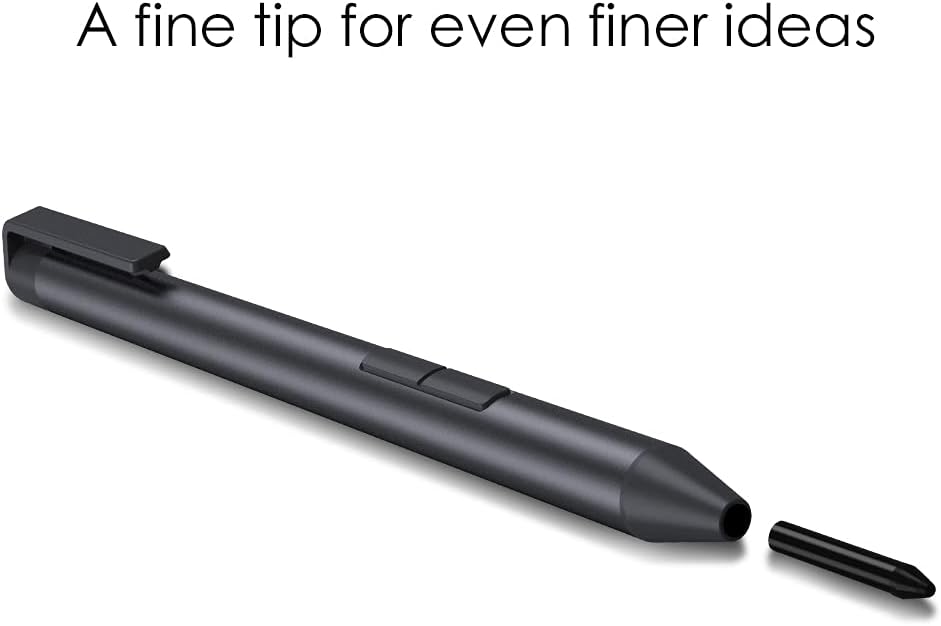 This image demonstrates the replaceable fine tip of the Hipen H7 stylus.
3. Sostituzione della batteria
When the stylus performance degrades or it stops responding, replace the AAAA battery following the instructions in the "Battery Installation" section.
Risoluzione dei problemi
- Lo stilo non risponde:
- Assicurarsi che la batteria AAAA sia installata correttamente e abbia una carica sufficiente. Sostituire la batteria se necessario.
- Verify that your device supports the MPP protocol.
- Riavvia il dispositivo.
- Inaccurate input or jitter:
- Ensure the pen tip is clean and not damaged. Replace if necessary.
- Check for any magnetic interference near your device.
- Assicurati che lo schermo del tuo dispositivo sia pulito.
- I pulsanti laterali non funzionano:
- Confirm that the eraser function is only supported on Intel devices.
- Ensure the stylus is properly connected (no pairing needed, but ensure battery is good).
Specifiche
| Caratteristica | Dettaglio |
|---|---|
| Modello | CHUWI H7 Stylus Pen (Hipen H7) |
| Sensibilità alla pressione | 4096 livelli |
| Protocollo | PMP 2.0 |
| Dimensione della punta della penna | 1.0 mm (punta fine) |
| Tipo di batteria | AAAA Battery |
| Durata della batteria | Up to 180 days (approximate, based on usage) |
| Sonno automatico | Dopo 60 secondi di inattività |
| Dimensioni | Lunghezza: 144 mm, Diametro: 9.5 mm |
| Peso | 16g (stylus only) / 45g (with battery) |
| Materiale | Plastica |
| Dispositivi compatibili | CHUWI Hi10 Max, FreeBook, and other MPP-enabled devices |
 Questa immagine fornisce una panoramica visivaview of the stylus's key features and specifications.
Garanzia e supporto
Informazioni sulla garanzia
CHUWI products typically come with a limited warranty. Please refer to the warranty card included with your purchase or visit the official CHUWI websito per termini e condizioni di garanzia dettagliati specifici per la tua regione.
Assistenza clienti
For technical assistance, troubleshooting, or further inquiries, please contact CHUWI customer support through their official websito o le informazioni di contatto fornite nella confezione del prodotto.