
Introduzione
Thank you for choosing the CITYSPORTS Treadmill with Incline. This manual provides essential information for the safe and efficient operation, maintenance, and troubleshooting of your new fitness equipment. Please read this manual thoroughly before initial use and retain it for future reference.
1. Impostazione
1.1 Disimballaggio e posizionamento
Carefully remove the treadmill from its packaging. Ensure all components are present. Place the treadmill on a flat, stable surface, away from direct sunlight and moisture. Maintain a clear space of at least 2 meters behind the treadmill and 0.5 meters on each side for safety.
1.2 Apertura del tapis roulant
To unfold the treadmill for use, gently lift the handlebar assembly until it locks into an upright position. Ensure all locking mechanisms are securely engaged before stepping onto the belt.
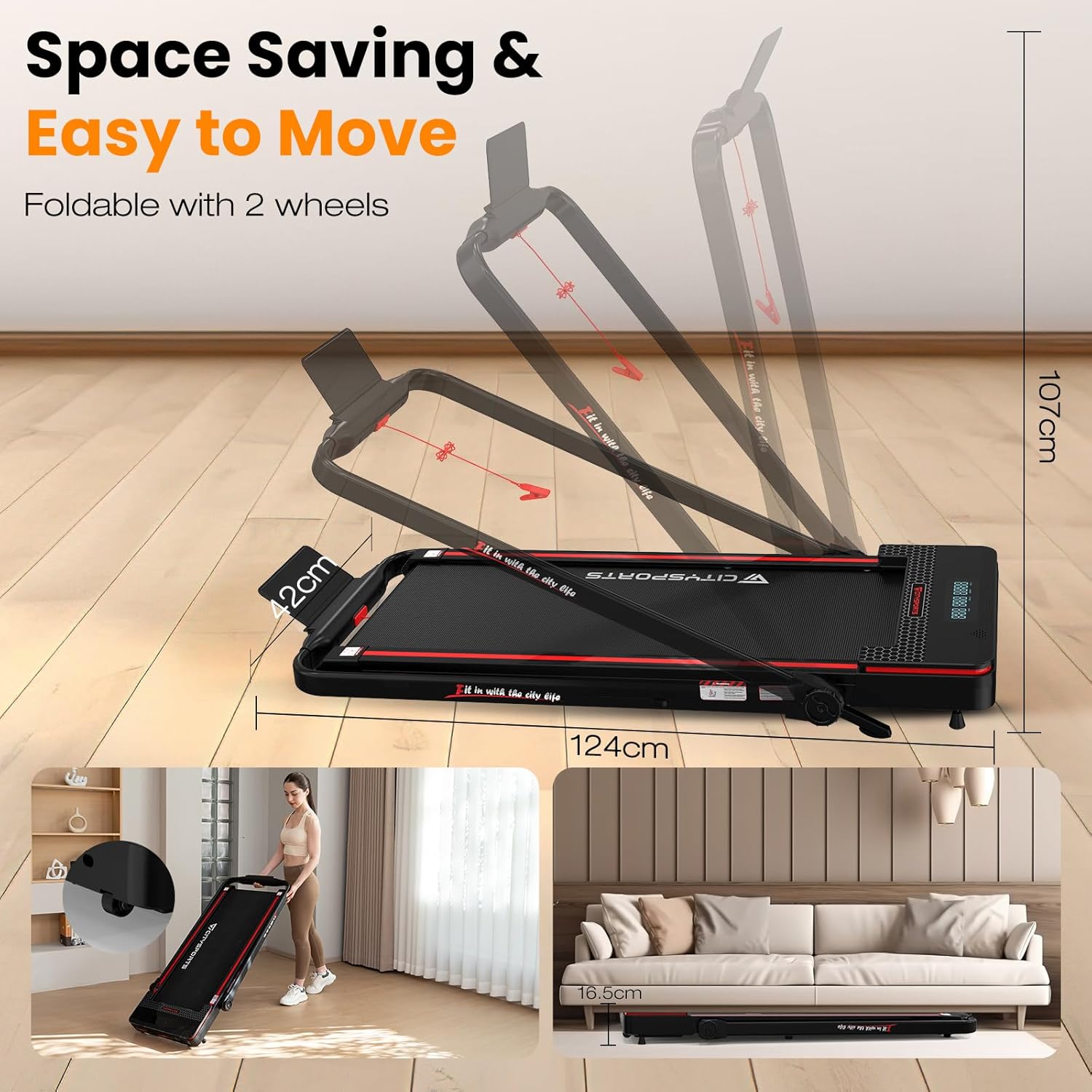
Immagine 1.1: The treadmill can be easily unfolded for use and folded for compact storage. It features transport wheels for convenient movement. Dimensions are approximately 124cm (length) x 107cm (height) when unfolded, and 16.5cm (height) when folded flat.
1.3 Collegamento dell'alimentazione
Plug the power cord into a grounded electrical outlet. Ensure the power switch on the treadmill is in the 'ON' position.
1.4 chiave di sicurezza
Attach the safety key clip to your clothing before starting any workout. The treadmill will not operate without the safety key in place. In case of an emergency, pulling the safety key will immediately stop the treadmill.
2. Istruzioni per l'uso
2.1 Pannello di controllo e display
The treadmill features an LED display that shows key workout metrics. Familiarize yourself with the display and control buttons before starting your exercise.

Immagine 2.1: The LED display provides real-time feedback on your workout, including speed, time, distance covered, and calories burned.
2.2 Iniziare un allenamento
- Ensure the safety key is properly attached to your clothing and inserted into the treadmill.
- Sali sul tapis roulant.
- Premere il tasto INIZIO button on the control panel or remote control. The treadmill will begin at a low speed.
2.3 Regolazione della velocità
Utilizzare il +/- buttons on the control panel or remote control to increase or decrease the speed. The speed range is 1 to 12 km/h.
2.4 Regolazione dell'inclinazione
This treadmill features an adjustable incline up to 8%. Refer to the specific incline adjustment controls on your model, typically located near the main control panel. Adjusting the incline can simulate uphill walking or running, increasing workout intensity and calorie expenditure.

Immagine 2.2: Utilizing the 8% incline feature can significantly increase calorie burn compared to a flat surface, providing a more effective workout.
2.5 modalità di allenamento
The treadmill supports various exercise modes to suit your fitness goals:
- Modalità di camminata: Ideal for light exercise or warm-ups.
- Modalità di esecuzione: For moderate to intense cardiovascular workouts.
- Modalità di arrampicata: Engages the incline feature for a more challenging, uphill simulation.
- Modalità di lavoro: Allows for light walking while performing other tasks, such as working at a standing desk.

Immagine 2.3: The treadmill supports multiple modes, including Climbing, Running, Walking, and Working, to accommodate diverse fitness routines and daily activities.
2.6 Interruzione di un allenamento
Per fermare il tapis roulant, premere il tasto FERMARE button. The belt will gradually slow down and come to a complete stop. Alternatively, pull the safety key to immediately stop the treadmill.
2.7 Piegatura per lo stoccaggio
To fold the treadmill for storage, ensure it is powered off and unplugged. Release the handlebar locking mechanisms and gently lower the handlebar assembly until it lies flat against the running deck. Use the transport wheels to move the folded treadmill to a suitable storage location, such as under a bed or sofa.
2.1 video: This video demonstrates the setup, operation, and folding process of the CITYSPORTS Treadmill, highlighting its ease of use and space-saving design.
3. Manutenzione
Una manutenzione regolare garantisce la longevità e le prestazioni ottimali del tuo tapis roulant.
3.1 Pulizia
Dopo ogni utilizzo, pulire la console e le altre superfici con un panno morbido e asciutto.amp cloth. Do not use abrasive cleaners or solvents. Periodically vacuum under the treadmill to prevent dust and debris from accumulating.
3.2 Lubrificazione della cinghia
The running belt requires periodic lubrication to reduce friction and extend its lifespan. Refer to your treadmill's specific lubrication instructions, typically found in a separate guide or on the product itself. Use only silicone-based treadmill lubricant.
3.3 Regolazione della cinghia
If the running belt becomes off-center or slips, it may need adjustment. Consult the specific instructions for belt centering and tensioning provided with your treadmill. Typically, this involves using an Allen wrench to adjust the rear roller bolts.
4. Risoluzione Dei Problemi
Questa sezione affronta i problemi più comuni che potresti riscontrare con il tuo tapis roulant.
- Il tapis roulant non si accende:
Check if the power cord is securely plugged into a grounded outlet. Ensure the power switch is in the 'ON' position. Verify that the safety key is correctly inserted. - Il tapis roulant si ferma inaspettatamente:
Ensure the safety key is firmly in place and has not been dislodged. Check for any loose connections. - La cintura da corsa scivola o esita:
The belt may require tension adjustment or lubrication. Refer to the 'Maintenance' section for instructions. - Rumore insolito durante il funzionamento:
Inspect the treadmill for any loose parts. Ensure the treadmill is on a level surface. If the noise persists, contact customer support.
5. Specifiche
| Caratteristica | Specificazione |
|---|---|
| Marca | SPORTIVI |
| Colore | Nero Rosso |
| Dimensioni del prodotto (L x P x A) | Dimensioni: 124 cm x 42 cm x 107 cm |
| Peso dell'articolo | 25.35 kg |
| Materiale | Alluminio |
| Velocità massima | 12 chilometri all'ora |
| Caratteristica speciale | Design compatto |
| Pubblico di destinazione | Adulto |
| Potenza massima del motore | 1400 Watt |

Immagine 5.1: The treadmill is equipped with a powerful 1400W motor, designed for quiet and efficient operation, supporting users up to 110 kg.
6. Informazioni sulla garanzia
Your CITYSPORTS Treadmill is covered by a manufacturer's warranty. Please refer to the warranty card included with your product for specific terms, conditions, and duration. Keep your proof of purchase for any warranty claims.
7. Assistenza clienti
If you have any questions, require assistance, or need to report an issue with your CITYSPORTS Treadmill, please contact our customer support team. Contact details can typically be found on our official websito o sulla confezione del prodotto.
Per il supporto online, visitare: CITYSPORTS Official Store