
SKYSHL SS322T-2A3
Manuale utente del tester per fibra OTDR monomodale SKYSHL SS322T-2A3
Modello: SS322T-2A3
1. Introduzione
This manual provides detailed instructions for the operation and maintenance of the SKYSHL SS322T-2A3 Single Mode Optical Time Domain Reflectometer (OTDR). This device is designed for comprehensive fiber optic testing, integrating OTDR, Optical Power Meter (OPM), Optical Light Source (OLS), and Visual Fault Locator (VFL) functionalities. It is suitable for various applications including fiber network construction, maintenance, and fault location.
2. Informazioni sulla sicurezza
Si prega di leggere attentamente tutte le avvertenze di sicurezza e le istruzioni per l'uso prima di utilizzare questo dispositivo. Il mancato rispetto di queste istruzioni può causare lesioni o danni al dispositivo.
- Radiazione laser: The VFL and OLS emit laser radiation. Avoid direct eye exposure to the laser beam. Never look directly into the optical output ports.
- Optical Connectors: Always ensure optical connectors are clean before use. Contaminated connectors can lead to inaccurate measurements and damage to the device or fiber.
- Alimentazione elettrica: Use only the specified power adapter and battery type. Do not attempt to open or modify the battery pack.
- Condizioni ambientali: Operate the device within the specified temperature and humidity ranges. Avoid exposure to extreme temperatures, moisture, or corrosive environments.
- Manutenzione: Refer all servicing to qualified personnel. Do not attempt to disassemble the device.
3. Contenuto della confezione
Verifica che tutti gli articoli elencati di seguito siano inclusi nel pacco. Se alcuni articoli risultano mancanti o danneggiati, contatta immediatamente il fornitore.

Figure 3.1: The SKYSHL SS322T-2A3 OTDR and its complete set of accessories, including various fiber optic connectors, patch cables, cleaning swabs, USB cable, power adapter, and user manual.
- 1x SKYSHL SS322T-2A3 SM OTDR Fiber Tester
- 2x SM FC-FC Fiber Optic Patch Cables
- Various Connectors: FC, SC, LC, ST
- Flanges: FC-SC, FC-ST, FC-FC, FC-LC
- Adattatore di alimentazione
- Cavo USB
- Manuale d'uso
- Borsa per il trasporto
- Tamponi di pulizia
4. Dispositivo suview
The SKYSHL SS322T-2A3 features a robust design with a 7-inch touch screen for intuitive operation. Key components include optical ports for OTDR, OPM, OLS, and VFL functions, along with control buttons and a power input.

Figura 4.1: Fronte view of the SS322T-2A3 OTDR, showing the 7-inch touch screen display and the navigation/function buttons on the right side.

Figura 4.2: in alto view of the SS322T-2A3, highlighting the various optical ports for OTDR (UPC/APC), VFL, and OPM, along with USB and Ethernet ports.
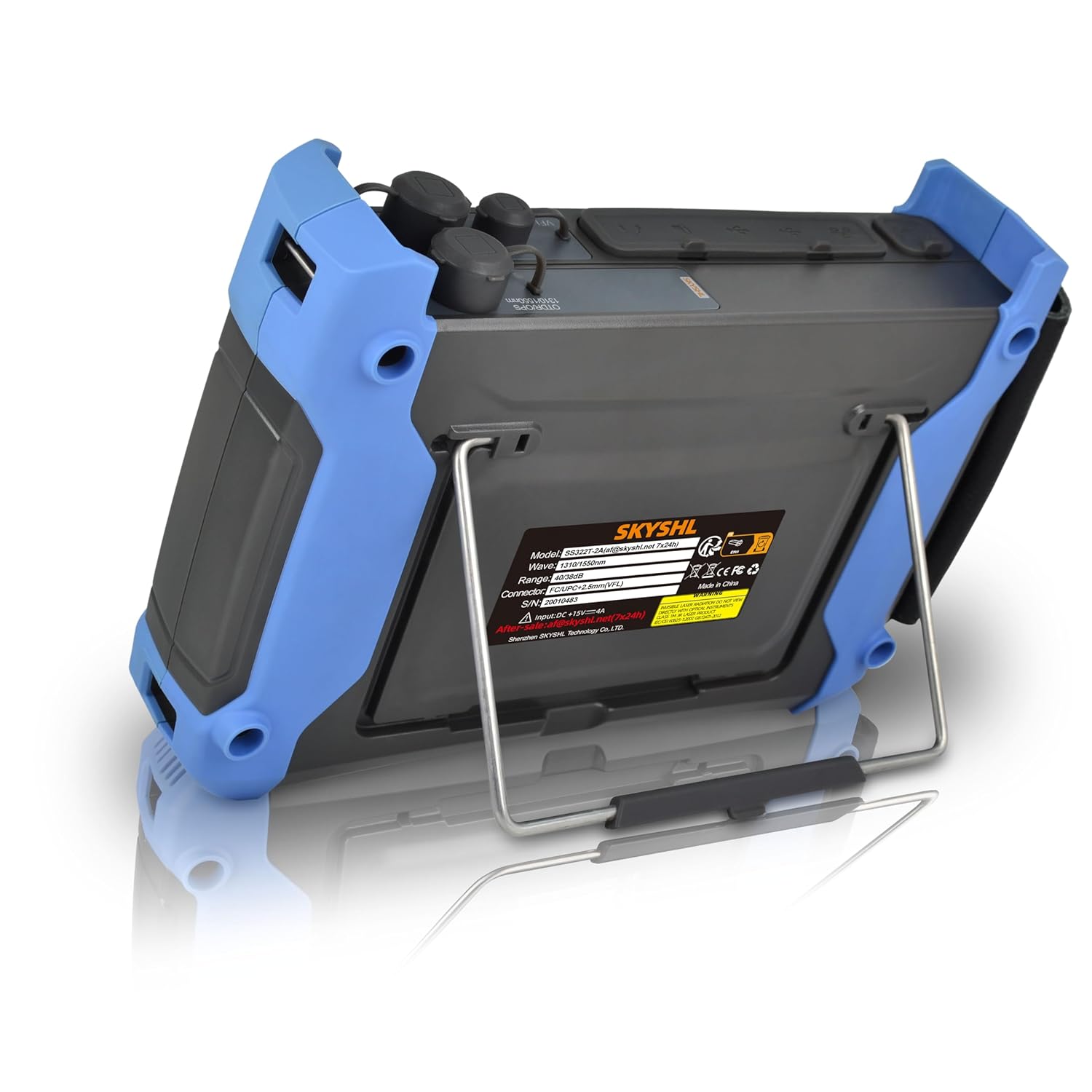
Figura 4.3: Posteriore view of the SS322T-2A3, showing the integrated kickstand for convenient desktop use and product information label.
5. Impostazione
5.1. Accensione iniziale
- Ensure the device is fully charged or connected to the power adapter.
- Press and hold the power button (usually located at the bottom right of the control panel) until the screen illuminates.
- Il dispositivo si avvierà e visualizzerà il menu principale.
5.2. Connecting Optical Fibers
Before connecting any fiber, ensure the connector end-face is clean. Use the provided cleaning swabs for optimal performance and to prevent damage.
- Identify the correct optical port for your test (OTDR, VFL, OPM).
- Select the appropriate adapter (SC, FC, ST, LC) for your fiber connector type.
- Gently insert the cleaned fiber connector into the device's port until it clicks into place.
6. Modalità operative
The SS322T-2A3 integrates multiple testing functions. Navigate through the main menu using the touch screen or physical buttons to select the desired mode.
6.1. OTDR (Optical Time Domain Reflectometer)
The OTDR function is used to characterize optical fibers, locate faults, and measure loss. The SS322T-2A3 supports 1310nm and 1550nm wavelengths with dynamic ranges of 40dB and 38dB respectively, allowing for testing distances up to 165km.

Figura 6.1: un example of an OTDR test curve displayed on the device, illustrating various fiber events and their corresponding distance and attenuation values.

Figure 6.2: A side-by-side comparison of OTDR test curves for 1310nm and 1550nm wavelengths, demonstrating different measurement parameters and results.
Performing an OTDR Test:
- Dal menu principale, selezionare "OTDR".
- Configure test parameters such as wavelength (1310nm or 1550nm), pulse width, range, and test mode (Auto or Manual).
- Collegare la fibra da testare alla porta OTDR.
- Press the "Start" button to initiate the test.
- The device will display the OTDR trace and an event table.
Nota: The smaller the pulse width, the smaller the event dead zone (0.8m typical) and attenuation dead zone (4.5m typical), allowing for detection of close-range faults. However, a smaller pulse width also results in a smaller dynamic range.
6.2. OPM (Optical Power Meter)
The OPM measures the optical power of a fiber optic signal. The SS322T-2A3 supports wavelengths from 850nm to 1650nm and a power range of -60 to +3dBm.
Using the OPM:
- Dal menu principale, selezionare "OPM".
- Connect the fiber to the OPM port.
- Il dispositivo visualizzerà la potenza ottica misurata in dBm.
6.3. OLS (Optical Light Source)
The OLS provides a stable optical signal for loss measurements when paired with an OPM. The SS322T-2A3 offers 1310nm and 1550nm wavelengths.
Using the OLS:
- Dal menu principale, selezionare "OLS".
- Select the desired wavelength (1310nm or 1550nm).
- Connect the fiber to the OLS port. The device will emit a continuous wave or modulated signal.
6.4. VFL (localizzatore visivo di guasti)
The VFL emits a visible red laser (650nm, 2km range) into the fiber, allowing for visual identification of breaks, bends, or faulty connectors over short distances.
Utilizzando il VFL:
- Dal menu principale, selezionare "VFL".
- Collegare la fibra alla porta VFL.
- Activate the VFL. Observe the fiber for any visible red light leakage, indicating a fault.
7. Event Map and Graphics Analysis
The SS322T-2A3 simplifies fiber analysis with its intelligent event mapping and graphics analysis modes, making it easier to identify and locate network components and faults.

Figure 7.1: The OTDR display showing both the graphical trace and a detailed event table, providing specific data points for each detected event on the fiber link.

Figure 7.2: A visual representation of the event map and graphics analysis mode, which simplifies the interpretation of OTDR traces by presenting events in an easy-to-understand graphical format.
After an OTDR test, the device can automatically generate an event map, visually representing splices, connectors, and other events along the fiber. The graphics analysis mode provides detailed information about each event, including distance, loss, and reflectance, aiding in quick fault diagnosis.
8. Smart APP Module and Data Management
The SS322T-2A3 supports connectivity with smart devices (Android/iOS/Windows) and PCs via a dedicated APP module. This allows for viewing, sharing, analyzing, and saving test data remotely.
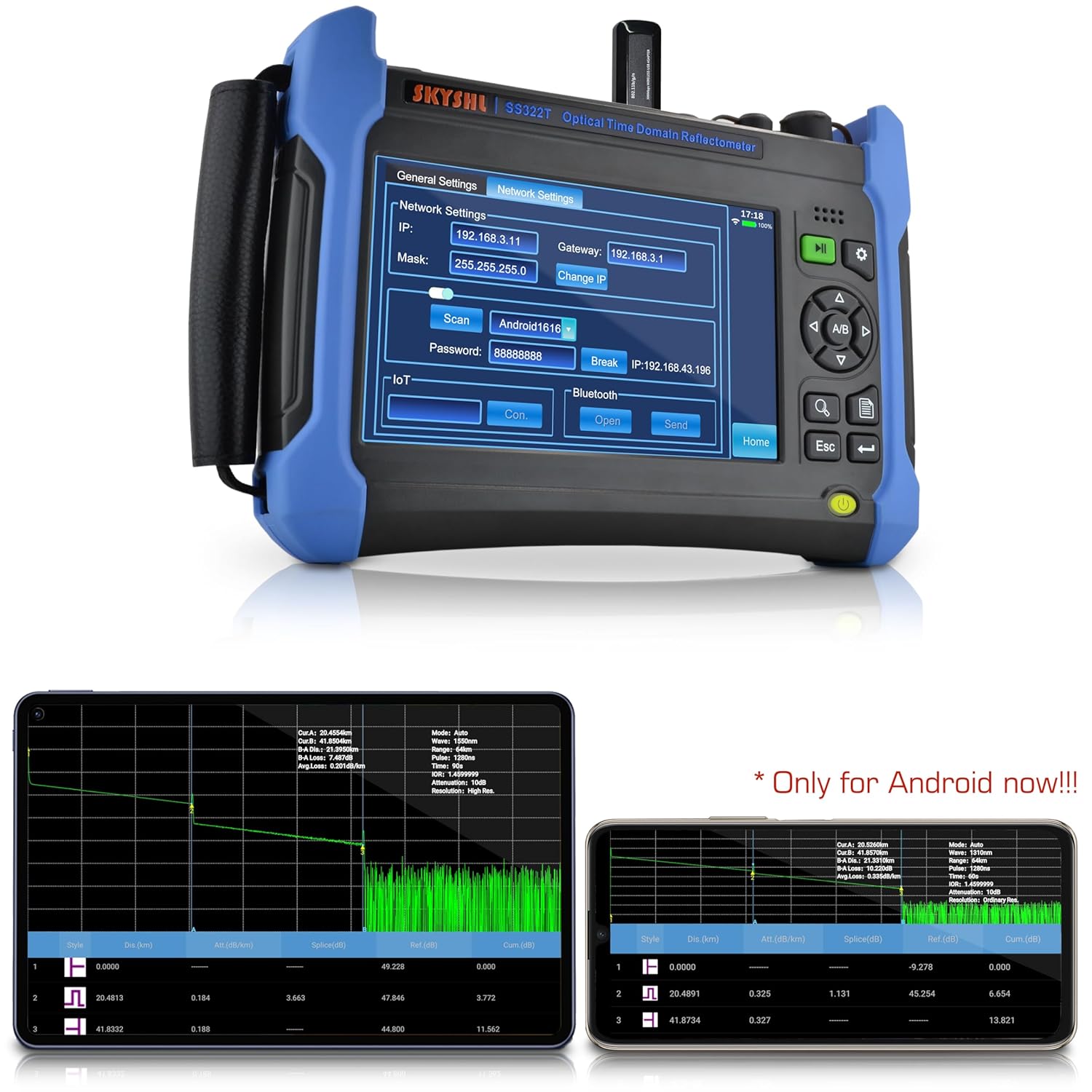
Figure 8.1: The network settings interface on the SS322T-2A3, showing options for Wi-Fi and Bluetooth connectivity to facilitate data transfer and remote control via the Smart APP.
Connessione alla Smart APP:
- Download and install the SKYSHL Smart APP on your compatible device.
- On the SS322T-2A3, navigate to "General Settings" -> "Network Settings".
- Enable Wi-Fi or Bluetooth and connect to your smart device.
- Follow the APP instructions to establish a connection and manage your test data.
Nota: The Smart APP functionality is currently optimized for Android devices.
9. Manutenzione
Proper maintenance ensures the longevity and accuracy of your SS322T-2A3 OTDR.
9.1. Pulizia
- Optical Ports: Always clean optical connector end-faces before each use with specialized fiber optic cleaning tools (e.g., cleaning swabs, lint-free wipes with isopropyl alcohol). Contamination is the leading cause of inaccurate measurements and damage.
- Screen and Casing: Use a soft, dry, lint-free cloth to clean the screen and device casing. Non utilizzare detergenti abrasivi o solventi.
9.2. Conservazione
- Quando non lo si utilizza, riporre il dispositivo nella sua custodia per proteggerlo dalla polvere e da eventuali danni fisici.
- Conservare in un luogo fresco e asciutto, lontano dalla luce solare diretta e da temperature estreme.
- If storing for extended periods, ensure the battery is partially charged (around 50%) and recharge it every few months to prevent deep discharge.
10. Risoluzione Dei Problemi
Questa sezione affronta i problemi più comuni che potresti riscontrare con il tuo OTDR SS322T-2A3.
| Problema | Possibile causa | Soluzione |
|---|---|---|
| Il dispositivo non si accende. | Low battery or faulty power adapter. | Charge the device using the provided power adapter. Ensure the adapter is properly connected. |
| Inaccurate OTDR measurements. | Dirty optical connectors, incorrect test parameters, or damaged fiber. | Clean all optical connectors. Verify OTDR test parameters (wavelength, pulse width, range). Inspect the fiber for damage. |
| La luce VFL è debole o non visibile. | Dirty VFL port, VFL function not activated, or fiber too long/damaged. | Clean the VFL port. Ensure VFL mode is active. VFL is effective for short distances (up to 2km); for longer fibers, use OTDR. |
| Cannot connect to Smart APP. | Incorrect network settings, APP not installed, or device compatibility issues. | Check Wi-Fi/Bluetooth settings on both the device and your smart device. Ensure the APP is correctly installed. Verify device compatibility (currently optimized for Android). |
If the problem persists after attempting these solutions, please contact SKYSHL customer support for further assistance.
11. Specifiche
Key technical specifications for the SKYSHL SS322T-2A3 OTDR.
- Numero modello: SS322T-2A3
- OTDR Wavelengths: 1310nm / 1550nm
- OTDR Dynamic Range: 40 dB (1310 nm) / 38 dB (1550 nm)
- Maximum Test Distance: Fino a 165 km
- Event Dead Zone (EDZ): 0.8m (typical for SM)
- Attenuation Dead Zone (ADZ): 4.5m (typical for SM)
- VFL Wavelength: 650 nm
- VFL Range: 2 chilometri
- OPM Wavelength Range: 850nm ~ 1650nm
- OPM Power Range: -60 ~ +3dBm
- OLS Wavelengths: 1310nm / 1550nm
- Display: Touchscreen da 7 pollici
- Connettori compatibili: APC & UPC SC, FC, ST, LC
- Sistema operativo: Linux
- Dimensioni: 9.84 x 7.09 x 2.17 pollici
- Peso: 6.83 libbre
- Batterie: 1 batteria al litio metallico (inclusa)
12. Garanzia e supporto
SKYSHL provides comprehensive support for the SS322T-2A3 OTDR.
- Garanzia: 3 years free replacement.
- Manutenzione: Lifetime maintenance.
- Supporto tecnico: 24 hours professional technical support is available. Please refer to the contact information provided with your product or on the official SKYSHL websito per assistenza.
Ask a question about this manual
Ask about setup, troubleshooting, compatibility, parts, safety, or missing instructions. Manuals+ will review the question and use this page’s manual context to help answer it.