
1. Introduzione
This manual provides essential information for the proper use and maintenance of your EBTOOLS 8-Inch 2-in-1 Pocket PC Computer. Please read this guide thoroughly before operating the device to ensure optimal performance and longevity. This compact and versatile device features an 8-inch touchscreen, a 360-degree rotating design, and runs on Windows 11 Pro.

Image: The EBTOOLS 8-Inch 2-in-1 Pocket PC shown in its tablet configuration, with a scenic road displayed on the screen.
2. Contenuto della confezione
Verifica che tutti gli articoli elencati di seguito siano inclusi nella confezione del prodotto:
- 1 x EBTOOLS 8-Inch 2-in-1 Laptop
- 1 x Cavo di alimentazione
- 1 x adattatore di alimentazione (spina USA)
- 2 x User Manuals (this document is one of them)

Image: The EBTOOLS 8-Inch 2-in-1 Pocket PC, its power supply cord, and the US plug adapter, laid out as they would appear in the package.
3. Prodotto finitoview
The EBTOOLS 8-Inch 2-in-1 Pocket PC is designed for portability and versatility. It features a compact form factor and a 360-degree rotating display, allowing it to function as both a laptop and a tablet.
Caratteristiche principali:
- Processore: N100 CPU, capable of up to 3.4GHz frequency.
- Memoria: 12 GB di RAM LPDDR5.
- Magazzinaggio: 512GB M.2 SSD, expandable up to 2TB.
- Display: 8-inch touchscreen with 360-degree rotation.
- Connettività: WiFi6 (2.4G/5G band) and Bluetooth 5.2.
- Telecamera: 2MP 30 Frame HD built-in front camera for video calls.
- Tastiera: Edge-less full-size QWERTY keyboard with integrated touchpad.
- Batteria: Built-in 5000mAh polymer lithium battery, providing 4-6 hours of use.
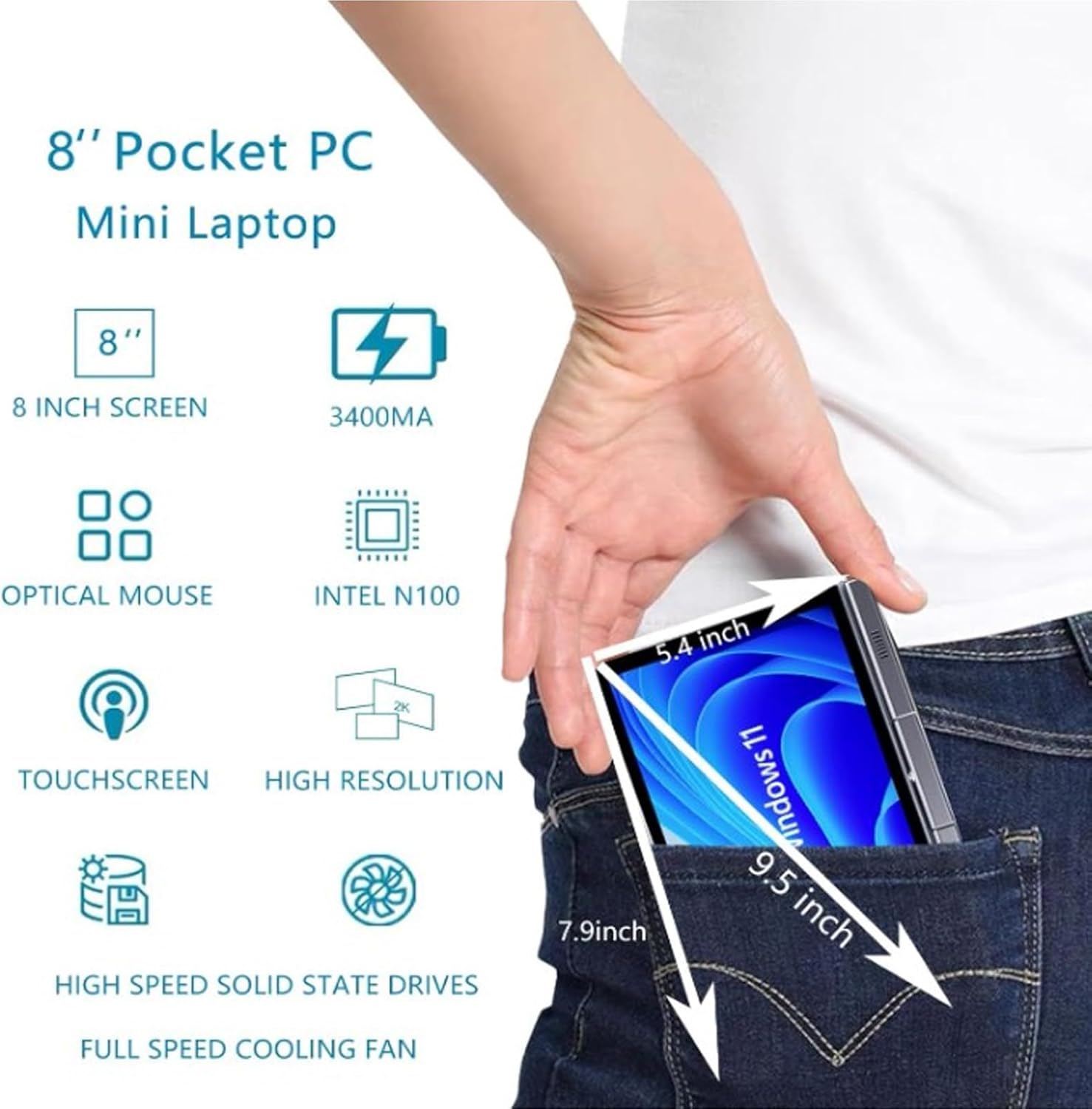
Image: A visual representation of the 8-inch Pocket PC's compact dimensions, demonstrating its portability by showing it fitting into a standard pocket.

Image: A labeled diagram highlighting the various ports (USB 3.0, Type-C, Audio, RJ45) and keyboard components (Front Camera, Speaker, Power Light, Power Button, Left/Right/Middle Mouse Buttons) of the EBTOOLS 8-Inch 2-in-1 Pocket PC.
4. Impostazione
4.1 Accensione iniziale e ricarica
- Carica il dispositivo: Before first use, connect the power adapter to the Type-C port on the device and plug it into a power outlet. Allow the device to charge fully. The power light indicator will show charging status.
- Accensione: Press and hold the Power Button located on the keyboard deck until the screen illuminates.
- Configurazione iniziale: Seguire le istruzioni visualizzate sullo schermo per completare il processo di installazione di Windows 11 Pro, inclusa la selezione della lingua, la connessione di rete e la creazione dell'account utente.
The device is designed for immediate use upon completion of the initial Windows setup.
5. Istruzioni per l'uso
5.1 Tastiera e touchpad
- The device features an edge-less full-size QWERTY keyboard for typing.
- The integrated touchpad supports standard mouse functions, including moving the pointer, scrolling, and left/right clicks. The left, right, and middle mouse buttons are clearly indicated on the diagram.
5.2 Funzionamento del touchscreen
- The 8-inch display is a multi-touch screen. Use gestures such as tap, swipe, pinch-to-zoom, and rotate for navigation and interaction with applications.
5.3 Rotazione di 360 gradi
- The display can be rotated 360 degrees to switch between laptop mode (traditional clamshell) and tablet mode (screen folded back against the base).
- When in tablet mode, the keyboard is automatically disabled to prevent accidental input.
5.4 Collegamento delle periferiche
- Porta USB 3.0: Connect external devices such as USB drives, mice, or keyboards to the USB 3.0 port.
- Tipo-C: Utilizzato per la ricarica e il trasferimento dati.
- High Definition Multimedia Interface (HDMI): Connect an external monitor or projector using an HDMI cable for extended display.
- 3.5mm Standard Headphone Jack: Collega cuffie o altoparlanti esterni.
- Porta di rete RJ45: Collegare un cavo Ethernet per una connessione Internet cablata.
5.5 Connettività wireless
- WiFi6: Access wireless networks (2.4G and 5G bands) for internet connectivity. Enable Wi-Fi through Windows settings.
- Bluetooth 5.2: Pair with Bluetooth-enabled devices such as headphones, speakers, or other peripherals. Enable Bluetooth through Windows settings.
6. Manutenzione
6.1 Pulizia
- Utilizzare un panno morbido e privo di lanugine per pulire lo schermo e le superfici esterne. Per macchie ostinate, strofinare leggermenteampInumidire il panno con acqua o con una soluzione detergente per schermi.
- Evitare di utilizzare prodotti chimici aggressivi, detergenti abrasivi o spray aerosol direttamente sul dispositivo.
- Assicurarsi che il dispositivo sia spento e scollegato prima della pulizia.
6.2 Conservazione
- Conservare il dispositivo in un luogo fresco e asciutto, lontano dalla luce solare diretta e da temperature estreme.
- If storing for an extended period, ensure the battery is charged to approximately 50% to preserve battery health.
7. Risoluzione Dei Problemi
This section addresses common issues you might encounter with your EBTOOLS 8-Inch 2-in-1 Pocket PC.
7.1 Il dispositivo non si accende
- Ensure the device is fully charged. Connect the power adapter and wait a few minutes before attempting to power on again.
- Verify the power adapter and cable are securely connected and the power outlet is functional.
- Prova a tenere premuto il pulsante di accensione per 10-15 secondi per eseguire un hard reset.
7.2 Problemi di connettività Wi-Fi o Bluetooth
- Controlla se il Wi-Fi o il Bluetooth sono abilitati nelle impostazioni di Windows.
- Restart the device and your wireless router/Bluetooth device.
- Assicurati di trovarti nel raggio di azione della rete Wi-Fi o del dispositivo Bluetooth.
- Aggiornare i driver wireless, se disponibili.
7.3 Il touchscreen non risponde
- Riavviare il dispositivo.
- Assicurarsi che lo schermo sia pulito e privo di detriti.
- Check for any system updates that might include touchscreen driver fixes.
7.4 Durata breve della batteria
- Regola le impostazioni di risparmio energia in Windows per ottimizzare l'utilizzo della batteria.
- Chiudere le applicazioni non necessarie in esecuzione in background.
- Ridurre la luminosità dello schermo.
- Ensure the device is not running resource-intensive tasks continuously.
8. Specifiche
| Caratteristica | Specificazione |
|---|---|
| Sistema operativo | Windows 11 Pro |
| Dimensioni dello schermo | 8 pollici |
| Processore | N100 CPU (up to 3.4GHz) |
| Memoria RAM | 12 GB LPDDR5 |
| Magazzinaggio | 512GB M.2 SSD (supports up to 2TB) |
| Fotocamera frontale | 2MP 30 Frame HD Built-In Camera |
| Bluetooth | BT5.2 è un'auto a motore. |
| Wireless Fidelity Type | 2.4G / 5G Band (WiFi6) |
| Interfacce | 1 x USB3.0, 1 x 3.5mm Standard Headphone Jack, 1 x High Definition Multimedia Interface Port, 1 x Type-C, 1 x RJ45 Network Port |
| Tipo di batteria | Batteria al litio polimerica incorporata da 5000 mAh |
| Durata della batteria | 4-6 ore (uso tipico) |
| Peso dell'articolo | 2.68 libbre (circa 1.22 kg) |
| Dimensioni del pacco | 9.45 x 7.09 x 2.36 pollici |
9. Garanzia e supporto
9.1 Garanzia del prodotto
Specific warranty details for your EBTOOLS 8-Inch 2-in-1 Pocket PC are typically provided with your purchase documentation or on the manufacturer's official websito. Per informazioni sulla copertura, la durata e i termini della garanzia, fare riferimento a queste risorse.
9.2 Assistenza clienti
For technical assistance, troubleshooting beyond this manual, or warranty claims, please contact EBTOOLS customer support. Contact information can usually be found on the product packaging, the manufacturer's websito o tramite il tuo rivenditore.
When contacting support, please have your product model number (EBTOOLS9pxf4058ch-12) and purchase information readily available.