Introduzione
Welcome to your new Nontaus D15 Wooden Multimedia 2.0 Channel Speaker. This manual provides detailed instructions for setup, operation, maintenance, and troubleshooting to ensure optimal performance and longevity of your speakers. Please read this manual thoroughly before using the product.
Prodotto finitoview
Contenuto della confezione
- Speaker Unit (2 speakers)
- Cavo audio da 3.5 mm
- Cavo di alimentazione USB
Caratteristiche degli altoparlanti
- 2.0 Channel Stereo Sound
- 6 Watt Deep Stereo Audio (3W x 2 RMS)
- Wooden Enclosure for enhanced acoustics
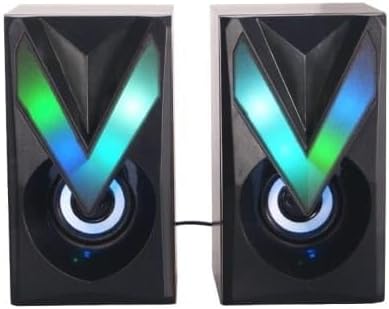
- Vibrant RGB LED lighting
- USB alimentato
- 3.5mm Audio Jack Connectivity
- Controllo touch
Componenti dell'altoparlante

The Nontaus D15 speaker system consists of two units. Each unit features a main speaker driver and an integrated RGB LED lighting panel. The primary control unit (one of the speakers) houses the volume control and input connections.

The rear of the speakers may include a bass port for enhanced low-frequency response and the fixed cable for connecting the two speaker units.
Impostare
Collegamento degli altoparlanti
- Posizionamento: Place the two speaker units on a stable, flat surface, ideally equidistant from your listening position for optimal stereo separation.
- Connect Speaker Units: Ensure the cable connecting the two speaker units is securely plugged in. This cable is usually fixed to one speaker and plugs into the other.
- Connessione audio: Plug the 3.5mm audio jack into the audio output port of your device (computer, laptop, smartphone, MP3 player, tablet).
- Collegamento elettrico: Insert the USB power cable into an available USB port on your computer, laptop, or a compatible USB power adapter (5V/1A recommended).
- Accensione: Once connected, the speakers should power on automatically, and the RGB LED lights will illuminate.

Ensure all connections are firm to prevent audio interruptions or power issues.
Istruzioni per l'uso
Controllo del volume
The Nontaus D15 speakers feature touch controls. Locate the touch-sensitive area, typically on the front or top of one of the speaker units.
- Aumenta volume: Tap or slide your finger on the designated area to increase the volume.
- Diminuisci volume: Tap or slide your finger on the designated area to decrease the volume.
- Disattiva/Attiva audio: A quick tap might mute or unmute the audio. Refer to the specific touch control interface on your speaker.
Controllo dell'illuminazione a LED RGB
The RGB LED lighting is designed to be vibrant. Control options may vary:
- Ciclo automatico: The lights may cycle through colors automatically.
- Controllo touch: Some models allow changing light modes or turning lights on/off via a dedicated touch area.
Manutenzione
Pulizia
To clean your speakers:
- Disconnect the speakers from power before cleaning.
- Use a soft, dry cloth to wipe down the speaker surfaces.
- Do not use liquid cleaners, aerosols, or abrasive materials, as these can damage the finish or internal components.
Magazzinaggio
Quando non vengono utilizzati per lunghi periodi, conservare gli altoparlanti in un luogo fresco e asciutto, lontano dalla luce solare diretta e da temperature estreme.
Risoluzione dei problemi
| Problema | Possibile causa | Soluzione |
|---|---|---|
| Nessun suono |
|
|
| Suono distorto |
|
|
| Luci RGB non funzionanti |
|
|
Specifiche
| Caratteristica | Dettaglio |
|---|---|
| Nome del modello | Nontaus D15 |
| Marca | Generico |
| Tipo di altoparlante | Multimedia |
| Tecnologia di connettività | Wired (3.5mm audio, USB power) |
| Modalità di uscita audio | Stereo |
| Configurazione del canale audio surround | 2.0 |
| Potenza massima di uscita dell'altoparlante | 6 Watt (3 W x 2 RMS) |
| Fonte di alimentazione | Elettrico con filo (USB) |
| Metodo di controllo | Tocco |
| Materiale | Legna |
| Colore | Brown (Wooden finish) |
| Dimensioni del prodotto (P x L x A) | Dimensioni: 8 cm x 15 cm x 17 cm |
| Peso dell'articolo | 350 grammi |
| Dispositivi compatibili | Tablet, Laptop, Computer, MP3 Player, Smartphone |
| Tipo di garanzia | Limitato |
Garanzia e supporto
Informazioni sulla garanzia
This product comes with a limited warranty. Please refer to the warranty card included in your package for specific terms and conditions, or contact your retailer for details.
Assistenza clienti
For technical assistance or customer service inquiries, please contact your point of purchase or visit the manufacturer's websito.