
Introduzione
Thank you for choosing the Abovsare Digital Wall Clock. This 16-inch large display digital clock features 11 RGB color-changing options, remote control operation, and ambient night lights, making it a versatile addition to any living room, bedroom, office, or classroom. This manual provides detailed instructions for setup, operation, maintenance, and troubleshooting to ensure optimal performance and longevity of your device.
Caratteristiche principali:
- 16-inch High Definition LED Large Screen Display
- 11 RGB Color Changing Options for Jumbo Digits
- 9 Different Color Ambient Night Lights
- 10 Levels Automatic Brightness Dimmer (Manual & Auto-Dimming)
- Built-in Memory Function (retains time data after power disconnection)
- Count-up or Count-down Function (up to 99 minutes and 99 seconds)
- Convenient Remote Control Operation

Figure 1: Abovsare Digital Wall Clock showcasing its large, vibrant display with multiple color options.
Impostare
Contenuto della confezione
Prima di iniziare, verifica che tutti gli articoli siano inclusi nel tuo pacchetto:
- Digital Clock Unit
- Telecomando
- Power Cable (10ft/3m)
- Adattatore di alimentazione (5V/2A)
- Wall Studs for Mounting
- Manuale di istruzioni (questo documento)
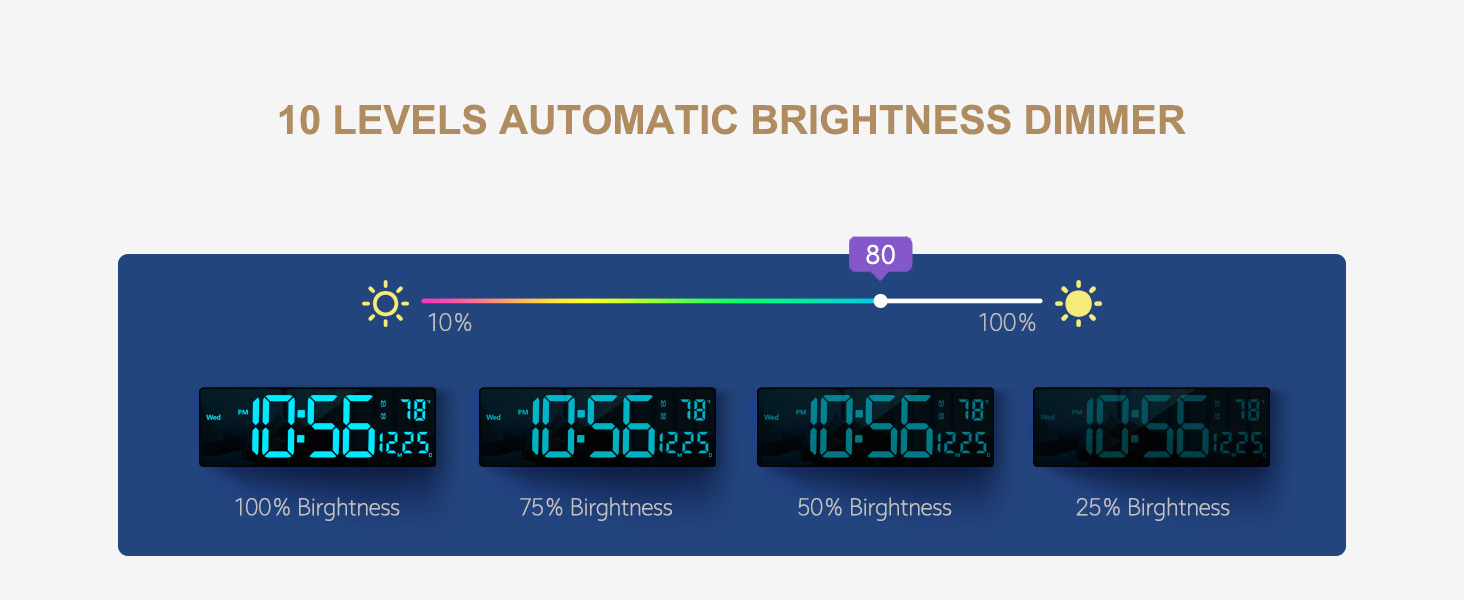
Figura 2: Posteriore view of the clock indicating power input and hanging points, alongside a visual representation of included accessories.
Accensione
The Abovsare Digital Wall Clock requires continuous power to operate. It is not battery operated for primary function.
- Connect the provided power cable to the DC 5V/2A input port on the back of the clock.
- Collega l'alimentatore a una presa elettrica standard.
- Il display dell'orologio si illuminerà, indicando che l'apparecchio è acceso.
Note: The clock requires 2 C batteries (not included) for its memory function only. These batteries ensure that time data is not lost during a power outage, eliminating the need to reset the clock once power is restored. They do not power the display.
Montaggio e posizionamento
Your digital clock can be either wall-mounted or placed on a tabletop.
Montaggio a parete:
- Scegliere una posizione adatta sulla parete, assicurandosi che sia vicina a una presa di corrente.
- Use the provided wall studs and the hanging holes on the back of the clock to securely mount it. Ensure the clock is level.
- Route the power cable neatly to the outlet.
Posizionamento sul tavolo:
- Place the clock on a flat, stable surface such as a desk, shelf, or nightstand.
- Ensure the power cable can reach an outlet without being strained.
Istruzioni per l'uso
All settings and operations for the clock are conveniently managed using the included remote control.
Controllo remoto finitoview
Familiarize yourself with the buttons on the remote control. (Specific button functions will be detailed in subsequent sections.)

Figure 3: The digital clock and its remote control, highlighting the ability to change display colors.
Impostazione di ora e data
Refer to the remote control's specific buttons for time and date adjustment. Typically, there are dedicated buttons or a 'SET' button followed by navigation keys.
- Premere il tasto IMPOSTATO pulsante per accedere alla modalità di impostazione.
- Utilizzare il SU/GIÙ or SINISTRA/DESTRA arrows to adjust values (e.g., hour, minute, year, month, day).
- Premere IMPOSTATO di nuovo o OK per confermare e passare all'impostazione successiva.
- Uscire dalla modalità di impostazione premendo il tasto EXIT or IMPOSTATO button repeatedly until the display returns to normal.
Changing Display Colors (11 RGB Colors)
The clock offers 11 distinct colors for the jumbo digits, easily changeable via remote control.
- Individuare il COLORE or dedicated color buttons on the remote.
- Press the button to cycle through the 11 available colors.
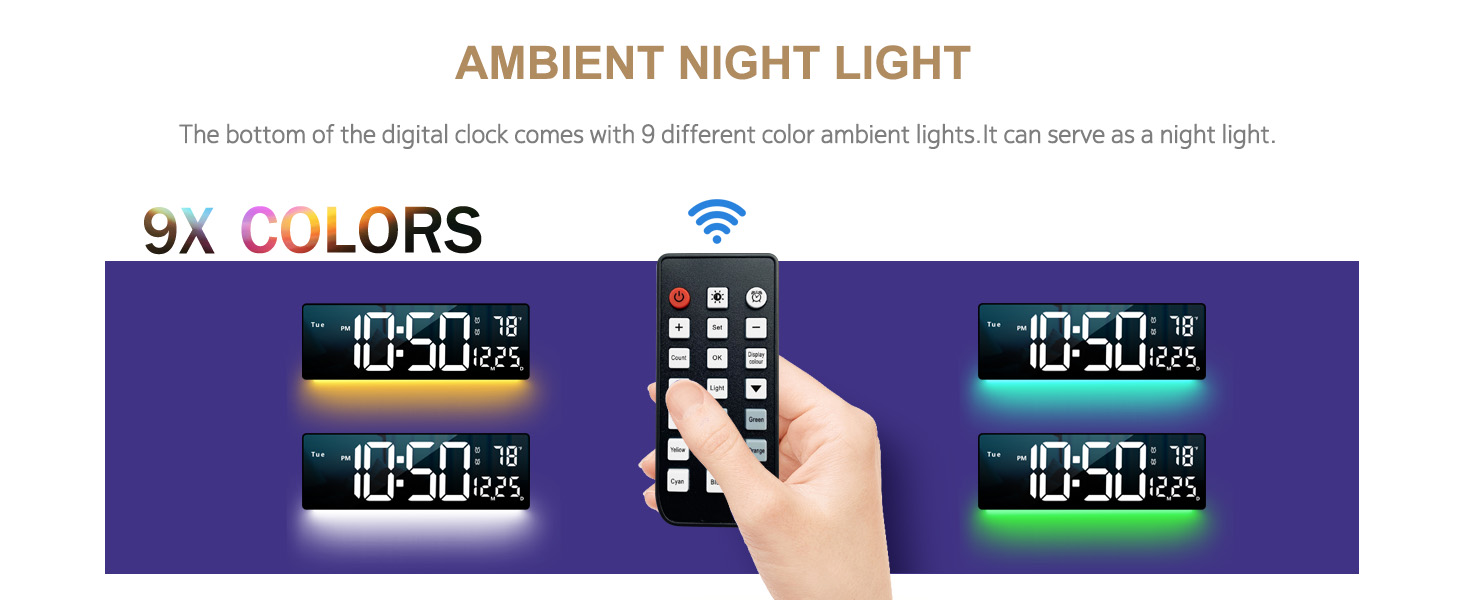
Figura 4: Esamples of the 11 vibrant color modes available for the clock's display.
Ambient Night Light
The clock features 9 different ambient light colors at its base, which can function as a night light.
- Premere il tasto LUCE AMBIENTALE or LUCE NOTTURNA pulsante sul telecomando.
- Cycle through the 9 colors or turn the ambient light off.

Figure 5: The clock's ambient night light feature, demonstrating different color outputs.
Adjusting Brightness (10 Levels)
The clock offers 10 levels of adjustable brightness, both manual and automatic.
- Regolazione manuale: Utilizzare il LUMINOSITÀ +/- buttons on the remote to set your desired brightness level (10% to 100%).
- Oscuramento automatico: The built-in sensor automatically adjusts brightness based on ambient light conditions. Activate this mode via the remote (look for an AUTO or SENSORE pulsante).

Figure 6: Visual representation of the clock's display at different brightness settings.
Count-up and Count-down Function
The clock includes a timer function for both counting up and counting down, up to 99 minutes and 99 seconds.
- Premere il tasto TIMER button to activate the function.
- Use the remote to set the desired count-down time or start the count-up.
- Premere AVVIO/ARRESTO to control the timer.

Figure 7: The clock's timing and countdown feature in use.
Manutenzione
Pulizia
Per mantenere l'aspetto e la funzionalità dell'orologio:
- Unplug the clock from the power outlet before cleaning.
- Pulisci il display e casing con un panno morbido, asciutto e privo di lanugine.
- Non utilizzare detergenti abrasivi, solventi o spray direttamente sull'orologio.
Batteria con funzione di memoria
The clock uses 2 C batteries (not included) to power its memory function, preserving time settings during power interruptions.
- Individuare il vano batteria sul retro dell'orologio.
- Inserire 2 batterie C, assicurandosi della corretta polarità (+/-).
- Riposizionare il coperchio del vano batterie.
- Replace batteries annually or if you notice settings are not retained after power outages.
Risoluzione dei problemi
| Problema | Possibile causa | Soluzione |
|---|---|---|
| Il display dell'orologio è spento. | Non collegato; alimentazione spentatage; faulty power adapter/cable. | Ensure the clock is securely plugged into a working outlet. Check if the power adapter and cable are undamaged. Remember, the clock requires constant power and is not battery-operated for display. |
| Il telecomando non funziona. | Remote batteries are dead or incorrectly inserted; remote not pointed at clock; obstruction. | Replace remote control batteries. Ensure batteries are inserted with correct polarity. Point the remote directly at the clock's sensor. Remove any obstructions between the remote and the clock. Check the packaging thoroughly for the remote and USB cable. |
| Time/Date settings are lost after power outage. | Memory function batteries are dead or not installed. | Install 2 C batteries into the memory function compartment on the back of the clock, ensuring correct polarity. Replace existing batteries if they are old. |
| Il display è troppo luminoso/scurato. | Brightness setting needs adjustment; automatic dimming enabled. | Use the BRIGHTNESS +/- buttons on the remote to manually adjust. If automatic dimming is active, ensure it is functioning correctly or switch to manual mode. |
| Temperature/Date not displaying correctly or missing segments. | Possible unit malfunction. | Ensure the clock is receiving stable power. If the issue persists, contact customer support for assistance. |
Specifiche
| Caratteristica | Dettaglio |
|---|---|
| Marca | Sopravvalutare |
| Numero di modello | clock6658R |
| Tipo di visualizzazione | LED digitale |
| Dimensioni del prodotto | 15"L x 5"A |
| Peso dell'articolo | 1.2 libbre |
| Fonte di alimentazione | Elettrico con cavo (adattatore 5V/2A) |
| Memory Function Batteries | 2 batterie C (non incluse) |
| Color Options (Digits) | 11 colori RGB |
| Colori della luce ambientale | 9 colori |
| Livelli di luminosità | 10 (Manual & Automatic Dimming) |
| Tipo di montaggio | Montaggio a parete e da tavolo |
| Caratteristiche speciali | Ambient Night Light, Automatic Brightness Dimmer, Count-up/Count-down Function, Memory Function, Remote Control |
Garanzia e supporto
Garanzia limitata
This Abovsare Digital Wall Clock comes with a limited warranty. Please retain your proof of purchase for any warranty claims. The warranty covers defects in materials and workmanship under normal use. It does not cover damage resulting from misuse, accidents, unauthorized modifications, or improper installation.
For specific warranty terms and conditions, please refer to the documentation included with your purchase or visit the official Abovsare brand store on Amazon: Abovsare Brand Store.
Assistenza clienti
If you encounter any issues not covered in the troubleshooting section, or require further assistance, please contact Abovsare customer support through the Amazon platform or via the contact information provided in your product packaging. When contacting support, please have your product model number (clock6658R) and purchase details ready.