
1. Introduzione
Thank you for choosing the Xiaomi Dust Mite Vacuum Cleaner 2. This handheld vacuum is specifically designed for effective removal of dust mites and allergens from various textile surfaces. Featuring a powerful 12000 Pa suction, a UV disinfectant lamp, and a 4-stage cyclonic filtration system, it ensures a deep and hygienic clean. The integrated 50°C hot air drying function helps minimize residual moisture, making it ideal for mattresses, pillows, and upholstery. Its lightweight design (1.6 kg) ensures ease of use for daily cleaning.
2. Istruzioni di sicurezza
Per evitare lesioni o danni, leggere attentamente tutte le istruzioni di sicurezza prima di utilizzare l'apparecchio.
- Non utilizzare l'aspirapolvere su superfici bagnate o per aspirare liquidi.
- Tenere l'apparecchio fuori dalla portata dei bambini.
- Always unplug the vacuum cleaner from the power outlet before performing any cleaning or maintenance.
- Non utilizzare l'aspirapolvere se il cavo di alimentazione o la spina sono danneggiati.
- Ensure that the air vents are not blocked during operation to prevent overheating.
- Utilizzare solo accessori e accessori consigliati dal produttore.
- Non esporre ai raggi UV lamp directly to eyes or skin.
3. Componenti del prodotto
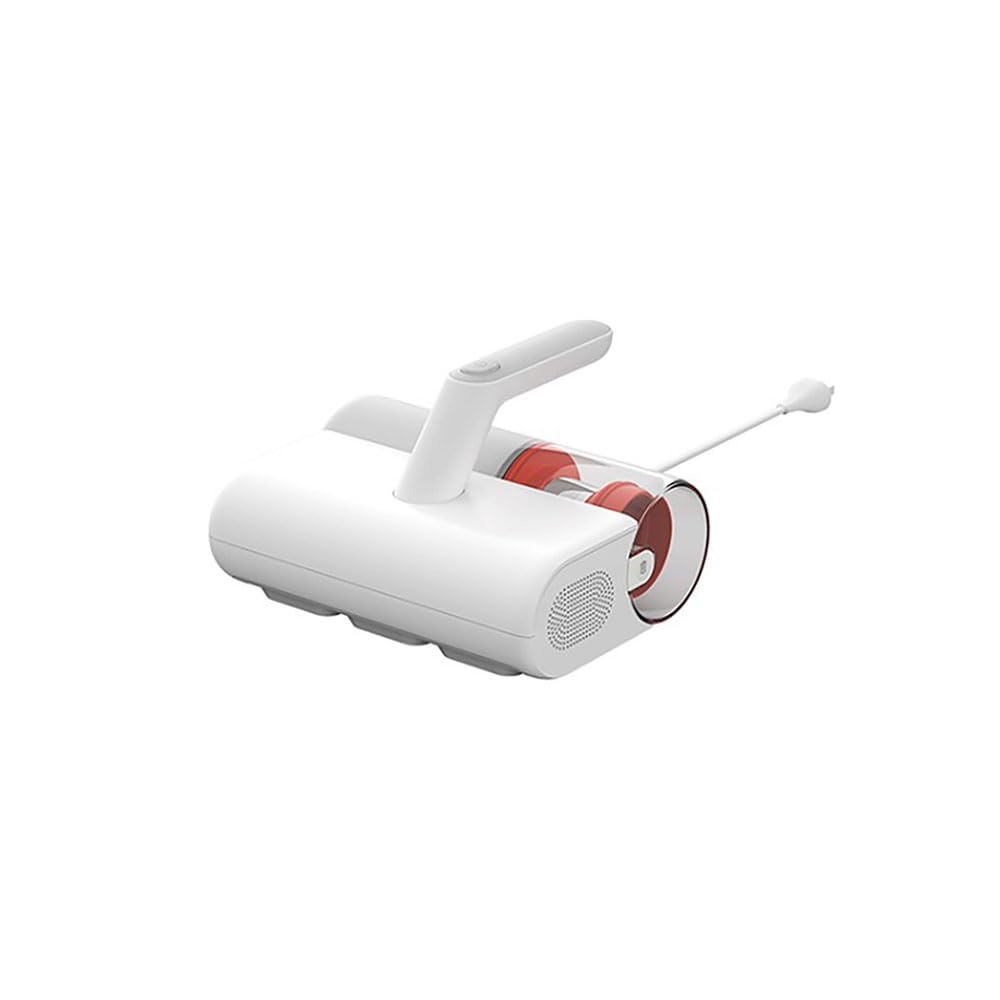
Familiarize yourself with the main parts of your Xiaomi Dust Mite Vacuum Cleaner 2:
- Unità principale: Contains the motor, handle, and control buttons.
- Contenitore per la raccolta della polvere: Transparent, bagless container for collected dust and debris.
- Filtro HEPA: High-efficiency particulate air filter, located within the dustbin.
- Sterilizzazione UV-C Lamp: Located on the underside, activates upon contact with a surface.
- Spazzola a rullo: Rotating brush on the underside for agitating surfaces.
- Cavo di alimentazione: Per collegare il dispositivo a una presa elettrica.
4. Impostazione
Prima del primo utilizzo, attenersi alla seguente procedura:
- Disimballare tutti i componenti e rimuovere eventuali materiali di imballaggio.
- Ensure the dust collection bin and HEPA filter are correctly installed in the main unit. Refer to the markings for proper alignment.
- Connect the power cord securely to the vacuum cleaner and then to a suitable electrical outlet.
5. Istruzioni per l'uso
To use your Xiaomi Dust Mite Vacuum Cleaner 2:
- Collegare l'aspirapolvere a una presa di corrente.
- Place the vacuum cleaner directly onto the surface you wish to clean (e.g., mattress, sofa, pillow).
- Press the power button located on the handle to turn on the device. The UV lamp will activate automatically when the vacuum is in contact with a surface.
- Move the vacuum cleaner slowly and steadily over the surface in overlapping strokes to ensure thorough cleaning. The hot air function will simultaneously help dry the surface.
- After cleaning, press the power button again to turn off the device.
- Scollegare l'aspirapolvere dalla presa di corrente.
This image shows the Xiaomi Dust Mite Vacuum Cleaner 2 being used to clean upholstery, demonstrating its handheld operation.
6. Manutenzione
Una manutenzione regolare garantisce prestazioni ottimali e prolunga la durata del tuo aspirapolvere.
6.1. Svuotamento del contenitore di raccolta della polvere
- Assicurarsi che l'aspirapolvere sia scollegato.
- Locate the release button for the dustbin and detach it from the main unit.
- Aprire il cestino e svuotarne il contenuto in un cestino dei rifiuti.
- If necessary, wipe the inside of the dustbin with a damp cloth and allow it to air dry completely before reattaching.
6.2. Pulizia del filtro HEPA
- With the dustbin removed, carefully take out the HEPA filter.
- Picchiettare delicatamente il filtro su un bidone della spazzatura per rimuovere polvere e detriti.
- For a deeper clean, rinse the HEPA filter under running water. Assicurarsi che il filtro sia completamente asciutto prima di reinstallarlo. Drying may take up to 24 hours.
6.3. Cleaning the UV-C Sterilization Lamp
- Assicurarsi che l'aspirapolvere sia scollegato.
- Gently wipe the surface of the UV lamp with a clean, dry, soft cloth. Do not use liquids or abrasive cleaners.
6.4. Pulizia della spazzola a rullo
- Assicurarsi che l'aspirapolvere sia scollegato.
- Periodically inspect the roller brush for tangled hair or debris.
- Carefully remove any obstructions using scissors or a brush.
7. Risoluzione Dei Problemi
In caso di problemi, fare riferimento ai seguenti problemi comuni e alle relative soluzioni:
- Nessun potere:
- Check if the power cord is securely plugged into both the vacuum cleaner and the wall outlet.
- Verificare che la presa a muro funzioni testandola con un altro apparecchio.
- Bassa aspirazione:
- The dust collection bin may be full. Empty it.
- The HEPA filter may be clogged. Clean or replace it as per maintenance instructions.
- Check for any blockages in the suction nozzle or roller brush area.
- UVLamp Non funziona:
- Ensure the vacuum cleaner is powered on and in direct contact with the surface being cleaned. The UV lamp has a safety mechanism that prevents it from operating when not in contact with a surface.
- Controllare se l'UV lamp area is clean and free from obstructions.
- Rumore insolito:
- Turn off and unplug the vacuum. Inspect the roller brush and suction path for any foreign objects that may be causing the noise.
Se il problema persiste dopo aver provato queste soluzioni, contattare l'assistenza clienti.
8. Specifiche
| Numero di modello | Modello BHR8276EU |
| Marca | XiaomiMi |
| Potenza di aspirazione | 12000 anni |
| Potenza nominale | 350 L |
| Capacità del bidone della spazzatura | 0.3 litri |
| Peso | 1.6 kg |
| Tipo di filtro | Filtro HEPA (lavabile) |
| Caratteristiche speciali | Sterilizzazione UV-C Lamp, Hot Air Drying (50°C), Bagless, Lightweight, Hypoallergenic |
| Fonte di alimentazione | Elettrico con cavo |
| Voltage | 12 Volt |
9. Garanzia e supporto
Garanzia: This product comes with a two-year warranty against manufacturing defects from the date of purchase. Please retain your proof of purchase for warranty claims.
Assistenza clienti: For any questions, technical assistance, or warranty claims, please contact Xiaomi customer service through their official websito o le informazioni di contatto fornite con la documentazione di acquisto.