
Introduzione
The DYTDIEYINGTU RC301-2.5/E3 is a wired shutter release remote designed to provide stable and precise control over your camera's shutter. This compact and lightweight accessory is ideal for preventing camera shake during long exposures, macro photography, or when using slow shutter speeds. It operates without batteries, drawing power directly from the camera.
This manual provides instructions for setup, operation, and compatibility with various Fujifilm and Canon camera models.
Contenuto della confezione
- RC301-2.5/E3 Shutter Release Remote (1 unit)
Impostare
To set up your RC301-2.5/E3 shutter release remote, follow these steps:
- Locate the remote control port on your camera. This is typically a 2.5mm jack.
- Insert the 2.5mm plug of the RC301-2.5/E3 cable into the camera's remote control port. Ensure a secure connection.
Specific Notes for Fujifilm Cameras:
For many Fujifilm models, the shutter release port is located on the right side of the display, often above the SD memory card slot. It is typically a small round hole marked with "REMOTE".
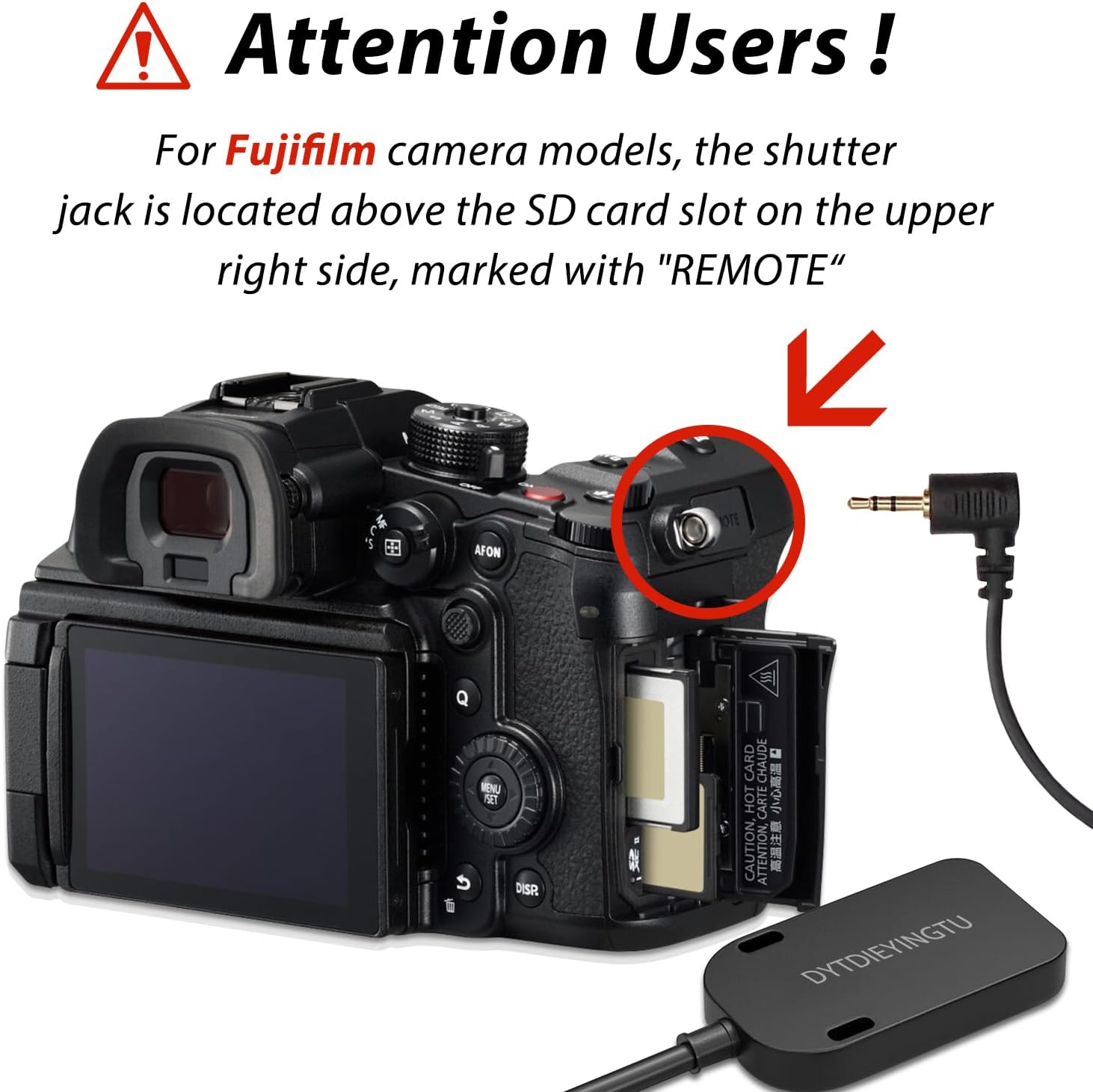
Image: Fujifilm camera showing the 2.5mm remote port location, typically above the SD card slot.
For Fujifilm models such as XT20, XT30, XE1, XE2, and XE3, you may need to enable the remote function in the camera's menu. Navigate to the "Microphone / Remote Shutter Device" settings and select "Remote".

Image: Fujifilm camera menu displaying the "REMOTE RELEASE" option under movie settings, which needs to be enabled for remote operation.

Image: Close-up of a Fujifilm camera's remote port with the RC301 cable connected, alongside a note about setting the camera to video gear for recording.
Specific Notes for Canon Cameras:
For some Canon models, the remote port is located on the side of the camera body. Refer to your camera's manual for the exact location.
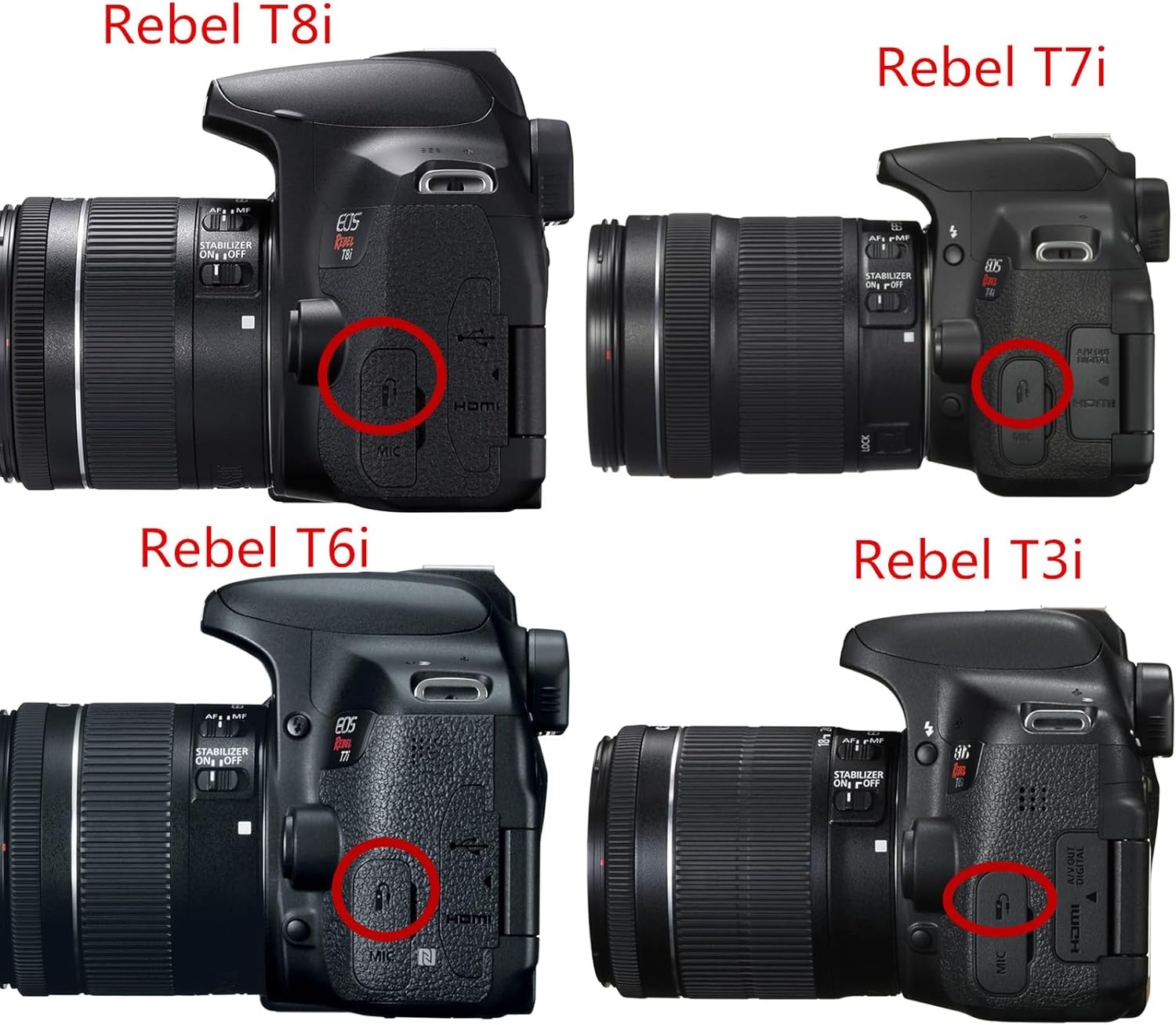
Image: Four Canon Rebel series cameras (T8i, T7i, T6i, T3i) with their remote control ports circled in red for easy identification.
Istruzioni per l'uso
The RC301-2.5/E3 remote features two buttons for camera control:
- Pulsante grande: This button has a two-stage action.
- Mezza pressione: Attiva la messa a fuoco automatica.
- Stampa completa: Triggers the shutter to take a photo.
- Pulsante piccolo: This button simultaneously triggers autofocus and takes a photo with a single press.
Video Recording with Canon Cameras:
For certain Canon camera models (e.g., 77D, 80D, 90D, M6II, 200D II), you can configure the camera to use the shutter button for video recording. Access your camera's menu and set the "shutter button" function to "shoot video" (REC). Refer to your camera's specific manual for detailed instructions on this setting.
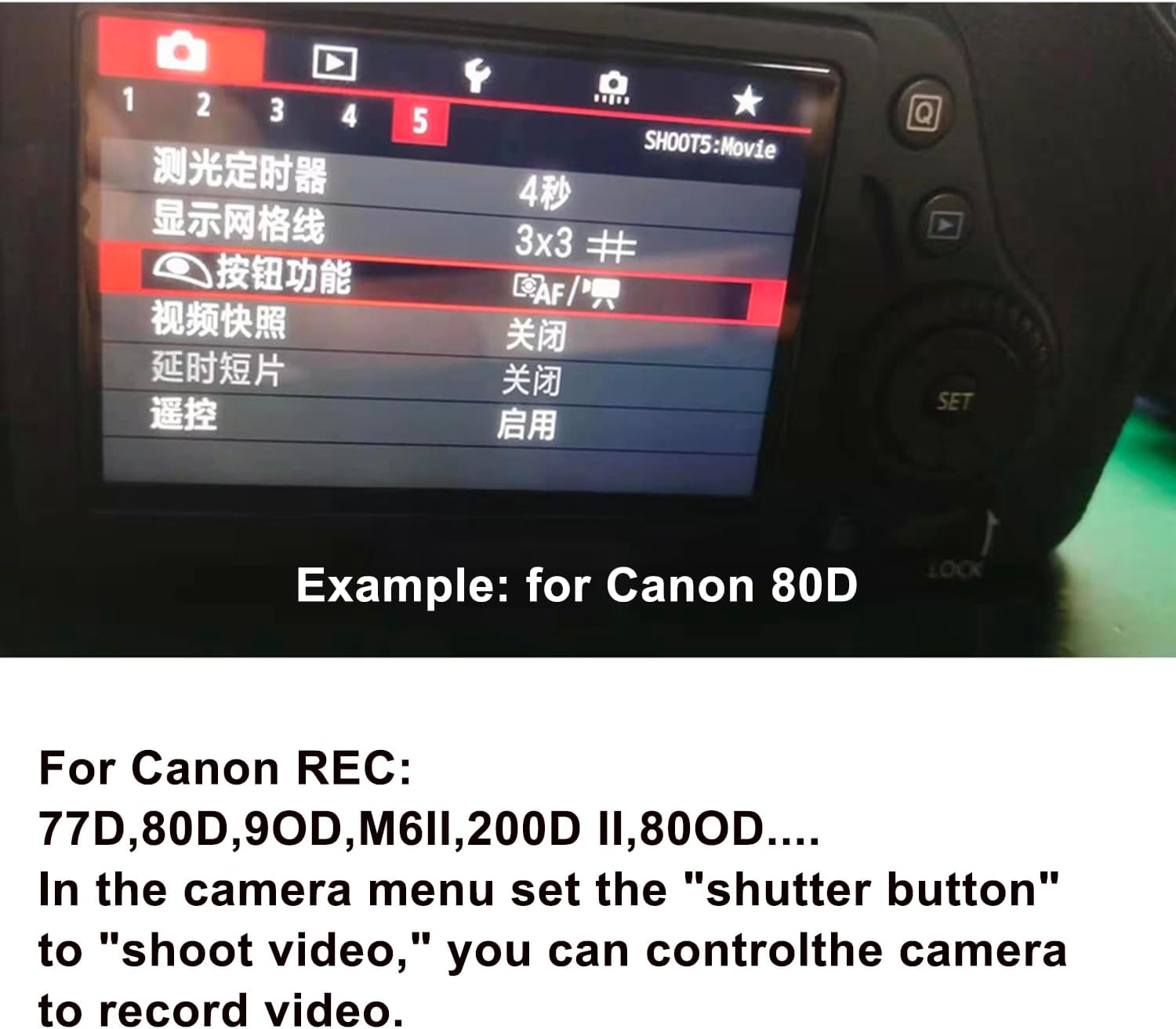
Immagine: Example of a Canon 80D camera menu, highlighting the option to configure the shutter button for video recording.
Modelli di fotocamere compatibili
The RC301-2.5/E3 shutter release remote is compatible with a wide range of Fujifilm and Canon cameras. Please verify your camera model against the lists below:
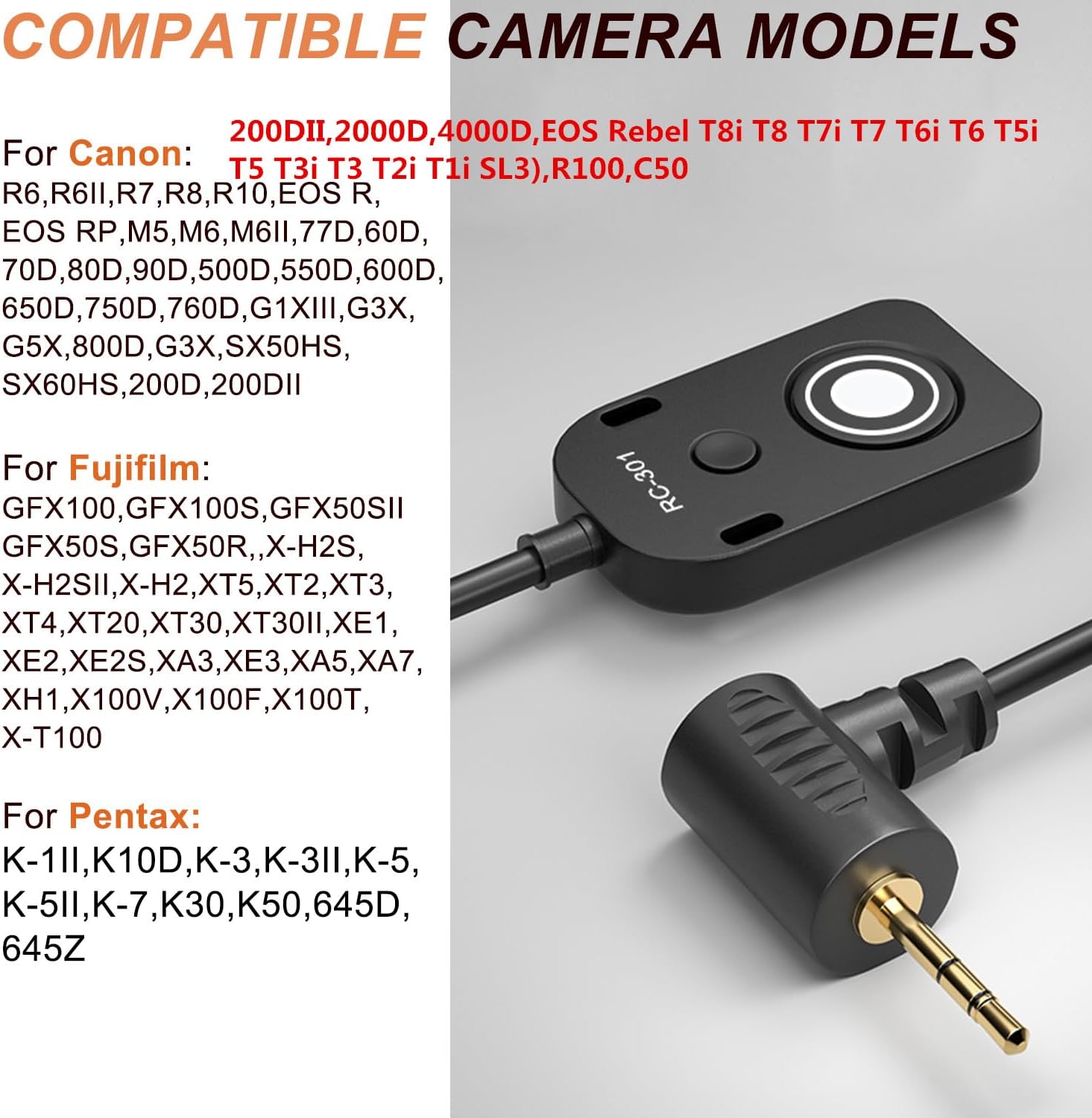
Image: Visual representation of the RC301 remote and its 2.5mm plug, alongside a comprehensive list of compatible Canon, Fujifilm, and Pentax camera models.
For Canon Cameras:
- EOS Rebel: T8i, T8, T7i, T7, T6i, T6S, T6, T5i, T5, T4i, T3i, T3, T2i, T1i, XT, XTi, XSi, SL2, SL3, 2000D, 4000D, R100
- EOS M Series: M5, M6, M6II
- EOS R Series: R, RP, R6, R6II, R7, R8, R10, R50V
- Other EOS Models: 700D, 650D, 600D, 550D, 500D, 1100D, 80D, 70D, 60D, 77D, 90D, 200D, 200DII, 800D
- PowerShot: G1X Mark III, G3X, G5X, SX50HS, SX60HS

Image: The RC301 shutter release cable with its 2.5mm plug, specifically marketed for Canon cameras, listing compatible models.
For Fujifilm Cameras:
- GFX Series: GFX100, GFX50SII, GFX100S, GFX100S II, GFX50S, GFX50R
- X-H Series: X-H2S, X-H2, XH1
- X-T Series: XT5, XT2, XT3, XT4, XT20, XT30, XT30II
- X-E Series: XE1, XE2, XE2S, XE3
- X-A Series: XA3, XA5, XA7
- X100 Series: X100V, X100F, X100T
Specifiche
| Numero di modello | RC301-2.5/E3 196.8in/5m |
| Dimensioni del prodotto | 1.56 x 0.82 x 0.38 pollici (unità principale) |
| Lunghezza del cavo | 196.8 pollici / 5 metri |
| Peso dell'articolo | 3.17 once |
| Tipo di connettore | Presa da 2.5 mm |
| Fonte di alimentazione | Camera (no external battery required) |
| Colore | Nero |

Image: Diagram illustrating the compact dimensions of the RC301 shutter release remote (37.8mm x 21.8mm x 8.9mm).
Risoluzione dei problemi
- Il telecomando non risponde:
- Ensure the 2.5mm plug is fully inserted into the camera's remote port.
- Verifica che il modello della tua fotocamera sia elencato come compatibile.
- For Fujifilm XT20, XT30, XE1, XE2, XE3, check camera menu settings to ensure "Remote" is selected under "Microphone / Remote Shutter Device".
- Confirm the camera is powered on and in a shooting mode that supports remote shutter release.
- Video recording not working with Canon cameras:
- Some Canon models require a specific setting to enable video recording via the shutter button. Check your camera's menu to set the "shutter button" to "shoot video" (REC). This remote primarily functions as a shutter release; dedicated video start/stop functionality may vary by camera model and settings.
Manutenzione
To ensure the longevity and proper functioning of your RC301-2.5/E3 shutter release remote:
- Keep the remote and cable clean and dry.
- Avoid exposing the remote to extreme temperatures or direct sunlight for extended periods.
- Do not pull the cable forcefully when disconnecting from the camera; always grasp the plug.
- Store the remote in a safe place to prevent physical damage.
Garanzia e supporto
Per informazioni sulla garanzia o assistenza tecnica, consultare la documentazione fornita con l'acquisto o contattare direttamente il produttore. Conservare la prova d'acquisto per eventuali reclami in garanzia.