
1. Introduzione
Thank you for choosing the Mesqool CR1025 Clock Radio. This device combines an alarm clock, Bluetooth speaker, FM radio, night light, and phone charger into one compact unit. This manual provides detailed instructions for setup, operation, and maintenance to ensure optimal performance and user experience.

Figure 1: Mesqool CR1025 Clock Radio
2. Prodotto finitoview
2.1 Caratteristiche principali
- Design multifunzionale: Alarm Clock, Bluetooth Speaker, FM Radio, Night Light, and Phone Charger.
- Bluetooth 5.0: For stable and quick wireless audio streaming.
- FM Radio: 87.5MHz-108.0MHz frequency range with 20 preset stations.
- Luminosità regolabile: 5 levels for the LED display.
- Volume regolabile: 16 levels (45dB to 116dB).
- Sveglia: Allows automatic shutdown of audio playback.
- Funzione snooze: 9-minute delay for alarms.
- Batteria di backup: Mantiene le impostazioni di ora e sveglia durante lo spegnimentotages.
- Doppie porte di ricarica USB: Type-C and USB-A for device charging.
- Formato ora: 12-hour and 24-hour display options.
- Ora legale (DST): Quick adjustment feature.

Figura 2: Funzionalità 5 in 1
2.2 Contenuto della confezione
- Mesqool CR1025 Clock Radio
- Adattatore di alimentazione
- Cavo USB
- CR2032 Lithium Battery (pre-installed or separate for backup)
- Manuale dell'utente (questo documento)

Figura 3: Contenuto della confezione
3. Controlli e display
Familiarize yourself with the buttons and ports on your Mesqool CR1025 Clock Radio.
3.1 Controlli del pannello superiore
- Manopola del timer di spegnimento: Rotate to set sleep timer duration. Press to confirm.
- Pulsante di allarme: Premere per impostare o attivare/disattivare gli allarmi.
- Time/12/24 Button: Press to set time. Hold to switch between 12/24-hour format.
- Dimmer/DST Button: Press to adjust display brightness. Hold to activate/deactivate Daylight Saving Time.
- Pulsante SNOOZE/LUCE: Press to snooze alarm or turn night light on/off.
- Pulsante Preimposta/Abbina: Press to cycle through FM presets. Hold to enter Bluetooth pairing mode.
- Play/Mode Button: Press to play/pause in Bluetooth mode. Hold to switch between FM/Bluetooth modes.
- Power/Scan Knob: Rotate to adjust volume. Press to power on/off. Hold to auto-scan FM stations.
3.2 Porte del pannello posteriore
- DC IN: Porta di ingresso alimentazione.
- Uscita USB-A: Per caricare dispositivi esterni.
- Uscita di tipo C: Per caricare dispositivi esterni.
4. Impostazione
4.1 Collegamento di alimentazione
- Collegare l'adattatore di alimentazione alla porta DC IN sul retro della radiosveglia.
- Collegare l'adattatore di alimentazione a una presa a muro standard. Il display si illuminerà.

Figura 4: Collegamento di alimentazione
4.2 Batteria di backup
The CR2032 battery provides backup for time and alarm settings during a power outage. The display will not show time, and alarms will not sound until power is restored.
- Ensure the battery insulator tab is removed if the battery was pre-installed.
- If replacing, open the battery compartment on the bottom and insert a new CR2032 battery with the correct polarity.
4.3 Impostazione dell'ora
- Premere e tenere premuto il tasto Time/12/24 finché le cifre dell'ora non lampeggiano.
- Ruotare il Accensione/Scansione manopola per regolare l'ora.
- Premere il tasto Time/12/24 nuovamente il pulsante per confermare l'ora; le cifre dei minuti lampeggeranno.
- Ruotare il Accensione/Scansione knob to adjust the minutes.
- Premere il tasto Time/12/24 button to save the time setting.
4.4 Formato 12/24 ore
Per passare dal formato orario a 12 ore a quello a 24 ore, premere il tasto Time/12/24 button briefly while the time is displayed.

Figure 5: 12H/24H and DST Display
4.5 Ora legale (DST)
To activate or deactivate DST, press and hold the Dimmer/DST button. The 'DST' indicator will appear or disappear on the display.
5. Istruzioni per l'uso
5.1 Impostazione dell'allarme
- Premere e tenere premuto il tasto Allarme finché le cifre dell'ora della sveglia non lampeggiano.
- Ruotare il Accensione/Scansione knob to adjust the alarm hour.
- Premere il tasto Allarme nuovamente il pulsante per confermare l'ora; le cifre dei minuti lampeggeranno.
- Ruotare il Accensione/Scansione knob to adjust the alarm minutes.
- Premere il tasto Allarme pulsante per salvare l'ora della sveglia.
- Per attivare/disattivare l'allarme, premere il tasto Allarme brevemente il pulsante. Sul display apparirà/scomparirà un'icona di allarme.
5.2 Funzione posticipa
Quando suona la sveglia, premere il tasto SNOOZE / LIGHT button to activate the 9-minute snooze function. The alarm will sound again after 9 minutes. This can be repeated up to 9 times. To stop the alarm completely, press the Allarme pulsante.

Figure 6: Snooze Function
5.3 Funzionamento della radio FM
- Premere il tasto Play/Mode pulsante per passare alla modalità Radio FM.
- Scansione automatica: Premere e tenere premuto il tasto Accensione/Scansione knob to automatically scan and save available FM stations (up to 20 presets).
- Sintonizzazione manuale: Briefly rotate the Accensione/Scansione knob to fine-tune the frequency.
- Seleziona Predefiniti: Premere il tasto Preset/Pair pulsante per scorrere le stazioni salvate.
- Regolazione del volume: Ruotare il Accensione/Scansione knob to adjust the volume (16 levels).

Figura 7: Caratteristiche della radio FM
5.4 Funzionamento dell'altoparlante Bluetooth
- Premere il tasto Play/Mode button to switch to Bluetooth mode. The 'BT' icon will flash on the display.
- On your mobile device, enable Bluetooth and search for 'CR1025'.
- Select 'CR1025' to pair. Once connected, the 'BT' icon will stop flashing.
- Riproduci l'audio dal tuo dispositivo. Usa il Play/Mode pulsante per riprodurre / mettere in pausa.
- Regolazione del volume: Ruotare il Accensione/Scansione manopola per regolare il volume.

Figura 8: Connettività Bluetooth 5.0
5.5 Funzionamento della luce notturna
Premere il tasto SNOOZE / LIGHT button to turn the night light on or off. The night light provides a soft, warm glow.

Figure 9: Warm Night Light
5.6 Regolazione della luminosità del display
Premere il tasto Dimmer/DST button repeatedly to cycle through 5 levels of display brightness, from off to brightest.
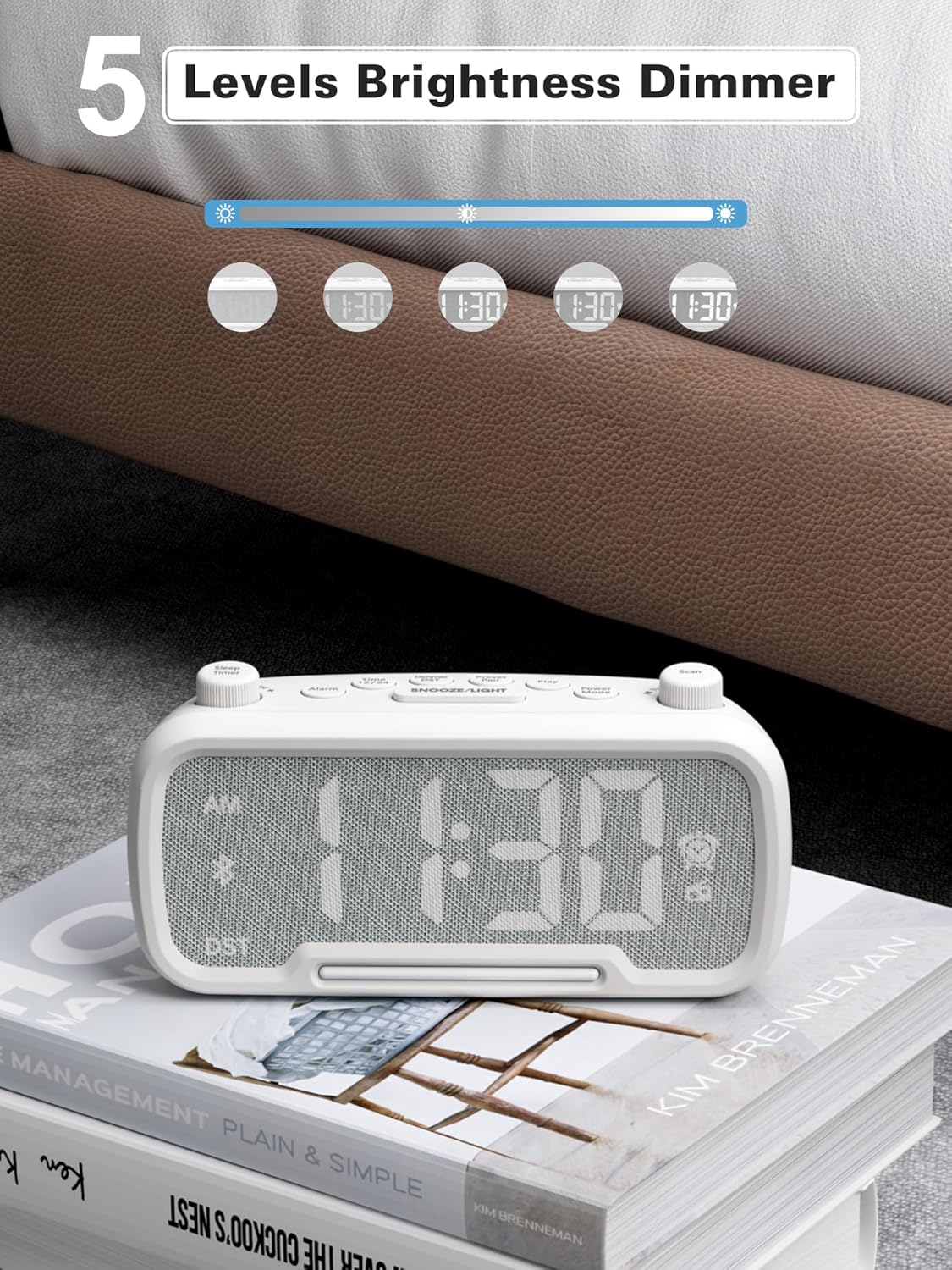
Figure 10: 5 Levels Brightness Dimmer
5.7 Timer di spegnimento
The sleep timer allows you to set a duration after which the radio or Bluetooth audio will automatically turn off.
- While playing FM radio or Bluetooth audio, rotate the Timer di spegnimento knob to select the desired sleep duration (e.g., 15, 30, 60, 90 minutes).
- The display will show the remaining sleep time. The audio will turn off automatically when the timer expires.
5.8 Ricarica del telefono
The clock radio features two USB charging ports (Type-C and USB-A) for convenient charging of your mobile devices.
- Connect your device's charging cable to either the USB-A or Type-C port on the back of the clock radio.
- Collega l'altra estremità del cavo al tuo dispositivo mobile. La ricarica inizierà automaticamente.

Figura 11: Doppie porte di ricarica USB
6. Manutenzione
- Pulire l'unità con un panno morbido e asciutto. Non utilizzare detergenti abrasivi o solventi.
- Tenere l'unità lontana dalla luce solare diretta, da fonti di calore e dall'umidità.
- Garantire un'adeguata ventilazione attorno all'unità.
- Se l'unità non verrà utilizzata per un periodo prolungato, scollegarla dalla presa di corrente.
7. Risoluzione Dei Problemi
| Problema | Possibile causa | Soluzione |
|---|---|---|
| Nessuna alimentazione/Display spento | Adattatore di alimentazione non collegato o difettoso. | Ensure power adapter is securely plugged into the unit and wall outlet. Check outlet functionality. |
| L'allarme non suona | Allarme non attivato o impostato in modo errato. | Verify alarm time is set and the alarm icon is visible on the display. Check alarm volume. |
| Scarsa ricezione della radio FM | Segnale debole o interferenza. | Adjust the unit's position. Try auto-scanning again. |
| Bluetooth non associato | Dispositivo non in modalità di associazione o troppo lontano. | Ensure the clock radio is in Bluetooth mode (BT icon flashing). Move device closer. Forget device on phone and re-pair. |
| La ricarica USB non funziona | Cable faulty or device incompatible. | Try a different USB cable. Ensure the clock radio is powered on. |
8. Specifiche
- Modello: CR1025
- Potenza in ingresso: CA 100-240 V, 50/60 Hz
- Batteria di backup: 1 x CR2032 (incluso)
- Frequenza FM: 87.5 - 108.0 MHz
- Versione Bluetooth: 5.0
- Uscita USB: USB-A, Type-C (Charging only)
- Luminosità dello schermo: 5 livelli
- Livelli del volume: 16 livelli (45dB - 116dB)
- Dimensioni: 5.9 x 3.81 x 8.4 cm (2.32 x 1.5 x 3.31 pollici)
- Peso: 216 g (0.48 libbre)
Figura 12: Dimensioni del prodotto
9. Garanzia e supporto
Mesqool products are designed and manufactured to the highest quality standards. For warranty information, technical support, or customer service inquiries, please refer to the contact information provided on the product packaging or visit the official Mesqool websito.
Websito: Mesqool Official Store