
Teslong NTC30L
Teslong USB-C Endoscope Camera User Manual
Model: NTC30L
Prodotto finitoview
The Teslong USB-C Borescope Inspection Camera is a versatile tool designed for inspecting hard-to-reach areas. Featuring an 8-LED light system and a flexible, waterproof snake scope, it offers clear visuals for various applications. Compatible with iPhone 15 and Android phones via USB-C, it provides a convenient plug-and-play experience without the need for Wi-Fi or complex setups.

Image: The Teslong Endoscope Camera connected to a smartphone, showing its application in inspecting pipes.
Cosa c'è nella scatola
- NTC30LD85L10 USB C Endoscope
- Adattatore per fulmini
- Accessories (Magnet, Hook, Mirror)
- Manuale d'uso

Image: The complete package contents, including the coiled endoscope cable, user manual, and accessory attachments.
Caratteristiche principali
- Ultra-Long 33FT Cable: The extended 15M/50ft probe with an IP67 waterproof camera expands visual reach for challenging, hard-to-reach areas.
- Connettività universale: Features a USB-C plug design with a Lightning adapter for seamless connection to iPhone 15, Android smartphones, and Android tablets. No Wi-Fi or complex setups required.
- Illuminazione regolabile: Equipped with 8 high-brightness adjustable LED lights to provide unparalleled clarity in dark environments.
- Flexible & Waterproof Design: The semi-rigid cable molds into any shape, and its IP67 waterproof rating ensures suitability for wet environments.
- Uso multifunzionale: Ideal for plumbing, automotive repairs, home DIY, and inspecting elusive spaces.

Image: Visual representation of the 33ft flexible cable's versatility, demonstrating its use with various tools for extended reach in DIY projects.

Image: The endoscope camera head with its 8 adjustable LED lights, emphasizing its IP67 waterproof rating and illumination capabilities.
Guida all'installazione
- Download the "Xscope" App: Cercare "Xscope" on Google Play Store (for Android) or Apple App Store (for iOS) and install the application on your smartphone or tablet.
- Concedi permessi: After installation, open the app. When prompted, click "Allow" to grant the app necessary permissions to access your device's camera and photos/videos.
- Collegare l'endoscopio: Plug the USB-C connector of the endoscope camera directly into your compatible smartphone or tablet. If using an iPhone with a Lightning port, attach the provided Lightning adapter first, then plug in the endoscope.
- Start Inspection: Once connected, the app should automatically detect the endoscope. You can then start using the camera for inspection.

Image: Illustrates the USB-C compatibility of the endoscope with modern smartphones and tablets, including iPhone 15 and Android devices.

Image: Shows the simple plug-and-play operation of the endoscope, emphasizing that no Wi-Fi, Bluetooth, or external charging is needed.
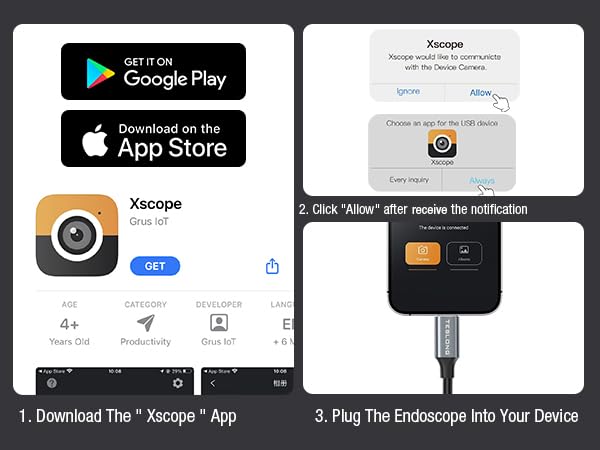
Image: A step-by-step visual guide on how to download the Xscope app, grant necessary permissions, and connect the endoscope to your device.
Istruzioni per l'uso
Once the endoscope is connected and the Xscope app is running, you can control various functions directly from your device's screen.
- Rotazione dell'immagine: Rotate the image 90 degrees for optimal viewangoli di inclinazione.
- Color/Black and White Mode: Switch between color and black and white display modes.
- Modalità schermo diviso: Utilize split screen for comparative viewing.
- Clonazione schermo: Mirror the screen for easier viewing o presentazione.
- Album: Accedi e riview foto e video acquisiti.
- Ingrandisci: Pinch with two fingers on the screen to zoom in or out (1X, 1.5X, 2X).
- Interruttore foto/video: Easily toggle between photo and video capture modes.
- Catturare: Press the dedicated button within the app to take photos or record videos.
- Regolazione della luminosità del LED: Use the physical control wheel on the cable to adjust the brightness of the 8 LED lights.

Image: The Xscope app interface, detailing controls for image manipulation, capture, and album access.

Image: The useful accessories provided with the endoscope, including a magnet, hook, and mirror, which attach to the camera head for enhanced functionality.
Manutenzione
- Pulizia della lente: Dopo ogni utilizzo, soprattutto in ambienti sporchi o bagnati, pulire delicatamente l'obiettivo della fotocamera con un panno morbido e asciutto. Per lo sporco ostinato, un panno leggermente damp cloth can be used, followed by drying. Ensure no moisture remains on the lens.
- Cura del cavo: Coil the cable neatly after use to prevent kinks and damage. Avoid sharp bends or excessive force when manipulating the cable.
- Magazzinaggio: Store the endoscope in a cool, dry place, away from direct sunlight and extreme temperatures. Keep it in its original packaging or a protective case to prevent dust accumulation and physical damage.
- Cura degli accessori: Clean the magnet, hook, and mirror attachments as needed. Ensure they are dry before storing.
Risoluzione dei problemi
| Problema | Possibile causa | Soluzione |
|---|---|---|
| Nessuna immagine sullo schermo / L'app non rileva la fotocamera |
|
|
| LED lights not working or dim |
|
|
| L'immagine è sfocata o poco chiara |
|
|
Specifiche
- Numero modello: NTC30L
- Tipo di lente: Lenti singole
- Diametro della fotocamera: 8.5mm
- Risoluzione: 1280*960
- Luci della fotocamera: 8 luci LED regolabili
- View Angolo: 79°
- Compatibilità del dispositivo: For all smartphone or tablet devices powered by USB-C (Android 8.0+ / iOS 12.0+)
- Grado di impermeabilità: Grado di protezione IP67
- Distanza focale: 30-100 mm (1.2-4.0 pollici)
- Lunghezza del cavo: 33 piedi (10 metri)
- Colore: Nero
- Produttore: Teslong
Garanzia e supporto
Teslong products are designed for durability and performance. For any questions, technical support, or warranty claims, please refer to the contact information provided in the included User Manual or visit the official Teslong websito.
Si prega di conservare la prova d'acquisto ai fini della garanzia.
Per ulteriori risorse e FAQ, puoi visitare il Negozio Teslong su Amazon.
Ask a question about this manual
Ask about setup, troubleshooting, compatibility, parts, safety, or missing instructions. Manuals+ will review the question and use this page’s manual context to help answer it.