
1. Prodotto finitoview
The Aufero Laser Engraver Machine is designed for precision engraving and cutting, featuring a 10W diode laser output and a spacious 17x15.7 inch engraving platform. This beginner-friendly machine incorporates safety features such as X&Y axis limit switches to enhance positioning accuracy and prevent collisions. The unique knife-edge platform, also known as a vector grid platform, provides a flat surface with narrow, parallel, and closely spaced slits, ideal for various engraving and cutting tasks. Its design allows for a removable, size-adjustable working panel.
Key specifications include a 32-bit MCU motherboard, support for up to 921600 baud rate, an engraving speed of 12000mm/min, and a fine laser spot size of 0.1 x 0.05mm. The engraving platform is constructed from all-metal with high-precision CNC processing, ensuring durability and resistance to laser heat.

Figura 1.1: Oltreview of the Aufero Laser Engraver Machine, showcasing its design and the 10W Aufero branding on the engraving surface.
2. Informazioni sulla sicurezza
This laser engraver is a Class 4 laser product. Class 4 lasers are high-power lasers that can cause severe eye and skin injuries from direct or scattered exposure. They can also pose a fire hazard. Adherence to all safety guidelines is critical for safe operation.
- Protezione degli occhi: Always wear appropriate laser safety goggles that are rated for the specific wavelength and power of this laser (10W diode laser). Never look directly into the laser beam or its reflection.
- Protezione della pelle: Evitare l'esposizione diretta della pelle al raggio laser.
- Ventilazione: Operate the machine in a well-ventilated area to dissipate fumes and smoke produced during engraving and cutting, which can be harmful. Consider using an exhaust system.
- Sicurezza antincendio: Keep a fire extinguisher nearby. Do not leave the machine unattended during operation, especially when cutting flammable materials. Ensure the work area is clear of combustible materials.
- Compatibilità dei materiali: Only engrave or cut materials known to be safe for laser processing. Avoid materials that produce toxic fumes or catch fire easily.
- Arresto di emergenza: Familiarize yourself with the location and operation of the emergency stop button or power switch to quickly shut down the machine in an emergency.
- Bambini e animali domestici: Tenere bambini e animali domestici lontani dall'area operativa.
- Superficie stabile: Place the machine on a stable, level, and non-flammable surface.
3 Caratteristiche
- Potente laser a diodo da 10 W: Capable of engraving and cutting a wide range of materials with precision.
- Ampia area di incisione: A generous 15.7 x 15.7 inch (400mm x 400mm) working area accommodates larger projects.
- Funzionamento ad alta velocità: Engraving speeds up to 12000mm/min for efficient workflow.
- Precision Laser Spot: A fine 0.1 x 0.05mm laser spot ensures detailed and accurate results.
- Advanced Motherboard: Equipped with a 32-bit MCU for stable and fast processing, supporting high baud rates up to 921600.
- X&Y Axis Limit Switches: Enhance positioning accuracy and prevent the laser head from exceeding the working area, protecting the machine from collisions.
- All-Metal Knife-Edge Platform: Durable and heat-resistant, designed for optimal material support and smoke extraction during operation. The platform is made from high-precision CNC processed metal.
- Removable and Adjustable Working Panel: The unique splicing design allows for size adjustment and easy removal of the working panel, offering flexibility for various project sizes and cleaning.
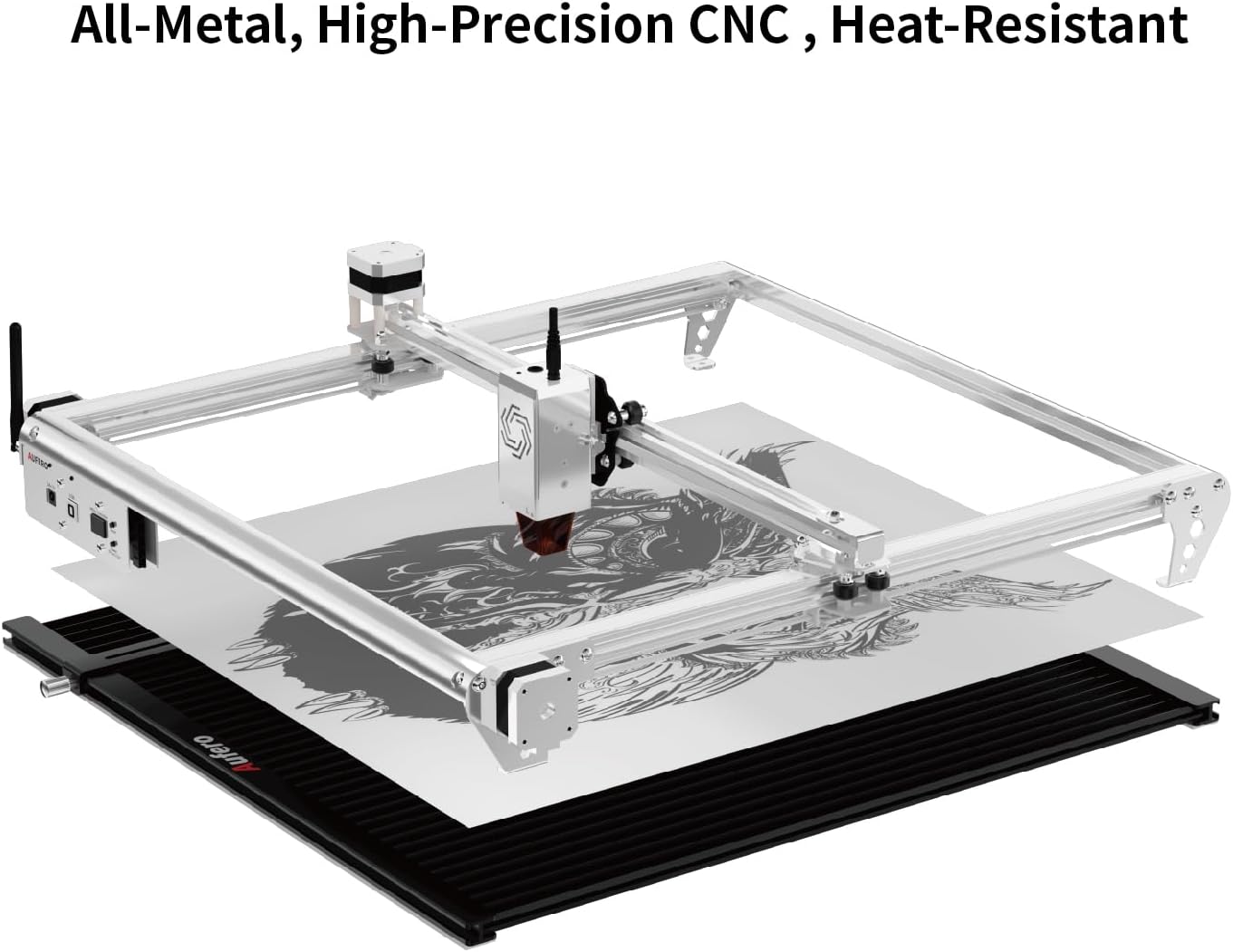
Figure 3.1: Illustration of the Aufero Laser Engraver's all-metal construction and the knife-edge platform, designed for durability and heat resistance.

Figura 3.2: dettagliata view of the unique removable and adjustable working bed, highlighting its features such as rotatable screws, movable fixed corners, and square notches for protection.
4. Impostazione
Proper setup is essential for the safe and effective operation of your Aufero Laser Engraver. Follow these general steps:
- Disimballaggio: Rimuovere con cautela tutti i componenti dall'imballaggio. Verificare che tutti i pezzi elencati nella lista di imballaggio siano presenti e integri.
- Montaggio: Assemble the frame according to the provided assembly instructions. Ensure all screws are tightened securely.
- Installazione del modulo laser: Install the laser module onto the gantry. Ensure it is firmly seated and the electrical connections are secure.
- Working Platform Setup: Place the knife-edge working platform on a stable, level, and non-flammable surface. The platform should be positioned directly beneath the laser's working area.
- Connessioni via cavo: Connect the power cable, USB cable (if applicable), and any other necessary cables to the machine and your computer.
- Installazione del software: Install the recommended laser control software on your computer. Refer to the software's specific instructions for installation and driver setup.
- Ventilation Setup: Ensure adequate ventilation for the work area. If using an enclosure or exhaust system, set it up according to its instructions.
- Attrezzatura di sicurezza: Always have your laser safety goggles readily available and wear them before powering on the machine.
5. Istruzioni per l'uso
This section provides general guidance for operating the Aufero Laser Engraver. Specific operations may vary based on the software used.
- Preparazione del materiale:
- Select a material suitable for laser engraving or cutting. Common materials include wood, acrylic, leather, and certain metals (for engraving).
- Place the material securely on the knife-edge working platform. Ensure it is flat and does not move during operation.
- Preparazione del progetto:
- Create or import your design using the laser control software.
- Adjust the design size and position to fit your material and desired output.
- Impostazioni dei parametri:
- Set the laser power, speed, and number of passes based on the material type and desired effect (engraving or cutting). Refer to material testing guides or recommended settings within your software.
- Ensure the laser focus is correctly set for your material thickness.
- Framing/Preview:
- Utilizzare la funzione di inquadratura nel software per preview the laser's path on the material without firing the laser at full power. This helps confirm correct positioning.
- Inizia l'operazione:
- Ensure all safety precautions are in place, including wearing laser safety goggles and having adequate ventilation.
- Avviare il processo di incisione o taglio dal software.
- Monitor the machine closely during operation. Be prepared to use the emergency stop if any issues arise.
- Completamento:
- Once the operation is complete, wait for the laser to stop completely and for any fumes to clear before removing the material.
- Carefully remove the engraved or cut material.
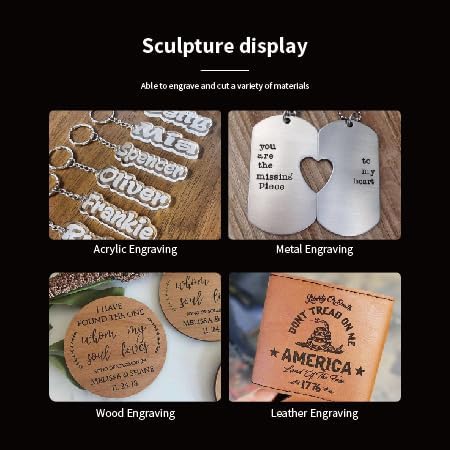
Figura 5.1: Esamples of various materials that can be engraved, including acrylic, metal, wood, and leather, demonstrating the machine's versatility.
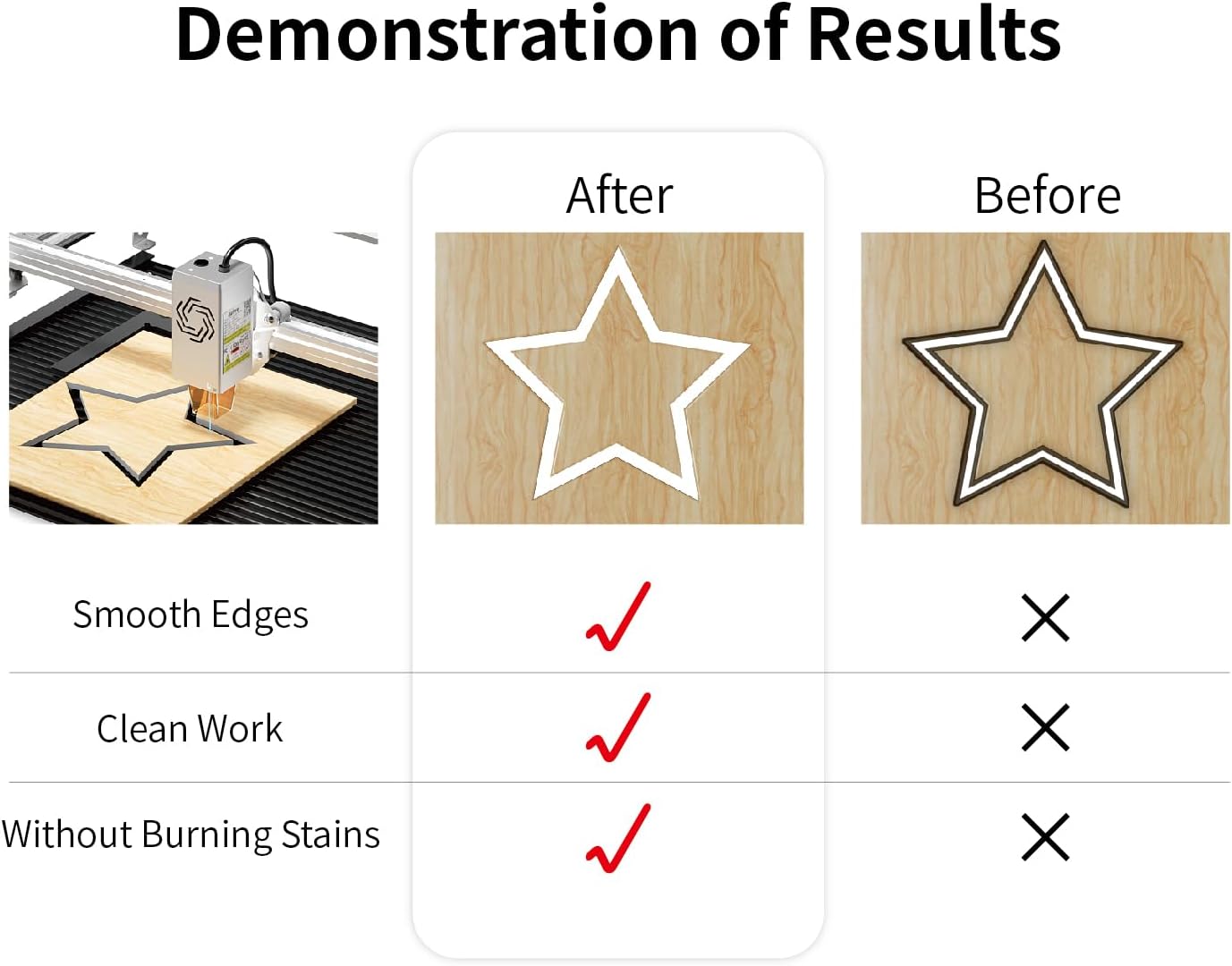
Figure 5.2: Demonstration of optimal laser cutting results, highlighting smooth edges, clean work, and the absence of burning stains when proper settings are applied.
6. Manutenzione
Regular maintenance ensures the longevity and optimal performance of your Aufero Laser Engraver.
- Pulizia della lente laser: The laser lens can accumulate dust and debris, affecting laser performance. Gently clean the lens with a specialized lens cleaning solution and a lint-free cloth or cotton swab. Perform this regularly, especially after extended use.
- Cleaning the Working Platform: The knife-edge platform can collect residue from engraved materials. Clean it regularly to maintain optimal air circulation and prevent buildup.
- Lubrificazione delle guide: Applicare periodicamente una piccola quantità di lubrificante alle guide per garantire un movimento fluido del modulo laser.
- Controllo delle cinghie: Inspect the timing belts for tension and wear. Adjust or replace them if necessary to maintain engraving accuracy.
- Pulizia generale: Keep the entire machine free of dust and debris. Use compressed air to clear hard-to-reach areas.
- Spegnimento quando non in uso: Always power off and unplug the machine when not in use for extended periods.
7. Risoluzione Dei Problemi
Questa sezione affronta i problemi più comuni che potresti riscontrare con il tuo incisore laser.
| Problema | Possibile causa | Soluzione |
|---|---|---|
| Il laser non si accende o ha un'uscita debole |
|
|
| Engraving/Cutting is not precise or distorted |
|
|
| La macchina non si connette al computer |
|
|
| Material burning or excessive smoke |
|
|
8. Specifiche
| Caratteristica | Dettaglio |
|---|---|
| Potenza di uscita laser | 10,000 mW (10 W) |
| Classe laser | Classe 4 |
| Area di incisione | 15.7 x 15.7 pollici (400 mm x 400 mm) |
| Velocità di incisione | Fino a 12000 mm/min |
| Dimensioni del punto laser | 0.1 x 0.05 millimetri |
| Scheda madre | MCU 32-bit |
| Supporto della velocità in baud | Fino a 921600 |
| Interruttori di finecorsa | X & Y Axis |
| Tipo di piattaforma | All-metal Knife-Edge (Vector Grid) |
| Dimensioni della piattaforma | 17 x 15.7 inches (approx. 432mm x 400mm) |
| Prima data disponibile | 7 ottobre 2024 |
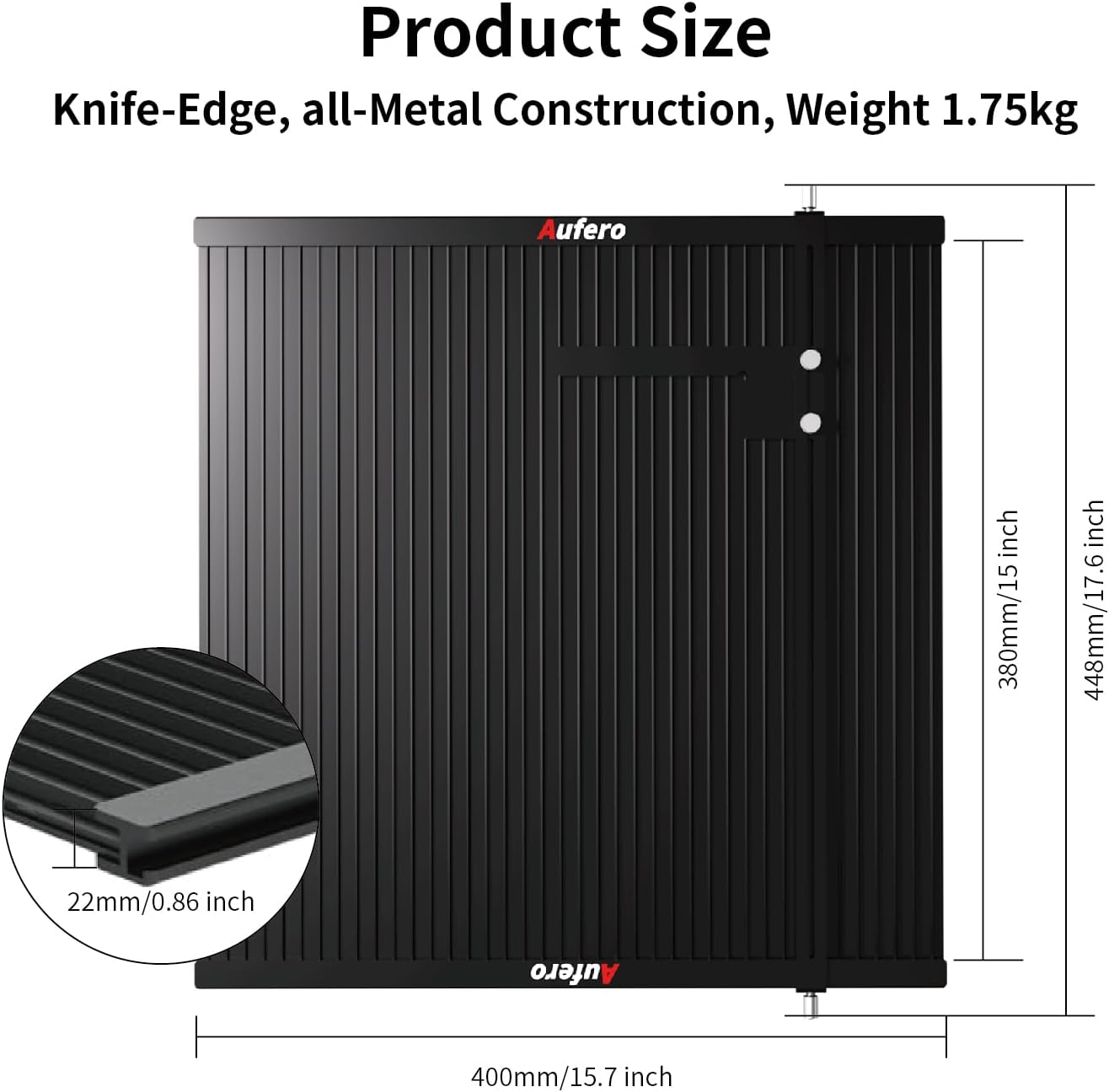
Figure 8.1: Product size and dimensions of the knife-edge working platform, indicating its all-metal construction and weight.
9. Garanzia e supporto
For warranty information and technical support, please refer to the documentation included with your product or contact Aufero Technology directly. As per Amazon's return policy, this product may be eligible for returns within 30 days of purchase. For specific warranty terms and conditions, please consult the manufacturer's official website or the warranty card provided with your machine.
You can visit the official Aufero Store on Amazon for additional resources and contact information: Aufero Store