
COLBOR CO-CF5-BK-EN
Manuale d'uso della macchina per la nebbia portatile COLBOR CF5
Model: CO-CF5-BK-EN
Introduzione
The COLBOR CF5 Portable Fog Machine is a compact and powerful device designed for creating atmospheric fog and haze effects. With its 40W output, adjustable settings, and portable design, it is suitable for various applications including photography, filmmaking, parties, and cosplay. This manual provides essential information for the safe and effective operation and maintenance of your COLBOR CF5 fog machine.

Image: The COLBOR CF5 Portable Fog Machine, showcasing its compact design, remote control, and various accessories including different nozzles and a flexible hose.
Contenuto della confezione
Before setup, please verify that all components are present in your package:
- COLBOR CF5 Fog Machine Unit
- Camera di nebbia
- Magnetic RGB Fan
- Protettore
- Telecomando
- Filtro spugna
- Tubo curvo (x2)
- Adattatore
- Tubo dritto
- Cavo USB-C
- Fog Juice Bottle
- Tubo flessibile
- Custodia A Sacchetto

Immagine: Un completo view of all items included in the COLBOR CF5 package, neatly arranged to show each component and its corresponding label.
Guida all'installazione
1. Ricarica iniziale
Before first use, fully charge the COLBOR CF5 fog machine using the provided USB-C cable. It is recommended to use a 5V 2A charging device to prevent short-circuiting and ensure proper charging. The charging time is approximately 1.5 hours.
2. Filling the Fog Liquid
- Unscrew the fog chamber from the main unit.
- Carefully fill the fog chamber with the provided fog juice. The chamber has a 12ml capacity. Do not overfill.
- Ensure the fog juice level is above 30% for optimal performance and to prevent dry burning.
- Screw the fog chamber back onto the main unit securely.
- After filling, wait for approximately 5 minutes to allow the liquid to properly saturate the heating element.

Image: A visual guide demonstrating the steps for filling the fog juice into the machine's chamber, emphasizing the 12ml capacity and the recommended 5-minute wait time after filling.
3. Fissaggio degli accessori
The COLBOR CF5 comes with various nozzles and a flexible hose for different fog effects. Simply attach the desired accessory to the output nozzle of the fog machine. The magnetic RGB fan can be attached to enhance visual effects and diffuse fog.

Image: The COLBOR CF5 with its magnetic RGB fan accessory attached, illustrating the 360-degree color ring adjustments and 3-level fan speed adjustment for enhanced fog effects.
Istruzioni per l'uso
1. Accensione/Spegnimento
Press and hold the power button on the unit to turn the device on or off. The display screen will illuminate upon activation.
2. Adjusting Fog Output
The COLBOR CF5 offers 25 modes for precise control over fog density and fan speed. Use the '+' and '-' buttons on the unit or the remote control to adjust these settings. The display screen will show the current density and speed levels.
- Densità: Controls the thickness of the fog.
- Velocità: Controls the fan speed for fog diffusion.
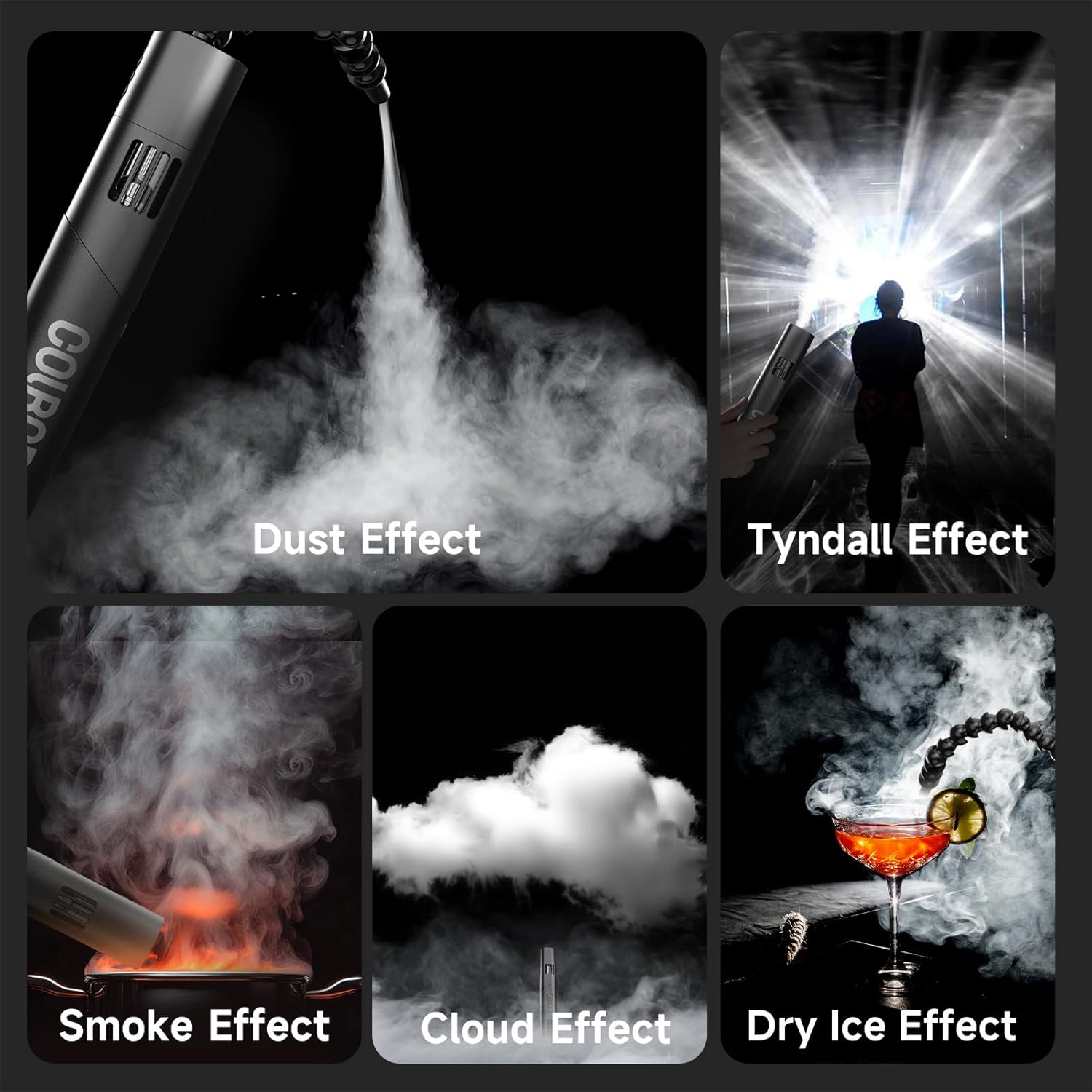
Image: A close-up of the COLBOR CF5's display screen and the remote control, highlighting the controls for adjusting fog density, fan speed, and cycle settings.
3. Funzionamento del telecomando
The included wireless remote control allows for convenient operation from up to 10 meters away. You can adjust fog output, fan speed, and RGB lighting settings remotely. The machine supports scheduled, metered, and repeatable fog output for flexible use.
Video: Official demonstration of the COLBOR CF5 Mini Fog Machine, showcasinle sue caratteristiche e il suo funzionamento.
Video: A detailed product instruction video for the COLBOR CF5 fog machine, covering various aspects of its use.
4. Creating Different Effects
The COLBOR CF5 can produce various fog effects, including dust, Tyndall, smoke, cloud, and dry ice effects, depending on the attached accessories and settings. The 60° adjustable body allows for precise direction of the fog.

Immagine: Examples of different fog effects achievable with the COLBOR CF5, such as dust, Tyndall, smoke, cloud, and dry ice effects, demonstrating its versatility.
Manutenzione
1. Pulizia
The fog juice used with the COLBOR CF5 is residue-free, minimizing the need for extensive cleaning. However, it is good practice to periodically wipe down the exterior of the unit with a soft, dry cloth. Ensure the unit is powered off and unplugged before cleaning.
2. Fog Chamber Replacement
The fog chamber is a consumable part. If you notice issues such as long-term overload, burnt odor, or persistent low fluid volume (below 30%) despite refilling, it is recommended to replace the fog chamber with an official COLBOR replacement part to maintain optimal performance and safety.

Image: An informational graphic explaining that the fog tank is a consumable and should be replaced if issues like overheating or burnt odor occur.
3. Conservazione
When not in use, store the COLBOR CF5 in its protective carry bag in a cool, dry place, away from direct sunlight and extreme temperatures. Ensure the fog chamber is not completely empty if storing for extended periods, but also avoid leaving it completely full for very long durations without use.
Risoluzione dei problemi
| Problema | Possibile causa | Soluzione |
|---|---|---|
| Device displays "FAULT" message or does not power on. | Internal error, low battery, or charging issue. | Ensure the device is fully charged using a 5V 2A charger. If the issue persists, contact customer support. |
| No fog output or weak fog. | Insufficient fog juice, clogged nozzle, or heating element issue. | Check fog juice level and refill if necessary (ensure above 30%). Clean the nozzle. Allow 5 minutes for heating element saturation after refilling. If problem continues, the fog chamber may need replacement. |
| Device overheating or spitting hot liquid. | Prolonged use, low fluid level, or faulty heating element. | Stop operation immediately. Allow the unit to cool down. Ensure fog juice level is adequate. If the issue persists, the fog chamber may be faulty and require replacement. |
| Il telecomando non risponde. | Out of range, battery low in remote, or interference. | Ensure you are within the 10-meter operating range. Check and replace remote control batteries if needed. Minimize obstructions between remote and unit. |
Video: A comparison test of different small fog machines, highlighting performance differences and potential issues like liquid spitting from other brands.
Specifiche
| Caratteristica | Dettaglio |
|---|---|
| Marca | COLBO |
| Numero di modello | CO-CF5-BK-EN |
| Potenza di uscita | 40W |
| Fog Juice Tank Capacity | 12ml |
| Tempo di ricarica | Circa 1.5 ore |
| Tempo di utilizzo | Fino a 30 minuti (continuo) |
| Gamma di controllo remoto | 10 metri |
| Adjustable Fog Density | Yes (Multiple levels) |
| Velocità della ventola regolabile | Yes (3-speed fan) |
| Corpo girevole | Regolabile a 60° |
| Illuminazione RGB | Yes (3W RGB lighting with magnetic interface) |
| Peso dell'articolo | 2.14 libbre |
| Dimensioni del pacco | 11.61 x 5.67 x 3.7 pollici |
| Paese di origine | Cina |
Garanzia e supporto
COLBOR is committed to providing quality products and customer satisfaction. The COLBOR CF5 fog machine is designed with aerospace-grade heat-resistant material and includes smart temperature control for safety and durability. The manufacturer offers lifetime customer support to assist with any inquiries or issues you may encounter.
For further assistance, please visit the official COLBOR Store on Amazon: COLBOR Store
Ask a question about this manual
Ask about setup, troubleshooting, compatibility, parts, safety, or missing instructions. Manuals+ will review the question and use this page’s manual context to help answer it.