
LiftMaster 41AB050-2M
LiftMaster 41AB050-2 / 41AB050-2M Logic Control Board Instruction Manual
1. Introduzione
This manual provides detailed instructions for the installation, operation, and maintenance of the LiftMaster 41AB050-2 / 41AB050-2M Replacement Logic Control Board. This board is designed for specific LiftMaster and Chamberlain AC Belt Drive Garage Door Openers. Please read this manual thoroughly before proceeding with installation to ensure safe and correct operation.
2. Informazioni importanti sulla sicurezza
WARNING: To prevent serious injury or death from electrocution, always disconnect electrical power to the garage door opener BEFORE installing or servicing the logic control board. Garage door springs are under extreme tension and can cause serious injury or death. DO NOT attempt to adjust, repair, or remove any components related to the garage door springs or cables.
- Assicurarsi che l'apriporta del garage sia scollegato dalla presa di corrente.
- Wear appropriate safety gear, including safety glasses.
- In caso di dubbi su un passaggio, consultare un tecnico qualificato per porte da garage.
- Tenere bambini e animali domestici lontani dall'area di lavoro.
3. Compatibilità
The LiftMaster 41AB050-2 / 41AB050-2M Logic Control Board is a 315MHz Security+ Receiver Logic Board with an End Panel Replacement Kit. It is compatible with various LiftMaster and Chamberlain AC Belt Drive Garage Door Openers manufactured between 2005 and 2015. This unit features a pulsante viola di apprendimento. It is also compatible with Sears Craftsman models 41AB150-2 and 41AB150-2M.
Importante: Verify your existing garage door opener's logic board has a purple learn button and matches the model numbers (41AB050-2, 41AB050-2M, 041AB050-2M, 41AB150-2, 41AB150-2M) before installation to ensure proper compatibility.
4. Contenuto della confezione
Il tuo pacco dovrebbe contenere i seguenti articoli:
- 1 x LiftMaster 41AB050-2 / 41AB050-2M Logic Control Board
- 1 x End Panel
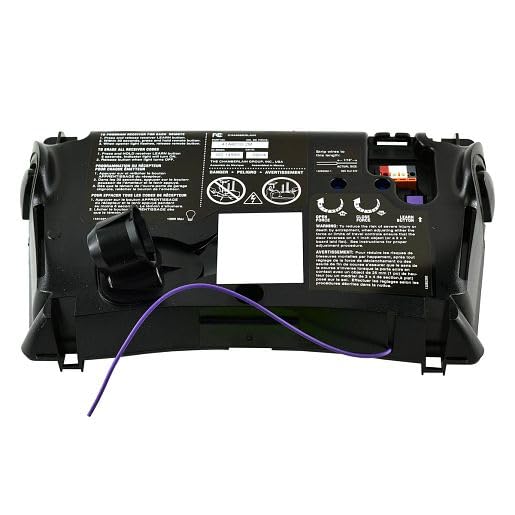
Image 1: The LiftMaster 41AB050-2 / 41AB050-2M Logic Control Board with its end panel. This image shows the overall appearance of the replacement part.
5. Configurazione e installazione
Follow these steps carefully to replace your garage door opener's logic control board:
- Scollegare l'alimentazione: Crucial Safety Step! Unplug the garage door opener from the electrical outlet. If there is a wall switch, ensure it is in the "OFF" position.
- Accedi al Pannello di Controllo: Remove the cover of your garage door opener unit to expose the existing logic control board. This usually involves unscrewing a few fasteners.
- Cablaggio fotografico: Before disconnecting any wires, take clear photos of all wire connections to the existing board. This will serve as a reference for reconnecting wires to the new board.
- Scollegare i fili: Carefully disconnect all wires from the old logic board. Note the position and color of each wire.
- Rimuovere la vecchia scheda: Unscrew or unclip the old logic board from its mounting points.
- Installa la nuova scheda: Position the new LiftMaster 41AB050-2 / 41AB050-2M logic control board in place and secure it with the screws or clips.
- Ricollegare i fili: Using your photographs as a guide, carefully reconnect all wires to the corresponding terminals on the new logic board. Ensure all connections are secure.
- Replace End Panel (if applicable): If your kit includes a new end panel, replace the old one now.
- Sostituisci la copertura: Securely reattach the garage door opener cover.
- Ripristina alimentazione: Plug the garage door opener back into the electrical outlet.
6. Funzionamento e programmazione
After installing the new logic board, you will need to program your remote controls and keypads to the opener. The 41AB050-2 / 41AB050-2M board features a pulsante viola di apprendimento.
- Individua il pulsante Impara: On the new logic board, locate the purple learn button.
- Attiva la modalità di apprendimento: Press and immediately release the purple learn button. The LED indicator light next to the button will illuminate steadily for 30 seconds.
- Programma remoto: While the LED is illuminated, press and hold the button on your remote control that you wish to operate the garage door.
- Conferma programmazione: Release the remote control button when the opener lights flash or two clicks are heard. This indicates successful programming.
- Operazione di prova: Press the programmed button on your remote control to test the garage door opener's function.
- Program Additional Remotes/Keypads: Repeat steps 2-5 for any additional remote controls or wireless keypads you wish to program.
For detailed instructions on programming specific remote models or troubleshooting programming issues, refer to your remote control's individual instruction manual or the LiftMaster support websito.
7. Manutenzione
The LiftMaster 41AB050-2 / 41AB050-2M Logic Control Board is designed for long-term reliability and requires minimal maintenance. However, consider the following:
- Mantenere pulito: Ensure the area around the control board inside the opener housing remains free of dust, debris, and insects.
- Condizioni ambientali: Avoid exposing the garage door opener to excessive moisture or extreme temperatures, which can affect electronic components.
- Ispezione professionale: It is recommended to have your garage door opener system professionally inspected annually to ensure all components, including the logic board, are functioning correctly.
8. Risoluzione Dei Problemi
If you encounter issues after installing the new logic board, review i seguenti problemi comuni e le relative soluzioni:
| Problema | Possibile causa | Soluzione |
|---|---|---|
| Opener does not respond after installation. | Power not restored, incorrect wiring, or remote not programmed. |
|
| Il telecomando non funziona. | Remote not programmed, dead remote battery, or interference. |
|
| Opener lights flash but door does not move. | I sensori di sicurezza sono disallineati o ostruiti. |
|
Se le procedure di risoluzione dei problemi non risolvono il problema, contattare l'assistenza clienti LiftMaster o un tecnico qualificato.
9. Specifiche
- Numeri di modello: 41AB050-2, 41AB050-2M, 041AB050-2M
- Compatibilità: LiftMaster and Chamberlain AC Belt Drive Garage Door Openers (2005-2015 models) with purple learn button. Also compatible with Sears Craftsman 41AB150-2 / 41AB150-2M.
- Frequenza: Sicurezza 315 MHz+
- Componenti inclusi: Control Board, End Panel
- Dimensioni: Circa 10 x 4 x 1 pollici (25.4 x 10.16 x 2.54 cm)
- Peso: Circa 2 libbre (0.91 kg)
- Produttore: Maestro di sollevamento
10. Informazioni sulla garanzia
For specific warranty details regarding the LiftMaster 41AB050-2 / 41AB050-2M Logic Control Board, please refer to the official LiftMaster websito o contattare direttamente il servizio clienti. I termini di garanzia coprono in genere i difetti di fabbricazione per un periodo di tempo specificato a partire dalla data di acquisto.
11. Assistenza clienti
If you require further assistance, have questions about installation, or need to report a defective product, please contact LiftMaster customer support through their official website or the contact information provided with your original purchase documentation.
Ufficiale LiftMaster Websito: www.liftmaster.com
Documenti correlati - 41AB050-2M
 |
LiftMaster Wi-Fi Garage Door Opener Manual: Models 8160W, 8160WB, 8164W, 8165W, 8155W Official installation, operation, and safety guide for LiftMaster Contractor Series Wi-Fi Garage Door Openers. Covers Chain Drive models 8160W, 8160WB, 8164W, 8165W and Belt Drive model 8155W. Learn about setup, myQ integration, and troubleshooting. |
 |
Apriporta da garage Wi-Fi LiftMaster: Manuale di installazione e funzionamento Manuale completo per gli apriporta da garage Wi-Fi LiftMaster (modelli 8355W, 8355W-267, 8360W, 8360WL, 8360WLB, 8365W, 8365W-267). Descrive installazione, montaggio, funzionamento, sicurezza, risoluzione dei problemi e connettività myQ per uso residenziale. |
 |
Manuale di installazione dell'apriporta da garage Wi-Fi da parete LiftMaster 98022 Guida completa all'installazione, alla programmazione e alla risoluzione dei problemi per l'apriporta da garage Wi-Fi a parete LiftMaster 98022. ... |
 |
LiftMaster Smart LED Garage Door Openers Installation Manual Comprehensive installation manual for LiftMaster Smart LED Garage Door Openers, including models 6690L, 6580L, and 4690L. Covers preparation, assembly, installation, operation, safety, maintenance, and troubleshooting. |
 |
LiftMaster 84505R Sicuro View Guida ai prodotti Smart Garage Opener Guida dettagliata al prodotto LiftMaster 84505R Secure View Apriporta intelligente per garage, dotato di telecamera integrata, doppia illuminazione a LED, trasmissione a cinghia ultra silenziosa e connettività myQ. |
 |
Guida al prodotto dell'apriporta intelligente per garage LiftMaster 84501 Guida completa al prodotto per l'apriporta intelligente per garage LiftMaster 84501, che descrive in dettaglio la trasmissione a cinghia ultra silenziosa, la doppia illuminazione a LED integrata, la connettività myQ e le funzionalità di sicurezza avanzate. |
Ask a question about this manual
Ask about setup, troubleshooting, compatibility, parts, safety, or missing instructions. Manuals+ will review the question and use this page’s manual context to help answer it.