
1. Prodotto finitoview
The Bewinner 2-Way Video Calling Camera is designed for indoor home security and communication. Featuring a 2.8-inch HD screen and 3-megapixel resolution, it enables clear two-way video and voice calls. This device includes AI detection capabilities, night vision, and supports wireless connectivity for convenient monitoring and interaction with family members, especially the elderly and children.
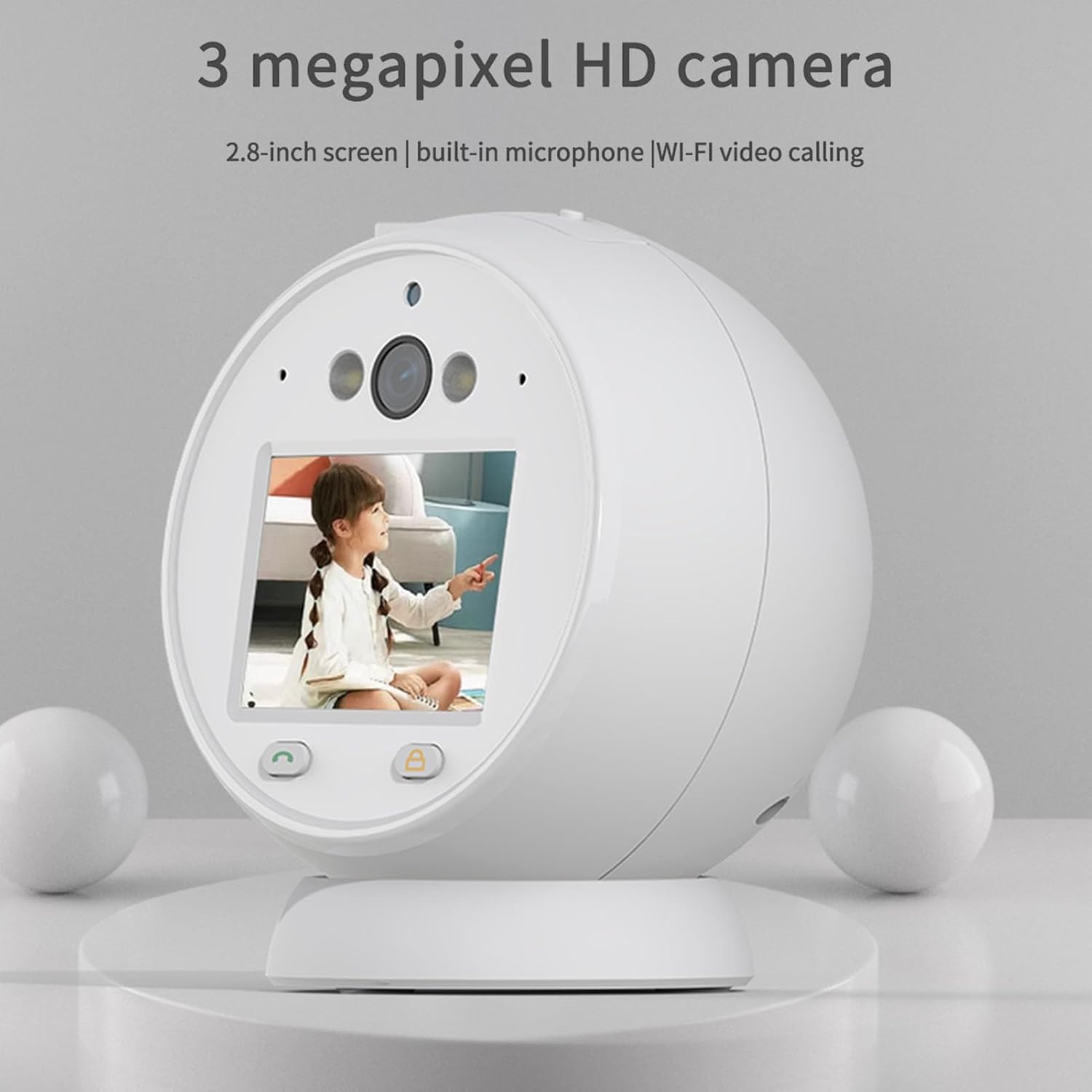
Image: The Bewinner 2-Way Video Calling Camera, showcasing its 2.8-inch screen and compact design.
2. Caratteristiche principali
- Videochiamate HD: Supports 2.8-inch horizontal screen technology with 3 million real pixels for ultra-high-definition two-way video and voice communication.
- Riduzione intelligente del rumore: Built-in microphone with intelligent ambient noise reduction ensures clear audio during calls.
- Connettività wireless a 2.4 GHz: Provides clear picture quality and supports cloud storage or a Micro SD card (up to 128GB, not included) for recording.
- Real-Time Video Surveillance: Features white infrared double light night viewing using LED display technology for efficient application in low-light conditions.
- Monitoraggio della sicurezza: Consente il controllo remoto viewing anytime, anywhere, enhancing the safety of elderly individuals and children.
- Rilevamento IA: Includes human-like detection and alarm push notifications for enhanced security.
- Controllo PTZ: Offers Pan-Tilt-Zoom control for adjusting the camera's viewangolo di ing.
- 360° Resolution: Fornisce un'ampia viewangolo di ripresa per una copertura completa.

Image: Visual representation of key features including human detection, alarm push, night vision, one-touch call, video call, voice call, PTZ control, 3MP HD, and 360° resolution.
3. Specifiche
| Nome del modello | Bewinnerfzq6sepu2w |
| Dimensioni dello schermo | HD da 2.8 pollici |
| Risoluzione | 3 Megapixel |
| Connettività | Wireless a 2.4 GHz (Wi-Fi) |
| Supporto di archiviazione | Archiviazione cloud, scheda Micro SD (fino a 128 GB) |
| Visione notturna | White Infrared Double Light |
| Audio | Two-way voice, Intelligent Noise Reduction |
| Fonte di alimentazione | Corrente alternata/corrente continua |
| Uso consigliato | Al chiuso |
| Tipo di controllore | Android (via compatible app) |
4. Guida all'installazione
4.1 Disimballaggio e ispezione iniziale
Carefully remove all components from the packaging. Verify that all items listed in the packing list are present and undamaged. The typical package includes the camera unit, a power supply cord, and this user manual.
4.2 Collegamento di alimentazione
- Connect the provided power supply cord to the camera's power input port.
- Plug the other end of the power supply cord into a standard AC power outlet.
- The camera will power on automatically, indicated by an LED light or screen activation.
4.3 Installazione dell'app e connessione di rete
To utilize the camera's full features, including remote viewing and video calls, you must connect it to your home Wi-Fi network via a compatible mobile application.
- Download the designated mobile application (refer to the packaging or included quick start guide for app name) from your device's app store (e.g., Google Play Store for Android).
- Apri l'app e crea un nuovo account utente oppure accedi se ne hai già uno.
- Follow the in-app instructions to add a new device. This typically involves scanning a QR code on the camera or manually entering its device ID.
- Quando richiesto, collega la telecamera alla rete Wi-Fi a 2.4 GHz. Assicurati che anche il tuo dispositivo mobile sia connesso alla stessa rete a 2.4 GHz durante la configurazione.
- Once connected, the camera's status indicator will confirm successful pairing, and you will be able to view the live feed through the app.
4.4 Installazione della scheda Micro SD (facoltativa)
Per l'archiviazione locale dei video, installare una scheda Micro SD (fino a 128 GB, non inclusa).
- Locate the Micro SD card slot on the camera (usually on the side or bottom).
- Inserire delicatamente la scheda Micro SD nello slot finché non scatta in posizione.
- Per prestazioni ottimali, formattare la scheda Micro SD tramite le impostazioni della fotocamera nell'applicazione mobile.

Image: The Bewinner camera unit shown alongside its power cable, illustrating the components for setup.
5. Istruzioni per l'uso
5.1 Vivere View e monitoraggio remoto
Open the mobile application on your smartphone or tablet. Select the camera from your device list to access the live video feed. You can monitor your home in real-time from anywhere with an internet connection.

Image: The camera monitoring a child, illustrating its use for remote safety and peace of mind.
5.2 Two-Way Video and Voice Calling
To initiate a video call, tap the video call icon within the app's live view interface. The camera's screen will display the incoming call. To speak, use the microphone icon in the app. The camera's built-in microphone and speaker allow for clear two-way communication.
5.3 Attivazione della visione notturna
The camera automatically switches to night vision mode in low-light conditions. The white infrared double light technology provides clear black and white video footage at night. You can typically adjust night vision settings (auto/on/off) within the mobile application.

Image: Depiction of the camera's white infrared double light night vision in action, providing visibility in darkness.
5.4 Rilevamento del movimento e allarmi
Configure motion detection settings in the app to receive alerts on your mobile device when movement is detected. You can customize detection zones, sensitivity levels, and alarm schedules.
5.5 Controllo PTZ
If your camera model supports PTZ (Pan-Tilt-Zoom), use the directional controls within the mobile app to remotely adjust the camera's viewing angle horizontally and vertically.
5.6 Gestione dell'archiviazione
Recorded videos can be stored on a Micro SD card or in the cloud (subscription may be required for cloud services). Access and manage recordings through the mobile application. You can view playback, download clips, or delete old footage.

Image: The camera displaying a family, highlighting its 360° resolution and storage capabilities (up to 128GB Micro SD and cloud).
6. Manutenzione
6.1 Pulizia della fotocamera
To maintain optimal performance, regularly clean the camera lens and body. Use a soft, dry, lint-free cloth. For stubborn smudges on the lens, slightly dampen the cloth with a lens cleaning solution. Avoid harsh chemicals or abrasive materials.
6.2 Aggiornamenti software
Periodically check the mobile application for firmware updates for your camera. Keeping the firmware updated ensures access to the latest features, security enhancements, and bug fixes. Follow the in-app instructions for updating the camera's software.
6.3 Gestione dell'archiviazione
Regolarmente riview e gestisci il tuo cibo immagazzinatotage. Delete unnecessary recordings to free up space on your Micro SD card or cloud storage. Ensure your Micro SD card is in good condition; replace it if you notice any data corruption or read/write errors.
7. Risoluzione Dei Problemi
- La fotocamera non si accende:
Ensure the power cord is securely connected to both the camera and a working power outlet. Try a different outlet. - Impossibile connettersi al Wi-Fi:
Verify that your Wi-Fi network is 2.4GHz. Ensure the camera is within range of your Wi-Fi router. Restart your router and the camera, then attempt to reconnect through the app. Double-check your Wi-Fi password. - No Live Video Feed:
Check your internet connection. Ensure the camera is powered on and connected to Wi-Fi. Restart the mobile app. - Scarsa qualità video:
Ensure the camera lens is clean. Check your Wi-Fi signal strength; a weak signal can affect video quality. Reduce the distance between the camera and the router if possible. - L'audio bidirezionale non funziona:
Check the microphone and speaker settings in the mobile app. Ensure your phone's volume is up. Make sure there are no obstructions blocking the camera's microphone or speaker. - Problemi di visione notturna:
Assicurati che la telecamera si trovi in un ambiente buio affinché la visione notturna si attivi automaticamente. Controlla le impostazioni della visione notturna nell'app. - La scheda SD non registra:
Ensure the Micro SD card is correctly inserted and formatted through the app. Check if the card is full; delete old recordings or replace the card.
8. Garanzia e supporto
Bewinner products are covered by a limited warranty. For specific warranty terms and conditions, please refer to the warranty card included with your product or visit the official Bewinner website. If you encounter any issues that cannot be resolved using the troubleshooting guide, please contact Bewinner customer support for assistance. Contact information can typically be found on the product packaging, the official websito o all'interno dell'applicazione mobile.
Conservare la prova d'acquisto per eventuali richieste di garanzia.